


 Video Converter Ultimate
 Skjermopptaker
 Videoreparasjon
 Sikker nedlasting
Hvordan lage video i svart-hvitt: Lag filtereffekter
Filmfotografer kan endre hvordan en film vil se ut ved å bruke filtre. Det finnes mange filtre i ulike typer programmer, men svart‑hvitt‑filteret er alltid til stede. Å gjøre videoen din svart‑hvitt skaper en stemning, for det kan vise en scene fra fortiden, sorg, nostalgi og mange følelser som fargebilder eller –videoer ikke kan formidle. Men hvordan kan du gjøre en video svart‑hvitt? Med de rette verktøyene i hånden er det fullt mulig. Fortsett å lese dette innlegget, så viser vi deg hvordan.

Del 1. Hvordan legger jeg til svart-hvitt-filter
Et nettbasert multimediekonverteringsverktøy kalt Video Converter Ultimate konverterer praktisk talt alle populære video‑ og lydfiler til ønsket utdataformat. Dette nettverktøyet er mer kapabelt enn det først ser ut til, fordi det lar brukere redigere videoer med nyttige verktøy, blant annet filtre, og utføre andre konverteringsoppgaver. Dette programmet er imidlertid ikke tilgjengelig i Play Store eller App Store. Nedenfor finner du en effektiv måte å legge til svart‑hvitt‑filtre i en video med Video Converter Ultimate.
Trinn 1. Installer Video Converter Ultimate
Klikk på ikonet nedenfor for å laste ned verktøyet til din Windows- eller Mac-datamaskin. Følg trinnene som er enkle å følge for å fullføre installasjonen av verktøyet, og start det deretter.
Gratis nedlastingFor Windows 7 eller nyereSikker nedlasting
Gratis nedlastingFor MacOS 10.7 eller nyereSikker nedlasting
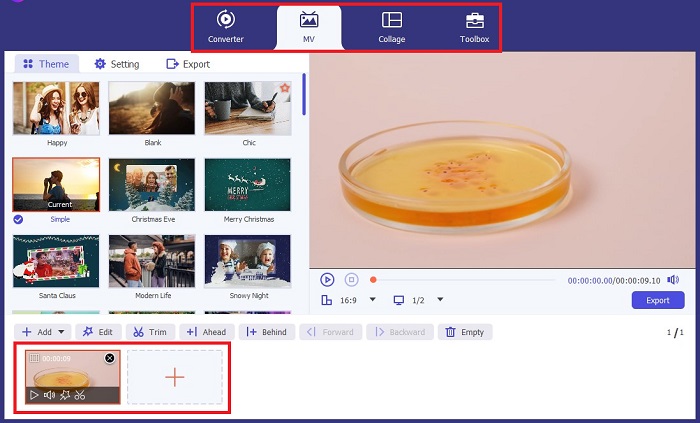
Trinn 2. Legg til videofilene
Ved å velge knappen Plus eller Add Files kan du importere videofilen du vil legge et filter på. Klikk Open etter at du har valgt videofilen du vil laste opp. I tillegg kan du, hvis du ønsker det, sette inn flere videofiler; med andre ord er det ingen begrensning på hvor mange videoer den kan filtrere.
Trinn 3. Åpne Filters & Effects
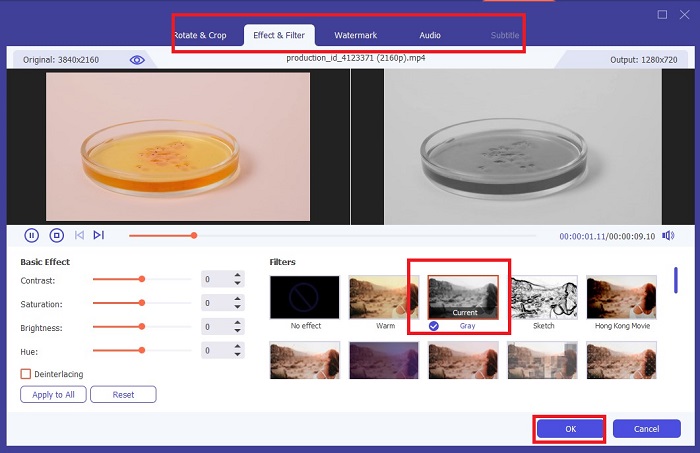
Ved å velge knappen Wand åpner du et nytt vindu for å tilpasse videoen. For å bruke et svart‑hvitt‑filter klikker du på Filters & Effects, og velger deretter svart‑hvitt. FVC Video Converter Ultimate lar deg også justere fargetone, metning, lysstyrke og kontrast i prosjektet ditt.
Trinn 4. Lagre svart‑hvitt‑videoen din.
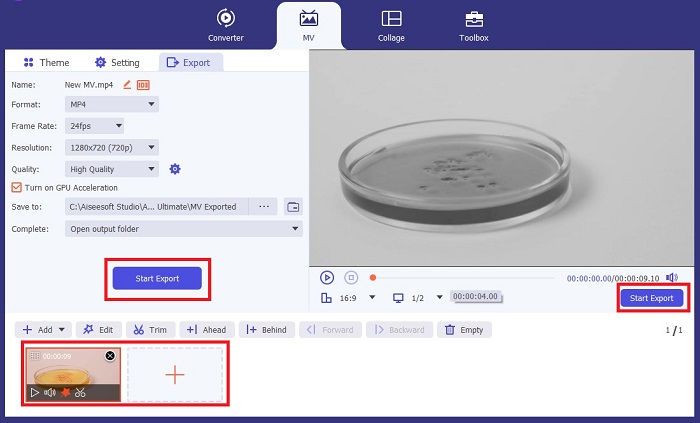
Hvis du er fornøyd med videoen, klikker du OK og konverterer den til ønsket filformat. Når du er ferdig med innstillingene dine, klikker du på knappen Convert for å lagre resultatet på enheten din.
Del 2: Hvordan lage video i svart-hvitt med Premiere Pro
Premiere Pro av Adobe er den bransjeledende videoredigeringsprogramvaren for filmer, TV-serier, videoinnhold og reklamefilmer. Det har blitt go-to-programvaren for filmskapere over hele verden fordi, sammenlignet med annen redigeringsprogramvare, gir dette verktøyet mange kreative verktøy for å få videoen din til å se polert, utmerket og profesjonell ut.
Hvis du vil sette en stemning i videoen din, er det å sette filtre det første du kan gjøre for å oppnå dette. Å sette filtre på videoer med Premiere Pro er relativt enkelt å gjøre. Dette er fire enkle trinn for å overlegge svart-hvitt-filtre med Premiere Pro.
Trinn 1. Legg til videoen du vil gjøre svart‑hvitt. For å gjøre dette går du til prosjektpanelet eller Timeline Panel, et område i Premiere Pro som regnes som arbeidsområdet ditt, der du klipper, legger til lyd, organiserer videoer, legger til effekter og mye mer. Dra videoene du ønsker å gjøre svart‑hvitt, og du er klar for neste trinn.
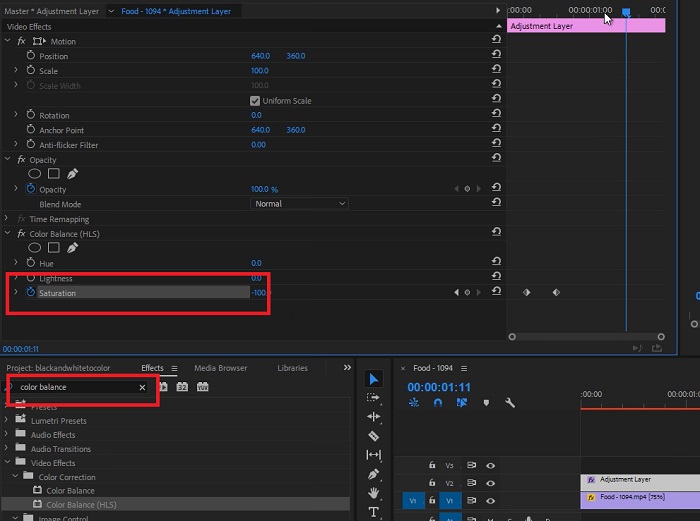
Trinn 2. For å åpne effektpanelet velger du Window > Effects. Nå er du nær å få svart‑hvitt‑filteret.
Trinn 3. Etter at du har gått til Effects-panelet, kan du se Video Effects; velg dette og klikk på Image Control. Under Image Control velger du Black and White-knappen og drar og slipper den på prosjektet ditt.
Mer lesing:
4 fantastiske måter å legge til et filter på en video i Windows og macOS
Enkle metoder for å konvertere bilder til svart-hvitt
Del 3: Tabellsammenligning av programvare
Du er nå ferdig med å gjøre videoen din i svart-hvitt. For ytterligere å forstå hva som er passende redigeringsprogramvare for deg, sammenlignet vi Video Converter Ultimate og Premiere Pro nedenfor.
| Programvare | Pris | Operativsystem | Egenskaper |
| Video Converter Ultimate | 1-måneds lisens koster $23.20 | Windows 10, Windows 8, Windows 7, Windows Vista, Windows XP (SP2 eller nyere) macOS 10.7 eller nyere. | Det etterlater null vannmerke. Verktøyet tilbyr en verktøykasse for lyd- og videoredigeringsaktiviteter. |
| Premiere Pro | Adobe Cloud-programmer tilbyr et 1-måneders abonnement for $52.99 | macOS Monterey v12.0 eller nyere. | Avanserte redigeringsverktøy 3D-videoredigering Audio Editor Filbehandling |
Del 4: Vanlige spørsmål om å legge til svart-hvitt-filter
Er Video Converter Ultimate en pålitelig og sikker plattform?
Ja! Video Converter Ultimate forsikrer deg om at plattformen er sikker og 100% sikker. Du kan også hoppe over å logge på kontoen din for å få tilgang til funksjonene til FVC Video Converter Ultimate.
Kan jeg bruke Premiere Pro på telefonen min?
Dessverre ikke. Video Converter Ultimate og Premiere Pro er kun kompatible med PC-enheter fordi de krever en høy enhet for å kjøre og for jevn bruk.
Kan jeg redigere bilder i Video Converter Ultimate og Premiere Pro?
Selvfølgelig! Siden og Premiere Pro er imidlertid mer fokusert på videoredigering. Du kan være begrenset i de kreative verktøyene som trengs for å redigere bildene dine.
Har Premiere Pro et vannmerke?
Premiere Pro etterlater ikke vannmerker. Selv om du er på prøvebruk med Premiere Pro, etterlater det ikke et vannmerke, men de kan kreve at du kjøper en lisensiert konto etter noen dager.
Kan Canva redigere videoen til svart-hvitt?
Absolutt ja! Canva, som andre plattformer, kan redigere videoer og tilbyr tonnevis av filtre som kan brukes på råvideoene dine.
Konklusjon
Denne artikkelen viser trinnene og fremgangsmåten for hvordan gjøre video svart‑hvitt med Video Converter Ultimate og Premiere Pro fra Adobe. Hvis du er nybegynner og ikke trenger avansert redigering, er Video Converter Ultimate perfekt. Men hvis du er en som vil ha programvare som er fokusert på redigering og har mange kreative verktøy for å gi liv til kreativiteten din, er Premiere Pro det rette valget for deg.
-
 3 metoder for hvordan du gjør en video lengre på iPhone og andre enheter
 Å lage en video lengre er ganske utfordrende å gjøre. Heldigvis fant vi tre metoder for å lage en video lengre på iPhone og andre enheter.
-
 Fremragende metoder for hvordan du deler videoer effektivt
 Denne artikkelen vil forklare hvordan du deler en video i deler. Så hvis du er interessert, klikk på dette innlegget da vi tilbyr deg de enkleste måtene å prøve.
-
 Topp 5 Video Bakover Generator-avspilling på PC og Mac
 Leter du etter den beste videobakovergeneratoren på nettet? Og i så fall, prøv å lese denne artikkelen da vi har samlet forskjellig programvare du kan velge mellom.
