


 Video Converter Ultimate
 Skjermopptaker
 Videoreparasjon
 Sikker nedlasting
Hvordan klippe videoer med TikTok: Inkluderer offline-programmer for å klippe videoer for TikTok
Har du en video på telefonen din som du vil legge ut på TikTok, men problemet er at videoen er for lang? Hvis ja, vil denne veiledningen gi deg de mest oversiktlige fremgangsmåtene for å korte ned en video til TikTok. I tillegg vil du lære enkle måter å klippe videoer med TikTok på. Dessuten gir vi deg et offline‑program for å trimme videoen din. Så hvis du ivrer etter å finne ut av alt dette, bør du lese dette innlegget.

Del 1. Hvordan klippe ut video for TikTok på skrivebordet
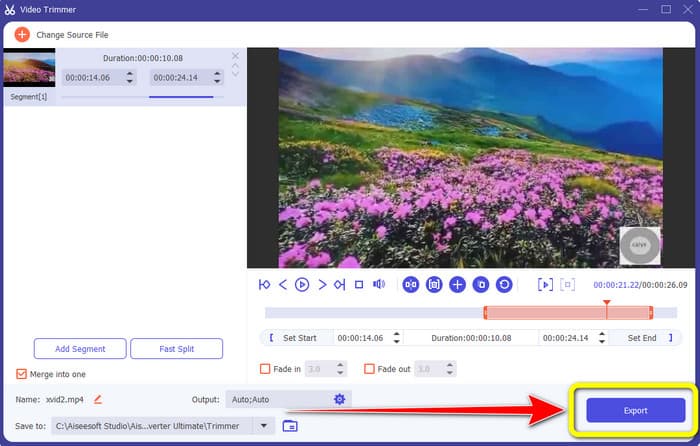
Hvis du bruker datamaskinen til å klippe en video for TikTok, finnes det et utmerket program for deg. For å klippe en video på datamaskinen bruker du Video Converter Ultimate. Når det gjelder å klippe videoer, tilbyr det en enkel metode. Det lar deg klippe videoer med bare noen få klikk, noe som gjør det praktisk for alle brukere. Du kan også justere kantene på videoen for å trimme eller klippe den. En annen måte er å bruke alternativene Angi start og Angi slutt. I tillegg kan du klikke på alternativene Fade inn og Fade ut for å gi videoen din en ekstra effekt. Du kan fortsatt gå til Innstillinger- eller Utdata‑alternativene under trimming for å gjøre endringer. Programmet lar deg endre oppløsning, bildefrekvens, zoom‑modus og videokvalitet. Du kan til og med endre samplingsfrekvens og bithastighet for lydsporet i videoen.
Dessuten kan Mac- og Windows-brukere få tilgang til denne nedlastbare programvaren. Video Converter Ultimate er tilgjengelig på Windows- og Mac-datamaskiner, noe som gjør det praktisk for brukerne. Det er flere funksjoner du kan møte når du bruker dette frakoblede programmet. Hvis du vil oppleve funksjonene, prøv det selv. Se de enkle trinnene nedenfor for å forkorte en video for TikTok ved hjelp av Video Converter Ultimate.
Trinn 1. Du kan klikke på Last ned-knappen nedenfor for å få tilgang til Video Converter Ultimate. Knappene nedenfor er tilgjengelige for både Windows‑ og Mac‑datamaskiner. Etter at du har installert programmet, kjør det på datamaskinen din.
Gratis nedlastingFor Windows 7 eller nyereSikker nedlasting
Gratis nedlastingFor MacOS 10.7 eller nyereSikker nedlasting
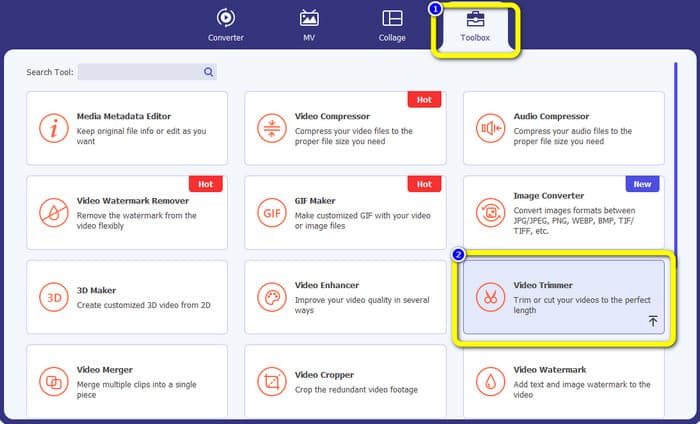
Trinn 2. Når grensesnittet vises på skjermen, går du til den øvre delen av grensesnittet og klikker på panelet Verktøykasse. Velg deretter verktøyet Video Trimmer for å gå videre med trimmeprosessen. Sørg for at videoen allerede ligger på datamaskinen før du bruker offline‑programmet.
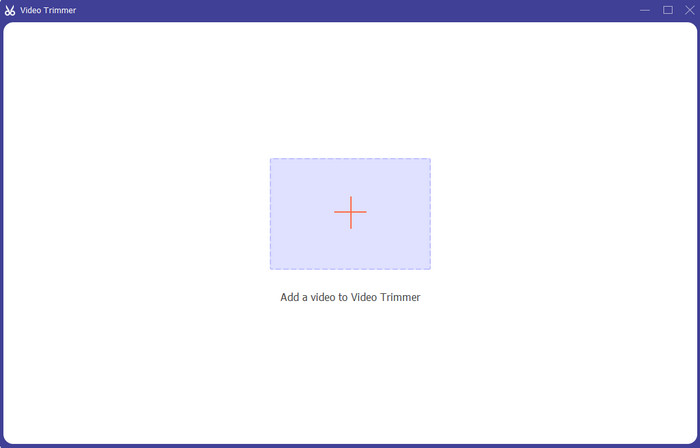
Trinn 3. Klikk på Pluss-ikonet midt i grensesnittet og legg til videoen fra filmappen.
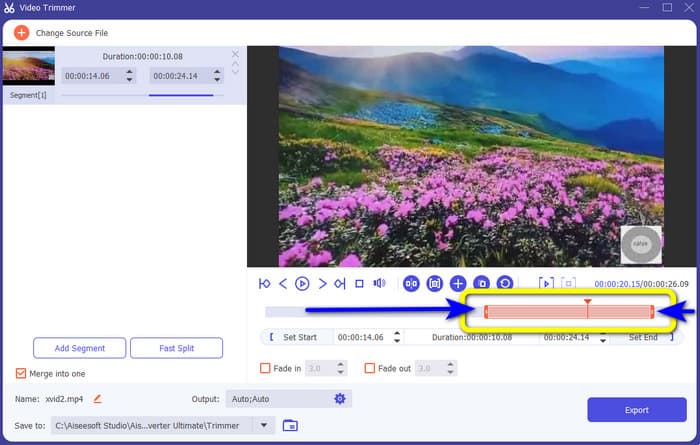
Trinn 4. Deretter kan du fortsette med trimmeprosessen. Gå til avspillingshodet på videoen. Etter det kan du dra hver kant av videoen for å starte trimmeprosessen.
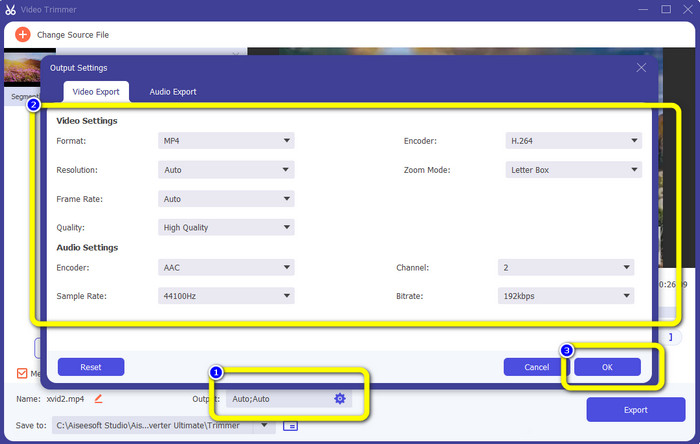
Trinn 5. Du kan også gå til alternativet Utdata‑innstillinger, der du kan endre videoens oppløsning, utdataformat, kvalitet og bildefrekvens. I tillegg kan du endre lydens bithastighet, samplingsfrekvens og andre parametere.
Trinn 6. Når du er ferdig med trimmeprosessen, klikker du på Eksporter-alternativet for å lagre den redigerte videoen. Deretter venter du til eksportprosessen er ferdig, og så er du klar.
Del 2. Hvordan trimme en video for TikTok ved hjelp av mobilapplikasjon
Hvis du vil bruke mobiltelefonen til å klippe videoen din, kan du bruke Easy Video Cutter. Denne mobilappen gjør det mulig å korte ned videoklippet enkelt og raskt. Den har også en lettfattelig prosedyre, noe som gjør den perfekt for alle brukere. For Android‑brukere er det en app som er tilgjengelig i Play Store. Den er mer som en alt‑i‑ett‑pakke for videoredigering. Likevel utmerker appens videoklipper‑verktøy seg på grunn av hvor enkelt det er å bruke. I tillegg får ikke de ferdigbehandlede videoene etter klipping noe vannmerke. Med dette programmet kan du også slå sammen flere videoer til én. Det er enkelt å finne videoen du vil redigere, og du kan til og med sortere videoene etter tid, dato, album, artist, varighet og andre faktorer. Dette unngår unødvendig bry når du leter etter en film som tilsynelatende ligger nær bunnen av videolisten.
Easy Video Cutter har imidlertid ulemper. Denne mobilappen er kun tilgjengelig for Android. Hvis du er iPhone-bruker, kan du ikke bruke appen. Appen viser også irriterende annonser når du redigerer en video. Bruk trinnene nedenfor for å klippe videoen ved hjelp av denne mobilapplikasjonen.
Trinn 1. Gå til Google Play Store og last ned applikasjonen Easy Video Cutter. Etter installasjonen kjører du applikasjonen på telefonen.
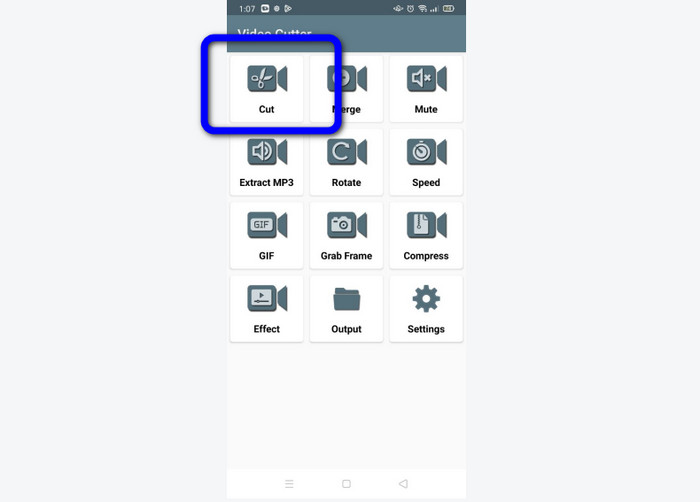
Trinn 2. Etter at applikasjonen er startet, vises hovedgrensesnittet på telefonskjermen. Det er mange verktøy du kan se i grensesnittet. Klikk på alternativet Cut (Klipp). Åpne deretter videoen fra filene dine.
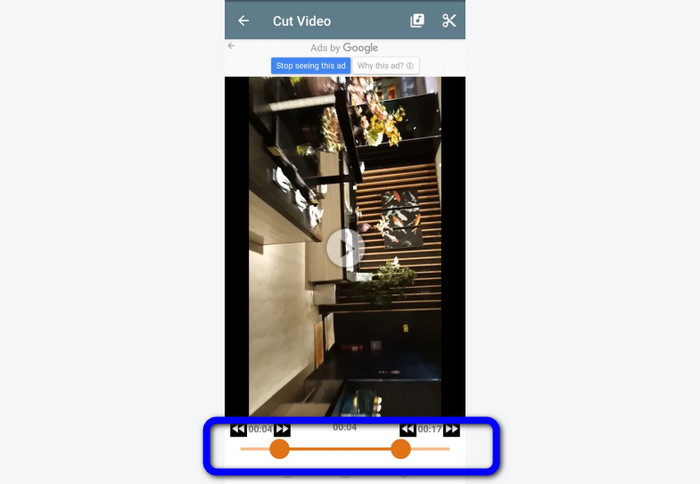
Trinn 3. I denne delen kan du trimme videoen ved å justere videoskyveknappen nederst i grensesnittet. Du kan justere startpunktet og sluttpunktet.
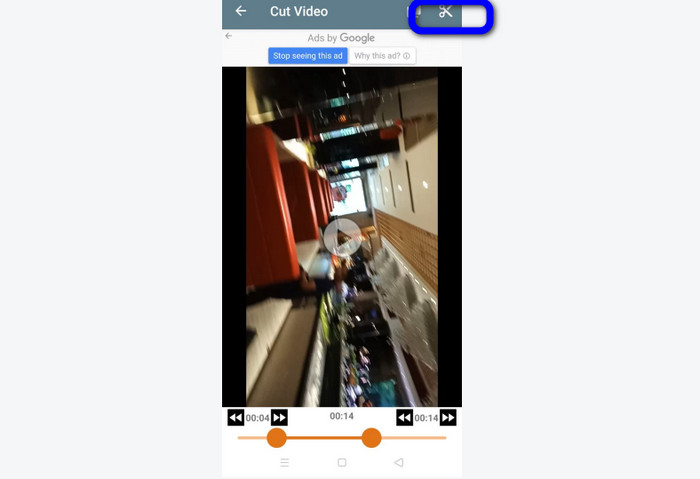
Trinn 4. Klikk på Saks-ikonet oppe i høyre hjørne av skjermen for å klippe videoen. Deretter lagrer du den redigerte videoen på telefonen din. Det var alt om hvordan du kan trimme videoer på Android.
Del 3. Hvordan trimme en video ved hjelp av TikTok
Vil du lære hvordan du kan klippe videoer på TikTok? Svaret finner du i denne delen. Følg trinnene nedenfor for å vite metoden for hvordan du trimmer en video i utkast til TikTok.
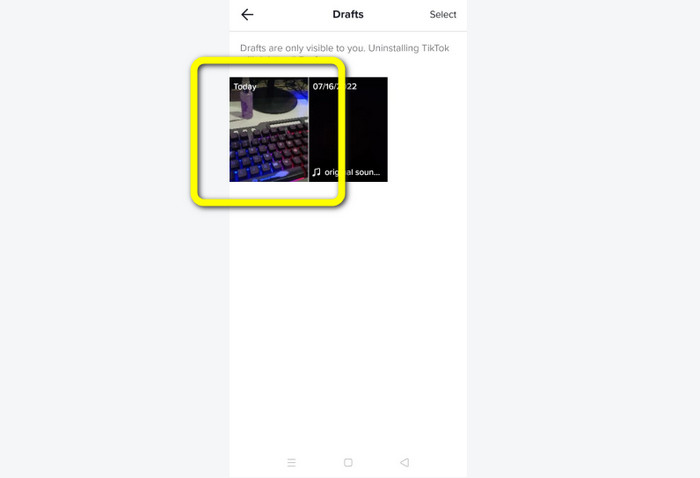
Trinn 1. Start TikTok på mobiltelefonen din. Gå deretter til Profil og åpne videoen i Utkast.
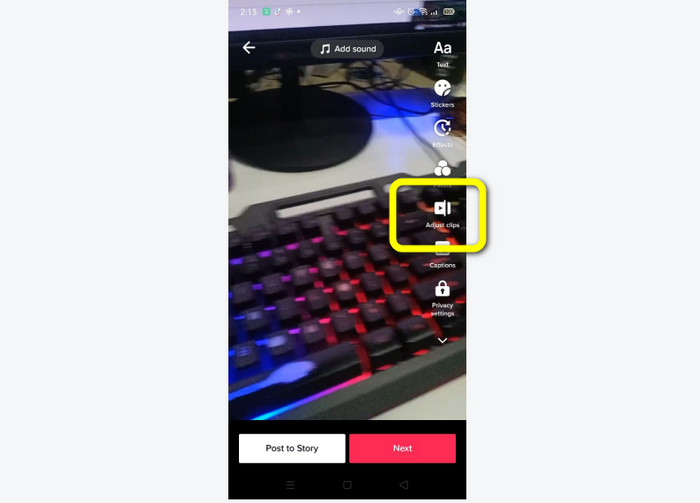
Trinn 2. Etter at du har åpnet videoen, går du til høyre side av skjermen og klikker på alternativet Adjust Clip (Juster klipp).
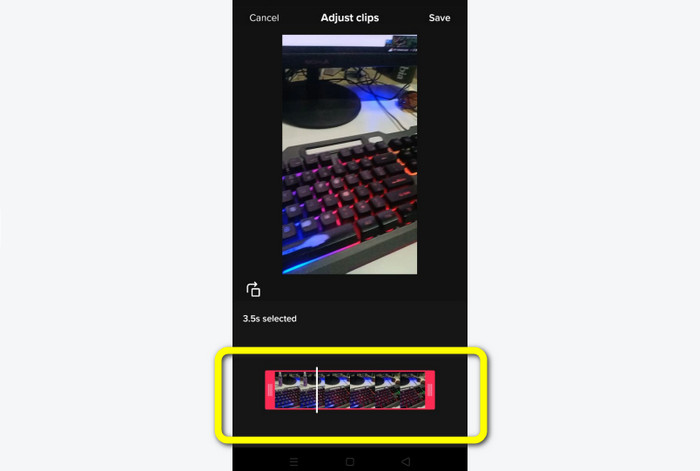
Trinn 3. Deretter kan du trimme videoen ved å justere kanten på avspillingshodet. Du kan flytte både høyre og venstre kant av videoen.
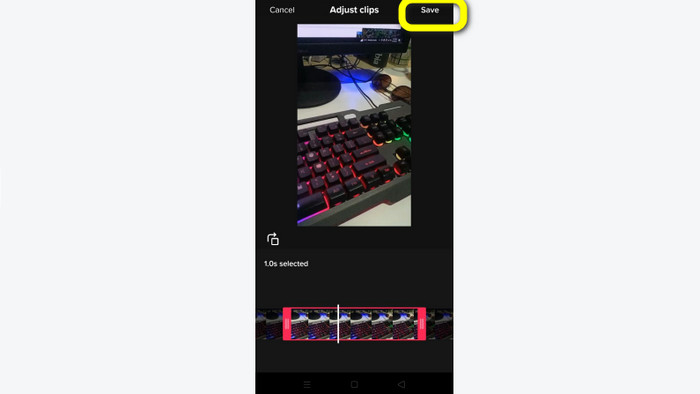
Trinn 4. Etter at du har trimmet videoen, klikker du på Lagre-knappen oppe i høyre hjørne av mobilskjermen. På den måten kan du lagre den redigerte videoen og legge den ut på TikTok.
Del 4. Vanlige spørsmål om hvordan du trimmer en video med TikTok
1. Hvorfor lar TikTok meg ikke trimme videoen min?
En av grunnene er at du ikke kan se standardknappen eller allerede har lagt ut videoen.
2. Hvorfor klipper TikTok klippene mine korte?
TikTok har en maksimal videolengde. Hvis videoen din ikke oppfyller kravet, vil TikTok kutte klippene dine. Det betyr at TikTok sørger for at videoene har riktig lengde.
3. Hvor lange bør TikTok-videoene mine være?
Du kan legge ut opptil 3 minutter med video før. Men nå lar TikTok deg laste opp en video opptil 10 minutter lenger.
Konklusjon
Det var det! Nå er du i stand til å trimme videoene dine med TikTok. Så hvis du ønsker å vite hvordan du kan trimme en video med TikTok, kan du lese den detaljerte informasjonen ovenfor. Hvis du også vil korte ned videoen din til TikTok, er den beste videoredigeringsprogramvaren vi kan tilby Video Converter Ultimate. Dette programmet har enklere metoder og et brukervennlig grensesnitt, noe som gjør det perfekt for alle brukere.
-
 2 uanstrengte måter å øke hastigheten på en video på TikTok
 Vil du vite hemmeligheten om hvordan du kan øke hastigheten på video på TikTok? Les deretter denne artikkelen for å få ideen om hvordan du gjør det og vite hva som er de to andre verktøyene som vil hjelpe deg
-
 4 effektive måter å fjerne Tiktok-vannmerker fra Tiktok-videoer
 Trenger du å fjerne Tiktok-vannmerket fra dine eksporterte Tiktok-videoer? Du kan gjøre det her ved hjelp av verktøyene vi presenterer; du kan enkelt gjøre det.
-
 3 effektive måter å legge til videoer og bilder sammen på Tiktok
 Vil du vite hvordan du legger til bilder på Tiktok-videoer? I så fall, klikk og les denne artikkelen for å lære hvordan du enkelt legger til bildene i Tiktok-videoen din.
