


 Video Converter Ultimate
 Scherm opnemer
 Videoreparatie
 Beveiligde download
3 van de beste FLAC-metadata-editors die u in 2025 moet kennen
We weten dat FLAC het beste verliesvrije muziekbestandsformaat is, en het is een ideaal formaat om audio van cd’s te rippen, omdat er geen ruwe audio verloren gaat als je hiervoor kiest. Onder de lossless‑audiobestanden is dit de beste keuze, omdat het compatibel is met vrijwel elk apparaat. Het levert een compressieratio van 30 tot 50 procent op zonder verlies van de oorspronkelijke kwaliteit. Met dit audioformaat kun je tegelijk over metadata, albumhoes en snel zoeken beschikken. Toch kunnen er problemen optreden, zoals onjuiste tags in het FLAC‑bestand, omdat het formaat – net als andere formaten – niet perfect is. In minder dan vijf minuten leer je de verschillende FLAC‑metadata‑editors op Mac en Windows kennen die je kunt gebruiken om dit probleem op te lossen.

Deel 1. Beste FLAC-metadata-editor voor Mac en Windows - FVC Video Converter Ultimate
FVC Video Converter Ultimate is de meest effectieve software die je nodig hebt voor dit metadata‑bewerkingsprobleem. Deze tool biedt een professionele en gemakkelijk te begrijpen GUI, zodat elke gebruiker vlot en zonder moeite metadata kan wijzigen of herstellen. Bovendien kun je meerdere informatie‑elementen of tags aan je FLAC toevoegen, zoals titel, naam van de auteur, datum, albumhoes en nog veel meer. Concurrenten op het gebied van metadatabewerking richten zich vaak op slechts enkele audio‑ en videoformaten. Maar met deze software kun je eenvoudig FLAC, MP3, WMA, WMV en meer dan 1000 andere formaten uploaden en hun metadata in een handomdraai bewerken.
Bovendien kan deze tool niet alleen de metadata wijzigen, herstellen of verwijderen; het kan ook worden gebruikt als een oplossing voor elk probleem met video-audio. En daarmee kunnen we je verzekeren dat als je de tool eenmaal hebt gebruikt, je je geen zorgen hoeft te maken over het opnieuw tegenkomen van hetzelfde probleem, omdat je de beste oplossing hebt. Wil je de eersteklas FLAC-metadata-editor op Mac en Windows gebruiken? Als dat het geval is, lees dan de onderstaande stappen door, want we geven u de gemakkelijk te volgen zelfstudie en voltooi de taak efficiënt.
Stap 1. Installeer de ultieme software op je desktop door op het juiste besturingssysteem te klikken om de correcte tool te downloaden. Ga verder met de installatie door het gedownloade bestand te openen en klik op Start Now om door te gaan.
Gratis downloadVoor Windows 7 of nieuwerVeilige download
Gratis downloadVoor MacOS 10.7 of nieuwerVeilige download
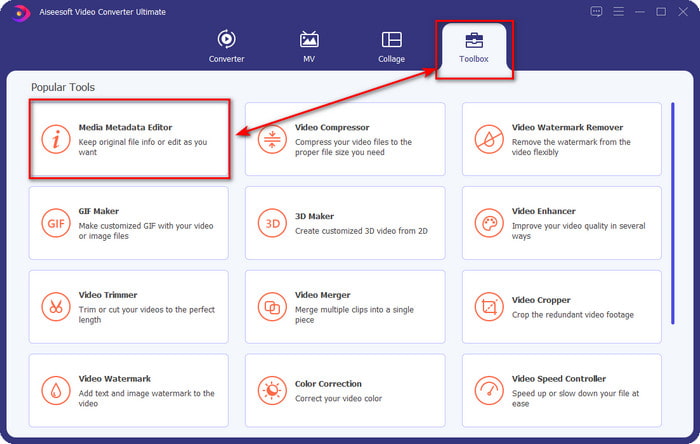
Stap 2. Klik op Media Metadata Editor om de tag‑editorfunctie in de sectie Toolbox te openen.
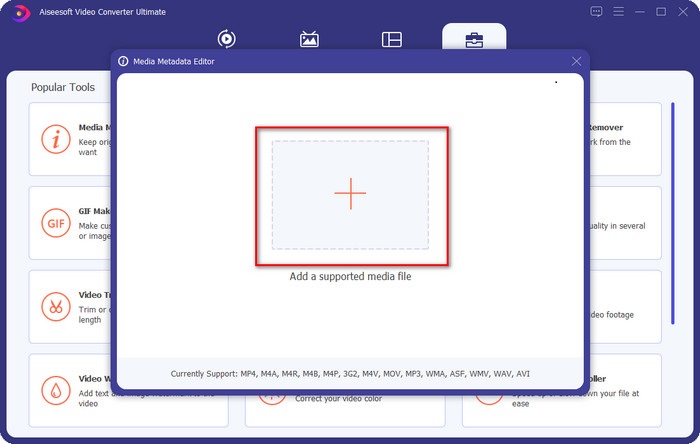
Stap 3. Klik op de knop + om het bestand toe te voegen, zoek het in de map die wordt geopend en klik op Open om het FLAC‑bestand succesvol toe te voegen.
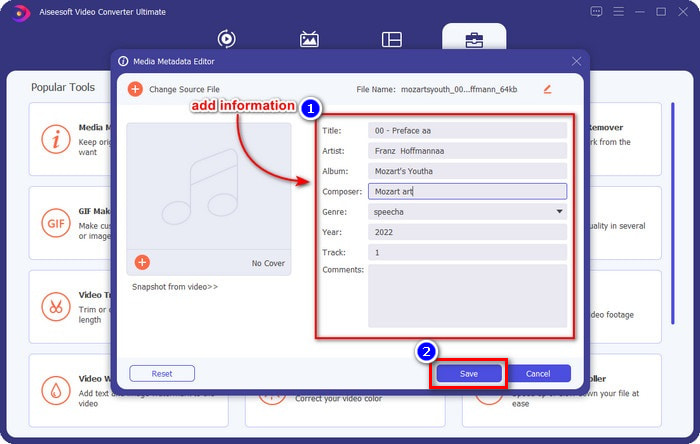
Stap 4. In dit paneel kun je nu de metadata van je FLAC aanpassen in elk tekstvak. Klik vervolgens op Save om de wijzigingen die je met de software hebt aangebracht op te slaan. Zo eenvoudig is het: je hebt tags aan je FLAC toegevoegd en ze efficiënt gecorrigeerd met behulp van een ultieme tool.
Voordelen
- Het is de beste keuze voor het bewerken van metadata in FLAC-, MP4-, WMA-, WAV-, TTA-, OGG- en meer dan 1000 formaten.
- Het ondersteunt meerdere bewerkingsfuncties die u kunt gebruiken in het gedeelte Toolbox.
- Intuïtieve grafische gebruikersinterface, en het is gemakkelijk te gebruiken.
- Downloadbaar op Windows- en Mac-besturingssystemen.
Nadelen
- De aanschaf van de tool is een must om tegen lage kosten gebruik te kunnen maken van de ongelooflijke functies.
Deel 2. Andere 2 beste gratis FLAC-metadata-editors voor Windows
Fregat3
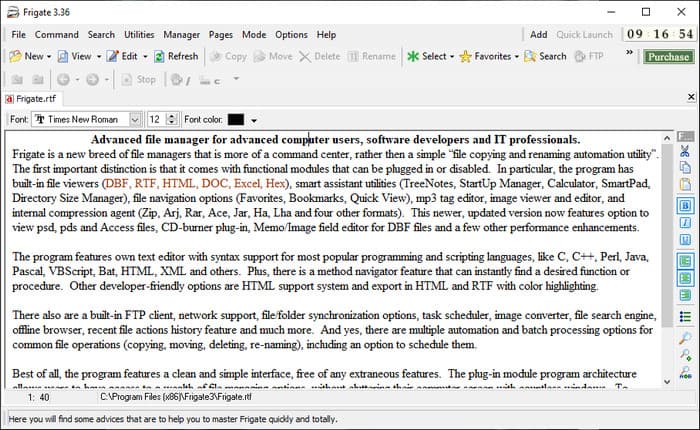
Frigate3 is een FLAC‑metadata‑editor die je graag op je Windows‑pc zult gebruiken. Met deze tool kun je de tags op je desktop eenvoudig aanpassen. Maar voordat je de tool downloadt, moet je de twee beschikbare opties bekijken: de standaard‑ en de pro‑versie. De standaardversie van deze tool bevat alleen de basisfuncties die je tijdens het gebruik hebt. Als je de standaardversie downloadt, is de bestandsgrootte kleiner dan die van de pro‑versie.
Als je in plaats daarvan de pro-versie ervan hebt gedownload, heb je alle functies die deze software biedt die niet standaard zijn, maar de bestandsgrootte is veel groter dan de standaard. Ondanks dat het een gratis Windows-software is, kunnen we nog steeds zien dat de tool een beetje stijf is om te begrijpen, en de GUI ziet er niet zo goed uit als de andere software op de markt. Hoewel dit een probleem is, wordt het nog steeds beschouwd als een effectief hulpmiddel om deze taak uit te voeren.
Voordelen
- Gratis te downloaden op Windows.
- Het ondersteunt de standaard- en pro-versies van de tool.
- In staat om plug-ins toe te voegen.
Nadelen
- De GUI is niet zo goed als de andere metadata-editor.
- Soms is de tool moeilijk te starten.
- Het netwerk is onbeveiligd wanneer u de officiële website van de tool bezoekt.
MuziekBrainz PiCard
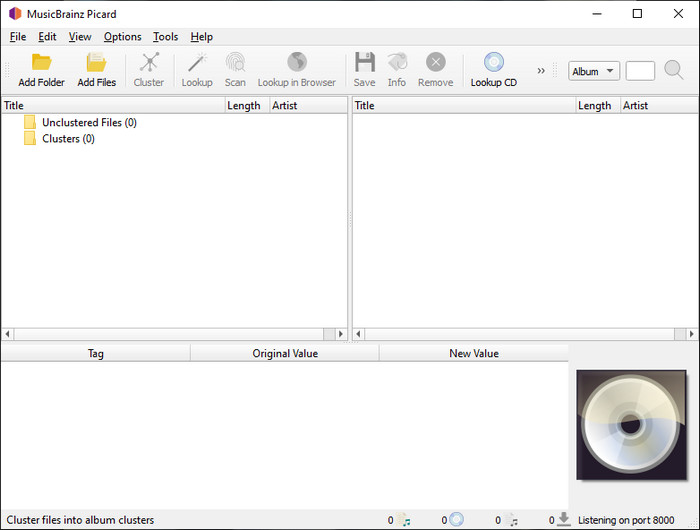
MusicBrainz Picard is een FLAC‑metadata‑editor voor Windows die je gratis op je desktop kunt downloaden om de metadata toe te voegen. Als het audiobestand in de database is opgenomen, kun je de tags met behulp van deze tool ophalen of bijwerken. In tegenstelling tot andere tools kan deze software meerdere, meer gedetailleerde informatie toevoegen, zoals de uitvoerenden en de instrumenten die in de muziek zijn gebruikt. Houd er echter rekening mee dat de tags in MusicBrainz door vrijwilligers worden verzameld.
Bovendien is deze software een speciale audiotag-editor, wat betekent dat het alleen de meeste audioformaten ondersteunt, of ze nu lossy, lossless of beide zijn. Ook al is het een uitgebreide encyclopedie met muziektags en is het bruikbaar voor het publiek, sommige tags die het biedt zijn onbetrouwbaar, dus je zult ze handmatig moeten toevoegen. Desalniettemin is de tool gebruiksvriendelijk en beter dan de Frigate3, maar niet zo goed als de ultieme tool.
Voordelen
- Het heeft een ingebouwde database voor audiotags.
- Eenvoudige gebruikersinterface.
- Leren hoe het te gebruiken is eenvoudig.
Nadelen
- Soms zijn de metadata die in de database zijn verzameld onbetrouwbaar.
- Het is beperkt tot alleen audiobestanden.
Deel 3. Veelgestelde vragen over FLAC Metadata Editor
Kan ik FLAC van hoge kwaliteit opnemen?
Jazeker, je kunt audio in dit formaat opnemen, maar bedenk wel dat niet alle audiorecorders dit formaat ondersteunen en dat niet alle recorders audio in hoge kwaliteit kunnen vastleggen. Als je dus niet weet hoe je met een FLAC‑lossless recorder audio in hoge kwaliteit opneemt, klik dan op deze link om meer over dit onderwerp te leren.
Wat is de beste software om FLAC om te zetten?
Zonder enige twijfel is de FVC Video Converter de beste FLAC-converter die je kunt gebruiken om de FLAC compatibel te maken met de andere apparaten zonder de oorspronkelijke kwaliteit te verliezen. Met deze tool kun je meerdere FLAC's tegelijk converteren, maar onthoud dat als je meer wilt dan alleen een converterdownload, de ultieme tool een must is.
Ondersteunt spraakmemo FLAC als audio-uitgang?
Spraakmemo’s gebruiken M4A in plaats van FLAC voor het opslaan van opgenomen audio. Als je meer over spraakmemo’s wilt weten, kun je de uitgebreide uitleg lezen die we over de ingebouwde app hebben gemaakt; lees die zorgvuldig om te ontdekken of het de beste audiorecorder op iOS‑apparaten is door op deze link te klikken.
Gevolgtrekking
FLAC is niet alleen een audioformaat, het is een van de beste audioformaten die je kunt gebruiken om audio in hoge kwaliteit op je apparaten op te slaan. Dus als je de .flac‑bestanden in je bibliotheek wilt ordenen, kan de tool die we hebben besproken je helpen deze taak efficiënt uit te voeren. Als je een Windows‑gebruiker bent, raden we je aan de software in deel 2 te bekijken die we hebben gevonden om metadata op Windows toe te voegen. Maar als je een betrouwbaardere en professionelere tool wilt om metadata aan FLAC toe te voegen, raden we je in plaats daarvan aan om FVC Video Converter Ultimate te gebruiken. Met zo’n tool kun je metadata als een professional bewerken, op een manier die de andere Windows‑tools die we hebben gepresenteerd niet kunnen bieden. Als je dus meer wilt weten over de beste FLAC‑metadata‑editor op Mac en Windows, moet je het programma downloaden om de andere functies te ontdekken.
-
 Top 5 videometadata-editors voor 2025 [onpartijdige beoordeling]
 Wil je je videometadata bekijken? Als dat zo is, lees dan de details hieronder om het onderwerp volledig te begrijpen en te weten welke tool het beste bij je past.
-
 7 populaire muziektag-editors op Windows, Mac en mobiele apparaten
 Muzieklabels zijn populair om te gebruiken voor het rangschikken van de muziek in uw bibliotheek volgens de gegevens erin. Wat als je het wilt veranderen? Lees de details hieronder om meer te weten.
-
 5 beste MP4-metadata-editors [bijgewerkt 2025]
 Hoe kan ik mijn MP4-metadata wijzigen? De beste manier om de metadata van je MP4 te wijzigen, is door een tag-editor te gebruiken die het MP4-formaat ondersteunt, zoals het voorbeeld dat we hieronder opsommen.
