


 Video Converter Ultimate
 Scherm opnemer
 Videoreparatie
 Beveiligde download
Hoe M2TS naar MP4 te converteren zonder de kwaliteit te verminderen
“Wanneer ik de video's van mijn Sony-camera op de computer zet, zijn het M2TS-bestanden, die niet kunnen worden gedeeld op Facebook of YouTube. Waar kan ik een videoconvertor vinden om de bestanden naar MP4 te converteren en op mijn computer te bekijken? "
Soms wil je M2TS-bestanden afspelen op draagbare apparaten of ze uploaden naar YouTube of Facebook. Het is dan verstandig ze om te zetten naar een gangbaar videoformaat zoals MP4. In dit artikel delen we 5 gratis manieren om M2TS naar MP4 te converteren op Windows en Mac.

Deel 1. Beste manier om M2TS gratis naar MP4 te converteren
Niet alle mediaspelers ondersteunen M2TS-bestanden. Om beter te kunnen genieten van M2TS‑video’s van HD‑camcorders, kun je M2TS het best omzetten naar het veelgebruikte MP4‑formaat voor weergave. FVC Free M2TS Converter is een alles‑in‑één M2TS‑converter en ‑editor. Je kunt er niet alleen M2TS-bestanden mee converteren naar MP4, MKV, AVI, MOV, enzovoort, maar ook M2TS‑bestanden bewerken, zoals comprimeren, samenvoegen, thema toevoegen en meer.
Gratis downloadenVoor Windows 7 of hogerVeilige download
Gratis downloadenVoor macOS 10.7 of hogerVeilige download
Stap 1.Door op de knop Gratis downloaden te klikken, kun je Free M2TS Converter snel downloaden. Installeer het programma vervolgens en start het op je Windows‑computer. Klik op de knop Bestand(en) toevoegen om het M2TS‑bestand in het programma te importeren.
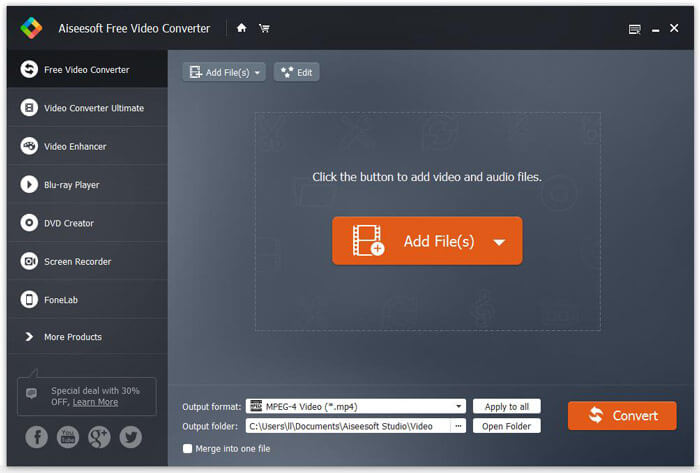
Stap 2.Klik op de vervolgkeuzeknop van Uitvoerformaat en kies MPEG-4 Video (*.mp4) als uitvoerformaat. Je kunt ook de uitvoermap instellen om het geconverteerde bestand op te slaan.

Stap 3.Als je een specifiek thema aan de video wilt toevoegen, kun je op de knop Bewerken in het bovenste menu klikken om een passend thema te kiezen. Nadat alle instellingen zijn voltooid, kun je op de knop Converteren klikken om het M2TS‑bestand naar MP4 om te zetten.

Deel 2. Hoe M2TS online naar MP4 te veranderen
Als je M2TS gratis online naar MP4 wilt converteren, is FVC Free Online Video Converter een uitstekende keuze. Als een gratis online multimediaconverter ondersteunt het bijna alle gangbare video- en audioformaten naar MP4, FLV, MKV, MOV, M4V, MTS, TS, M2TS, WMV, ASF, VOB, MP3, AAC, enzovoort. Bovendien is het heel eenvoudig te gebruiken.
Stap 1. Ga naar de website van FVC Free Online Video Converter. Klik bovenaan op Bestanden toevoegen om te converteren. Download en installeer vervolgens de FVC‑launcher.

Stap 2. Selecteer de video die je wilt converteren. Als je een MP4‑video wilt, klik je gewoon op MP4. Klik daarna op Converteren.

Stap 3. Je kunt de MP4‑video eenvoudig op het bureaublad opslaan. Daarna begint de conversie automatisch.
Deel 3. Hoe M2TS naar MP4 te converteren met ConvertFiles
ConvertFiles is de webgebaseerde M2TS naar MP4-converter die meer dan 200 indelingen van video's, audio, afbeeldingen, documenten, presentaties en archieven ondersteunt. Volg de eenvoudige stappen hieronder om het M2TS-bestand online naar MP4 te converteren.
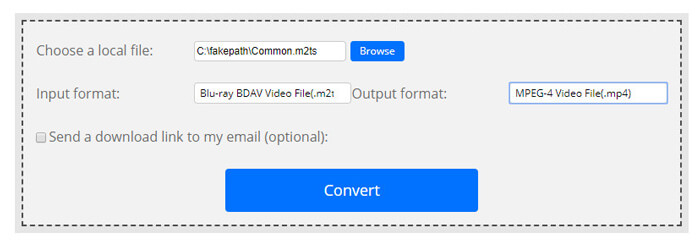
Stap 1.Ga naar de officiële pagina van ConvertFiles. Klik op de knop Bladeren om je lokale M2TS‑bestand te uploaden.
Stap 2.Klik op het vakje Invoerformaat en selecteer HDV Video File(.m2ts), en klik vervolgens op het vakje Uitvoerformaat om MPEG-4 Video File(.mp4) als uitvoerformaat te kiezen.
Stap 3.Klik op de knop Converteren om gratis te beginnen met het omzetten van M2TS naar MP4. De conversie kan enkele minuten duren. Daarna kun je op de downloadlink klikken om het geconverteerde MP4‑bestand te downloaden.
Soms kan de conversie mislukken vanwege het ongeldige invoerformaat. Om een hoog slagingspercentage te behalen, kunt u in plaats daarvan Free M2TS Converter proberen.
Deel 4. Hoe M2TS naar MP4 te transformeren met VLC
VLC Media Player is een open source multimediaspeler voor Windows, Mac, Linux, iOS en Android. Het werkt ook als een geweldige M2TS naar MP4-converter om M2TS-bestanden naar MP4, MOV, AVI en meer te converteren. Bovendien kunt u de M2TS-bestanden bewerken, zoals bijsnijden, knippen, roteren, afbeeldingseffecten toevoegen en meer.
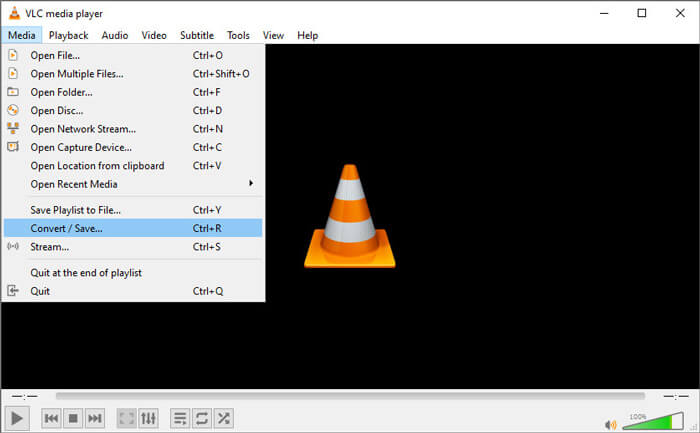
Stap 1.Download en installeer VLC Media Player op je computer en voer het programma uit. Klik op Media > Converteren / Opslaan... om verder te gaan. Klik vervolgens op de knop Toevoegen... om je M2TS‑bestand toe te voegen.
Stap 2.Klik op de knop Converteren / Opslaan om naar het Convert‑venster te gaan. Klik op de vervolgkeuzeknop Profiel en selecteer Video - H.264 + MP3 (MP4) als uitvoerformaat.
Stap 3.Klik op de knop Bladeren om een doelmap te kiezen. Klik daarna op de knop Start om M2TS naar MP4 te converteren.
Deel 5. Hoe MP4 exporteren vanuit M2TS met Handbrake
HandBrake is een andere gratis en open source videotranscoder die video van bijna elk formaat kan converteren. U kunt Handbrake proberen om het M2TS-bestand naar MP4 te converteren met de volgende stappen.
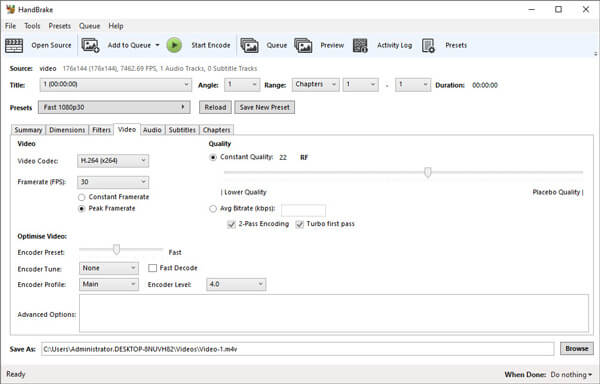
Stap 1.Download, installeer en start HandBrake gratis op je Windows/Mac. Klik linksboven op Open Source om het M2TS‑bestand uit je lokale map te importeren.
Stap 2.Je kunt de instellingen voor het M2TS‑bestand aanpassen. Selecteer MP4 in de vervolgkeuzelijst bij Formaat op het tabblad Samenvatting. Op het tabblad Video kun je de videocodec, videokwaliteit, framerate en video‑optimalisatie aanpassen.
Stap 3.Klik op de knop Bladeren om de doelmap in te stellen. Klik vervolgens op de knop Start Encode om gratis te beginnen met het converteren van M2TS naar MP4.
Deel 6. Veelgestelde vragen over het converteren van M2TS naar MP4
Wat is het verschil tussen M2TS en MP4?
M2TS staat voor MPEG-2 Transport System. Het is een Blu-ray Disc Audio Video-containerbestandsindeling en wordt gebruikt voor het multiplexen van video, audio en andere streams. Over het algemeen zijn M2TS-bestanden groter dan MP4-bestanden van dezelfde kwaliteit. MP4-bestanden worden op bijna alle mediaspelers ondersteund, maar M2TS-bestanden kunnen maar op een paar spelers worden afgespeeld.
Hoe kan ik M2TS‑bestanden op mijn pc afspelen?
U kunt M2TS-bestanden rechtstreeks openen in een aantal populaire mediaspelertoepassingen, waaronder Windows Media Player, VLC Media Player, 5K Player, SMPlayer, Splash, enz. U kunt ook M2TS-bestanden afspelen met de Sony Picture Motion Browser-software.
Kan VLC M2TS‑bestanden afspelen?
Ja. U kunt M2TS-bestanden afspelen met VLC Media Player op Windows en Mac. Start gewoon de VLC-mediaspeler en klik op Media om bestand te openen om het M2TS-bestand in VLC af te spelen. Als dat niet werkt voor een codecprobleem, moet u eerst M2TS naar VLC-ondersteund videoformaat converteren.
Conclusie
Met de 5 gratis methoden hierboven kunt u gemakkelijk M2TS-bestanden naar MP4 converteren. Na vergelijking zou FVC Free M2TS Converter de beste M2TS naar MP4-converter moeten zijn. Met de hardwareversnellingstechnologie exporteert het MP4-bestanden in hoge kwaliteit binnen enkele minuten. U kunt deze gratis converter in één keer proberen.
-
 Uitgebreide gids voor het converteren van TS naar MP4
 Wat zijn TS-bestanden en wil je TS naar MP4 converteren? In dit bericht zullen we je gratis en online methoden delen om TS naar MP4 te converteren.
-
 Hoe MTS-bestanden naar MP4 te converteren
 Weet u niet hoe u een MTS-bestand naar MP4 moet converteren? In deze gids vindt u 6 gratis en eenvoudige manieren om het MTS-formaat te wijzigen naar MP4 op Windows of Mac zonder kwaliteitsverlies.
-
 2 eenvoudige manieren om gratis MTS naar MP3 te converteren
 Heeft u de behoefte om MP3-audio uit het MTS-bestand te extraheren, maar weet u niet hoe? Dit bericht deelt 2 eenvoudige manieren om u te helpen MTS / M2TS naar MP3 te converteren met een hoge audiokwaliteit.
