


 Scherm opnemer
 Videoreparatie
 Beveiligde download
Hoe u het formaat van een GIF kunt wijzigen voor onenigheid met behulp van GIF Maker-toepassingen
GIF is de afkorting van Graphic Interchange Format, geanimeerde afbeeldingen die veel worden gebruikt op sociale netwerken. Discord laat gebruikers bijvoorbeeld plezier toevoegen aan het platform met GIF’s. Er zijn echter situaties waarin je geen GIF’s kunt resizen op Discord. Sommige gebruikers krijgen te maken met beperkingen qua bestandsgrootte tijdens het uploaden. Gelukkig kun je dit soort fouten verhelpen met GIF‑maker‑applicaties!

Deel 1. 5 oplossingen om onenigheid op te lossen, kunnen het formaat van GIF niet wijzigen
Je hebt eindelijk je eigen GIF voor je Discord-profiel gemaakt om deze fout te ontdekken - het formaat van GIF kan niet worden gewijzigd. Dit gebeurt meestal wanneer u GIF's probeert te uploaden boven de ondersteunde vereisten voor bestandsgrootte en afmetingen. Om u te helpen vindt u hier de top vijf GIF Maker-applicaties voor 2023.
1. FVC gratis video naar GIF Maker
FVC Free Video to GIF Maker is een softwaretoepassing die elke video omzet in GIF‑animaties en meer dan 100 formaten ondersteunt. Met de GIF‑instellingen kun je je GIF’s naar wens aanpassen en van formaat veranderen. De applicatie is beschikbaar voor zowel Windows als Mac. Bovendien is het een praktische en gebruiksvriendelijke toepassing die je gratis kunt gebruiken.
Stap 1. Installeer de applicatie
Het eerste dat u hoeft te doen, is de applicatie downloaden. Dit kunt u doen door op onderstaande link te klikken. Nadat u het installatiebestand heeft gedownload, dubbelklikt u erop om het op uw apparaat te installeren. Voer het daarna uit. U kunt nu de functies en hulpmiddelen verkennen en ermee vertrouwd raken.
Gratis downloadenVoor Windows 7 of laterVeilig downloaden
Gratis downloadenVoor MacOS 10.7 of laterVeilig downloaden
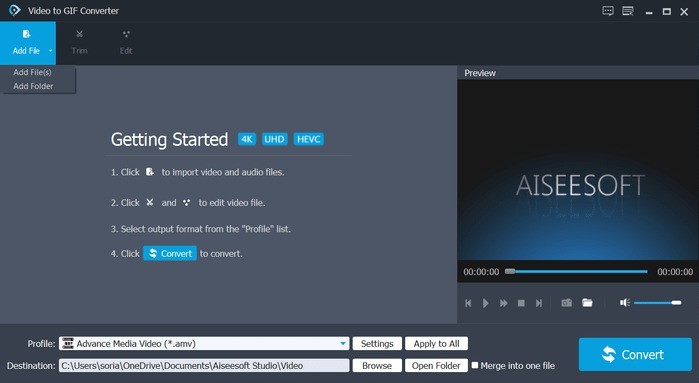
Stap 2. Importeer je GIF‑bestand
Voeg nu het GIF‑bestand toe dat je wilt resizen. Importeer je GIF door op het tabblad Add File in de linkerbovenhoek te tikken. Er verschijnt een verkennervenster waarin je je GIF‑bestand kunt kiezen.
Stap 3. Bestand aanpassen naar GIF
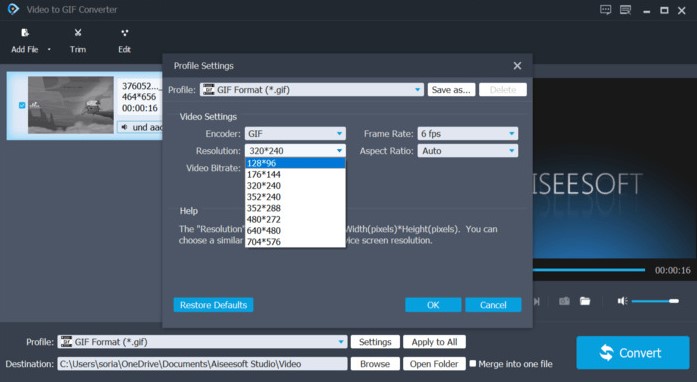
Je ziet onder de geïmporteerde bestanden het profielgedeelte; klik op Settings. Je GIF kan nu worden geresized in de video‑instellingen. Kies 128×96 pixels door op de resolutie‑optie te klikken. Volgens de specificaties van Discord mag het maximaal 128×128 zijn.
Stap 4. Converteren
Als je klaar bent, klik je op de knop Convert rechtsonder in het programma.

Video Converter Ultimate
335+ downloads- Gemakkelijk GIF's maken zonder beperking van de grootte.
- Flexibel en offline te gebruiken.
- Snelle en gratis meerdere GIF-conversie.
- Ondersteunt meer dan 100+ formaten.
- Sterk aanbevolen door eerdere gebruikers.
Gratis DownloadVoor Windows 7 of hogerBeveiligde download
Gratis downloadenVoor macOS 10.7 of laterVeilige download
2. EZGIF
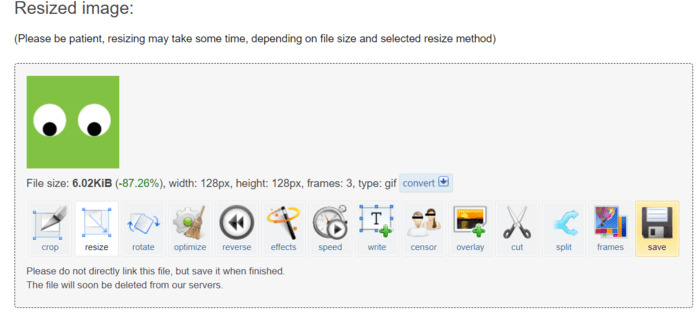
EZGIF is een online GIF-editor rechtstreeks in de webapplicatie. U kunt het formaat van uw GIF's eenvoudig wijzigen met behulp van de meegeleverde hulpmiddelen. Het is volledig gratis en kan op elk moment worden gebruikt.
Stap 1. Open om deze webapplicatie te gebruiken je browser en ga naar EZGIF.com. Open het tabblad Resizer om te beginnen.
Stap 2. Importeer je bestand door op de knop Choose file te klikken of plak de URL van het bestand. Klik op de upload‑knop om verder te gaan.
Stap 3. Om je GIF’s te resizen, voer je de afmetingen 128×128 in bij de hoogte‑ en breedtevelden. Klik daarna op de knop Resize.
Stap 4. Tot slot hoef je alleen nog maar op het opslag‑icoon in de linkerbenedenhoek van je GIF te klikken.
3. RedKetchup.io
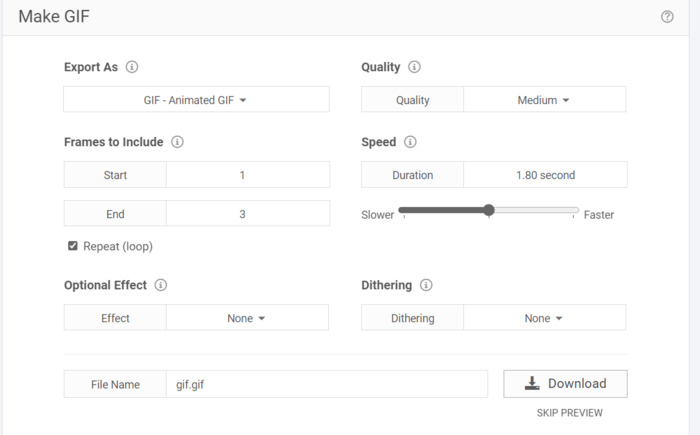
RedKetchup.io is een online GIF-resizer. Het is een gratis webapplicatie voor het bijsnijden, vergroten of verkleinen en online maken van GIF's voor directe downloads. Het biedt duidelijkere opties en schaalparameters.
Stap 1. Start om te beginnen je browser en ga naar redketchup.io. Open het resizer‑tabblad door op het hamburger‑menu linksboven op de website te klikken.
Stap 2. Klik in het vak Select GIF op de knop Browse en selecteer het door jou gekozen bestand.
Stap 3. Scroll naar beneden en zoek het vak Resize GIF. Om aan de Discord‑standaard te voldoen, moet je het verkleinen tot 20,48 % of een afmeting van 128×128 pixels.
Stap 4. Klik op de download‑knop hieronder om je bestand te downloaden.
4. Kapvleugel
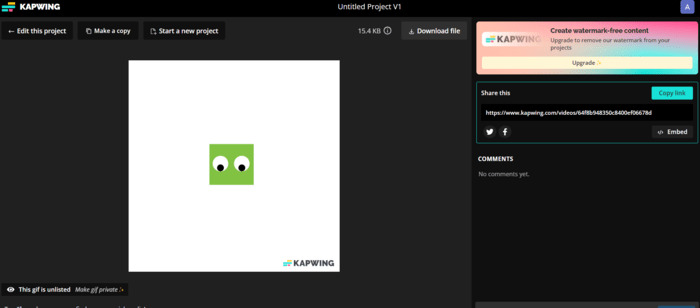
Kapwing biedt een gratis online GIF-tool voor het wijzigen van het formaat. De applicatie lijkt op professionele software en maakt gebruik van AI-technologie. Met deze app is het wijzigen van het formaat van GIF's heel eenvoudig. Aangezien u echter de gratis versie gebruikt, geeft de tool uw GIF's een watermerk.
Stap 1. Ga naar Kapwing.com. Klik om te beginnen op de knop met de tekst Choose GIF.
Stap 2. Importeer je bestand door op de knop Upload te klikken.
Stap 3. Klik op de crop‑functie in het rechtergedeelte van de pagina. Je kunt het bestand resizen door het kleiner te slepen. De afmeting mag niet groter zijn dan 128×128 pixels.
Stap 4. Klik op de knop Export Project om het bestand te downloaden. Je moet eerst inloggen om je projecten online op te slaan. Klik ten slotte op het bestand om de knop Download File erboven te zien.
5. GIFGIF's
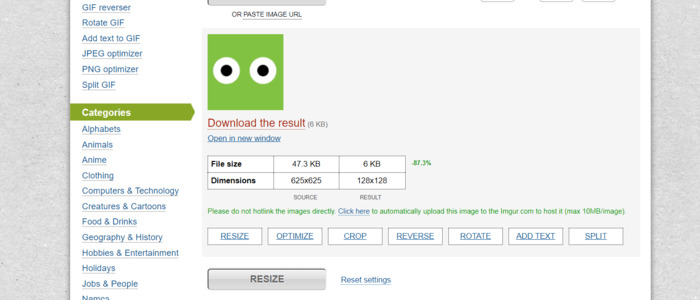
Het dient als een GIF-toolkit die gratis online beschikbaar is. Ze hebben vooraf gemaakte GIF's met verschillende categorieën die je kunt downloaden. Het is qua eenvoud vergelijkbaar met EZGIF, omdat ze geen betaalde en exclusieve tools hebben.
Stap 1. Bezoek gifgifs.com in je browser. Begin door op het tabblad Resizer te klikken.
Stap 2. Je kunt bestanden importeren door op de Upload button te klikken of door de URL van de GIF te plakken.
Stap 3. Om je GIF te resizen, kun je de schuifregelaar gebruiken of simpelweg de gewenste afmetingen van je GIF intypen. De vereiste grootte is 128×128 pixels.
Stap 4. Het resultaat verschijnt onderaan. Klik op Download the Result onder het GIF‑bestand.
Deel 2. Tips voor het uploaden van Discord GIF-vereisten
Discord heeft mogelijkheden om het formaat te wijzigen, maar in sommige gevallen is dit niet op elke GIF van toepassing. Dankzij GIF-maker-applicaties is het optimaliseren en vergroten of verkleinen van uw GIF's nu eenvoudig. Bij het uploaden moeten uw GIF's een maximale afmeting van 128×128 pixels hebben om correct te kunnen worden verzonden. U kunt de resolutiekwaliteit wijzigen als deze maximaal 25 MB bedraagt. Wist je dat er een truc bestaat om GIF's vaker te uploaden dan de limietbeperkingen? Ja! Als je iets groters wilt delen, tot 100 MB, hoef je het alleen maar in ZIP te comprimeren. Als Discord je GIF nog steeds niet kan uploaden, probeer dan het volgende:
◆ Meld u af en log in op uw Discord-account
◆ Probeer uw Discord bij te werken
◆ Installeer uw Discord-applicatie opnieuw
◆ Neem contact op met het supportteam van Discord op hun pagina of stuur een e-mail naar support@discord.com
Verder lezen:
5 nieuwste softwaretools die je kunt gebruiken om een geweldige omgekeerde GIF te maken
GIF inkorten: beste online, desktop‑ en mobiele tools om een GIF te trimmen
Deel 3. Veelgestelde vragen over het wijzigen van het formaat van GIF
Hoe het formaat van GIF voor Discord-profielfoto wijzigen?
Door gebruik te maken van applicatietools die speciaal zijn ontworpen om GIF’s te maken en te bewerken. Ik raad aan om FVC Free Video to GIF Maker te gebruiken, omdat deze meer dan 100 formaten ondersteunt. Bovendien heeft het verschillende tools om GIF’s volledig naar jouw wensen aan te passen.
Waarom werken Discord GIF's niet?
De gebruikelijke oorzaak van dit probleem is het hebben van te grote GIF's. Mogelijk hebt u de automatische weergave van GIF's niet ingeschakeld als de mogelijke functionaliteit in uw instellingen aanwezig is. Soms heeft het te maken met uw internetverbinding.
Hoe neem ik contact op met Discord-ondersteuning?
U kunt contact opnemen met Discord-ondersteuning via hun pagina of door een e-mail te sturen naar support@discord.com.
Zijn de Emotes Discord-servers offline?
GameWisp is niet langer actief en de integratie is sinds 31 oktober 2020 stopgezet. Als gevolg hiervan zijn globale emotes die door de integratie zijn gemaakt nog steeds beschikbaar in je serverinstellingen als gewone emotes, maar kunnen ze niet langer globale emotes zijn.
Heeft Discord ongepaste GIF's?
Het bevat mogelijk ongepaste GIF's. Ik raad aan om uw inhoud te filteren om ervoor te zorgen dat u geen ongepaste GIF's ziet.
Gevolgtrekking
GIF’s kunnen Discord‑servers levendiger en vermakelijker maken. Maar slechts weinig mensen hebben ervaring met het omgaan met dit soort bestanden. Daarom helpen innovatieve applicaties zoals de FVC GIF Maker nieuwe gebruikers bij het oplossen van problemen, bijvoorbeeld wanneer Discord geen GIF’s kan resizen. Het is een voordeel om dergelijke applicaties te hebben, omdat ze tijd en moeite besparen. Al met al kun je zien dat GIF‑maker‑applicaties de creativiteit en een soepele gebruikerservaring op Discord verbeteren.
-
 5 beste sites voor het opslaan van een GIF op de iPhone als video
 Kan'geen GIF op mijn iPhone opslaan? Blijf op dit bericht en we geven je de mogelijke oplossingen voor het opslaan van GIF's op de iPhone.
-
 Een geanimeerde GIF maken met de beste GIF-maker
 Het maken van een GIF is een tijdrovende klus zonder de juiste tools te gebruiken. Bekijk dit artikel voor meer informatie over het maken van een GIF.
-
 Creatieve GIF-programmatools voor het wijzigen van het formaat beschikbaar met gemak
 Het formaat van GIF's wijzigen kan een pijnlijke taak zijn. Gebruik de juiste programma's om het formaat van uw GIF's te wijzigen en uw werk vlekkeloos uit te voeren. Bekijk dit artikel voor meer informatie.
