


 Video Converter Ultimate
 Scherm opnemer
 Videoreparatie
 Beveiligde download
7 eenvoudige manieren om HEIC binnen enkele seconden snel naar PNG te converteren
Wil je je HEIC-bestand breed compatibel maken met andere apparaten? Dan hebben wij precies wat je zoekt! In dit artikel laten we je de beste manieren zien om je HEIC-bestand naar PNG te converteren zonder gedoe. Dus maak je klaar terwijl we ons verdiepen in de beste manieren om HEIC naar PNG moeiteloos te converteren.

Deel 1. Waarom HEIC naar PNG-indeling converteren?
HEIC-bestandsindeling is een afbeeldingsindeling die door Apple is gemaakt. Het is een afbeeldingsindeling die Apple-apparaten vaak gebruiken. Hoewel het een hoge resolutie heeft, neemt het niet te veel ruimte in beslag op je apparaat. HEIC-bestanden zijn echter niet compatibel met niet-Apple-apparaten. PNG, wat staat voor Portable Graphics Format, is daarentegen een afbeeldingsbestandsindeling die is gemaakt om GIF-indelingen te vervangen.
Het is het meest gebruikte afbeeldingsformaat dat niet is gecomprimeerd, wat betekent dat het een enorme bestandsgrootte heeft. Desalniettemin ondersteunen bijna alle apparaten dit beeldbestandsformaat. Dus als u uw HEIC-afbeelding op andere apparaten dan Apple wilt openen, kunt u deze beter converteren naar een PNG-bestandsindeling.
Deel 2. 5 eenvoudige manieren om uw HEIC-bestand online naar PNG-bestand te converteren
Zoeken naar de beste manieren om HEIC naar PNG te converteren, is best moeilijk. We hebben echter gezocht naar de beste en eenvoudigste methoden om HEIC naar een PNG-bestandsindeling te wijzigen.
Gebruik FVC Gratis HEIC naar PNG Converter
De meest uitstekende manier om HEIC naar PNG te converteren is door een convertertool te gebruiken. En de beste tool die wij op internet hebben gevonden is de FVC Free HEIC to PNG Converter. Deze converter is een online tool waarmee je je HEIC-bestand eenvoudig naar het PNG-bestandsformaat converteert. Bovendien, als je je HEIC-bestanden in batch naar PNG wilt converteren, heeft deze tool daar een functie voor.
Het is ook toegankelijk in bijna alle gangbare browsers, waardoor het een tool zonder browserlimiet is. Bovendien heeft het een eenvoudige software-interface en heeft het geen limiet voor de bestandsgrootte, dus je kunt HEIC-bestanden converteren zonder na te denken over de bestandsgrootte. Volg daarom de eenvoudige gids hieronder als u geïnteresseerd bent in het gebruik van deze online HEIC naar PNG-converter.
Stap 1. Zoek in je browser naar FVC Free HEIC to PNG Converter. Je kunt ook op deze link klikken om direct naar hun webpagina te gaan. Zo ziet de eerste interface eruit:

Stap 2. Klik vervolgens op de knop Add HEIC/HEIF File(s). De mappen van je computer verschijnen, waar je je HEIC-bestand selecteert.
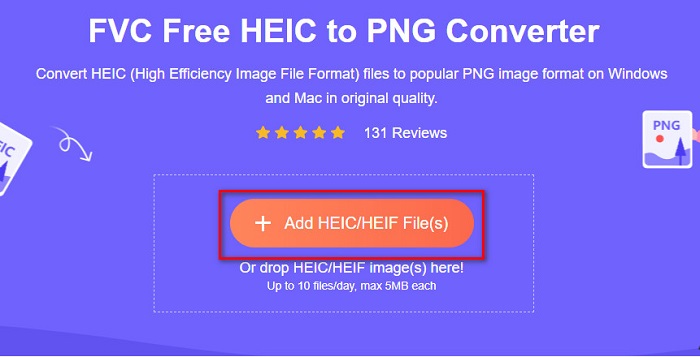
Stap 3. Daarna verschijnen de mappen van je computer, waar je je HEIC-bestand selecteert. Klik op Open. Vervolgens wordt je HEIC-naar-PNG-conversie gestart.

Stap 4. Klik ten slotte in de interface van de software op de knop Download om je PNG-bestand te downloaden.

Simpel, niet? U kunt uw HEIC-bestand converteren naar een PNG-bestand door deze eenvoudige stappen te volgen.
Gebruik Xconvert.com
Xconvert is een gratis online HEIC-naar-PNG-converter die HEIC-bestanden eenvoudig naar PNG-bestanden converteert. Deze online converter heeft een gebruiksvriendelijke interface die vooral handig is voor beginners. Bovendien kun je de resolutie van je afbeelding aanpassen wanneer je deze online converter gebruikt. Omdat het echter een internetafhankelijke tool is, kun je een trager conversieproces ervaren wanneer je internet traag is. Ook bevat het advertenties die storend kunnen zijn.
Stap 1. Zoek Xconvert.com in je browser. Klik op hun website op de knop Add Files, vervolgens verschijnen de bestanden van je computer en selecteer je je HEIC-bestand.

Stap 2. Je afbeelding wordt geüpload naar de interface van de software. Klik na het uploaden op de knop Convert rechtsonder in de interface van de software. Wacht daarna tot je bestand klaar is om te downloaden en ga dan door naar de volgende stap.
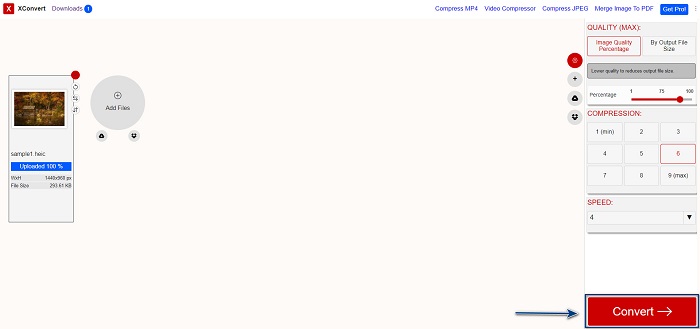
Stap 3. Wanneer je bestand klaar is, klik je op de knop Download om je PNG-bestand te downloaden; boven de downloadknop zie je ook de uitvoergrootte en hoe lang de conversie heeft geduurd.

Zamzar . gebruiken
Een andere manier om HEIC online naar PNG te converteren is met de online converter Zamzar. Je hebt deze converter waarschijnlijk al eens gezien toen je zocht naar een HEIC-naar-PNG-converter. Deze converter is toegankelijk in vrijwel alle gangbare browsers. Daarnaast heeft hij een eenvoudige gebruikersinterface, waardoor het een gebruiksvriendelijke tool is. Je bestand kan echter beschadigd raken als de internetverbinding wordt onderbroken tijdens het conversieproces. Desondanks gebruiken veel mensen deze converter om HEIC naar een PNG-bestand om te zetten.
Stap 1. Zoek in de browser die je gebruikt naar Zamzar. Klik op hun website op de knop Add Files. De bestanden van je computer verschijnen, upload dan je HEIC-afbeelding.

Stap 2. Klik na het uploaden van je HEIC-bestand op de drop-down-knop en selecteer PNG als bestandsuitvoerformaat.

Stap 3. Klik tot slot op de knop Convert Now om je HEIC-bestand naar het PNG-bestandsformaat te converteren. Download daarna je PNG-bestand. Wacht gewoon een paar seconden, en dat is alles!

Gebruik Conversion Tools.io
Conversion Tool is een online HEIC-naar-PNG-converter met een eenvoudige gebruikersinterface. Hij kan je HEIC-bestand met hoge snelheid naar PNG converteren. Bovendien bevat hij, in tegenstelling tot veel andere online converters, weinig advertenties. Maar het nadeel is dat je slechts tien bestanden per dag kunt converteren en dat er een limiet is aan de bestandsgrootte. Als je echter een klein bestand converteert, kan deze tool goed bij je passen.
Stap 1. Zoek Conversion Tools.io in je browser. Klik vervolgens op de knop Browse in de hoofdinterface van de software, of sleep en zet je HEIC-bestand op de knop Browse neer.

Stap 2. Klik daarna op de knop Run Conversion om te beginnen met het converteren van je HEIC-bestand naar een PNG-bestand. Wacht vervolgens tot je afbeeldingsbestand geladen is en ga dan naar de volgende stap.

Stap 3. Klik tot slot op de knop Download om je PNG-bestand te downloaden.

Gebruik CDKM
De laatste tool die we je willen laten zien is CDKM. Met deze tool kun je HEIC-bestanden met slechts een paar klikken naar PNG converteren. Het kan echter enkele seconden duren om te converteren met deze online converter, afhankelijk van je internetsnelheid. Ook bevat het advertenties die irritant kunnen zijn. Toch heeft het geen limiet voor de bestandsgrootte, waardoor het de moeite waard is om te proberen.
Stap 1. Zoek in je browser naar de CDKM online converter. Klik in de hoofdinterface van de software op de knop Choose Files. De mappen van je computer verschijnen, selecteer vervolgens je HEIC-bestand om te uploaden.

Stap 2. Klik daarna op de knop Start Conversion om het conversieproces te starten.

Stap 3. Scroll ten slotte een beetje naar beneden en je ziet de knop Download. Klik op de knop Download om je PNG-bestand te downloaden.

Deel 3. Converteer HEIC naar PNG op Mac
Apple-apparaten ondersteunen HEIC-bestandsindelingen en door Mac te gebruiken, kunt u native een HEIC-bestand openen. Maar als u uw HEIC-bestand naar PNG wilt converteren, kunt u dit wijzigen met de Photo App op Mac. Dienovereenkomstig, als u een Mac-gebruiker bent, kunt u dit deel beter lezen.
Stap 1. Sleep en zet je HEIC-bestand eerst neer in de Foto’s-app. Bekijk vervolgens je HEIC-foto en klik op Bestand > Exporteer > Exporteer 1 foto.

Stap 2. Klik daarna bij Soort foto op het uitvoerformaat dat je wilt. Selecteer het PNG-bestandsformaat.

Stap 3. Klik vervolgens op de knop Export en kies de opslaglocatie voor je uitvoerbestand. Je ziet dat je HEIC-bestand is gewijzigd naar het PNG-bestandsformaat.

Deel 4. HEIC-bestand converteren naar PNG op iPhone
Als u een iPhone gebruikt, kunt u een HEIC-bestand op uw apparaat openen. Maar als u uw HEIC-bestand naar PNG wilt converteren met een iPhone-apparaat, dan hebben we een manier voor u. Door deze eenvoudige en gemakkelijke stappen hieronder te volgen, kunt u HEIC moeiteloos naar PNG converteren.
Stap 1. Tik in de Foto’s-app op je iPhone op de knop Selecteer bovenaan je scherm. Selecteer vervolgens je HEIC-bestand en tik op het pictogram Delen.
Stap 2. Veeg je scherm omhoog; je ziet de optie Foto kopiëren, tik daar vervolgens op.
Stap 3. Ga ten slotte naar de app Bestanden, tik op de knop Bladeren en kies je gewenste uitvoerlocatie (tik op iCloud Drive of Op mijn iPhone). Plak je HEIC-bestand daar.

Nadat je je bestand hebt geplakt, zul je zien dat je bestand automatisch wordt geconverteerd naar een PNG-bestand.
Deel 5. Uitgebreide kennis over HEIC-bestanden en PNG-bestanden
Als u nog steeds twijfelt of u uw HEIC-bestand naar PNG wilt converteren, bieden we u een vergelijkingstabel om u te helpen de verschillen tussen deze twee bestanden te onderscheiden. Bovendien geeft het u een duidelijk overzicht van HEIC- en PNG-kenmerken. Lees aandachtig om het verschil tussen HEIC-bestanden en PNG-bestanden te kennen.
| HEIC | PNG | |
| Compatibiliteit | Alleen Apple-apparaten ondersteunen dit bestandsformaat. | Bijna alle apparaten ondersteunen dit bestand, ook Apple-apparaten. |
| Bestandsgrootte | Kleine bestandsgrootte. | Kan een enorme bestandsgrootte bereiken. |
| Beeldkwaliteit | Hoge beeldkwaliteit. | Heeft een goede kwaliteit, maar niet beter dan het HEIC-bestand. |
| Gecomprimeerd/Niet-gecomprimeerd | gecomprimeerd | ongecomprimeerd |
| Bewerken | Behoudt de beeldkwaliteit bij het bewerken. | De kwaliteit kan afnemen bij het bewerken. |
Deel 6. Veelgestelde vragen over het converteren van HEIC naar PNG
Heeft het converteren van HEIC naar PNG invloed op de bestandsgrootte?
Ja. Wanneer u HEIC naar PNG converteert, wordt de bestandsgrootte groter, hoewel deze niet groot zal zijn.
Kun je PNG-bestanden openen in Adobe Photoshop?
Zeker. U kunt PNG-bestanden openen in Adobe Photoshop omdat Adobe Photoshop de PNG-bestandsindeling ondersteunt.
Kun je het PNG-bestandsformaat native openen op Apple-apparaten?
Ja. Wanneer u schermafbeeldingen van uw iPhone maakt, worden deze automatisch als PNG-bestand op uw filmrol opgeslagen.
Gevolgtrekking
Eindelijk! We zijn nu aan het einde van onze tocht. Dit artikel geeft je de beste oplossingen om je HEIC-bestand naar het PNG-bestandsformaat te converteren. En alle online HEIC-naar-PNG-converters die hierboven zijn getoond, kunnen je bestand effectief en moeiteloos converteren. Bovendien zijn er ook andere opties die je kunt gebruiken als je een Mac- of iPhone-gebruiker bent. Maar als je op zoek bent naar de beste HEIC-naar-PNG-converter met uitmuntende functies, dan is de FVC Free HEIC to PNG-converter de beste keuze voor jou.
-
 Hoe HEIC-bestand te openen op Windows, Mac en online
 Bent u op zoek naar een manier om HEIC-bestanden te openen? Dit artikel biedt u de beste oplossingen om HEIC-bestanden op Windows, Mac en online te openen.
-
 JPG VS GIF: 3 moeiteloze manieren om JPG naar GIF te converteren
 Wil je het verschil weten tussen JPG en een GIF? Of wil je JPG overschakelen naar GIF-geanimeerd formaat? Lees dan dit artikel om een idee te krijgen.
-
 5 beste manieren om afbeelding te veranderen in geanimeerde GIF [Bijgewerkt 2022]
 Een converterafbeelding naar GIF nodig? Dit artikel biedt de vijf beste converters die we op de markt kunnen vinden. Laten we deze tools dus ontdekken door dit artikel te lezen.
