


 Video Converter Ultimate
 Scherm opnemer
 Videoreparatie
Meest betrouwbare MP4-metadata-editor om gemakkelijk MP4-metadata toe te voegen, te bewerken en te verwijderen
MP4-tags kunnen je helpen de bestanden te ordenen en beheren door ze te sorteren op basis van de metadata. Daarom zijn veel gebruikers op zoek naar een perfecte metadata-editor om deze taak eenvoudig af te handelen. Gelukkig hebben we vandaag de beste tag-editors op de markt uitgezocht die je voor je MP4-bestanden kunt gebruiken. Met behulp van grondig onderzoek bekijken we welke MP4-metadata-editor je zou moeten gebruiken om de bestanden op de juiste manier te ordenen.

Deel 1. 4 Beste gratis MP4-tag-editors beschikbaar op het web en offline
VLC Media Speler
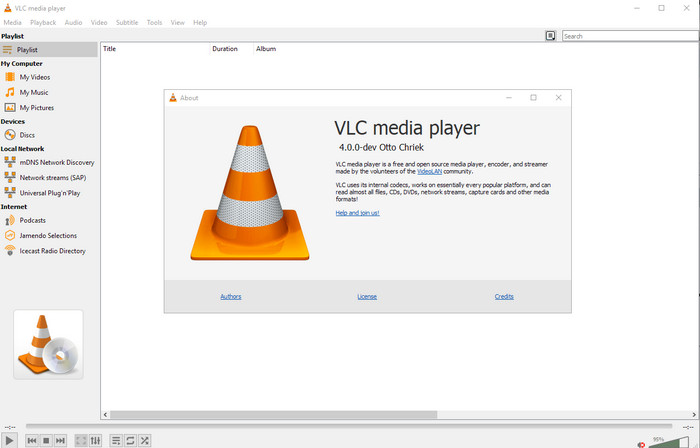
Beschikbaar op: Windows, Mac en Linux
Als eerste op onze lijst staat de beste videospeler, maar als je een gratis mp4-metadata-editor wilt, heb je deze misschien nodig. VLC Media Player geeft je een gratis manier om de tags die aan je MP4-bestanden zijn gekoppeld te bewerken of te verwijderen. Met deze tool kun je eenvoudig de metadata in het bestand aanpassen, zoals titel, auteursrecht, genre, artiest, datum, tijd en meer. Hoewel veel gebruikers zeggen dat het hier eenvoudig is om de metadata te bewerken, zijn er ook mensen die het daarmee oneens zijn. Zij vinden het verwarrend en ineffectief, in tegenstelling tot andere tag-editors. Desondanks, als je een veilige tool wilt downloaden die zich al ruimschoots bij gebruikers heeft bewezen, probeer deze tool dan eens.
Amvidia Tag-editor
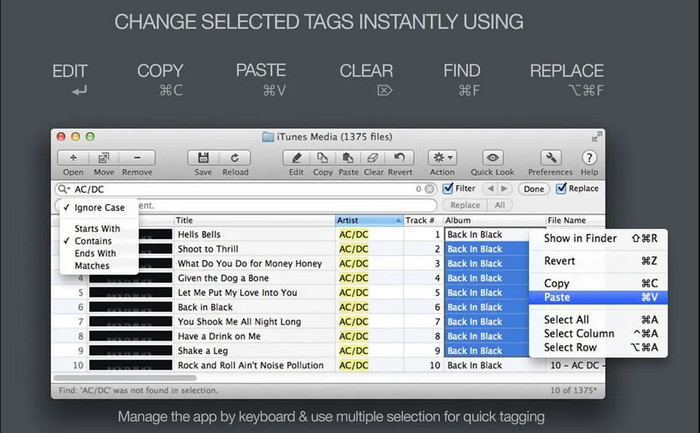
Beschikbaar op: Mac
Een andere MP4-metadata-editor op de Mac is de Amvidia Tag Editor. Als je metadata, albumhoezen, tags in iTunes wilt toevoegen of de bestandsnaam wilt wijzigen, dan kan dat hier allemaal; als je batch-tagging nodig hebt, helpt deze tool je daarbij. Bovendien ondersteunt deze gratis te downloaden software een groot aantal mediaformaten die je in de tool kunt laden, maar je moet hem wel eerst downloaden. Vanwege de zeer uitgebreide functies kan het voor beginners even duren voordat ze met de tool overweg kunnen, omdat je veel stappen moet doorlopen voordat je metadata toevoegt. Ook de interface is verouderd, net als die van VLC.
TigoTago
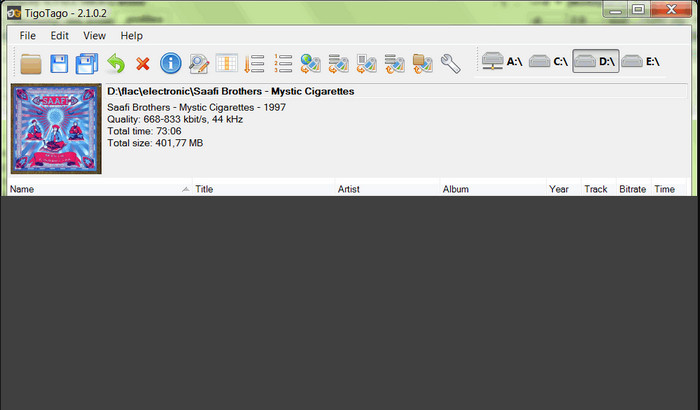
Beschikbaar op: Windows
TigoTago is een andere MP4-metadatabewerker die je gratis op Windows kunt gebruiken. Dus als je specifieke gegevens of tags van je MP4-bestand moet bewerken, download dan de tool en pas de MP4-tags eenvoudig één voor één aan. Met deze tool kun je de basistags invullen die een bestand heeft, zoals titel, album, tracks en artiest, maar je kunt ook geavanceerde tags toevoegen, zoals songteksten, opmerkingen, enzovoort. Als we deze tool vergelijken met VLC, kunnen we zeggen dat hij veel beter is, omdat hij het bewerken van tags vooropstelt. Hoewel hij beter is dan de mediaspeler, is er nog steeds ruimte voor verbetering, onder meer wat betreft de GUI en andere functies.
InstantD3 - Gratis online ID3-tag-editor
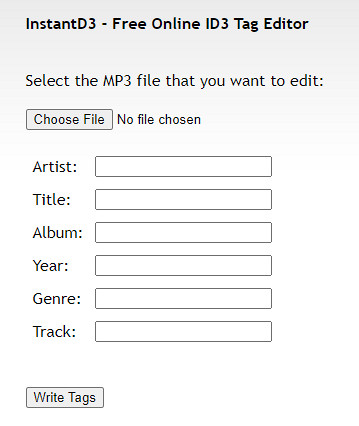
Beschikbaar op: web
Als u geen software wilt downloaden, kunt u toegang krijgen tot deze online MP4-videotag-editor, de InstantD3 - Gratis online ID3-tag-editor. Hoewel de tool beschikbaar is op internet, kan deze niet online in de metadata zoeken om de tags die u nodig hebt automatisch op uw MP4 toe te passen. De tool biedt een intuïtieve interface om de gebruikers een gemakkelijke manier te laten ervaren om tags aan hun audiobestanden toe te voegen. Omdat de tool gratis is, staan er advertenties op de website, maar we moeten u waarschuwen dat de advertenties op de website niet geschikt zijn voor de leeftijd van 18 jaar hieronder. Gebruik de tool ook op eigen risico; zodra u de website van de tool hebt geopend, is uw internetverbinding niet beveiligd.
Deel 2. Beste keuze video-editor om metadata toe te voegen, te bewerken en te verwijderen op Windows en Mac
Beschikbaar op: Windows, Mac & Linux
De hierboven genoemde MP4-metadata-editors zijn uitstekend, maar FVC Video Converter Ultimate is de krachtige metadata-editor die je nodig hebt om metadata te bewerken of te verwijderen. Deze tool biedt de beste bewerkingsfuncties die je eenvoudig kunt gebruiken en toch een professioneel resultaat opleveren. In tegenstelling tot de hierboven genoemde tools, die slechts een beperkt aantal mediaformaten ondersteunen, kun je met deze tool MP4, MOV, MKV, FLV, AVI en meer dan 1000 andere formaten uploaden en snel de metadata van al deze bestanden wijzigen. Is het niet geweldig wat deze tool kan doen? Als je deze geweldige tool eenmaal ziet, kun je eenvoudig de stapsgewijze handleiding volgen die we geven om tags in je MP4-bestanden te bewerken, toe te voegen en te verwijderen.
Stap 1. Klik eerst op de downloadknop om de MP4-tag-editor op Mac of Windows te downloaden. Volg het installatieproces nadat je het bestand hebt aangeklikt en open het.
Gratis downloadVoor Windows 7 of nieuwerVeilige download
Gratis downloadVoor MacOS 10.7 of nieuwerVeilige download
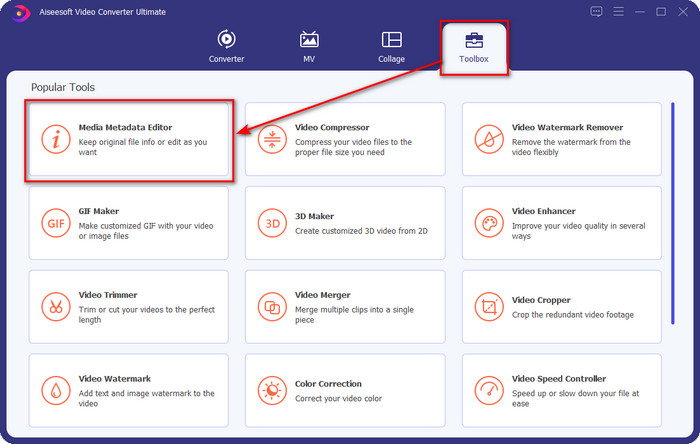
Stap 2. Nu je de editor hebt geopend, kies je uit de drie beschikbare secties de Toolbox; klik daaronder op de Media Metadata Editor.
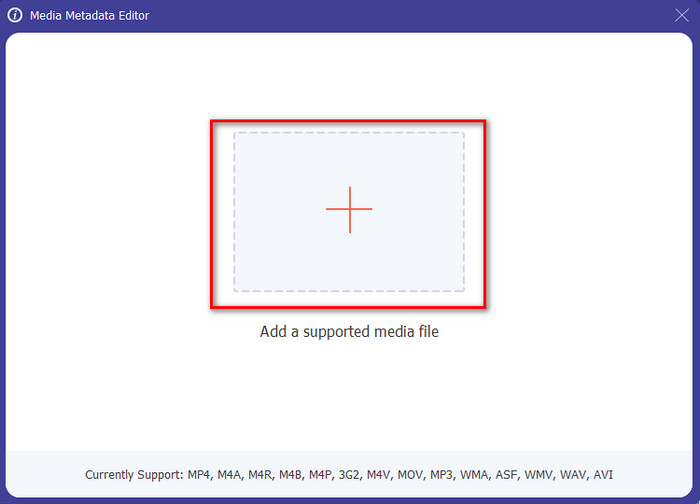
Stap 3. Om het MP4-bestand te uploaden, klik je op de knop +, zoek je de .mp4 in de map die verschijnt en klik je op Open om het succesvol toe te voegen.
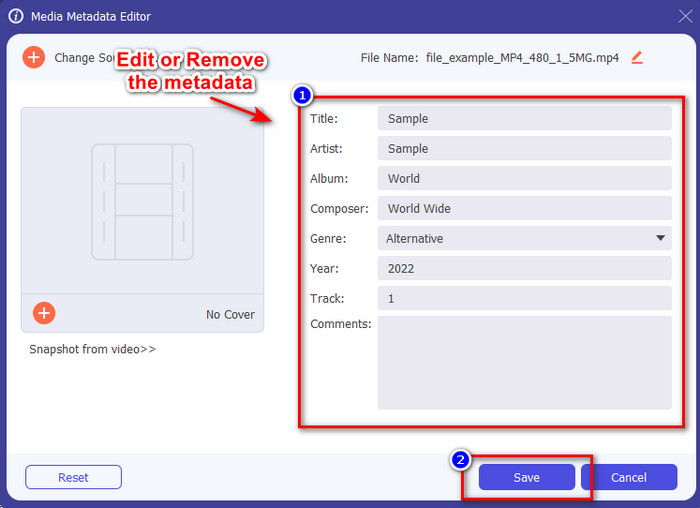
Stap 4. Voeg de informatie toe, verwijder deze of bewerk deze in het tekstvak dat op je scherm verschijnt; vul alles in zoals jij het wilt. En om de wijzigingen die je in de MP4-tag hebt aangebracht op te slaan, klik je op de knop Opslaan. Je zult merken dat het een fluitje van een cent is als je voor de ultieme editor kiest.
Gerelateerd:
Deel 3. Veelgestelde vragen over MP4 Tag Editor
Hoe MP4-metadata op Windows controleren?
Als u de metadata van uw MP4-bestand wilt controleren, volgt u deze stappen. Zoek eerst het .mp4-bestand, tik op de rechtermuisknop, ga naar Eigenschappen en klik ten slotte op Details. Alle informatie die je nodig hebt over je metadata staat in deze lijst. Dus als u ze naar uw wensen wilt bewerken, kiest u de tool die u hierboven moet gebruiken.
Waar kan ik MP4-bestanden bekijken?
De meeste mediaspelers ondersteunen MP4-bestanden omdat dit het standaard video-bestandsformaat is. Maar de vraag is: waar kun je MP4-video’s in hoge resolutie bekijken? In dat geval moet je op deze link klikken. Alles wat je moet weten, staat in dit artikel.
Hoe kies je de beste MP4-tag-editor?
Je moet een paar dingen onthouden voordat je de MP4-metadata-editor kiest die je gaat gebruiken; als u niet weet wat deze zijn, kunt u op deze normen vertrouwen. Zorg er eerst voor dat de metadata-editor het formaat ondersteunt dat u heeft; niet alle editors ondersteunen een breed formaatbereik. Het gebruik van een metadata-editor die uw formaat niet ondersteunt, zou nutteloos zijn. Ten tweede, zorg ervoor dat de tool gebruiksvriendelijk is; als je nieuw bent in het bewerken van de metadata, zorg er dan voor dat de tool die je kiest niet te moeilijk is om te leren. Zorg er ten slotte voor dat het veilig is om te gebruiken; als het downloadbaar of online is, moet u weten of het veilig is om te gebruiken. Zorg ervoor dat voordat u de editor gebruikt, u al deze eenvoudige standaarden moet volgen om alleen het beste te hebben.
Gevolgtrekking
De MP4-metadata-editors die we in dit artikel hebben toegevoegd, kunnen je helpen om snel de metadata van je MP4-bestanden te bewerken, toe te voegen of te verwijderen. Met de relevante beoordelingen die we over de tools hebben geschreven, kunnen we ze nu vergelijken en zien welke het beste bij onze behoeften past wat betreft het bewerken van MP4-tags. Als je nog steeds niet hebt besloten welke je moet gebruiken, bieden we je de beste uit de lijst aan: de FVC Video Converter Ultimate. Deze fantastische tool zal aan je behoeften voldoen; de tool downloaden is de enige manier om hem te krijgen. Klik dus op de downloadknop, volg de stappen die we voor je hebben gegeven en geniet van het bewerken van tags zonder moeite.
-
 5 eenvoudigste manieren om metadata in mediabestanden te verwijderen
 Hoe metagegevens verwijderen? Is het moeilijk om het te doen? Moet ik een gratis tool kopen of gebruiken om tags te verwijderen? Op al deze vragen vindt u in dit artikel een antwoord.
-
 Top 5 metadata-extractors die online en offline beschikbaar zijn [2025]
 Je kunt meerdere metadata-extractors op de markt vinden, maar vandaag kiezen we alleen de vijf meest gekozen tag-extractors volgens het publiek.
-
 Top 5 videometadata-editors voor 2025 [onpartijdige beoordeling]
 Wil je je videometadata bekijken? Als dat zo is, lees dan de details hieronder om het onderwerp volledig te begrijpen en te weten welke tool het beste bij je past.
