


 Video Converter Ultimate
 Nagrywarka ekranu
 Naprawa wideo
Jak szybko przyciąć GIF za pomocą 4 przycinaczy GIF
Zmiana rozmiaru GIF‑a jest prostym zadaniem, jeśli użyjesz najlepszego rozwiązania do przycinania GIF‑a. Jednak nie każdy edytor GIF‑ów oferuje profesjonalne i praktyczne narzędzie do kadrowania. Wszystko, co musisz wiedzieć o narzędziach do przycinania GIF‑ów, znajdziesz w tym wpisie. Aby poznać wszystkie najlepsze opcje, z których możesz skorzystać, przeczytaj poniższe informacje i poznaj cztery niesamowite narzędzia do kadrowania, dzięki którym zmienisz rozmiar swojego GIF‑a.

Część 1. Jak przycinać pliki GIF w systemie Windows i Mac
Sposób 1. Użyj konwertera wideo Ultimate – najlepszego narzędzia do przycinania GIF
To profesjonalne narzędzie, które zapewnia użytkownikom najwyższą jakość niezależnie od problemu. FVC Video Converter Ultimate dołączył już do grona edytorów GIF‑ów, pozwalając ciąć, przycinać, kadrować, a nawet tworzyć własne GIF‑y. To narzędzie sprawdza się nie tylko przy GIF‑ach – możesz także konwertować GIF na MOV, AVI, MP4, MKV, WMV i ponad 200 innych formatów. Co więcej, proces, jaki oferuje to narzędzie, znacznie różni się od innych, ponieważ obsługuje błyskawicznie szybkie przetwarzanie, by szybko importować i eksportować pliki. Ponadto program rozwiązał już wiele problemów związanych z edycją GIF‑ów. Dlatego bez trudu poradzi sobie również z ich kadrowaniem. Chcesz się nauczyć, jak przyciąć GIF‑a? W takim razie poniższe informacje pokażą szybki samouczek, jak zrobić to w krótkim czasie.

FVC Video Converter Ultimate
5,689,200+ pobrań- Profesjonalny i bardzo niezawodny przycinacz GIF jest dostępny na Windows i Mac.
- Obsługuje konwersję GIF do formatów MP4, MOV, WMV, MKV i 200+.
- Dostępne są dodatkowe zaawansowane funkcje ułatwiające tworzenie GIF-ów, przyspieszanie lub zwalnianie itp.
- Jest bezpieczny przed wszelkiego rodzaju wirusami.
- Ultraszybki proces eksportowania, który pomoże Ci w krótkim czasie przygotować przycięty plik GIF.
Bezpłatne pobieranieDla Windows 7 lub nowszegoBezpieczne pobieranie
Bezpłatne pobieranieDla MacOS 10.7 lub nowszegoBezpieczne pobieranie
Krok 1. Pobierz narzędzie do przycinania na dysk, klikając przycisk pobierania poniżej. Następnie zainstaluj oprogramowanie i kliknij Start Now, aby przejść do następnego kroku.
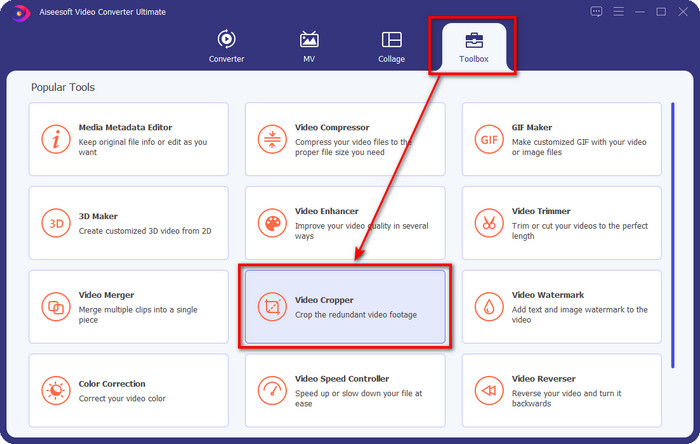
Krok 2. Gdy program będzie już otwarty, kliknij Toolbox i poszukaj Video Cropper na górze interfejsu.
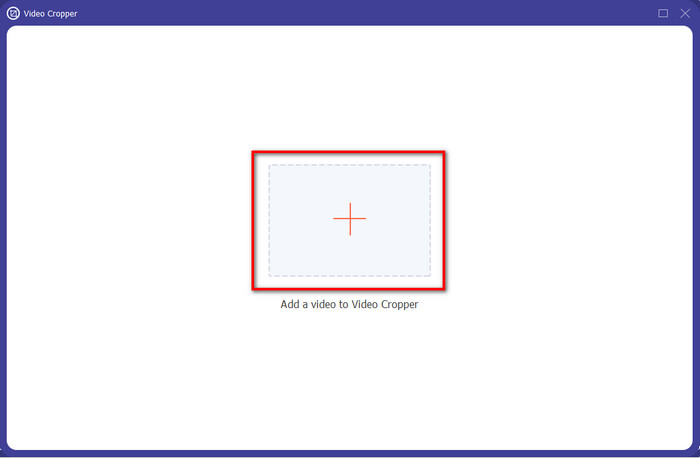
Krok 3. Pojawi się nowy interfejs, kliknij przycisk +; otworzy się okno, w którym możesz wyszukać swojego GIF‑a, kliknij go i naciśnij Open, aby kontynuować.
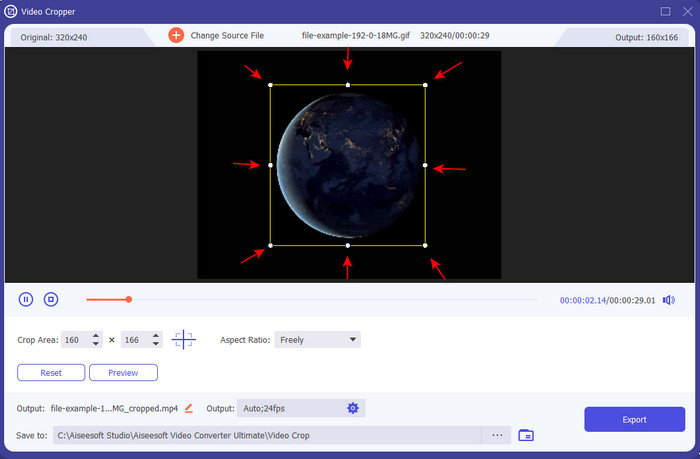
Krok 4. Kliknij opcję Cut (ikona nożyczek), po czym pojawi się nowy interfejs, na którym możesz przyciąć GIF‑a i dopasować proporcje obrazu (aspect ratio) do własnych potrzeb, swobodnie przeciągając małe punkty.
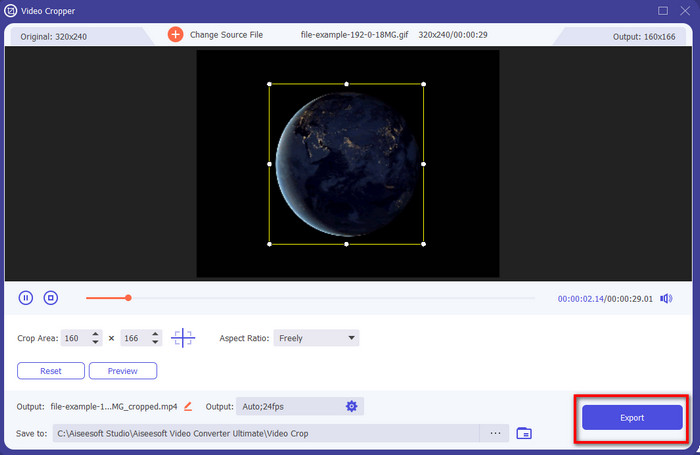
Krok 5. Po zakończeniu regulacji naciśnij Export, aby zapisać i pobrać przyciętego GIF‑a na dysk; voilà – to takie proste, właśnie przyciąłeś swojego GIF‑a.
Sposób 2. Użyj Photoshopa
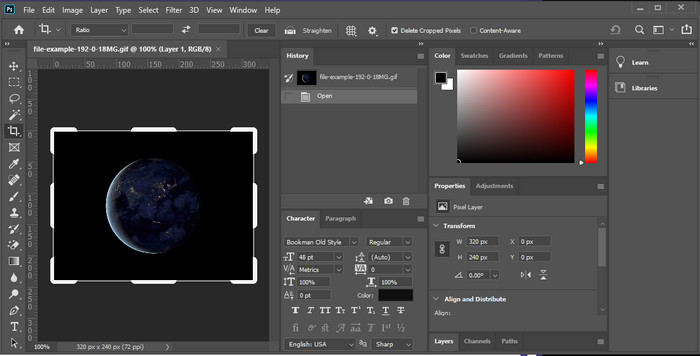
Photoshop to profesjonalne narzędzie, które obsługuje zaawansowaną edycję każdego dodanego obrazu, również GIF‑ów. Program pomógł już milionom doświadczonych użytkowników wykonywać skomplikowaną obróbkę zdjęć. Jednak ze względu na rozbudowane funkcje edycyjne stał się dość techniczny dla nowych użytkowników, zwłaszcza jeśli nie mają doświadczenia w edycji. Mimo że może służyć jako narzędzie do przycinania, jest zbyt rozbudowany do tak prostego zadania. Jeśli jednak szukasz sposobu, jak przyciąć GIF‑a w Photoshopie, postępuj zgodnie z poniższymi wskazówkami.
Krok 1. Pobierz i uruchom Photoshopa na komputerze.
Krok 2. Kliknij File, odszukaj GIF‑a i naciśnij Open. Naciśnij C na klawiaturze, następnie dopasuj rozmiar i wciśnij Enter, aby kontynuować.
Krok 3. Wyeksportuj końcowy efekt, klikając Save w menu File.
Część 2. Jak przycinać GIF-y online
Sposób 1. Użyj Ezgif
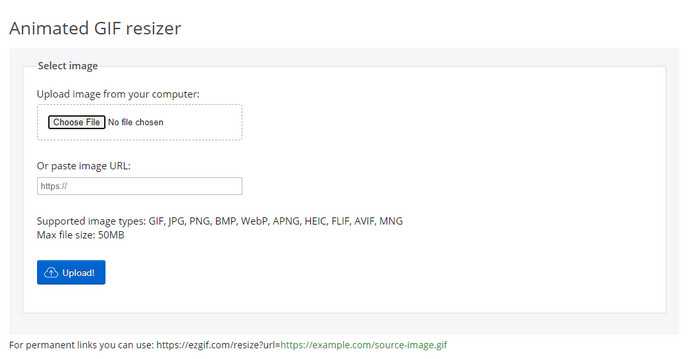
Jeśli potrzebujesz narzędzia online do przycinania GIF‑a, zapewne już wiesz, że Ezgif jest jedną z opcji. Nie jest dla nas zaskoczeniem, że ten internetowy edytor GIF‑ów znajduje się na liście, ponieważ słynie ze swoich możliwości edycyjnych. W przeciwieństwie do wcześniej wspomnianych narzędzi do przycinania, jest całkowicie darmowy i nie wymaga pobierania. Ogólne wrażenia są całkiem dobre, ale nie najlepsze, jakie mieliśmy, ze względu na reklamy, które potrafią mocno zepsuć korzystanie z tego narzędzia. Dodatkowo, jeśli przycinasz tu animowane GIF‑y, musisz uzbroić się w cierpliwość – przesyłanie i pobieranie plików zajmuje trochę czasu.
Krok 1. Otwórz przeglądarkę i wyszukaj Ezgif.
Krok 2. Przejdź do zakładki Crop, kliknij Choose File, odszukaj plik w folderze i naciśnij Upload.
Krok 3. Przeciągnij ramkę (frame dots) zgodnie ze swoimi potrzebami i kliknij Crop Image, aby kontynuować.
Sposób 2. iLoveIMG
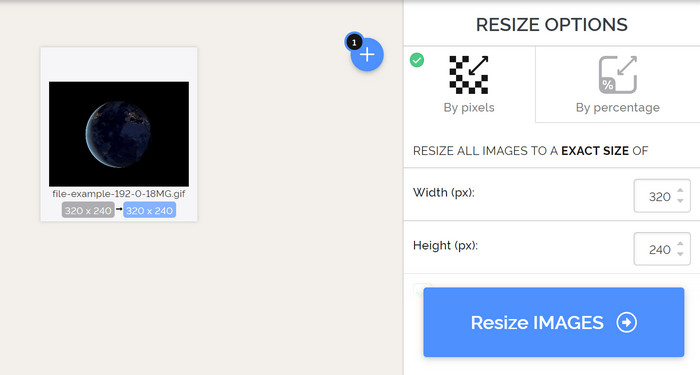
Dowiedz się, jak przycinać GIF‑y online za pomocą iLoveIMG. To narzędzie oferuje funkcje, które pomogą w przycinaniu, zmianie rozmiaru, kompresji i innych operacjach na obrazach. Co więcej, przesyłanie i pobieranie plików jest tu sprawniejsze niż w Ezgif, ponieważ ładowanie nie zajmuje tyle czasu. Jeśli nie chcesz pobierać programu do przycinania na komputer, to narzędzie jest dobrą opcją – podobnie jak pierwsze wspomniane rozwiązanie online. Musisz się jednak liczyć z tym, że reklamy w interfejsie mogą być nieco irytujące.
Krok 1. Otwórz wyszukiwarkę, znajdź iLoveIMG i kliknij Crop Image.
Krok 2. Kliknij Select Image i wybierz plik GIF. Dostosuj proporcje ramki (frame ratio) do swoich potrzeb i naciśnij Crop Image.
Krok 3. Poczekaj, aż proces przycinania się zakończy, a następnie pobierz plik.
Część 3. Często zadawane pytania dotyczące przycinania GIF
Jakich kwalifikacji powinienem szukać w przycinaczu GIF?
Wybierając narzędzie do przycinania GIF-ów, musisz wziąć pod uwagę wiele kwalifikacji, a pierwszą z nich jest kompatybilność narzędzia na twoich platformach. Przeczytaj recenzję artykułu na temat narzędzi, aby dowiedzieć się, czy są one dostępne na Twoich urządzeniach. Następnie jest bezpieczny dla złośliwego oprogramowania, zwłaszcza online lub do pobrania; przycinanie jest łatwym zadaniem, ale upewnij się, że Twoje narzędzie do przycinania jest niezawodne. Wreszcie, narzędzie do przycinania powinno mieć kilka funkcji, które będą potrzebne do określenia, czy przycięty rozmiar jest odpowiedni. Należą do nich ramka przycinania, opcja podglądu, długość i wysokość i inne.
Czy korzystanie z internetowego narzędzia do przycinania GIF-ów jest bezpieczne?
Większość internetowych narzędzi do przycinania GIF‑ów jest bezpieczna, ale nie wszystkie. Dlatego zanim z nich skorzystasz, upewnij się, że wybrane narzędzie online jest bezpieczne, aby uniknąć nieodwracalnych szkód w urządzeniach.
Jak ustawić GIF jako tło?
Istnieje wiele sposobów, by ustawić GIF‑a jako tło w telefonie lub na komputerze. Dodatkowo udostępniamy tu narzędzie bonusowe, które pomoże ci stworzyć GIF poprzez kompilację zdjęć lub filmów. Na co jeszcze czekasz? Kliknij ten link, aby dowiedzieć się, jak ustawić GIF‑y jako tapetę na swoim urządzeniu.
Wniosek
Wszystkie możliwe sposoby przycinania GIF‑ów online i offline są tutaj. Narzędzia, które uwzględniliśmy w tym artykule, już udowodniły, że zmiana rozmiaru jest łatwa z ich pomocą. Jeśli jednak potrzebujesz profesjonalnego efektu i bezproblemowego narzędzia, to FVC Video Converter Ultimate będzie doskonałym wyborem. Program tworzy wyraźną różnicę między po prostu dobrym a najlepszym narzędziem do przycinania. Jeśli więc chcesz przycinać jak profesjonalista, przycisk pobierania poniżej czeka, abyś mógł pobrać to narzędzie.
Bezpłatne pobieranieDla Windows 7 lub nowszegoBezpieczne pobieranie
Bezpłatne pobieranieDla MacOS 10.7 lub nowszegoBezpieczne pobieranie
-
 Jak przyciąć plik MP4 bez utraty jakości wideo [2021]
 Dowiedz się, jak przyciąć MP4 za pomocą prostych kroków dostępnych tylko dla Ciebie. Utrzymuj więc tempo, ponieważ przedstawiamy Ci najlepsze z najlepszych narzędzi do przycinania, których możesz użyć.
-
 Stwórz swój najlepszy animowany GIF za pomocą internetowego kreatora GIF [2021]
 Pouczająca recenzja na temat tworzenia GIF-ów za pomocą tych prostych internetowych twórców GIF-ów, z którymi już się spotykasz lub nie w Internecie.
-
 [Aktualizacja 2021] 9 najlepszych edytorów GIF na komputery PC, Mac, iOS i Android
 Chcesz dodać osobisty akcent do swojego GIF-a, aby stał się bardziej wyrazisty? Kontynuuj czytanie tego artykułu, aby dowiedzieć się, jak edytować i najlepsze narzędzie do pracy.
