


 Video Converter Ultimate
 Gravador de ecrã
 Reparo de vídeo
Conheça os 7 melhores aplicativos de aumento de volume que você pode usar em seu desktop e telefones
Isn't it irritating if the volume of the video is so low that even if you make your volume adjust it to the highest nothing changes? There are several reasons why the audio volume became low. Instead of stressing out on the video why don't you try to use a booster to make your audio loud and clearer. So today is your lucky day, as we present different volume boosters you can choose on. All of the tools presented in here have been used by the writer of this article. To state the facts about the tools depending on the platform you are currently using. And to proceed let's start our walkthrough to the different sound boosters you can use on Windows, Mac, iPhones and Android.

Parte 1. 4 dos melhores impulsionadores de volume para Windows PC, Mac e online
1.Conversor de Vídeo Final
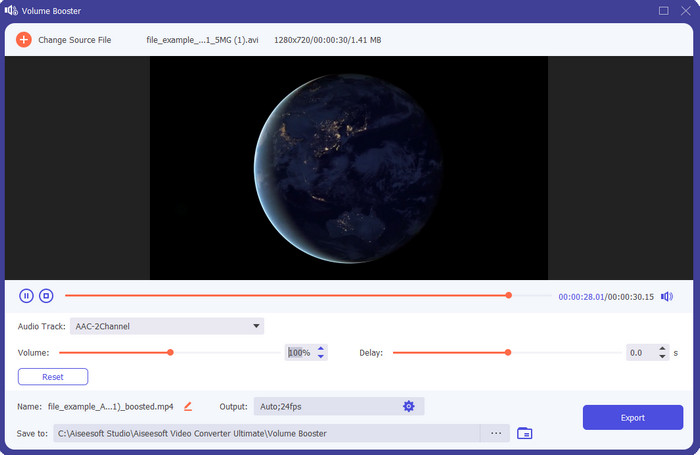
If you're looking for the best volume booster app then the Video Converter Ultimate must be it. This tool can make your audio better in quality without damaging your speakers. So, if you adjust the audio volume with this tool then don't expect crackling on your speakers. Moreover, if you have a problem with low quality audio you can use this tool to enhance it. Even if you are not a pro you can still manage to do the audio boost with this tool. And not only that, this software has a lot of tool features you may like to use if you downloaded this tool. Unlike any audio booster on the list, this tool provides a lot of enhancer to make your audio better in sound. Also, if you have an audio delay problem then you can also use this. It is frankly the phenomenal tool in this list if we were about to compare all of the tools. So, if you want to experience a full blast 8 or 16 D audio then download this tool right now.
Free DownloadFor Windows 7 or laterSecure Download
Free DownloadFor MacOS 10.7 or laterSecure Download
Prós
- Faça o ajuste automático de equalizadores e presets para tornar seu trabalho mais fácil e melhor.
- A saída final do áudio ficou muito melhor do que antes e sem destruir sua audição ou até mesmo os alto-falantes.
- É muito intuitivo que mesmo usuários que não têm experiência em boosts possam fazê-lo.
Contras
- Está disponível apenas em desktop e nenhuma versão para telefone.
- Compre antes de poder acessá-lo, mas não é tão caro.
2.VLC Media Player
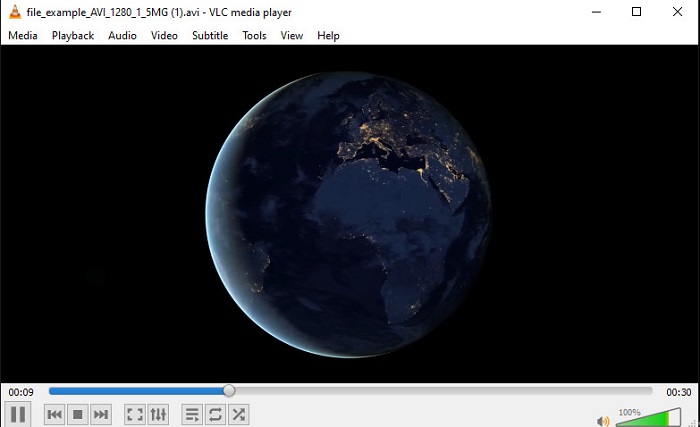
VLC Media Player is one of the best media players you can download on the web. This tool already has a built-in free volume booster on its interface and the audio can go up to 125% percent if you want. However, this desktop tool doesn't monitor how strong your speaker can handle. Which means if you abuse playing your audio into the max level there is a chance that the speaker can go mild crackle in the long run especially to the built-in speakers. But this tool is the only app presented here that has a booster and a player at one. So, if you want to watch and do the boosting of audio at one go then try to use this tool. Although it raises the volume it can't guarantee you to have a great audio quality because you only increase the audio.
Prós
- Construído em reforço de áudio.
- Aumente seu áudio até 125% para torná-lo mais alto.
- Grátis para download no PC ou Mac.
Contras
- A ferramenta não possui equalizador embutido para melhorar a qualidade do áudio.
- Ele não monitora a intensidade do seu áudio.
Related:
How to Fix VLC Won't Play MKV Files
How to Fix VLC Not Playing DVD
3. Lança 3D
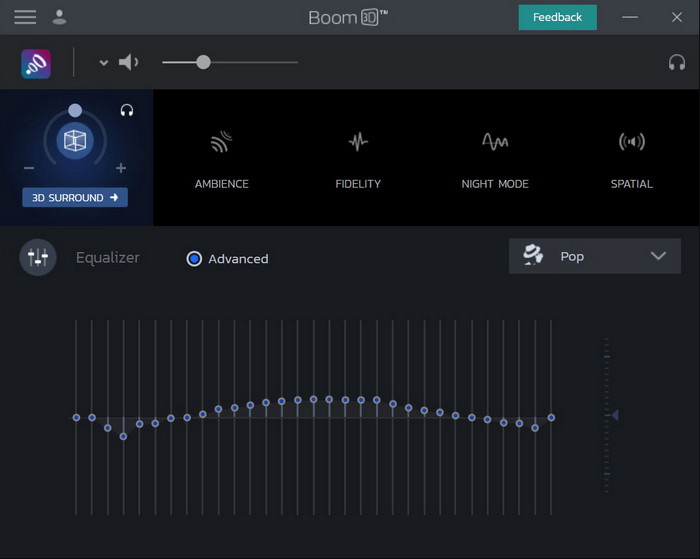
Boom 3D is the most advanced in the line of audio enhancing. This volume booster Windows 10 and Mac specialized a lot of enhancers for you to use on. Also, you can adjust the equalizers and preset manually unlike the Video Converter Ultimate this tool already did it for you automatically. Although the tool looks impressive, there are still disadvantages if you try to use this tool. Especially if you are a beginner, this tool needs to be set-up or in other words the tool is a lot to be handled by the beginner. Nevertheless, studying how to use this tool will take a lot of your time but it will be worth your time.
Prós
- Substitua manualmente o equalizador e o preset.
- Não é necessário internet para acessar a ferramenta.
- É ótimo para ser usado pelo profissional que quer ter um áudio de boa qualidade.
Contras
- Não é a melhor escolha para iniciantes que não têm ideia do que são equalizadores e presets.
- Precisa de muito tempo para estudar como usar esta ferramenta.
4. Intensificador de Volume
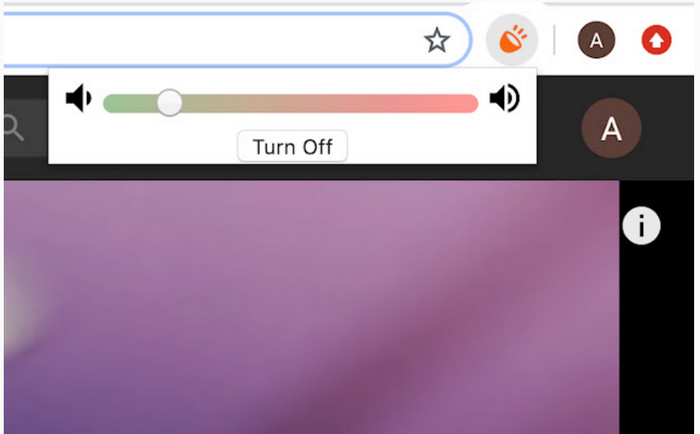
Volume Booster is a volume booster Chromeextension you can easily access if you have the internet. This tool can be used by anyone for free and also the tool is safe because it is from chrome. And if you try to use this tool expect to have a great boost to the audio you were about to listen to. However, you can't use this chrome extension outside the chrome itself. So, if you want to listen to the audio that has been saved to your drive then you can't use this to enhance your audio. Not only that, when we try to make the audio max there are some crackles, we heard so to avoid this make sure you set it too barely minimum.
Prós
- A ferramenta é segura porque é uma extensão do chrome.
- Amigo do usuário.
Contras
- Não pode ser usado fora do cromo.
- Alguns rachaduras de áudio serão ouvidas se você ligá-lo ao máximo.
- Não suporta equalizadores.
Parte 2. Os 3 principais aplicativos de aumento de volume para iPhone e Android
1. Aumentador de volume - Equalizador FX
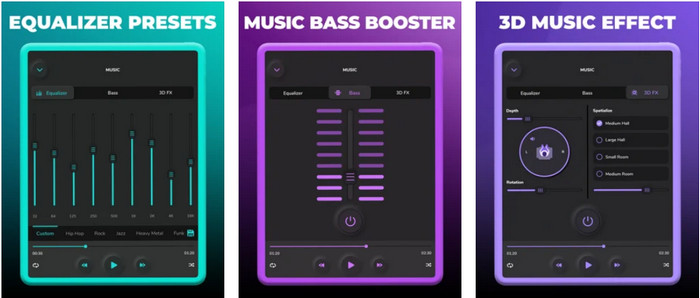
Volume Booster – Equalizer FX pushes the maximum audio limit of your iPhone to make a loud and better audio. This iPhone volume booster has been used by a lot of iOS users to make their own equalizing of audio. And the app already receives a fair rating of 3.9 stars. It is not either bad or any more than good. Also, this tool can't do audio boost on online streaming and the ads are killing this app. Moreover, crashes are still happening in this tool just like the bugs and more. However, if you want a bass boost on an iPhone then this is a must to try.
Prós
- É um bom reforço para usuários do iPhone.
- Você pode realizar equalização básica e ajuste de áudio.
Contras
- Na maioria das vezes a ferramenta trava.
- Tem uma limitação de onde você pode usar o aumento de áudio.
2.AmpMe – Sincronização de alto-falante e música
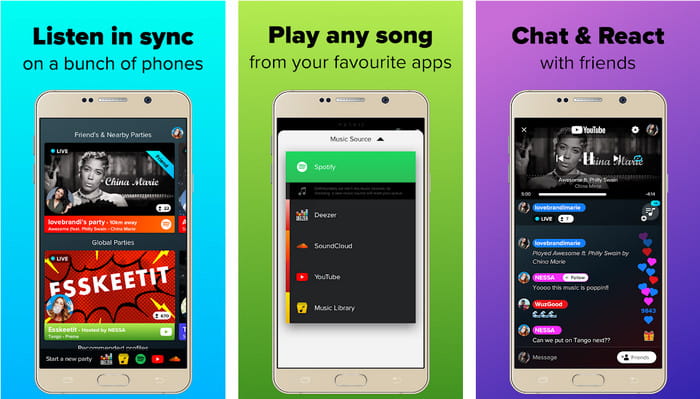
AmpMe - Speaker & Music Sync is a great downloadable audio volume booster for Android devices. This is more than just a booster because you can be the host and play your playlist or join a live party with the app. To make it simpler with this app you can interact with the others while listening and chatting at the same time. Although the tool is impressive there are still some bugs and crashes you will experience while using this tool. Also, some users have a hard time adding music to their playlist which is annoying. And the tool is a bit hard to manage, especially if you don't know the functions of it. But the overall is great to be used by the Android users.
Prós
- Você pode ser seu próprio DJ com o AmpMe e compartilhá-lo com outras pessoas próximas com o mesmo aplicativo.
- Ouça e converse ao mesmo tempo.
- Produz áudio de alta qualidade.
Contras
- A taxa de assinatura é muito alta para ser paga se você quiser ficar mais barato.
- É difícil cancelar a assinatura mesmo quando você excluiu a conta.
- Às vezes, quando você entra em uma festa ao vivo, o aplicativo é desconectado automaticamente.
3. Aumentador de Volume GOODEV
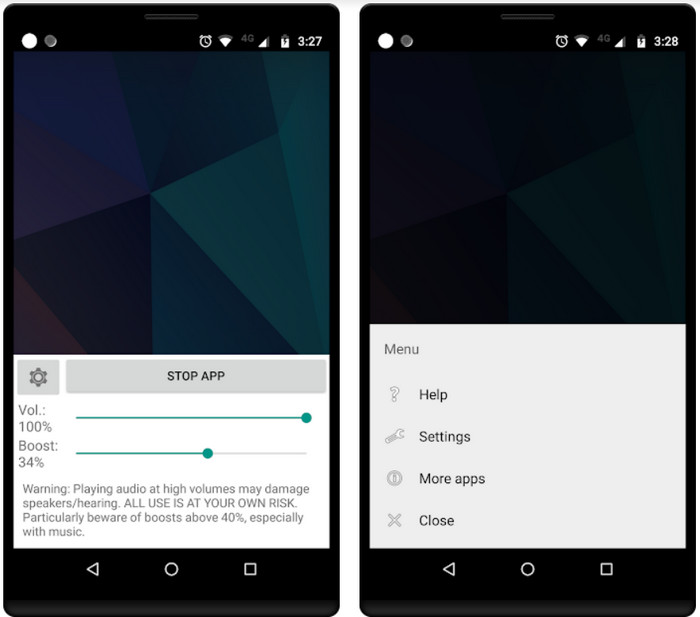
Volume Booster GOODEV has a simple and easy to manage interface. This volume booster has already received a great rating of 4.4 stars from its user. Also, a lot on the review said that this tool is the best for its job. But now there are some crashes happening when you use this tool and most of the time the tool itself doesn't boost your audio anymore even when you launch it. So, to re-activate it you must restart your phone or re-open the app in this way to fix it.
Prós
- Amplificador de áudio fácil de entender que pode ser baixado facilmente no seu celular Android.
- Amigo do usuário.
Contras
- Os anúncios estão aparecendo do nada.
- Na maioria das vezes, o aplicativo trava sozinho sem motivo desconhecido.
- A versão antiga deste aplicativo é muito melhor que a versão atualizada.
Parte 3. Qual é o melhor impulsionador de volume
Aqui está um gráfico de comparação apresentado a você para comparar quais são os recursos da ferramenta que você pode usar com a ferramenta que a outra ferramenta não possui.
| Recurso/s da ferramenta | Video Converter Ultimate | VLC Media Player | Lança 3D | Aumentador de volume | Volume Booster – Equalizador FX | AmpMe – Sincronização de alto-falante e música | Aumentador de volume GOODEV |
| Amplificadores de áudio |  | | | | | | |
| Melhorador de áudio | |  | | | | | |
| Recurso de sincronização de áudio e vídeo | | | | | | | |
| Amigo do usuário | | | | | | | |
| Plataformas compatíveis | Ferramenta baseada em desktop | Ferramenta baseada em desktop | Ferramenta baseada em desktop | Ferramenta de extensão do Chrome | Ferramenta baseada em download para iOS | Ferramenta baseada em download para Android | Ferramenta baseada em download para Android |
| Faixa de preço | 1 mês: $25,00 Licença Vitalícia: $55.20 Licença Multiusuário Vitalícia/5 PCs: $119.00 | Grátis para baixar | $11.99 e $23.99 | Livre | 3 a 20 $ | $0,99 – $99,99 por item | Livre |
Parte 4. Perguntas frequentes sobre o Volume Booster
Aumentar o volume do áudio prejudica a audição?
Na verdade sim. Especialmente se você estiver usando fones de ouvido ou fone de ouvido e colocar o volume do áudio no máximo e adicionar um amplificador de volume. Então espere que, a longo prazo, sua audição se destrua lentamente a longo prazo. Então, para evitar isso, você pode. É nossa sugestão que você deve limitá-lo a médio ou baixo e não ir para o máximo.
Quais são as outras desvantagens do aumento de áudio em alto-falantes?
Usamos um amplificador de áudio para ouvir o áudio muito melhor se os sons estiverem baixos. Mas mal você sabia que os alto-falantes também têm um limite de Hertz do qual são capazes. Quanto mais alto o hertz, mais alto você pode ser, mas em alguns alto-falantes embutidos eles não conseguem lidar com um som super alto. Portanto, há chances de o alto-falante estalar, o que significa que o áudio não pode ser manipulado pelo alto-falante.
Quais são as diferenças de graves e agudos dos alto-falantes?
Esses dois são os alto-falantes embutidos mais conhecidos, mas eles têm seu próprio propósito pelo qual estão nos alto-falantes. Para graves, ele pode lidar com uma baixa frequência de áudio e não pode lidar com alta frequência, também é especializado em nos fazer sentir o boom da música. Enquanto os agudos se concentram em frequências altas que os graves não conseguem lidar.
Conclusão
To end, you can not listen to your poor-quality audio if you boost it with the help of the volume booster on PC, Mac, online, and mobile devices. The tools presented in here are great to be used by anyone who wants to experience a new height in music. But there is a tool that helps its customers to make their audio boosting simpler and better. So, instead of learning how to adjust the equalizer and preset the Video Converter Ultimate already did it for you. And to know how brilliant this tool is then try it for yourself and download it on your storage.
-
 Como adicionar áudio e música ao vídeo gratuitamente em seu computador / telefone
 Este artigo mostra 4 maneiras fáceis de adicionar áudio a vídeo gratuitamente. Não importa qual faixa de áudio você deseja adicionar ao seu vídeo, você pode obter resultados satisfatórios aqui.
-
 O gravador de áudio imparcial Cinch Review e a melhor alternativa
 Cinch Audio Recorder é a melhor maneira de baixar músicas de sites de streaming. Aprenda mais sobre a revisão imparcial e a melhor alternativa do artigo.
-
 Maneiras viáveis de como você pode gravar áudio com o VLC Player
 Aprenda as melhores maneiras de gravar áudio com o VLC player e outras ferramentas práticas, lendo o artigo.
