


 Video Converter Ultimate
 Gravador de ecrã
 Reparo de vídeo
6 melhores controladores de velocidade de vídeo para Windows/Mac/Android/iOS
Speeding up or slowing down a video can create an incredible illusion if you are tired of using the effects. This video editing technique is simple yet effective. As you search over the internet, there are many different speed controllers options on the market, and we know it is hard to choose. But if you read this article, we will review the speed controller app you can use to change the playback speed. Are you interested in the best speed controllers apps? In that case, keep the ball rolling to learn more about the video speed controller available on your platforms.

Parte 1. Os 6 principais controladores de velocidade de vídeo para Windows, Mac, Chrome, iOS e Android
Topo 1. Video Converter Ultimate (Windows e Mac)
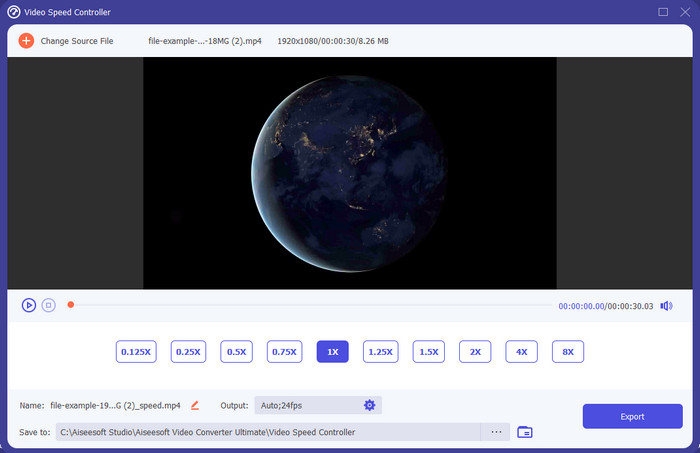
Do you need a video speed controller that is very effective and efficient in speeding up and slowing down the video? In that case, Video Converter Ultimate is the aid for this type of problem. It is the most accessible tool you can use to change the video's speed effortlessly, whether you need it at high speed or in a slow-mo. Even though you change the speed, the original video quality will remain, but the video motion is not because you change the speed.
Além disso, você pode fazer muitas coisas, como converter, mesclar, cortar e muito mais; basicamente, é uma ferramenta tudo-em-um. Quer conhecer as outras ofertas que você pode ter com este app de vídeo acelerado? Em caso afirmativo, leia os recursos da ferramenta para saber mais ou baixe o software em sua área de trabalho agora mesmo para testá-lo.

Video Converter Ultimate
Mais de 5.689.200 downloads- Ele pode alterar com precisão os quadros de vídeo para cima ou para baixo rapidamente em qualquer formato de vídeo, como MP4.
- Muitos recursos e efeitos de edição de vídeo estão disponíveis.
- É flexível em todas as plataformas como Windows ou macOS.
- O processo ultrarrápido faz com que você baixe ou exporte o processo em um piscar de olhos.
- Exportar ou baixar o vídeo que você editar não terá marca d'água.
Free DownloadFor Windows 7 or laterSecure Download
Free DownloadFor MacOS 10.7 or laterSecure Download
Prós
- Altere o quadro por quadro do vídeo, mesmo que você seja um profissional ou não.
- Opções de reprodução de vídeo fáceis de entender.
- Uma excelente capacidade de compartilhamento de mídia social.
- O download é gratuito, mas oferece compras no aplicativo.
Contras
- Precisa comprar se quiser ter a capacidade total da ferramenta.
Top 2. Clipchamp (Windows)
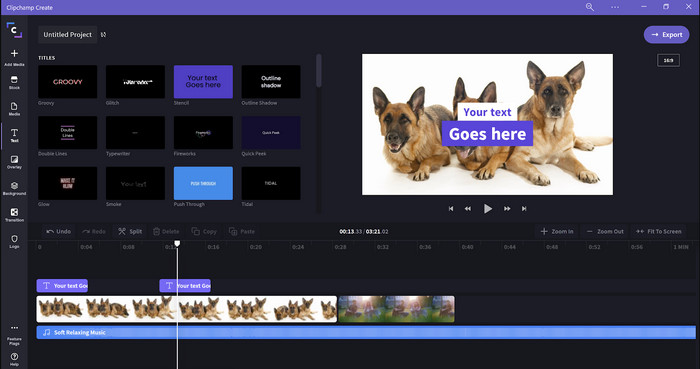
Clipchamp is a video speed editor you can use on Windows. This tool provides a less stiff learning curve, so you might like to check this out if you are new to editing. It also supports several features you would like to use. However, a major drawback to this tool is the video quality output. You can only export the file into 480 video quality, which is low for the other free tools. But if you need the tool to export 720 or 1080, you can subscribe to it by paying the subscription fee. Moreover, the tool is excellent, but it is still not as good as the first editor.
Prós
- GUI simples e fácil de usar.
- Oferece recursos adicionais para edição.
- Controle a reprodução de vídeo facilmente.
Contras
- Para a versão gratuita, a saída final é 480.
- Às vezes a ferramenta se tornava inflexível com a tarefa.
Parte superior 3. Controlador de velocidade de vídeo (Chrome)

Want to use an extension of the video speed controller on Chrome? Then you can use the Video Speed Controller. This tool is available in any Chrome browser to speed up or slow down the video you are watching. It is easy to use for everyone, and also it is safe to access as well because it is an extension for Chrome. However, if you export the video, the playback will remain the same even if you change it. Because the tool only works on the video you are currently watching on your Chrome and not outside of it. Additional information, once you speed up the video with this extension, all your play videos on Chrome are at the same speed.
Prós
- Controlador de velocidade no ponto que você pode usar no Chrome.
- Capaz de retroceder ou redefinir a velocidade de reprodução de vídeo no Chrome facilmente.
- Ele suporta o comando short-keys.
Contras
- O painel do controlador de vídeo não está visível.
- Você não pode alterar a velocidade do vídeo fora do Chrome.
Top 4. Acelere para Safari (iOS e Mac)
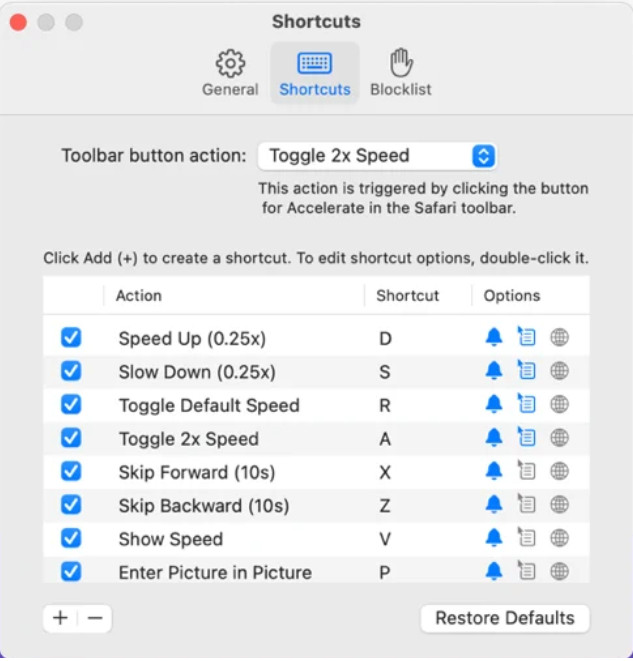
Need a video speed controller on Safari? Accelerate for Safari is available on every Safari of Apple devices. This tool can change the video playback of every HTML 5 video on Safari. Like the Chrome extension above, this is limited on every Apple device. So, if you are an Apple user, you might like to use this speed controller extension to speed up the video or slow it down. Moreover, you can use your keyboard keys to command the tool to change the video playback.
Prós
- É seguro usar em todo o Safari.
- Ele também suporta Picture-in-Picture e AirPlay.
- As teclas de atalho estão disponíveis para controlar a ferramenta.
Contras
- Ele não suporta outro navegador da Web que não seja o Safari.
- Limitado a vídeos HTML 5.
Topo 5. Lento Rápido Lento - Controle a velocidade dos seus vídeos (iOS)
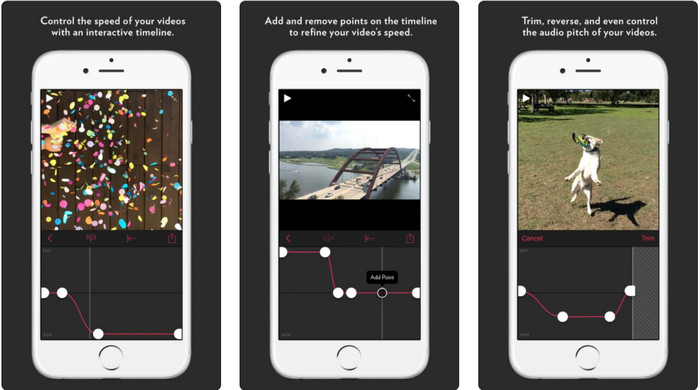
For a video speed controller on an iPhone, you can use the Slow Fast Slow. This tool helps iOS users instantly manipulate the video's playback speed; it works best on slow-mo. Moreover, it has a very interactive built-in timeline to adjust the speed. It also supports other features like pitch-bent and reversal of the clip. However, this tool requires an iOS 10 system, so you can't use it if your system isn't 10.
Prós
- Ele suporta outros recursos para o seu vídeo.
- Amigo do usuário.
- Pode desacelerar vídeos até 1/16 de velocidade.
Contras
- Não suporta saída 4k e escolha de FPS.
- Não funciona em alguns dos novos dispositivos iOS.
Top 6. Controlador de velocidade de vídeo Pro (Android)
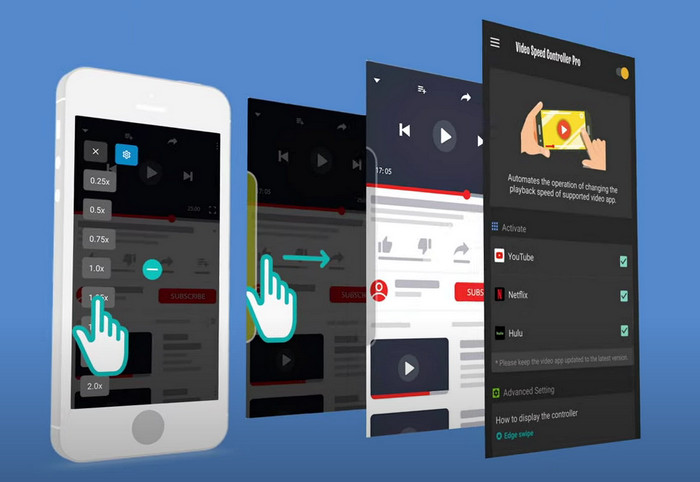
If you need a video speed controller on Android, then guess what? You can use the Video Speed Controller Pro by installing it on your Playstore. With the help of this tool, you can speed up any videos that are playing on your Android with ease. Moreover, this tool is like a speed controller extension on Android. Although the tool can speed up your video, the fastest it can go is 2x only. However, if you need to speed up watching videos, you can use this on Youtube, Netflix, and other video platforms on Android.
Prós
- É simples de usar.
- A ferramenta em si está no ponto.
- Uma barra de menu está disponível para revelar as opções em sua reprodução.
Contras
- As opções de velocidade de reprodução são limitadas.
- Às vezes não funciona bem.
Parte 2. Gráfico de comparação
| Recursos | Video Converter Ultimate (Windows e Mac) | Clipchamp (Windows) | Controlador de velocidade de vídeo (Chrome) | Acelerar para Safari (iOS e Mac) | Lento Rápido Lento – Controle a velocidade de seus vídeos (iOS) | Controlador de velocidade de vídeo Pro (Android) |
| Controle de velocidade |  | | | | | |
| Saída de vídeo de alta qualidade | |  | | | | |
| Recursos de edição | | | | | | |
| Processo de exportação ultrarrápido | | | | | | |
Parte 3. Perguntas frequentes sobre o Controlador de velocidade de vídeo
Por que preciso usar um controlador de velocidade?
Em alguns casos, você precisará assistir a um vídeo em alta velocidade ou em velocidade lenta. Um ótimo exemplo de assistir a um vídeo acelerado é terminar o vídeo que você está assistindo imediatamente ou algo parecido. Acelerar vídeos é uma grande ajuda para esses usuários. Enquanto em câmera lenta, isso geralmente é usado em uma repetição instantânea dos esportes de ritmo acelerado, como corrida, basquete, vôlei e muito mais. Seja um dos dois, você precisará de um controlador de velocidade eficaz para substituir manualmente a velocidade normal de acordo com suas necessidades.
Posso acelerar vídeos no Tiktok?
Yes, you can shoot videos that are on speed in Tiktok. However, you can't watch videos on Tiktok at high-speed. So, if you need the help of a suitable speed-up tool for you, click and read this article to know how to speed up video on Tiktok.
Como desacelerar vídeos?
Contrary to speeding up videos, you can make a slow-mo on your videos with the help of the editors available on the market. Which tool should you use? No worries, because we present the best slow-mo video software you can use to help you create a slow-mo effect. If you need to know more, you can click this link.
Conclusão
Today, you are now full of knowledge about the paid and free apps to speed up video on different platforms. The speed controllers provide a unique set of skills to help various users speed up videos. If we read it thoroughly, we can see that the FVC Video Converter Ultimate provides everything for the users who need help. So if you want to download the ultimate tool on your desktop, you can click the download button and enjoy an all-out experience of the tool.
-
 Como acelerar um vídeo com os 5 principais softwares disponíveis [Windows/Mac/Linux]
 Quer saber como acelerar o vídeo facilmente? Em seguida, leia este artigo enquanto explicamos como acelerar efetivamente no Windows, Mac e Linux.
-
 Maneiras mais fáceis de acelerar um vídeo em seus dispositivos Android [2021]
 Você sabia que pode acelerar um vídeo no seu Android? Então, se você quiser saber como acelerar um vídeo em seu telefone Android, leia este artigo.
-
 Dicas excelentes de 2021: como acelerar um vídeo no iMovie
 Seu amigo sugere o iMovie para ajudá-lo com seu problema de como acelerar um vídeo usando o sistema operacional iOS, mas você não sabe o que fazer? Veja mais sobre isso enquanto você lê mais através deste artigo.
