


 Video Converter Ultimate
 Gravador de ecrã
 Reparo de vídeo
Mais novo editor de metadados de audiolivros disponível online e offline
Gostaria de saber se posso alterar os metadados do meu audiolivro para fornecer as tags adequadas? Se sim, você tem alguma sugestão sobre o que devo usar? Será uma grande ajuda se você me der uma lista de software compatível na web e para download para usar.
Do you have the same question? In that case, you are in the perfect place. Today, we will introduce different online and offline tools you can use to update, change or remove the metadata on your audiobook. Furthermore, we consider their other specifications, features, compatibility, and many more to see which tool suits your needs. Without any more delays, we will write a full scope of all the information you need to determine the best audiobook tag editor you should use.

Parte 1. Ultimate Audiobook Metadata Editor Disponível no Windows e Mac
Suponha que você precise de uma ferramenta que seja suficiente para editar ou remover os metadados do audiolivro no Windows e no Mac. Nesse caso, é sem dúvida que o FVC Video Converter Ultimate é uma escolha perfeita. Este editor de tags pode ajudá-lo rapidamente a substituir manualmente a adição de metadados em qualquer arquivo de mídia, incluindo audiolivros, a qualquer momento. Com esta ferramenta, você pode adicionar muitos dados impressionantes ao audiolivro em menos de um minuto.
O que mais? Vamos supor que você queira compartilhar o audiolivro com alguém; com a ajuda desta ferramenta, você pode compartilhá-lo rapidamente sem se preocupar que os metadados serão perdidos. A ferramenta não é incrível? Honestamente, adicionamos etapas sobre como usar o melhor editor de tags de audiolivro abaixo para mostrar do que essa ferramenta é capaz; siga os passos em conformidade e divirta-se.
Step 1. Go ahead and click the download button below, pick what operating system you are currently using. Then click the file you've downloaded to install it quickly, follow the process, and open the tool to begin using it.
Free DownloadFor Windows 7 or laterSecure Download
Free DownloadFor MacOS 10.7 or laterSecure Download
Step 2. Tap the Toolbox section, look for the Media Metadata Editor, and click it.
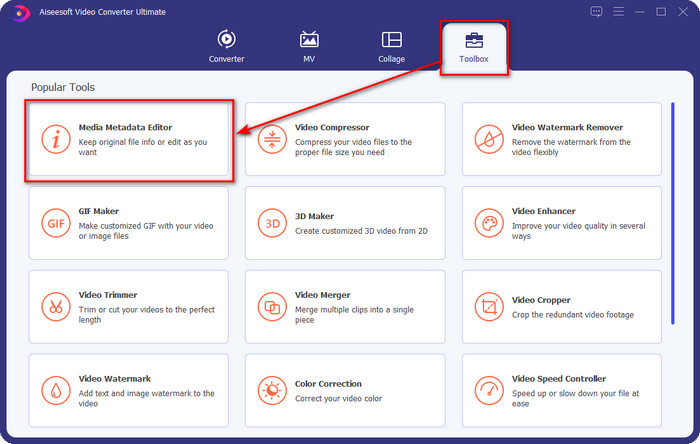
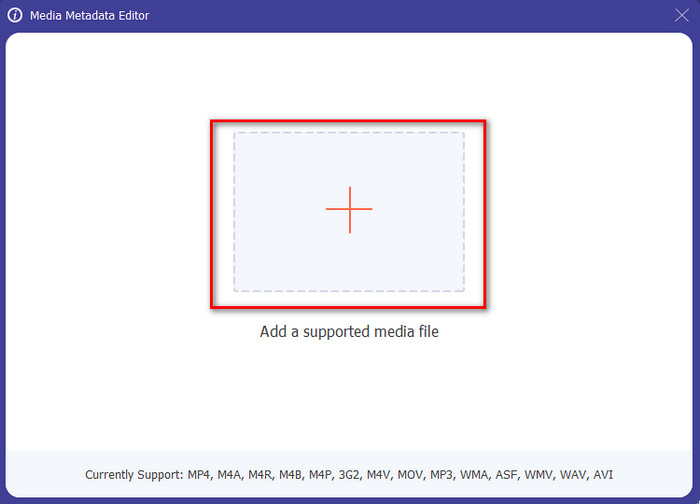
Step 3. After you've clicked it, a new window will show, tap the + button, and a folder will show on your display. Select the audiobook file and press Open.
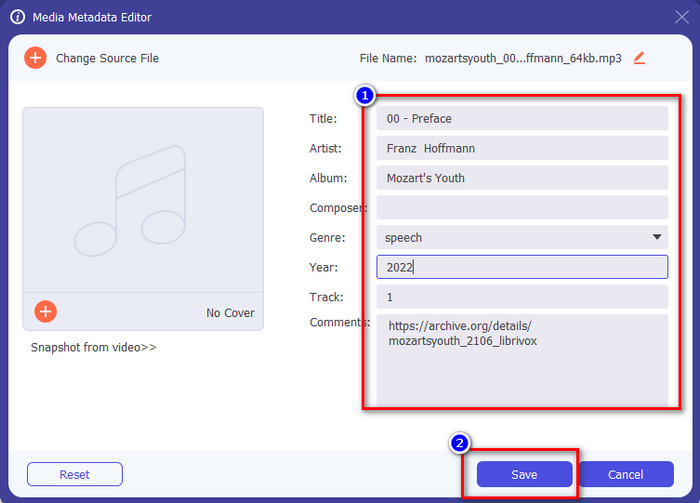
Step 4. Once it is open, update the tags of the audiobook by changing what's inside of the textbox, but you can also remove it according to your specification. Don't forget to click Save to save the updated data when you've done all of that.
Parte 2. 3 Melhor Editor de Metadados de Audiobook Disponível na Web
TagMP3.net
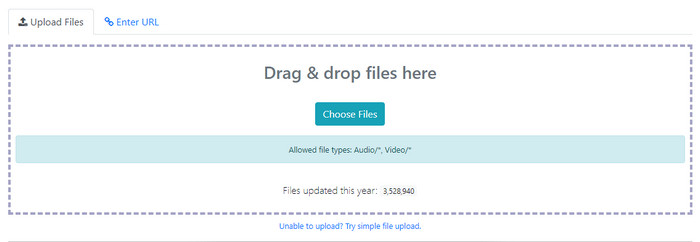
TagMP3.net is a free website you can use to change audiobook id3 tags and album art easily. It is a ready-to-use web tool you can access on your favorite web browser any time or anywhere with an internet connection. Moreover, with the help of its easy-to-understand interface, many users use this to add meta tags on the audiobook or video they have. Although the web tool can change or remove the metadata or tag on your file, it still supports the average format to upload into, and the data you can add isn't as detailed as other editors. Also, there are numerous ads on the web interface, but if you don't mind seeing these ads, this tool might fit your needs.
Prós
- Livre para acessar na web.
- Ele suporta facilmente adicionar e remover tags.
- Ele suporta arquivos médios de áudio e vídeo.
Contras
- Anúncios na interface.
- Menos metatags para inserir ou editar.
- Carregar um arquivo leva tempo porque precisa da internet.
Editor de tags MP3 ID3
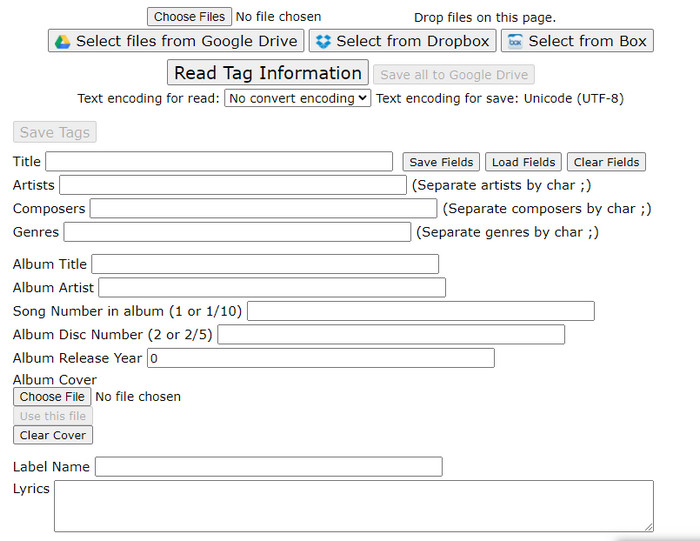
Another audiobook metadata editor you can freely access on the web is the MP3 ID3 Tag Editor. This tool offers you more information about your file, unlike the first editor online. The web interface is simple, yet it offers many different pieces of information you can add. Even though the web app is simple, there are many pesky ads on the interface like on TagMP3.net. Using this web tool to update your file's tags isn't enjoyable because of the ads. Also, the function arrangements aren't organized like the other editor you've ever seen. Some users find it a little bit hard to handle using the tool because of this.
Prós
- Disponível em diferentes navegadores da web para acessá-lo.
- Ele suporta metadados e tags mais detalhados do que a outra webtool.
- Grátis para usar.
Contras
- A interface web é uma bagunça.
- Os anúncios estão disponíveis se você acessá-los.
Maztr – Editor de Metadados
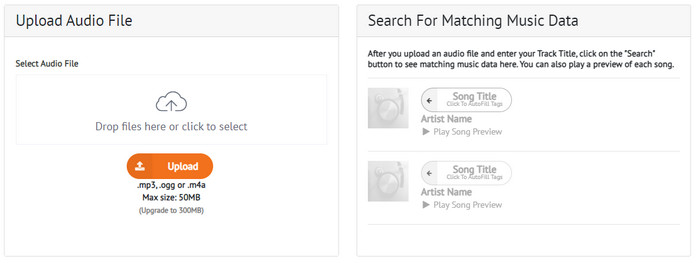
Maztr – Metadata Editor is a quick and easy-to-use audiobook tag editor that you can access on the web for free. This tool supports three main audio formats, which are MP3, OGG, and M4A audio files. Even though the tool supports three formats, it is still adequate to use in changing the metadata of your audio file. In addition to that, you can only upload an audio file less than 50MB in size, but if you want to upgrade it to 300MB, you'll need to subscribe to the tool to avail of other functions.
Prós
- Ele tem uma interface gráfica da web melhor.
- Possui recurso de preenchimento automático.
- Adicione, edite ou remova tags do arquivo de áudio facilmente na web.
Contras
- Ele suporta formatos de áudio limitados.
- Você não pode usar esta ferramenta da Web se precisar alterar os metadados de um tamanho de arquivo superior a 50 MB.
Parte 3. Perguntas frequentes sobre o Audiobook Tag Editor
O que é um audiolivro?
Um audiolivro é um termo usado nos arquivos de áudio gravados lendo um capítulo de um livro em voz alta. Tornou-se popular para pessoas que não tinham tempo para ler livros. Se você não é fã de ler um livro, o áudio pode ser adequado para você, porque você não precisará ler um livro, mas ouvirá a pessoa que está lendo isso para você em voz alta.
Por que preciso alterar a tag no meu audiolivro?
Há muitas razões pelas quais você precisa alterar a tag em seu audiolivro. Antes de tudo, você precisará atualizar o audiolivro para organizá-los adequadamente de acordo com os capítulos, episódios ou qualquer coisa específica. O próximo passo é entender o conteúdo do audiolivro antes de ouvi-lo. Por fim, é para atualizar o que está dentro desse audiolivro. Estas são apenas uma amostra das razões. Há muitos motivos diferentes pelos quais você precisa alterar as tags, mas listamos os motivos mais comuns para os usuários.
Qual é o melhor aplicativo para gravar um audiolivro em telefones?
Suppose you want to try to create an audiobook. In that case, we recommend you to read this article as we explain the different characteristics of audio recorders you can use to make an audiobook. So, without furthermore, click this link and see the Top 5 Audio Recorder on Mobile Devices.
Conclusão
Now that we have introduced the tag editors you can use, it is time to pick which suits you the most. They all have different tag editing features to offer to the users like you. But the question is, which is the perfect tool? Without a doubt, it is the FVC Video Converter Ultimate. If we compare the ultimate tool with the online editor, we can see that the ultimate tool does offer a lot to the users. You can also use the audiobook metadata editor on Mac, so what are you waiting for? Download it now to enjoy solving this problem with the best tool!
-
 4 dos melhores visualizadores de metadados on-line e off-line ['Atualizado em 2025]
 Posso verificar os metadados do meu arquivo? Sim, você pode, com a ajuda deste post, apresentaremos os diferentes visualizadores de metadados que você pode usar.
-
 5 maneiras mais fáceis de remover metadados em qualquer arquivo de mídia
 Como remover metadados? É difícil fazê-lo? Preciso comprar ou usar uma ferramenta gratuita para remover tags? Todas essas perguntas têm respostas neste artigo.
-
 Os 5 principais extratores de metadados disponíveis online e offline [2025]
 Você pode encontrar vários extratores de metadados no mercado, mas hoje, escolhemos apenas os cinco extratores de tags mais escolhidos de acordo com o público.
