


 Video Converter Ultimate
 Gravador de ecrã
 Reparo de vídeo
 Secure Download
Como imprimir fotos HEIC com saída de imagem de alta qualidade em um minuto
Despite having less support for other devices, Apple still declares that it will use the HEIC format to take a quick snap and store the image with a hyperspectral image that will cost you nothing but save you space. Regardless, if you want to print, view, or transfer an image to another device that isn't Apple-related, you will only get a notification of unsupported. But if you are a Mac user, you can quickly learn how to print HEIC photos with the same quality you can have on the raw file. So, if you want to know the steps on how to print it out, you must continue reading the following details.

Parte 1. 2 maneiras eficazes de imprimir fotos HEIC no Mac
À medida que exploramos e experimentamos como imprimir fotos HEIC no Mac, notamos que existem duas maneiras de fazer uma cópia impressa do arquivo HEIC sem converter o formato. Portanto, se você quiser saber como fazer uma cópia impressa da imagem HEIC que possui, continue lendo os dois métodos abaixo.
Verifique se a impressora está instalada corretamente no Mac e solucione o problema antes de prosseguir com as etapas. SE tudo estiver pronto e preparado, então você deve prosseguir.
1º Método: Usando uma tecla de atalho
Se você quiser menos cliques, deve usar a tecla de atalho para imprimir uma imagem no Mac. Siga as etapas e as teclas em que clicamos b para imprimir sem esforço o arquivo HEIC no seu Mac.
Step 1. Click the HEIC file that is stored on your Mac and open it.
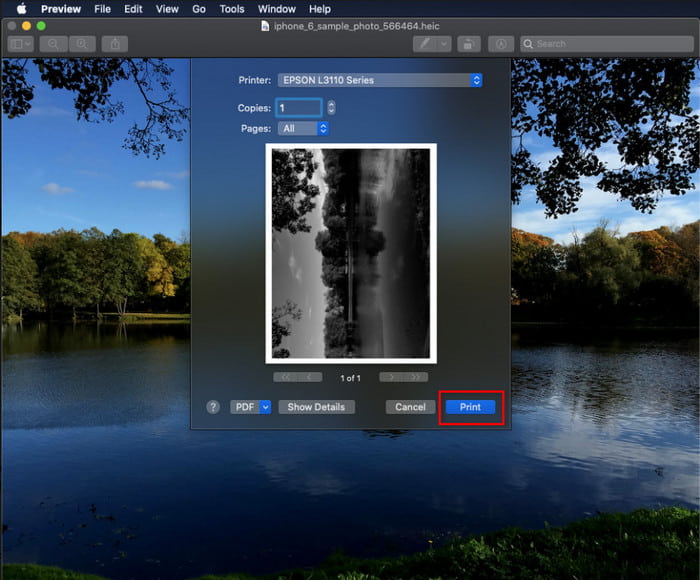
Step 2. After you open it, click the Command + P key on your keyboard.
Step 3. And on the printing dialogue box, you can see the preview of the image and you can adjust the printing status; click Print to make a hard copy of the HEIC image with high quality.
2º Método: Usando o Menu Arquivo
Se você acha que a tecla de atalho não pode ajudá-lo a imprimir o documento, tente usar o menu Arquivo. Com este menu, você pode clicar facilmente no botão de impressão e fazer algumas alterações antes de ter uma cópia impressa da imagem HEIC. Vamos começar a imprimir o HEIC que você tem no seu macOS sem usar as teclas de atalho sem mais delongas.
Step 1. Open the HEIC file on your Mac before you do anything else.
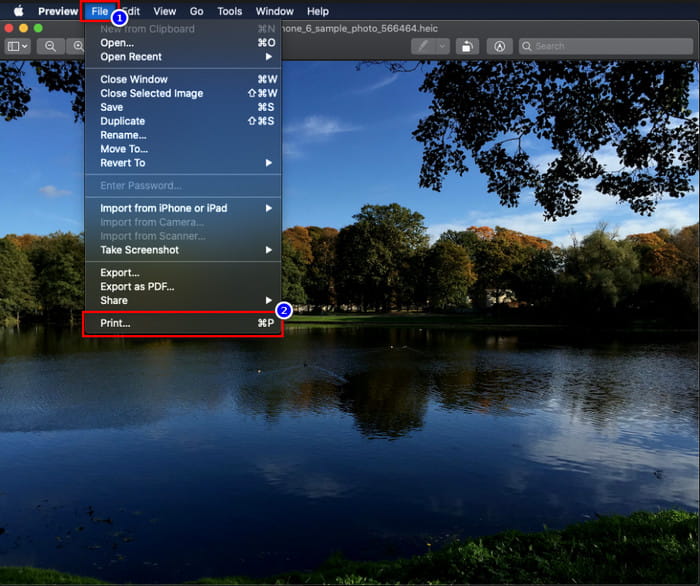
Step 2. On the upper-part section, click the File menu, and a list of options will show on your screen. Now choose the last option, and that is Print.
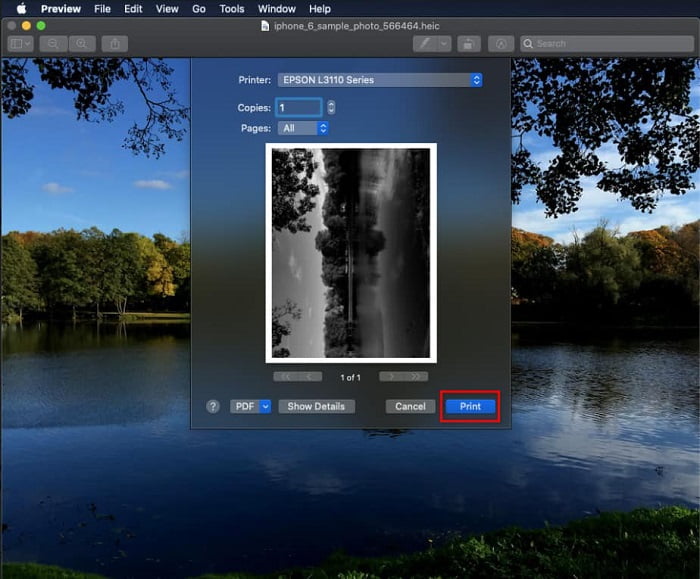
Step 3. Now you will see on your screen that the printing dialogue will open. In the middle part of it, you will see the sample HEIC file you have if it became a hard copy, and on the other side, you can do some tweaking before you print it out. After everything is settled up, click Print to start printing the document.
Parte 2. Por que não consigo carregar minhas fotos HEIC para impressão?
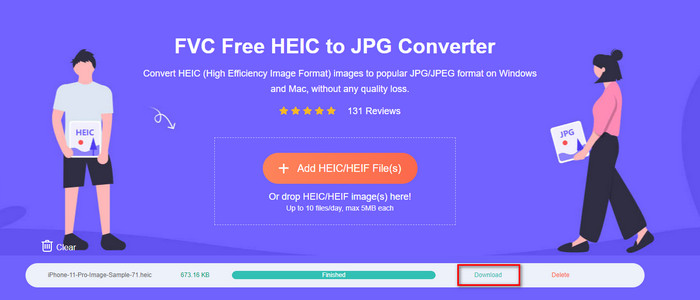
Are you one of the users having a hard time handling the HEIC file because you can't make a hard copy of it? In that case, let us introduce a specific web tool that could help you solve the problem: the FVC Free HEIC to JPG Converter. This web tool can turn your HEIC to JPG at ease. You can now easily upload the file on printing by changing the format to JPEG because the format became more recognizable than the HEIC. Although you are limited to converting up to ten times per day with 5MB or less, it is still a dependable web converter even with that limitations. So, let's not consume any more time and dig into the steps on how to use the best open source web converter at your reach.
Step 1. You can click this link to access the web converter, and a new tab will open promptly.
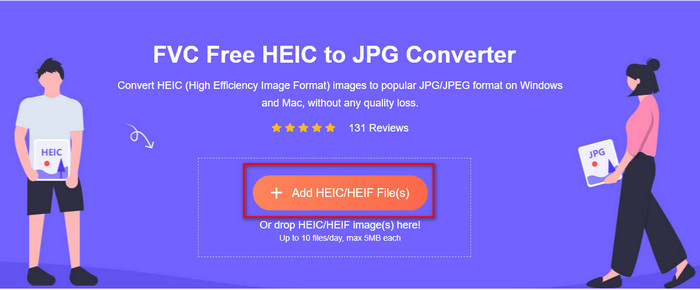
Step 2. Insert the HEIC file by clicking this button, locate the HEIC file on your folder and click Open to upload it fully.
Step 3. The process of converting will begin shortly and after that, click Download to save the file on your desktop. It is now ready to be printed as easily as you can make copies of the HEIC image on your printer with the same quality as the raw image file but in a different format.
Parte 3. Perguntas frequentes sobre a impressão de fotos HEIC
Posso imprimir fotos HEIC no Windows?
Infelizmente, o Windows não suporta HEIC, o que significa que não pode fazer uma cópia impressa do HEIC de alta qualidade. Mas não perca a esperança porque incluímos uma maneira de converter o HEIC em um formato JPEG reconhecível na parte dois. Você pode lê-lo livremente para saber como fazê-lo e imprimir o arquivo HEIC que possui no Windows, mas a extensão do arquivo é diferente.
Por que a impressora não reconhece o HEIC?
Because of the compression and the structure of the format, although it can contain high-quality images in smaller file sizes, smaller than JPEG, it is still hard to recognize because it is newly introduced in the market. But you can still convert the format to the most compatible image format that every printer can realize, and that is undoubtedly the best hi-res image that is still in use up today, and that is the JPEG. If you need a converter, we add one above, but you can click this link to know the other tools you can use to convert HEIC to JPEG as we review all of them for you.
O que é o arquivo HEIC?
Moving Picture Expert Group developed HEIC that could be the alternative standard image format for JPEG or JPG. Even though they built both formats, they are still different; if you want to know more about what HEIC is, click this link and read the details as we researched it.
Conclusão
Então, agora que temos a ideia de como imprimir fotos HEIC com as etapas acima, torna-se possível para todos os usuários de Mac fazer uma cópia impressa. No entanto, se você for um usuário do Windows, não poderá imprimir uma única imagem HEIC em sua impressora porque o formato não é compatível com o Windows. Mas isso não significa que você perderá a esperança de imprimir a imagem HEIC. Embora não possamos ajudá-lo a imprimir o arquivo HEIC original, ainda é possível converter o formato primeiro em JPEG/JPG antes de publicá-lo.
Na parte dois, incluímos o melhor conversor online de HEIC para JPG que você pode acessar na web e também está livre de vírus. Ainda não tem certeza se ele pode fazer o trabalho de conversão corretamente? Então, por que você não experimenta clicando neste link? Certamente você ficará impressionado porque a ferramenta pode converter os arquivos HEIC que você possui sem esforço.
-
 Converter HEIC para PDF usando as 4 principais maneiras aprimoradas em 2022
 Para saber mais informações sobre o melhor conversor de HEIC para PDF, você pode baixar este 2022. Você pode ler este artigo, pois fornecemos uma revisão sobre eles.
-
 5 das melhores escolhas de conversores HEIC para JPG em 2022
 Com o conversor HEIC para JPC, você pode alterar facilmente o formato da imagem para um JPG portátil. Quer saber quais são essas 5 ferramentas? Leia este artigo.
-
 Melhor conversor HEIC gratuito e pago que você deve conhecer [atualizado em 2022]
 Você quer saber o que é o conversor HEIC? Nesse caso, incluímos os 5 principais conversores HEIC gratuitos e pagos que você pode usar para alterar o formato HEIC.
