


 Video Converter Ultimate
 Gravador de ecrã
 Reparo de vídeo
 Secure Download
Aprenda a converter HEIC para GIF com os melhores e gratuitos conversores
Want to make your HEIC images into moving GIFs? Then we have a solution for you. HEIC files are high-quality image files that do not take much storage space. And apparently, HEIC images are just static images. So, for you to make an image file into animated images, you must convert your HEIC file to a GIF file format. GIF formats are static or animated images. Therefore, read this article to know the best HEIC to GIF to convert your file losslessly.

Parte 1. 4 melhores ferramentas para converter HEIC em GIF
Quando se trata de conveniência, é certo que os conversores online são os melhores porque você não precisa baixar nada. E se você está procurando os melhores conversores HEIC para GIF online, tentamos alguns dos melhores conversores HEIC para GIF disponíveis na internet. Portanto, nesta parte, você conhecerá os três melhores conversores online de HEIC para GIF.
Aiseesoft Free Image Converter Online
If you are searching for the most excellent online HEIC to GIF converter, this tool is what you are looking for. Aiseesoft Free Image Converter Online is a free online tool that allows you to convert HEIC images to GIF, PNG, and JPG format. It is known to be the quickest online HEIC to GIF converter found on the internet. Furthermore, unlike other online converters, it does not contain ads and has a fast-loading process.
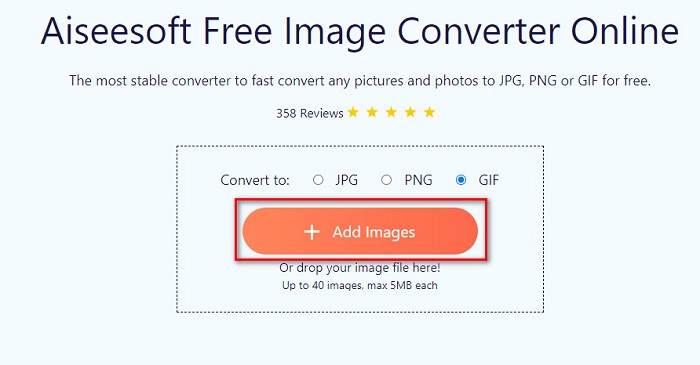
Step 1. Search Aiseesoft Free Image Converter Online, or click this link to go directly to their webpage. And then, on the first interface, click the Add Images button.
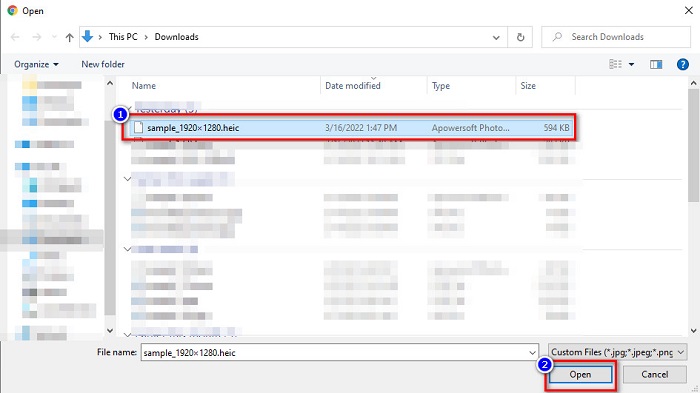
Step 2. Then, your computer files will appear, locate your HEIC image, and click Open.
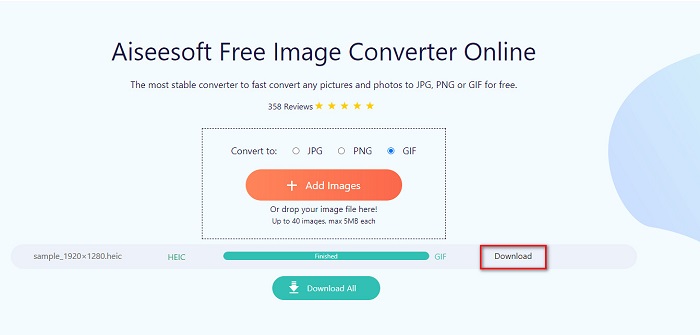
Step 3. Click the Download button to download your GIF image for the final step.
Prós
- Tem um processo de conversão ultra-rápido.
- Não contém anúncios perturbadores.
- Ele pode converter qualquer arquivo de imagem para PNG, JPG e GIF.
- Acessível em todos os navegadores da web, incluindo Google, Firefox e Safari.
Contras
- Você pode experimentar um processo de conversão lento quando sua conexão com a Internet estiver lenta.
CloudConvert
One of the top-used converters on the internet is CloudConvert. This converter can easily convert HEIC to GIF files because of its simple user interface. In addition to that, it supports many image formats, including HEIC, GIF, BMP, JPG, ICO, and more. You can also adjust your image's resolution, file size, and quality. Although it is a web-based app, it does not contain ads.
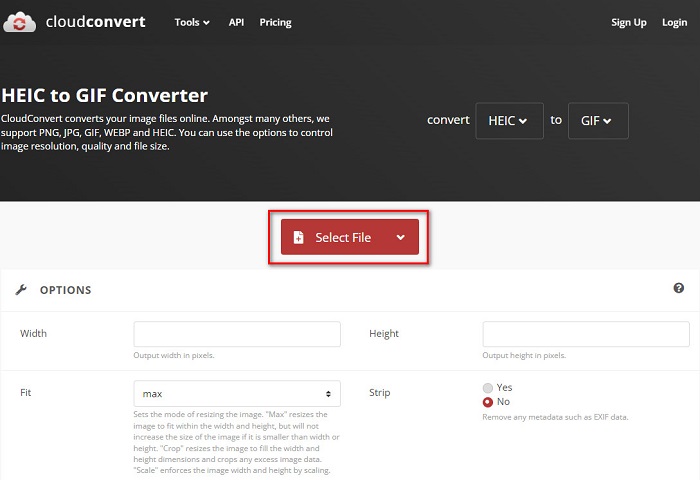
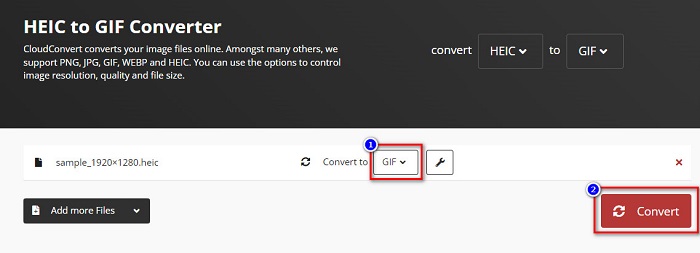
Step 1. On your browser, search CloudConvert HEIC to GIF converter. And then, on the software’s main interface, click the Select button. Your computer files will appear to select your HEIC file to upload.
Step 2. Next, click the drop-down button beside the Convert to, then select the output format that you want. After, click the Convert button to start converting your HEIC file to GIF format.
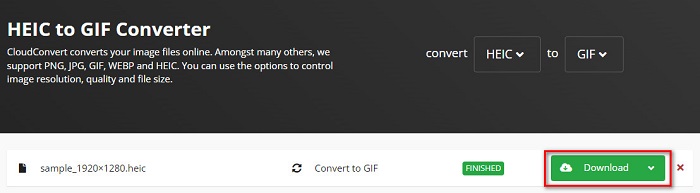
Step 3. Lastly, click the Download button to download your GIF file when your file is finished converting.
Prós
- Possui um processo de conversão rápido.
- Ele não contém anúncios irritantes.
- Ele suporta vários formatos de arquivo, incluindo HEIC, GIF, JPG, PNG, etc.
- Acessível em quase todos os motores de busca como Google e Safari.
Contras
- Quando a conexão com a Internet está lenta, você pode ter um processo de conversão lento.
OnlineConvertFree
Another online HEIC to GIF converter that is worth trying is OnlineConvertFree. This converter has an easy-to-use software interface and has a fast conversion process. Moreover, if you are looking for a converter that can compress and resize your file, this tool has that feature.
No entanto, contém anúncios que são perturbadores para muitos usuários. No entanto, este conversor ainda pode converter HEIC para GIF convenientemente.
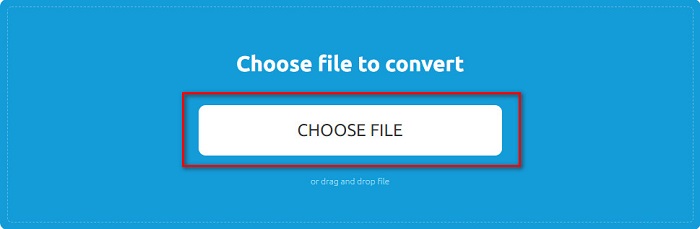
Step 1. For the first step, search OnlineConvertFree on your browser. And on the software’s main interface, click the Choose Files. Then, your computer files will appear, where you will select your HEIC file and upload it.
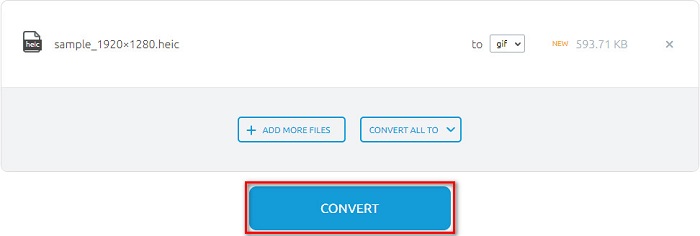
Step 2. Secondly, click the Convert button to convert your HEIC file to a GIF file. Then a new interface will appear.
Step 3. Finally, scroll down and click the Download button to download your GIF file.

Prós
- Possui uma interface de usuário simples.
- É seguro usar.
Contras
- Ele contém anúncios.
CDKM
CDKM é uma ferramenta online que ajuda a converter arquivos HEIC para GIF. Este conversor online é uma ferramenta fácil de usar, o que o torna uma ferramenta amigável para iniciantes. Além disso, ele suporta formatos de arquivo padrão como HEIC, GIF, PNG, JPG e SVG. No entanto, este conversor contém anúncios que podem ser perturbadores para você. No entanto, ele pode converter seu arquivo rapidamente, por isso é um conversor obrigatório.
Step 1. On your browser, search CDKM and go to their webpage. On the software’s main interface, click the Choose Files button. When your computer folders appear, select your HEIC file, then upload it to the main interface.
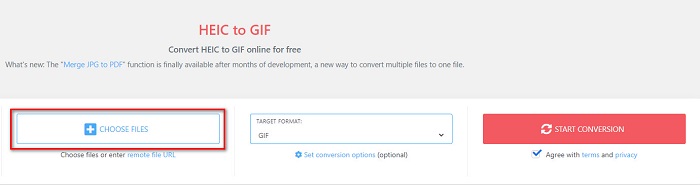
Step 2. Next, click the Start Conversion button to convert your HEIC file to a GIF file. Then proceed to the next step.
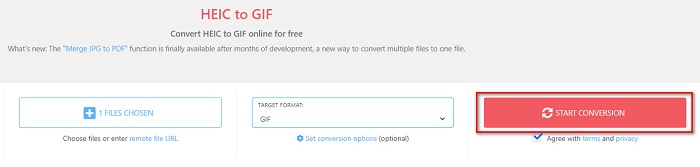
Step 3. And then, download your GIF file by clicking the Download button below.

Parte 2. Gráfico de comparação entre HEIC e GIF
HEIC is an image file format that Apple created. When you take a photo using an Apple device, you will see that the image extension of your photo is .heic. Also, these image files have great quality and small file size, making this image popular. However, HEIC files are not compatible with many devices. It is easy to open and view HEIC files on Apple devices. But you need to convert it to other formats if you want to view it on other platforms.
Por outro lado, os arquivos GIF são formatos de imagem sem perdas que são animados. Esses formatos de imagem podem ser imagens animadas ou estáticas. Além disso, quase todas as plataformas de mídia suportam formatos GIF.
| HEIC | GIF | |
| Comprimido/Descomprimido | Comprimido | Comprimido |
| Disponibilidade | Disponível em dispositivos Apple. | Disponível em todas as plataformas de mídia |
| Sem perdas/Não | Sem perdas | Sem perdas |
| Qualidade da imagem | Alta qualidade de imagem | Têm qualidade inferior em comparação com imagens HEIC |
| Melhor usado para | Melhor usado para tirar fotos | Melhor usado para animar clipes de vídeo curtos. |
Parte 3. Perguntas frequentes sobre como converter HEIC em GIF
Você pode reproduzir GIF animado em um dispositivo Mac?
Yes. Mac device can play animated GIFs; however, there are times that it cannot play it, so you must use an online viewer if it cannot play.
Posso converter imagens JPG em GIFs?
There are a lot of ways how to convert JPG to GIF. The online converters mention above allow you to convert JPG image files to GIFs.
Você pode salvar GIFs no seu iPhone?
Felizmente, os dispositivos iPhone suportam arquivos GIF. Portanto, você pode salvar GIFs no seu iPhone. Mas se você não conseguir salvar um arquivo GIF, reinicie o iPhone e tente fazer o download novamente.
Conclusão
As shown above, there are tons of ways to convert HEIC to GIF. However, not all online converters provide an ultra-fast conversion process. So if you are searching for the top online HEIC to GIF converter, use Aiseesoft Free Image Converter Online.
-
 O que é o arquivo VOB e como transformar o arquivo VOB em GIF gratuitamente
 Quer saber mais sobre os arquivos VOB e como compartilhá-los depois de copiados? ou Por que você precisa converter VOB para GIF? Então leia este artigo com atenção.
-
 Os 3 principais conversores que você não deve perder para converter PNG em GIF animado
 Você quer dar vida ao seu PNG? Em seguida, tente converter o formato PNG para GIF animado com as ferramentas úteis disponíveis e as etapas para fazer isso.
-
 5 melhores maneiras de alterar a imagem para GIF animado [atualizado em 2022]
 Precisa de um conversor de imagem para GIF? Este artigo fornecerá os cinco melhores conversores que podemos encontrar no mercado. Então, vamos descobrir essas ferramentas lendo este artigo.
