


 Video Converter Ultimate
 Gravador de ecrã
 Reparo de vídeo
 Secure Download
Remova a marca d'água Dreamstime com as 4 maneiras que você precisa saber
Se você precisa de imagens prontas para uso em sua apresentação ou projeto, não há como errar ao escolher a Dreamstime. Este aplicativo pode fornecer fotos livres de royalties prontas para serem usadas a qualquer momento. Já ajuda os usuários que procuram uma imagem específica com saída de alta qualidade a um preço baixo. Embora você possa baixar 15 imagens gratuitamente aqui, este produto deixa uma marca d'água para promover o aplicativo quando você usa a imagem baixada aqui.
We can’t argue that its usability is excellent and the image prices are low, but not all of us can afford to purchase credit on it. Worry no more! Because we got you covered, the information that we include below are ways you can follow to remove the Dreamstime watermark that it leaves on the final output.

Parte 1. Como remover a marca d'água Dreamstime comprando os créditos
Não podemos deixar a opção de compra para trás porque é a opção de remoção de marca d'água da Dreamstime mais eficaz que você pode usar. Antes de prosseguirmos, você precisa saber que a Dreamstime precisa que você tenha para que você possa comprar uma imagem sem marca d'água. O crédito do nome é uma moeda Dreamstime; utiliza dinheiro real e converte-o num digital que a Dreamstime aceita. Suponha que você não tenha crédito na Dreamstime. Nesse caso, você pode seguir os seguintes passos abaixo para adquirir um crédito para baixar e ter a imagem sem nenhum logotipo dos produtos restantes.
Step 1. Open the official website of Dreamstime, and then you must create an account before purchasing credit on Dreamstime. If you already have an account here, you must log in first to use it properly.
Step 2. Once you have log-in your account in the Dreamstime, click the Price and Download Plans, then go to the Credit Package to see what are the available rates included in it.
Step 3. Entirely add the details about the information it is asking you, then click Complete Checkout to process the payment you address on the tool. As easy as you have now, purchase credit as a currency on purchasing the image on Dreamstime.
Parte 2. Como remover a marca d'água Dreamstime gratuitamente na Web
Removedor de marca d'água grátis FVC online
Um dos removedores de marca d'água da Dreamstime mais conhecidos online que você pode usar é o Removedor de marca d'água grátis FVC Online. Você pode aproveitar esta ferramenta para remover a marca d'água que está na imagem que você possui. Em termos de desempenho, esta ferramenta online é mais capaz do que você pensa, principalmente na remoção do logotipo, marca d'água, carimbos, datas, objeto, etc., na imagem. Você ainda não duvida dessa ferramenta? Nesse caso, leia as etapas que adicionamos abaixo e você também pode segui-las para remover a marca d'água que a Dreamstime adicionou.
Step 1. Via clicking this link, a new tab will open on your browser.
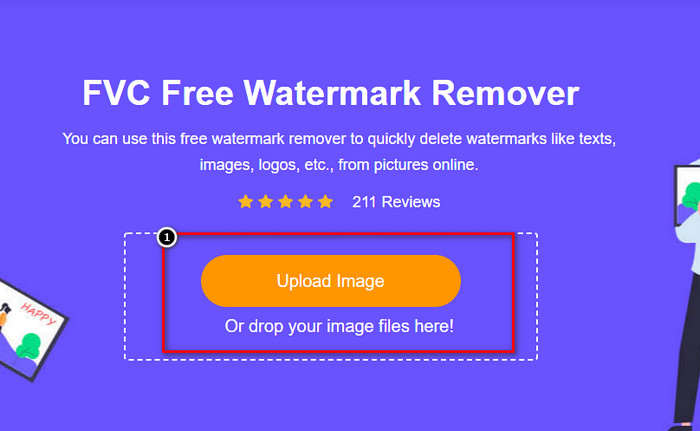
Step 2. Click Upload Image to import the photos you export on Dreamstime with a watermark.
Step 3. You can use tools to trace the watermark, choose one, and then trace the watermark with it.
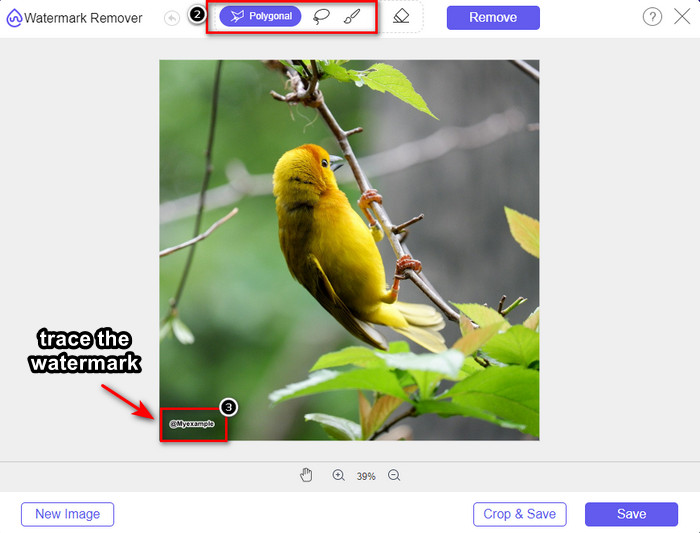
Step 4. Click the Remove icon first before you proceed with exporting the image.

Step 5. Lastly, click Download to save the image without the embedded watermark you highlight here.

WatermarkRemover.IO

WatermarkRemover.io is a Dreamstime photos remove watermark tool you can use online that could assist you on this journey. This tool is free to use, as the first-mentioned watermark remover online. YOu wouldn’t need to worry about signing this tool because it is useable on any given browser. It also uses an AI-tech to remove the watermark in your images once you use this tool. To help you do it, you must keep reading the succeeding information below.
Step 1. Open the official website of this watermark remover by searching it over your browser.
Step 2. Click the Upload Image icon to upload the photo with a watermark you want to remove.
Step 3. If you are done uploading the image with a watermark, hit the Download Image because it will automatically remove the watermark on your image.
Parte 3. Como remover a marca d'água Dreamstime em vídeos usando a solução definitiva
You can download a Dreamstime watermark remover for the videos like the ultimate FVC Video Converter Ultimate. It is the most flexible tool, ready to go, and finishes the job any time. This tool deals with the problem you might encounter with your videos, like low-quality audio, resolution, format unsupported, and disturbing watermark. Compared to the software you can install to remove the watermark, this one is phenomenally excellent in its performance, processing speed, and usability. Keep up the pace because we will show you how to remove the watermark on your videos in detailed steps.
Step 1. Before anything else, you will need to download the software on your desktop by clicking the download button presented below. Please select the correct version to install, go through the quick set-up, and launch the software.
Free DownloadFor Windows 7 or laterSecure Download
Free DownloadFor MacOS 10.7 or laterSecure Download
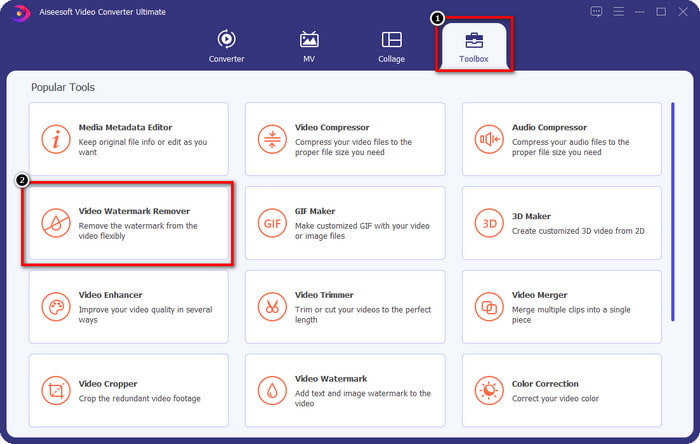
Step 2. Open the multifunctional Toolbox this software has, then select Video Watermark Remover.
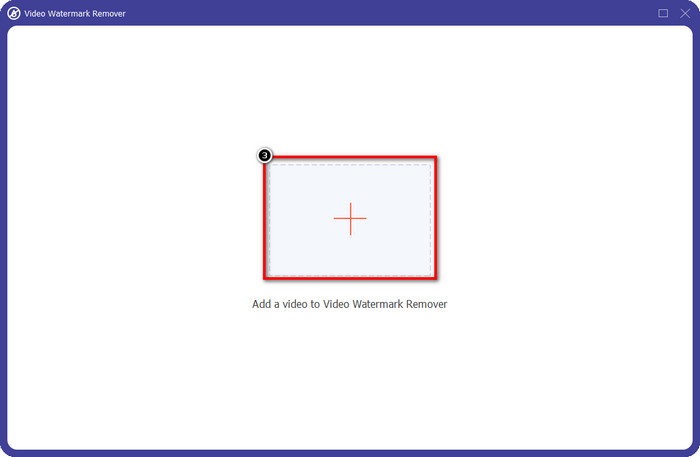
Step 3. After that, click the + icon to upload the video you download and start to remove the Dreamstime watermark.
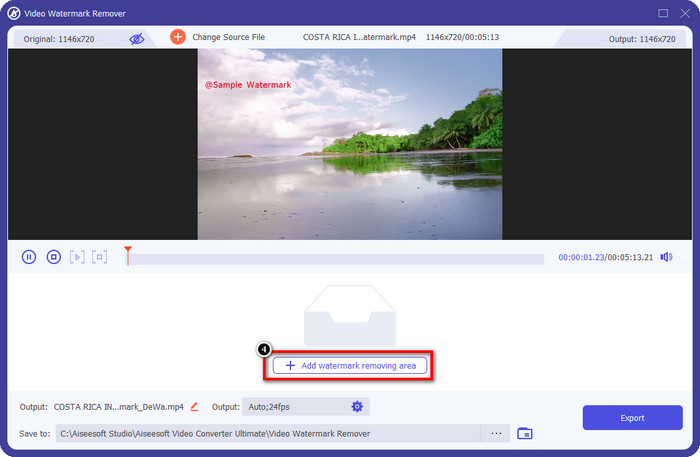
Step 4. Then click the Add Watermark Removing Area to place the selection box on the watermark.
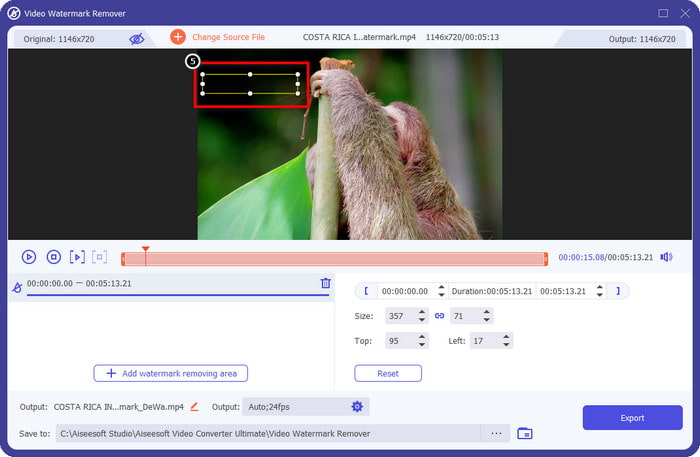
Step 5. After clicking the Add Watermark Removing Area, there will be a rectangular shape that will show on your screen place that on the watermark to remove it.
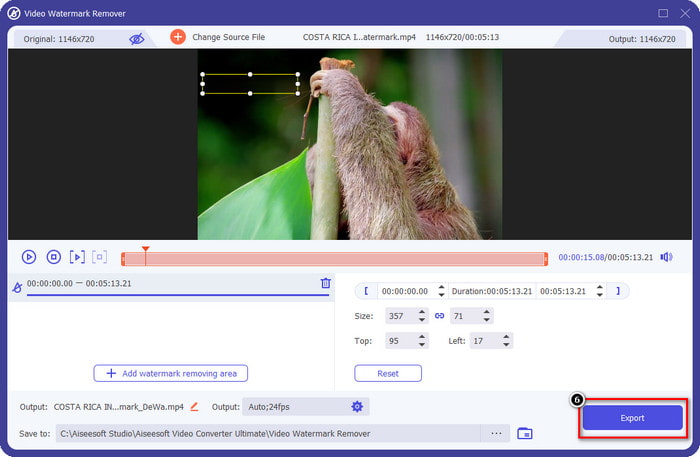
Step 6. Click the Export button to download the video without the watermark of the Dreamstime.
Related:
Parte 4. Perguntas frequentes sobre como remover a marca d'água do Dreamtime
Posso remover ilimitadamente a marca d'água no Dreamtime depois de comprá-lo?
Você não pode se você comprou um crédito, mas você pode continuar e rolar um pouco mais para baixo, e você verá que há acesso ilimitado às imagens que você pode aproveitar se estiver usando isso regularmente. Seu preço não é o mesmo em diferentes regiões ou lugares do mundo.
Que tipo de cartão a Dreamstime suporta?
Agora que você decidiu comprar um crédito ou taxa de assinatura aqui, você pode usar seu Master Card, Visa, AMEX e outros cartões de crédito importantes; você pode conferir no site oficial para conhecer os outros.
Posso usar créditos na Dreamstime para comprar vídeos sem marca d'água?
Você pode usar o crédito para comprar o vídeo ou qualquer produto que esta plataforma tenha. A finalidade do crédito não é apenas para imagens e vídeos; você também pode usá-lo para comprar áudio aqui.
Conclusão
Como remover a marca d'água Dreamstime? Bem, você já sabe como lidar com a marca d'água em suas imagens com as duas ferramentas que alistamos e o vídeo com o melhor removedor de marca d'água que você pode usar. Portanto, se você tiver um problema de marca d'água em vídeos ou imagens, poderá usar livremente o software acima e seguir o tutorial que adicionamos. Não diga adeus ao problema porque ele está resolvido!
-
 2 maneiras de remover a marca d'água VSDC no Windows e Mac rapidamente
 Você está procurando uma maneira de remover a marca d'água VSDC em seus vídeos? Com este artigo, fornecemos ferramentas que você pode usar para se livrar da marca d'água.
-
 Remova a marca d'água Animoto em vídeos com facilidade e eficácia
 Como remover a marca d'água do Animoto no vídeo? Continue lendo este artigo, pois fornecemos um tutorial completo sobre como fazê-lo.
-
 Como remover marca d'água do vídeo usando o Final Cut Pro [Guia Completo]
 Tem algum problema com a marca d'água nos vídeos? Não disse mais nada, pois fornecemos um tutorial sobre como remover marca d'água de vídeo usando o Final Cut Pro.
