


 Video Converter Ultimate
 Gravador de ecrã
 Reparo de vídeo
 Secure Download
Aprenda 3 maneiras de adicionar música ao iMovie facilmente [2024]
If you’re an iPhone or Mac user and love to edit videos, your go-to video editing tool is probably the iMovie app. This app is known for its user-friendly interface and basic editing features, making it easy to create videos. However, adding music to iMovie can be a little tricky compared to other video editing tools, especially when you need to add a personal touch. With that in mind, in this article, learn the easiest way how to add music to iMovie on Mac and iPhone. What are you waiting for? Let’s get started!

Parte 1. Como adicionar música ao iMovie no Mac
Adicionar música a um vídeo não é algo novo. Na verdade, é uma técnica clássica que transforma filmagens comuns em algo cativante e memorável. A música define o clima, aprimora a narrativa e pode até evocar emoções específicas em seu público. Com o iMovie, você tem uma ferramenta poderosa, mas fácil de usar, na ponta dos dedos, que simplifica esse processo.
O iMovie é um software de edição de vídeo comumente usado por usuários de Mac e iPhone por causa de sua interface intuitiva e recurso básico de edição. Com isso, independentemente de você ser um iniciante ou um usuário experiente, se quiser adicionar música ao iMovie no Mac, você pode fazer isso facilmente! Abaixo está um guia simples para ajudar você a adicionar música ao seu vídeo:
Step 1. First, launch the iMovie app on your Mac computer.
Step 2. Next, choose Create New and import the audio file that you want to add by clicking the Import Media button.
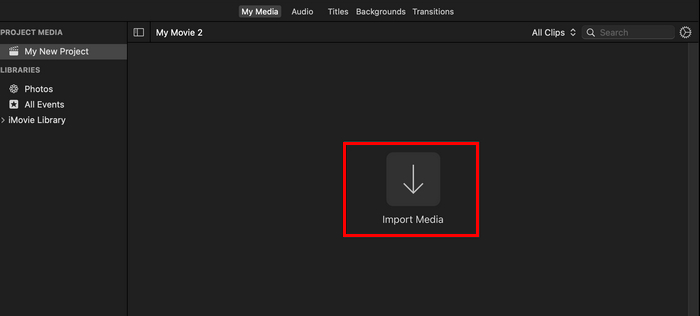
Step 3. Now, click on the audio files that you want to add and then click the Import All button. After that, you will notice that your imported music files are now in your project’s My Media tab.
Step 4. Lastly, open up your Finder window, select the song or media file, and click and drag it into your Media tab to add it to your project’s files.
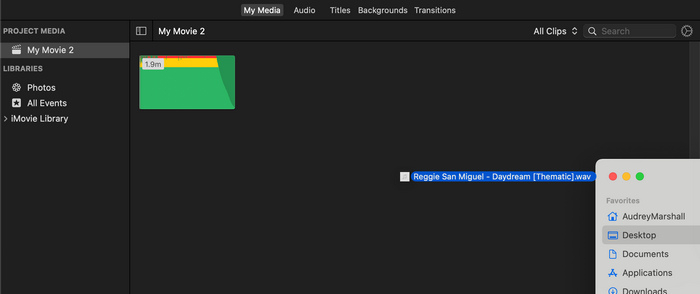
Para adicionar música facilmente ao iMovie no Mac, organize seus arquivos de áudio em pastas antes de importá-los. Com isso, você não precisará se preocupar em encontrar e gerenciar suas faixas de música, e seguir esta dica simples pode economizar tempo e ajudar a manter seu processo de edição eficiente e focado.
Parte 2. Adicionar música ao iMovie no iPhone
O iMovie também está disponível no iPhone, que oferece os mesmos recursos do iMovie no Mac. A versão do iMovie para iPhone mantém sua interface amigável e seus recursos essenciais de edição em movimento. Portanto, se você quiser adicionar música ao iMovie em um iPhone, siga as etapas abaixo:
Step 1. Open the iMovie app on your iPhone, or if you don’t have the app, install it from the App Store.
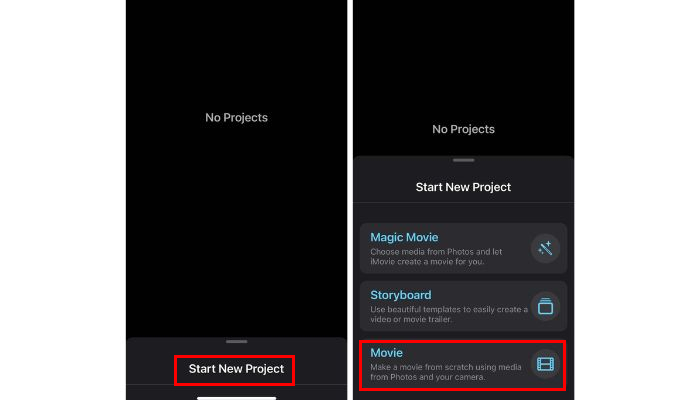
Step 2. After that, tap on the Start New Project and choose Movie among the options.
Step 3. Next, choose the video clips that you want to edit, and after that, tap the Create Movie button below.
Step 4. Now, to add music to iMovie on iPhone, tap the Gear icon below, and among the options, choose Audio. From there, you have three choices, Soundtracks, My Music, and Sound Effects, where you can select music for your video.
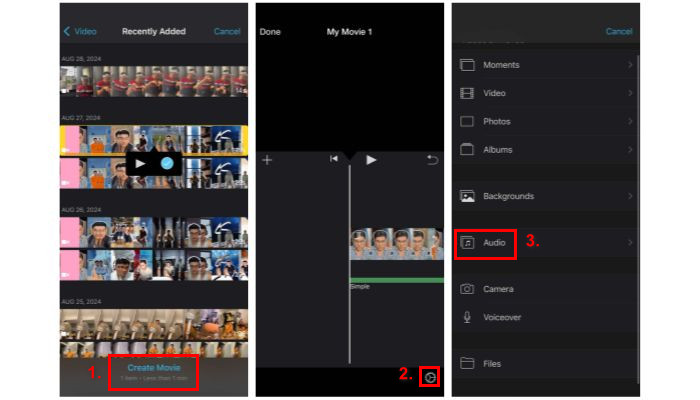
Step 5. Lastly, on your timeline, you can now see the audio along with your video. Once you’re satisfied with the result, tap on the Done button.
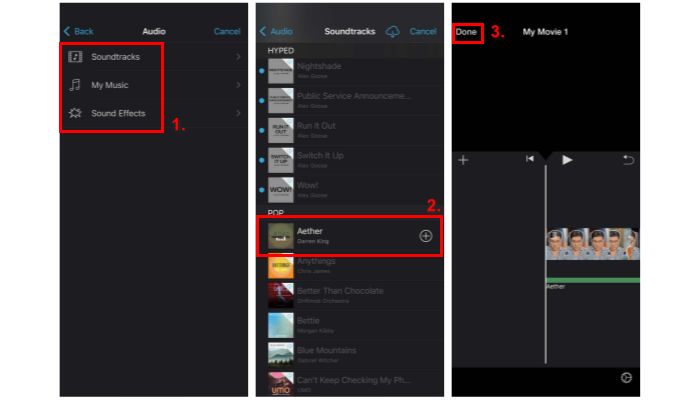
If you want to add music to iMovie from your library, make sure to download the tracks on your device first before starting your project in iMovie. The reason for this is that you can’t easily import music other than the built-in soundtrack within the app. Therefore, you really need to download them first and save them on your files. What’s more, click here to read how to add text to iMovie.
Parte 3. Alternativa mais fácil para adicionar música ao iMovie
Suppose you find the process on iMovie complicated. There are other alternatives that are easier and more efficient to use, and one of them is the FVC picked Video Converter Ultimate. This is a full-featured tool that works beyond a converter tool. It has a lot of features, like basic video and audio editing. But what makes this tool a top-tier alternative to adding music to iMovie is its intuitive and direct process of adding music to video in a few clicks. Now, let’s learn how to add music to iMovie with this alternative method:
Step 1. First, you need to download and install the FVC picked Video Converter Ultimate on your computer.
Free DownloadFor Windows 7 or laterSecure Download
Free DownloadFor MacOS 10.7 or laterSecure Download
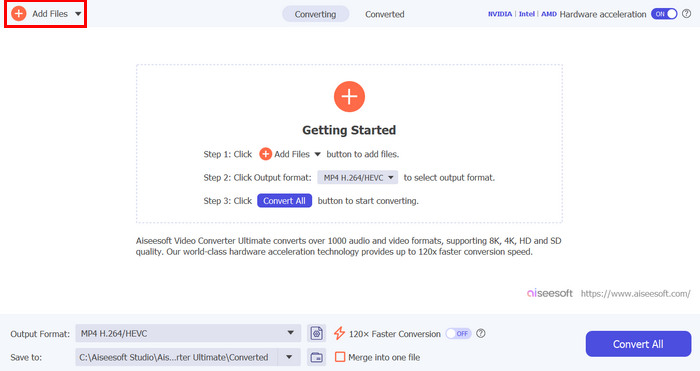
Step 2. After that, import the video file to which you want to add music by clicking the Add Files button.
Step 3. Now click on the drop-down button below the MP4 format, choose Add Audio Track from the options, and select the music you want to add. Lastly, click on the Convert All button to save your file.
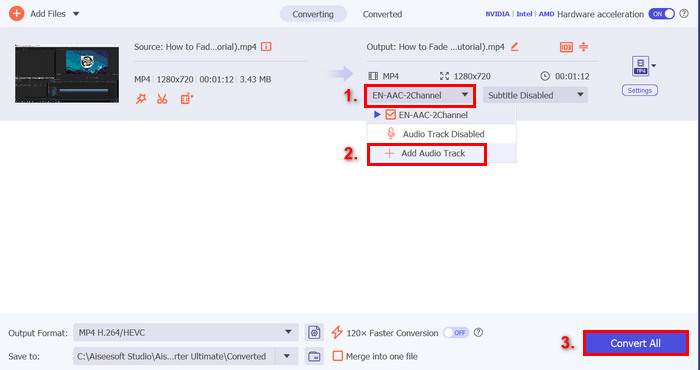
Antes de adicionar música ao seu vídeo, ele pedirá para você editá-la primeiro ou editá-la depois. Como essa ferramenta tem um recurso de edição integrado, depois de adicionar a música, você pode pré-visualizar e reeditar sua música para sincronizar com o vídeo. Isso garantirá que quaisquer ajustes que você precise fazer sejam feitos rapidamente, dando a você um resultado polido sem a necessidade de reedição.
Parte 4. Perguntas frequentes sobre como adicionar música ao iMovie
É possível adicionar música ao iMovie gratuitamente?
Sim. Você pode adicionar música ao iMovie gratuitamente, pois é um aplicativo gratuito desenvolvido pela Apple para determinados produtos, como computadores Mac, iPhones e iPads. No entanto, este aplicativo está disponível apenas para os dispositivos mencionados acima.
Posso adicionar músicas do Spotify ao iMovie?
Unfortunately, no. It is forbidden to directly add Spotify music to iMovie because Spotify's music is protected by digital rights management or DRM. This protection prevents Spotify tracks from being used outside of the Spotify app. But the thing is, there are ways to use a specific song from Spotify, for example, to create a ringtone. To do that, you'll need to purchase and download it from a music store or use a Spotify-compatible music converter to remove DRM.
Como adiciono várias músicas ao iMovie?
Para adicionar várias músicas ao iMovie, basta repetir o processo de importação e arrastar arquivos de áudio para sua linha do tempo. A primeira coisa que você precisa fazer é importar todas as músicas que deseja usar. Observe que elas devem estar visíveis na sua aba Minhas Mídias. Depois disso, você pode facilmente arrastar cada uma delas para sua linha do tempo, permitindo que você as edite adequadamente.
Conclusão
Learning how to add music to iMovie is a great way to enhance your videos. By following the carefully crafted steps in this article, you can easily add music to your videos with so much ease. So, whether you're a beginner or an experienced editor, these methods will help you create the perfect soundtrack for your iMovie projects.
-
 Como fazer fade in de música no iMovie em um Mac e iPhone
 Você está com dificuldades para fazer fade de áudio no iMovie? Continue lendo para descobrir as maneiras mais fáceis de aplicar efeitos de fade usando um Mac, iPhone ou software alternativo.
-
 Guia definitivo sobre como editar áudio no iMovie: 3 maneiras mais fáceis
 Quer saber como você pode melhorar seu projeto de áudio? Aprenda 2 maneiras de editar áudio no iMovie e descubra 1 alternativa que pode ajudar você a editar seu áudio de forma eficaz.
-
 Como adicionar marca d'água a um vídeo no iMovie no Mac [All Embracing]
 Você quer saber os segredos de adicionar uma marca d'água a um vídeo no iMovie? Não derrame o chá em ninguém e aprenda lendo este artigo.
