


 Video Converter Ultimate
 Gravador de ecrã
 Reparo de vídeo
 Secure Download
From HitPaw to HitPaw Edimakor Screen Recorder: How Is It?
A new change has arrived: the familiar HitPaw Screen Recorder, long trusted for capturing screen content, has officially been upgraded to HitPaw Edimakor Screen Recorder.
What new features does this upgrade bring? How does HitPaw Edimakor Screen Recorder perform now? Is it still worth choosing?
If you're curious about these questions, this guide is for you. It provides a detailed overview of the updated product and briefly explains how it differs from the previous version. Potential issues are also analyzed objectively. In addition, a powerful alternative will be introduced for comparison. Hopefully, the information here will help you choose the screen recording tool that best suits your needs.

Part 1. Overview Of HitPaw Edimakor Screen Recorder
Let's first take a look at what the upgraded HitPaw Edimakor Screen Recorder is positioned as now.
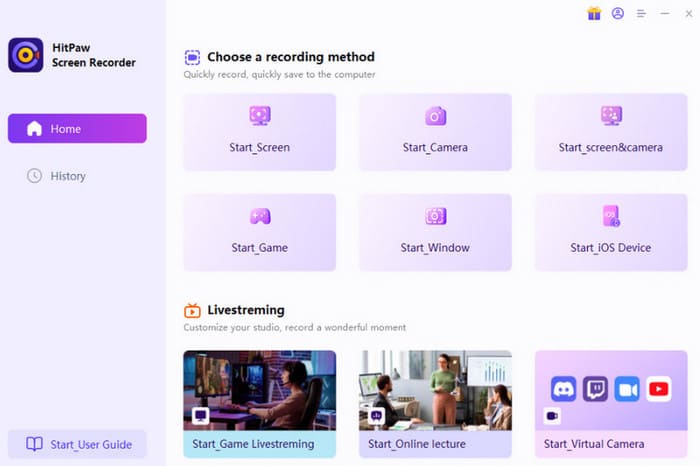
HitPaw Edimakor Screen Recorder is a desktop screen capture software for Windows and Mac. It supports recording from various sources, including desktop and webcam footage, system and microphone audio, online lectures, live streams, meetings, video calls, and more. This software incorporates all the customization and editing features expected of a recorder, while adding live streaming capabilities — which is the key focus we'll discuss next.
Compared to the original HitPaw Screen Recorder, HitPaw Edimakor Screen Recorder offers these enhancements:
- • Gaming recording frame rate increased from 60 FPS to 144 FPS.
- • Significantly improved smoothness when recording live streams and video calls.
- • New live streaming capability. Users can broadcast real-time screen recordings to over 300 platforms including YouTube, Twitch, and Discord.
- • Integrated AI noise reduction for cleaner system and microphone audio.
Main Features
Combining past and present upgrades, let's outline what the new HitPaw to Edimakor Screen Recorder offers:
- • Capture desktop and webcam footage.
- • Capture audio from system audio and microphone.
- • Record videos, online meetings, video calls, webinars, lectures, livestreams, and any other content.
- • Capture smooth, high-definition video and gameplay at up to 144 FPS.
- • Flexible recording area selection tools: full screen, window, or custom region.
- • Apply green screen effects to recordings, enabling one-click background removal or replacement.
- • Schedule recording tasks with customizable start/end times and duration.
- • Capture screenshots during recording for instant saving or sharing.
- • Add dynamic visual elements to mouse/keyboard activity for tutorial creation.
- • Incorporate AI noise reduction for crystal-clear audio.
- • Supports live streaming your screen recordings to over 200 platforms including YouTube, Discord, and Twitch.
We strongly advise apply the latest version of HitPaw Screen Recorder downloading exclusively from the official Edimakor website. Avoid installation packages from other sources for security reasons.
Part 2. Is Edimakor Screen Recorder Free?
Is the updated HitPaw Screen Recorder free? We can find the answer on its official website.
HitPaw Edimakor Screen Recorder currently does offer a free trial plan for every new user, provided that users can only use it on one computer and face a 1-minute recording time limit. Additionally, your output videos will carry a watermark.
To unlock all features, consider these paid options:
- • Monthly: $19.95/Month
- • Yearly: $49.95/Year
- • Perpetual: $69.95
All three plans include a three-day free trial. You may cancel your subscription at any time during this period.
Part 3. Should You Choose HitPaw Edimakor Screen Recorder: Pros & Cons
A HitPaw Edimakor Screen Recorder review must include two essential pieces: its advantages over similar products, which determine why we selected it; and its shortcomings, which determine whether we might be deterred from using it.
We summarize HitPaw Edimakor Screen Recorder's pros and cons as follows:
Prós
- Smooth recording of videos, especially games, with no lag.
- Integrated live streaming capability allows simultaneous recording and broadcasting without platform switching.
- AI-powered noise reduction significantly enhances audio quality in recordings.
- Supports customizing the position, size, and even opacity of the picture-in-picture camera window.
- Offers numerous auxiliary tools to facilitate tutorial and presentation creation.
Contras
- The free version has significant limitations. Recordings are capped at 1 minute.
- Without a subscription, output videos carry a watermark. Additional steps are required to remover a marca d'água later.
Part 4. Best Alternative to HitPaw Edimakor Screen Recorder
If watermarks and other limitations have deterred you from using HitPaw Edimakor Screen Recorder, consider trying FVC Screen Recorder as the best alternative.
FVC Screen Recorder, a desktop application compatible with both Windows and Mac systems, similarly enables users to capture footage from their desktop and webcam, along with audio from the system and microphone. Additionally, it can serve as an alternative to HitPaw Screen Recorder for Android and iOS. Simply connect your phone to your computer via cable or WiFi, and the software will capture activity on your phone's screen.
Free DownloadFor Windows 7 or laterSecure Download
Free DownloadFor MacOS 10.7 or laterSecure Download
Main Features
- • Capture video and audio from your computer, webcam, and external microphone.
- • Customizable recording area options.
- • Captures scrolling windows.
- • Includes basic editing tools for recorded files.
- • Supports scheduling recording tasks.
Here's how to use FVC Screen Recorder.
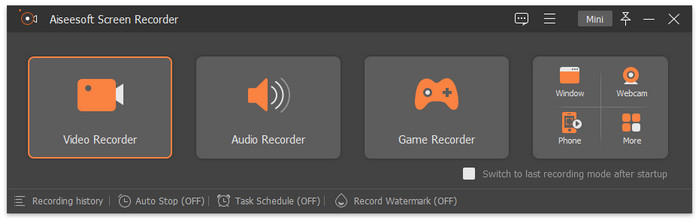
Step 1. Download and install FVC Screen Recorder on your computer. Open the recording interface.
Select Video Recorder.
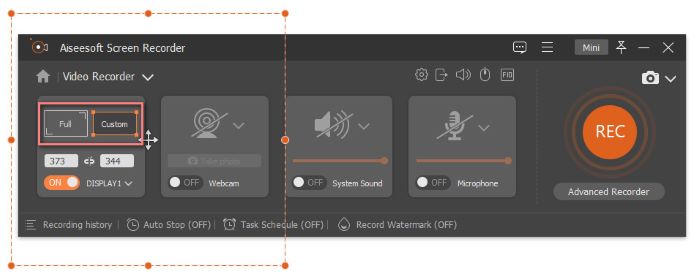
Step 2. Select the recording area as Full or Custom. Then confirm the audio source for recording.
Step 3. Click the red REC button to start recording.
Part 5. FAQs of HitPaw Edimakor Screen Recorder
Which screen recorder is best?
HitPaw Edimakor Screen Recorder is the perfect choice. It combines video and audio recording tools. Plus, its AI-powered noise reducer eliminates background noise. It also offers comprehensive features like scheduled recording and mouse/keyboard activity markers.
Can you screen record in 60fps?
Absolutely! As noted in the HitPaw Screen Recorder review, it supports recording 60 FPS video. The upgraded version, HitPaw Edimakor Screen Recorder, now even captures 140 FPS footage.
Is HitPaw Edimakor Screen Recorder good?
Yes, it's excellent. It supports recording screen activity, video playback, live streams, online meetings, virtual classes, and more. It even boasts simultaneous recording and live streaming capabilities.
Conclusão
HitPaw Edimakor Screen Recorder has made significant improvements across the board. For video recording, it now supports advanced FPS settings; for audio capture, it adds an AI noise reduction feature; and functionally, it introduces live streaming capabilities, allowing you to record while broadcasting simultaneously on over 200 platforms.
However, its 1-minute free recording limit and watermark restrictions can be quite frustrating. Therefore, we recommend trying FVC Screen Recorder as an alternative.
-
 [Análise completa] Gravador de jogos FBX: vale mesmo a pena experimentar?
 Se você deseja usar o FBX Game Recorder, mas não sabe por onde começar, este artigo aborda tudo o que você precisa saber, incluindo sua melhor alternativa.
-
 Step-by-Step Guide on How to Record a Video on Canvas
 If you’re wondering about the Canvas video recording feature, you’re on the right page. This article will show you how to easily record a video on Canvas.
-
 What is OnStar? Does OnStar Record a Video? [Guide]
 If you’re wondering how to record on OnStar, read this article to learn whether it’s really capable of recording and what tool can be its best alternative.
