


 Video Converter Ultimate
 Gravador de ecrã
 Reparo de vídeo
 Secure Download
Melhores maneiras de converter HEIC para JPG no Android usando aplicativos e online sem esforço
As Apple adapts the new image format, HEIC, can't natively support the format because it lacks codecs that support HEIC. Even though you use the newest version of the Android phone, the HEIC format isn't viewable on this device. Since the format isn't compatible with Android, the best approach you can use is to convert it into an image format compatible with all devices, JPEG. So, suppose you receive and want to convert HEIC to JPG on Android to view it. In that case, you must read the following details we add in this write-up as we researched for you to make it more accessible and more efficient than ever.

Parte 1. Como converter arquivo HEIC para JPG no Android usando aplicativos móveis
Dropbox
Dropbox offers you the best way to distribute and upload the files to the cloud storage instead of your local storage so that you can share them with anyone. With a HEIC to JPG converter on Android like this, converting the HEIC format into a JPEG became easy and practical. Although it can convert the image format into a JPEG, it doesn't usually get into the same trouble as the other converter needing a process to finish.
Porque altera automaticamente o formato para um formato compatível após ser compartilhado. Quer saber como converter o formato para JPEG? Então siga os passos abaixo para saber como fazer isso.
Step 1. Download and open the Dropbox app on your Android device. Then sign-up to it before using it, but if you already have a Dropbox account, you need to log in here.
Step 2. Tap the Camera Uploads and select the HEIC file you have on your phone.
Step 3. Tap the Save HEIC Photos and select the JPG format to save it with this extension type. Wait for the process, and you can check out the image on the Gallery that it is in this format.
Conversor gratuito de HEIC para JPG – Converta HEIC para JPEG
HEIC to JPG Free Converter is one of the best HEIC to JPG converter apps on Android that can help you convert the HEIC format you have to a compatible format. With this app, you can turn your HEIC file into a JPEG without worrying about losing the quality and metadata attached to it. Unlike Dropbox, where you will need to log in with this app, you wouldn't need to do it, so it's less hassle because you can directly convert the HEIC without logging in.
Embora você não precise fazer login ao usar o aplicativo, você notará que os anúncios pop-up serão exibidos em seu telefone se você usá-lo. Se isso não for um problema para você, siga as etapas abaixo para saber como usá-lo.
Step 1. Search the HEIC to JPG Free Converter on Playstore and, install it, open the app to proceed with using it.
Step 2. Tap Open File and look for the HEIC image on your mobile device, then tap Select to upload it on the converter.
Step 3. On the Convert to, choose the JPG format on the list and click Convert to start converting the HEIC file.
Parte 2. Maneira mais profissional de converter em lote HEIC para JPG Android Online
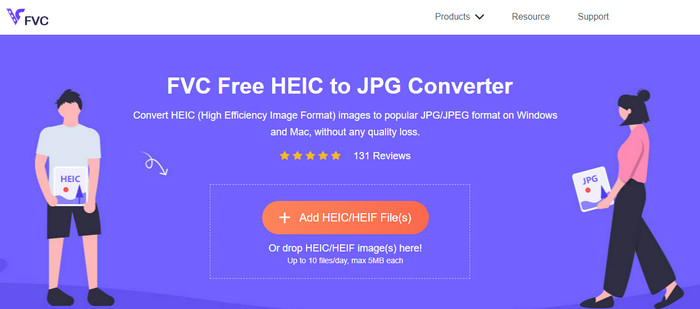
Do you need to know how to convert the HEIC file to JPG in Android without the help of the downloadable app? Then without any doubt, the FVC Free HEIC to JPG Converter is the web tool you will ever need. In a task like this, you will need a professional tool, especially if you want to convert a batch of HEIC files into a JPEG without losing the quality, and that is what this web tool brings.
Ao contrário dos aplicativos que mencionamos acima, com isso você não precisaria baixar dados adicionais antes de poder usá-lo e nem precisaria fazer login. Em vez de baixar o aplicativo no seu Android e esperar o processo de instalação , por que você não tenta usar essa ferramenta da Web imediatamente? Se esta ferramenta online chamou sua atenção, você deve ler os seguintes detalhes abaixo. Para saber como uma ferramenta web profissional converte HEIC para JPG no seu Android online e gratuitamente.
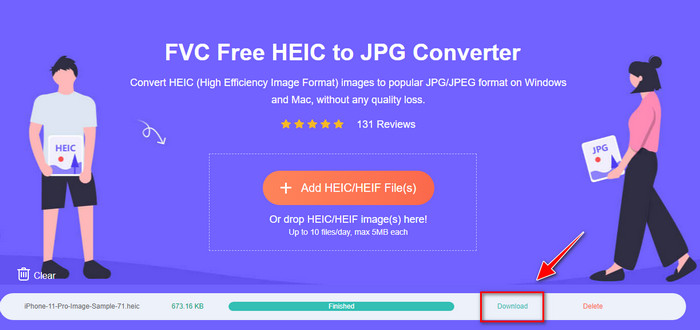
Step 1. To open the professional web tool, you must click this link, and a new tab on your browser will open.
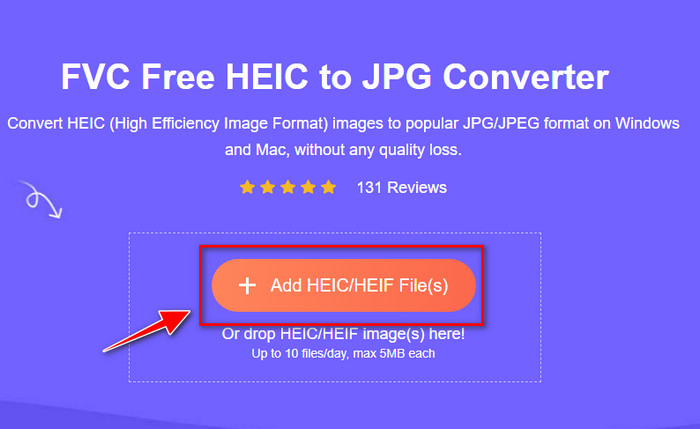
Step 2. While on the web tool, tap the Add HEIC/HEIF File and upload the HEIC file here. You can also upload more HEIC files here and convert them into a JPEG simultaneously.
Step 3. Wait for the conversion to finish, and if the progress bar is complete, you can now save the HEIC files you've uploaded here by clicking the Download button. The file will automatically be held on the downloads; you can check it out to view the image in the JPEG format.
Parte 3. Perguntas frequentes sobre como converter HEIC para JPG no Android
O Google Android Pie pode visualizar o arquivo HEIC?
Sim, você pode visualizar facilmente a imagem HEIC aqui. Esta 16ª versão do Android possui oficialmente os codecs HEIC para visualizar a imagem sem convertê-la em JPEG ou PNG. Assim, se o seu Android estiver nesta versão, você não precisaria converter o formato em JPEG ou PNG para visualizá-lo, e está pronto para receber a imagem HEIC.
Por que não consigo converter HEIC para JPG no Android?
Primeiro, você deve verificar o conversor que você usa no seu Android se ele suporta a conversão do HEIC em um JPG. Embora alguns aplicativos digam que suportam a conversão de HEIC, a maioria deles é clickbait. Para evitar que isso aconteça, você deve ler os comentários sobre eles para ver se eles suportam o HEIC e se ele pode converter o formato da imagem para JPG.
Por que o HEIC se tornou popular em dispositivos iOS?
HEIC became popular on iOS devices because of the compression it provides to the image and its in-detailed color combination, which is far better than the JPEG. If your photo is in this format, it is noticeable that its file size is smaller and better than a JPEG format. That is one of the reasons it became popular on iOS devices.
Conclusão
This article introduces the best HEIC to JPG converter for Android; all of them are accessible on your mobile devices. Even though they can help you convert the format into your Android, their strengths and weakness are what makes them different from one another. Suppose you want to use the professional converter on your Android to convert the HEIC file into a JPG. In that case, we suggest using the FVC Free HEIC to JPG Converter. Although this is web-based, it is still far better than the other aforementioned applications. If you want to test out the web tool on your Android device, then there are steps included above; you can check them out and follow them thoroughly to do it effectively.
-
 Converter HEIC para PDF usando as 4 principais maneiras aprimoradas em 2022
 Para saber mais informações sobre o melhor conversor de HEIC para PDF, você pode baixar este 2022. Você pode ler este artigo, pois fornecemos uma revisão sobre eles.
-
 Melhor conversor HEIC gratuito e pago que você deve conhecer [atualizado em 2022]
 Você quer saber o que é o conversor HEIC? Nesse caso, incluímos os 5 principais conversores HEIC gratuitos e pagos que você pode usar para alterar o formato HEIC.
-
 HEIC vs. JPG | Qual é o melhor formato de imagem a ser usado
 A batalha entre HEIC vs. JPG tornou-se mais profunda, mas qual dos dois é o melhor formato de imagem? Para responder às suas perguntas, então leia este artigo.
