


 Video Converter Ultimate
 Gravador de ecrã
 Reparo de vídeo
 Secure Download
7 maneiras fáceis de converter rapidamente HEIC para PNG em segundos
Want to make your HEIC file widely compatible with other devices? We have what you are looking for! This article shows you the best ways to convert your HEIC file to PNG without having a hard time. So buckle up as we indulge in knowing the best ways to convert HEIC to PNG effortlessly.

Parte 1. Por que converter HEIC para o formato PNG
O formato de arquivo HEIC é um formato de imagem criado pela Apple. É um formato de imagem que os dispositivos da Apple costumam usar. Embora tenha uma resolução de alta qualidade, não ocupa muito espaço no seu dispositivo. No entanto, os arquivos HEIC não são compatíveis com dispositivos que não sejam da Apple. Em contraste, PNG, que significa Portable Graphics Format, é um formato de arquivo de imagem criado para substituir os formatos GIF.
É o formato de imagem descompactado mais usado, o que significa que possui um tamanho de arquivo enorme. No entanto, quase todos os dispositivos suportam esse formato de arquivo de imagem. Portanto, se você deseja abrir sua imagem HEIC em outros dispositivos além da Apple, é melhor convertê-la em um formato de arquivo PNG.
Parte 2. 5 maneiras fáceis de converter seu arquivo HEIC para arquivo PNG online
Procurar as melhores maneiras de converter HEIC para PNG é bastante difícil. No entanto, procuramos os melhores e mais simples métodos para você alterar o HEIC para um formato de arquivo PNG.
Use o conversor FVC Free HEIC para PNG
The most excellent way to convert HEIC to PNG is to use a converter tool. And The best tool that we found on the internet is FVC Free HEIC to PNG Converter. This converter is an online tool that conveniently converts your HEIC file to PNG file format. In addition, if you want to batch convert your HEIC file to PNG, this tool has that feature for you.
Também é acessível em quase todos os navegadores comuns, tornando-se uma ferramenta sem limite de navegador. Além disso, possui uma interface de software simples e não possui limite de tamanho de arquivo, para que você possa converter arquivos HEIC sem pensar no tamanho do arquivo. Portanto, siga o guia simples abaixo se estiver interessado em usar este conversor HEIC para PNG online.
Step 1. On your browser, search FVC Free HEIC to PNG Converter. You can also click this link to go directly to their webpage. This is what the first interface looks like:

Step 2. Next, click the Add HEIC/HEIF File(s) button. Your computer folders will appear, where you will select your HEIC file.
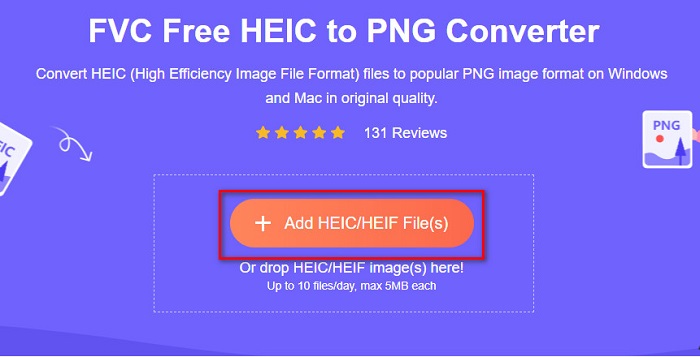
Step 3. Then, your computer folders will appear, where you will select your HEIC file. Press Open. Then your HEIC to PNG conversion will start.

Step 4. Lastly, the software’s interface, click the Download button, to download your PNG file.

Simples, não é? Você pode converter seu arquivo HEIC em um arquivo PNG seguindo estas etapas fáceis.
Use Xconvert.com
Xconvert is a free online HEIC to PNG Converter that easily converts HEIC files to PNG files. This online converter has an easy-to-use software interface beneficial for beginner users. Moreover, you can change the image resolution of your image when using this online converter. However, since it is an internet-dependent tool, you may experience a slow conversion process when the internet is slow. It also contains ads that might be disturbing for you.
Step 1. Search Xconvert.com in your browser. On their website, click the Add Files button, then your computer files will appear, and then select your HEIC file.

Step 2. Your image will be uploaded to the software’s interface. After uploading, click the Convert button located at the bottom right corner of the software interface. And then wait for your file to be ready to download, then proceed to the next step.
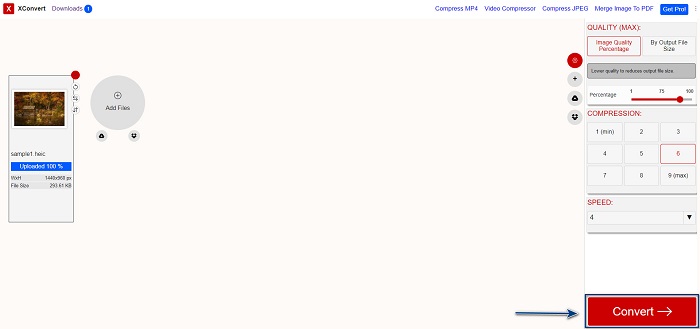
Step 3. When your file is ready, click the Download button to download your PNG file; above the download button, you will also see the output size and how long it took to convert.

Usar Zamzar
Another way to convert HEIC to PNG online is using Zamzar online converter. You probably have seen this converter when searching for a HEIC to PNG converter. This converter is accessible in almost all browsers available. In addition, it has a simple user interface making it a user-friendly tool. However, your file may be corrupted when the internet is interrupted during your conversion process. Nevertheless, many users use this converter to change HEIC to a PNG file.
Step 1. On the browser that you use, search Zamzar. On their website, click the Add Files button. Your computer files will appear, then upload your HEIC image.

Step 2. After uploading your HEIC file, click the drop-down button, then select PNG as your file output format.

Step 3. Finally, click the Convert Now button to convert your HEIC file to PNG file format. Then download your PNG file. Just wait for a couple of seconds, and that’s it!

Use as Ferramentas de conversão.io
Conversion Tool is an online HEIC to PNG converter with a simple user interface. It can convert your HEIC file to PNG at high speed. Furthermore, it does not contain many ads, unlike other online converters. But the downside of it is that you can only convert ten files a day, and it has a file size limit. But if you are converting a small file, then this tool may be suited for you.
Step 1. Search Conversion Tools.io in your browser. Then, click the Browse button on the software’s main interface, or drag and drop your HEIC file on the Browse button.

Step 2. After, click the Run Conversion button to begin converting your HEIC file to a PNG file. And then wait for your image file to load, then proceed to the next step.

Step 3. To end, click the Download button to download your PNG file.

Usar CDKM
One last tool that we will present to you is CDKM. This tool allows you to convert HEIC files to PNG with just a few clicks. However, using this online converter may take a few seconds to convert, depending on your internet speed. It also contains ads that may be irritating for you. Nonetheless, it does not have any file size limit, so it is worth trying.
Step 1. On your browser, search CDKM online converter. On the software’s main interface, click the Choose Files button. Your computer folders will appear, then select your HEIC file to upload.

Step 2. Next, click the Start Conversion button to start the conversion process.

Step 3. Lastly, scroll down a little and see the Download button. Click the Download button to download your PNG file.

Parte 3. Converter HEIC para PNG no Mac
Os dispositivos Apple suportam formatos de arquivo HEIC e, usando o Mac, você pode abrir um arquivo HEIC nativamente. Mas se você quiser converter seu arquivo HEIC para PNG, poderá alterá-lo usando o Photo App no Mac. Assim, se você é um usuário de Mac, é melhor ler esta parte.
Step 1. First, drag and drop your HEIC file to the Photo App. Then, preview your HEIC photo and click the File > Export button > Export 1 Photo.

Step 2. After, on the Photo Kind, click the output format that you want. Select PNG file format.

Step 3. And then, click the Export button, then select the destination of your file output. You will see that your HEIC file is changed to PNG file format.

Parte 4. Converter arquivo HEIC para PNG no iPhone
Se você estiver usando um iPhone, poderá abrir um arquivo HEIC no seu dispositivo. Mas se você deseja converter seu arquivo HEIC para PNG usando um dispositivo iPhone, temos uma maneira para você. Seguindo estas etapas simples e fáceis abaixo, você pode converter HEIC para PNG sem esforço.
Step 1. On the Photo App on your iPhone, tap the Select button located at the top of your screen. And then, select your HEIC file, then click the Share icon.
Step 2. Slide up your screen; you will see the Copy Photo option, then click it.
Step 3. Finally, go to the Files app, tap the browse button and select your desired output location (click iCloud Drive or On my iPhone). Then paste your HEIC file there.

Depois de colar seu arquivo, você verá que seu arquivo será convertido automaticamente em um arquivo PNG.
Parte 5. Conhecimento estendido sobre arquivo HEIC e arquivo PNG
Se você ainda estiver em dúvida se deseja converter seu arquivo HEIC para PNG, fornecemos um gráfico de comparação para ajudá-lo a distinguir as diferenças entre esses dois arquivos. Além disso, oferece uma visão geral clara das características HEIC e PNG. Leia com atenção para saber a diferença entre arquivos HEIC e arquivos PNG.
| HEIC | PNG | |
| Compatibilidade | Apenas o dispositivo Apple suporta este formato de arquivo. | Quase todos os dispositivos suportam este arquivo, incluindo dispositivos Apple. |
| Tamanho do arquivo | Tamanho de arquivo pequeno. | Pode atingir um tamanho de arquivo enorme. |
| Qualidade da imagem | Alta qualidade de imagem. | Tem uma boa qualidade, mas não melhor que o arquivo HEIC. |
| Comprimido/Descomprimido | Comprimido | Descompactado |
| Editando | Mantém a qualidade da imagem durante a edição. | A qualidade pode diminuir durante a edição. |
Parte 6. Perguntas frequentes sobre como converter HEIC em PNG
A conversão de HEIC para PNG afetará o tamanho do arquivo?
Sim. Quando você converte HEIC para PNG, o tamanho do arquivo aumenta, embora não seja alto.
Você pode abrir arquivos PNG no Adobe Photoshop?
Certamente. Você pode abrir arquivos PNG no Adobe Photoshop porque o Adobe Photoshop suporta o formato de arquivo PNG.
Você pode abrir o formato de arquivo PNG em dispositivos Apple nativamente?
Sim. Quando você faz capturas de tela do seu iPhone, elas serão salvas automaticamente no rolo da câmera como um arquivo PNG.
Conclusão
At last! We are now to the end of our adventure. This article gives you the best solutions to convert your HEIC file to PNG file format. And all the online HEIC to PNG converters that are shown above can effectively convert your file effortlessly. Moreover, there are also other options that you can use if you are a Mac or iPhone user. But if you are looking for the best HEIC to PNG converter with the outstanding features to use, then FVC Free HEIC to PNG converter is the best choice for you.
-
 Como abrir o arquivo HEIC no Windows, Mac e online
 Você está procurando uma maneira de abrir arquivos HEIC? Este artigo fornece as melhores soluções para abrir arquivos HEIC no Windows, Mac e Online.
-
 JPG VS GIF: 3 maneiras fáceis de como converter JPG para GIF
 Você quer saber a diferença entre JPG e um GIF? Ou você quer mudar o formato animado JPG para GIF? Então leia este artigo para ter uma ideia.
-
 5 melhores maneiras de alterar a imagem para GIF animado [atualizado em 2022]
 Precisa de um conversor de imagem para GIF? Este artigo fornecerá os cinco melhores conversores que podemos encontrar no mercado. Então, vamos descobrir essas ferramentas lendo este artigo.
