


 Video Converter Ultimate
 Gravador de ecrã
 Reparo de vídeo
 Secure Download
Remover marca d'água de JPG online: 3 métodos definitivos
Nowadays, saving photos is the best way to keep memories of our special people. However, there are some instances when your photo has watermarks on it. Fortunately, we will give you excellent information about how to remove watermarks from JPG files online with the help of several applications. JPG file is one of the most popular image file formats used in digital cameras, so some of your photos may be saved in JPG format. If you belong to those who want to eliminate unnecessary elements from your image, especially in a JPG file, you must read the succeeding parts of this article.

Parte 1: Uma marca d'água de JPG pode ser removida
Nesta era moderna, remover objetos perturbadores, como marcas d'água, logotipos e texto do formato de arquivo JPG é simples se você souber o que fazer e quais ferramentas usará. Não apenas em um arquivo JPG, mas também em outros formatos de arquivo de imagem. Tudo o que você precisa fazer é procurar removedores de marca d'água legítimos online.
Parte 2: Como remover marca d'água de JPG online
Remova a marca d'água do JPG usando o removedor de marca d'água gratuito FVC
Knowing how to remove a watermark from a JPG file is great because most people don’t want to see some distracting objects in their photos. If you want to look for the best methods to remove watermarks from JPG for free, you can use FVC Free Watermark Remover. This application has a fast uploading and removal process, so users don’t need to wait much longer when removing watermarks from their photos. It supports different file formats, such as JPG/JPEG, PNG, BMP, and more. Additionally, there are two ways to remove a watermark from your JPG: The Cropping tool and the Watermark Removing tool. Besides, after eliminating watermarks successfully, your image can be saved in the same format as the original. Furthermore, with detailed guides, simple buttons, and a straightforward interface, this online tool is perfect for non-professional users. Utilizing this tool doesn’t require an account, unlike other software. You also don’t need to install this application because you can directly use it on your browser. Lastly, you are the only one who can view your file, so you can ensure that your file is safe and secured.
Features
◆ Pode cortar a imagem antes ou depois de remover as marcas d'água.
◆ Oferece três ferramentas de remoção, Lasso, Brush e Polygonal, para remover objetos perturbadores.
Prós
- Possui guias detalhados e uma interface simples, o que é bom para iniciantes.
- O software online é gratuito, portanto não há necessidade de comprar uma assinatura.
- Fornece um processo de remoção rápida.
- Salve a imagem com a mesma qualidade.
- O arquivo está seguro e protegido.
- Não há necessidade de baixar o aplicativo, pois ele pode ser utilizado diretamente no navegador.
Contras
- Para operar o aplicativo, você precisa de uma conexão com a internet.
Vamos remover as marcas d'água do JPG usando FVC Free Watermark Remover. Siga os passos simples abaixo. Usaremos as ferramentas de remoção de marca d'água. Certifique-se de que a área da marca d'água foi colocada na parte central da foto.
Using Polygonal Tool
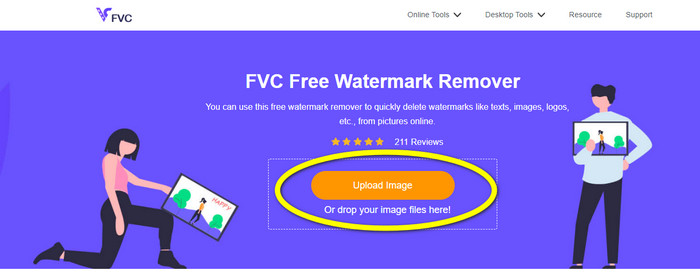
Step 1: The first step you must do is visit the FVC Free Watermark Remover website. Press the Upload Image button or drag your JPG file to upload it in this tool.
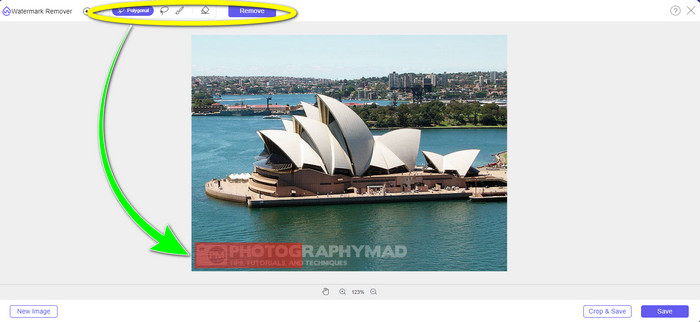
Step 2: Highlight the watermarks after uploading the photo. You can use tools like Lasso, Polygonal, and Brush to highlight.
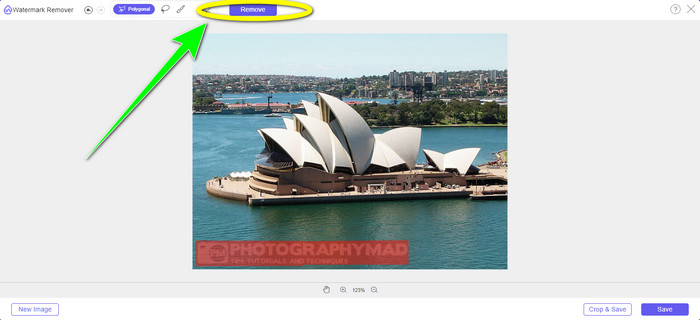
Step 3: After highlighting all the watermarks from your JPG file, you can already remove them by clicking the Remove button. Wait for the removal process, then proceed to the next step.
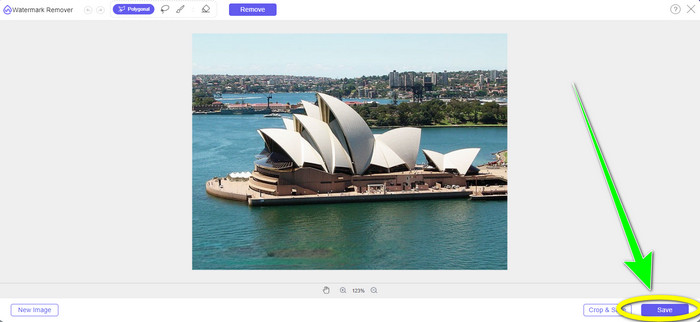
Step 4: When satisfied with your final output, click the Save button to save your JPG file without a watermark.
Using Brush Tool
Step 1: Upload the JPG image file with the watermark you want to remove.
Step 2: From the watermark remover tools, select the Brush tool to highlight the watermark from your photo. You can also click the + and - icons on the lower part of the interface to zoom your photo. Using the sliding bar below the brush tool, you can also change the brush size.
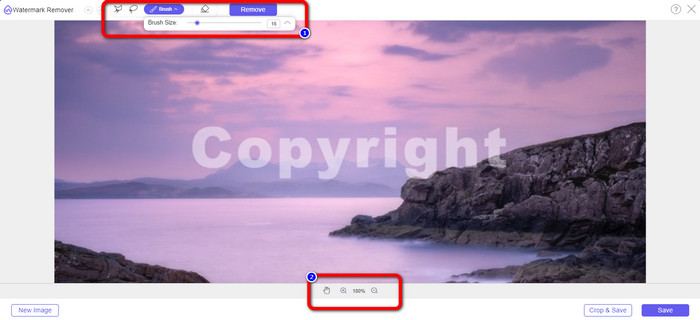
Step 3: After selecting the Brush tool, highlight all the watermarks from your photo.
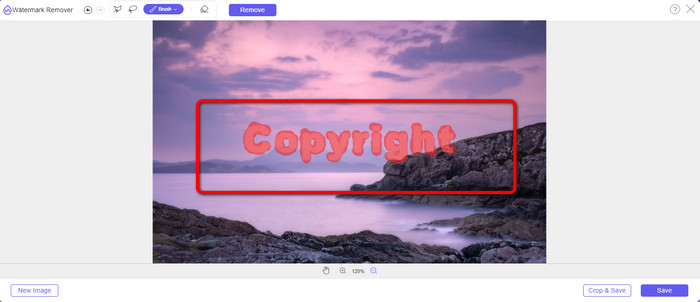
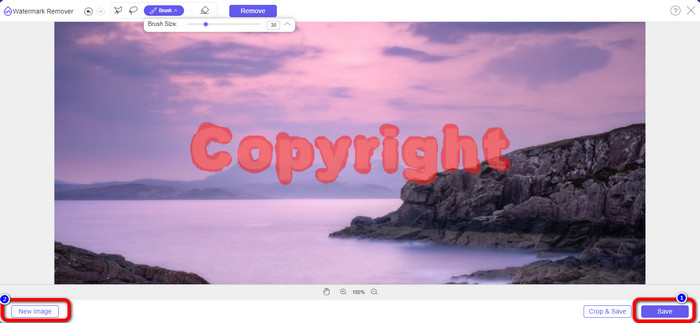
Step 4: When you are done highlighting the watermarks, you can remove them by clicking the Save button, and it will save the photo automatically. Open the file and see your photo without a watermark. If you want to remove the watermark from another photo, click the New Image button on the lower left part of the interface.
Using Lasso Tool
Step 1: Upload the JPG image file with a watermark.
Step 2: Choose the Lasso as your watermark remover tool.
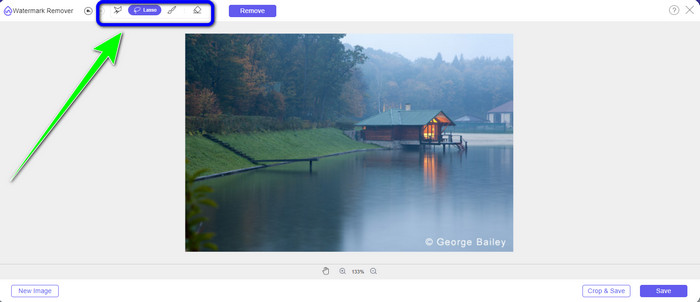
Step 3: Click the + icon below the photo to see the watermark clearly. Then, using the lasso tool, highlight the watermarks. The process is like using a pencil while pressing the left-click button. You can also click the Eraser button on the upper part of the interface to re-select the highlighted area.
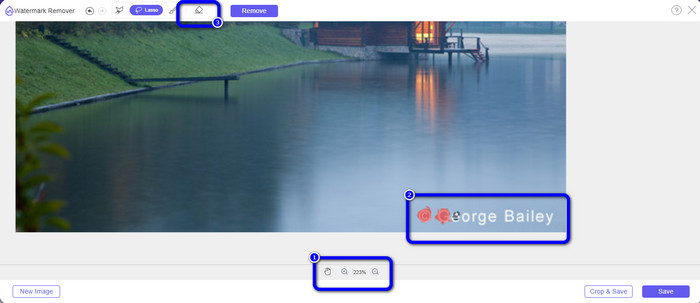
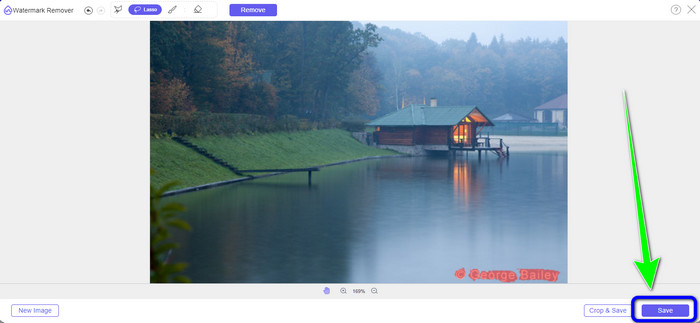
Step 4: If you are done highlighting the watermark using the Lasso tool, click the Save button to save the photo. Then, see the JPG image file without the watermark on it.
Using Cropping Tool
Ao usar a ferramenta Corte, certifique-se de que a área da marca d'água do seu jpg esteja na borda ou na parte do canto.
Step 1: Upload the JPG image file.
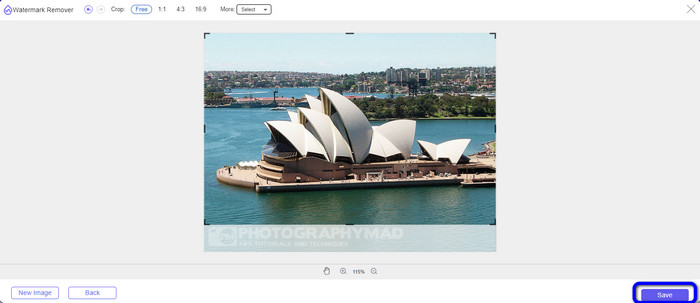
Step 2: Select the Crop & Save button to proceed to the cropping process.
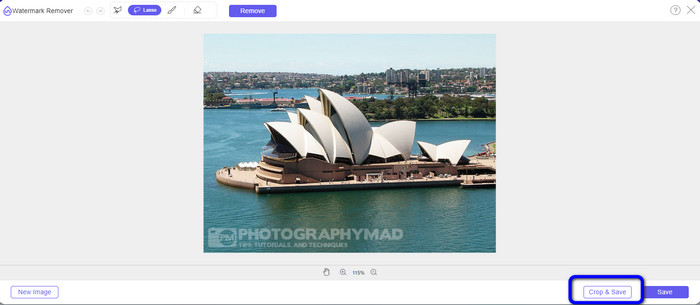
Step 3: In this part, you can already crop your photo. You can also choose the upper part of the interface to crop your photo.
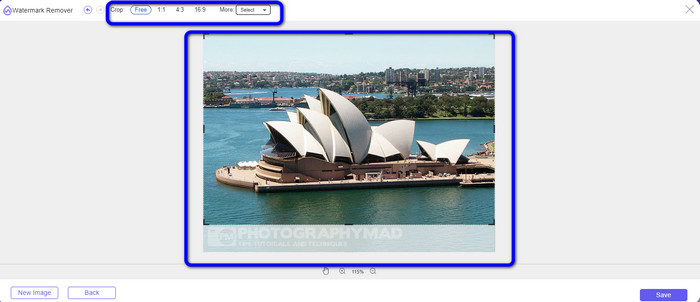
Step 4: You can click the Save button after cropping your photo to save it.
Related to:
How to Remove People from Photos: Easy & Fast Process
Easy Ways on How to Remove iSkysoft Logo from Video
Parte 3: Perguntas frequentes sobre como remover marca d'água de JPG
O que acontece se você remover uma marca d'água de uma foto?
Depois de remover uma marca d'água de uma foto, a imagem editada será excluída o mais rápido possível. É por causa da modificação intensa da foto original.
Existe uma marca d'água difícil de remover?
Sim existe. Uma marca d'água de imagem completa, como o tipo usado por empresas de fotografia para proteger fotografias, é a única exceção a essa regra. É impossível erradicá-los totalmente. Se você fizer isso, verá a qualidade ruim da foto depois de remover a marca d'água da imagem inteira.
Posso remover marcas d'água de JPG sem perder a qualidade?
Yes, you can. Use the FVC Free Watermark Remover. This online software enables you to remove any unwanted elements from JPG image files without losing the quality.
Conclusão
This article shows you the best strategy you can follow to remove watermarks from JPG online. Also, you discovered the most excellent watermark remover tools, such as Lasso, Polygonal, Brush, and the Cropping tool. You can only find these tools from a reliable online application, which is the FVC Free Watermark Remover.
-
 Maneira mais rápida de remover o logotipo do vídeo no Adobe Premiere Pro
 Experimente estas maneiras fáceis e rápidas de remover logotipos de um vídeo no Adobe Premiere Pro. Este artigo oferecerá as melhores maneiras de tentar usar seu dispositivo.
-
 Como remover o logotipo do vídeo usando o Windows Movie Maker
 Se você quiser saber como remover logotipos de vídeos usando o Windows Movie Maker e outras formas alternativas, leia este artigo. Temos maneiras fáceis para você.
-
 Como remover o logotipo VideoScribe do vídeo sem esforço
 Você não precisa mais se preocupar em remover o logotipo VideoScribe de seus vídeos. Este artigo fornecerá métodos sem problemas. Leia este post para saber mais.
