


 Video Converter Ultimate
 Gravador de ecrã
 Reparo de vídeo
 Secure Download
O que você pode fazer quando o iPad parar de reproduzir vídeos
According to a recent survey, iPad is more popular than smartphone when it comes to video playback, partly because the large screen. However, iPad is not perfect and many users encounter the problem that iPad is not playing videos. Ordinary people cannot find out why this problem happens, not to mention how to fix it. Therefore, this article will identify and share 100% working solutions, so that you can enjoy your favorite videos smoothly again.

Parte 1: Por que o iPad não reproduz vídeos
Existem muitos motivos pelos quais o iPad para de reproduzir vídeos na sua memória ou no YouTube. As causas mais comuns incluem:
- 1. O formato de vídeo não é compatível com o iPad. É compatível com H.264, MPEG-4 e Motion JPEG.
- 2. Má conexão com a Internet.
- 3. Software ou aplicativo desatualizado. A Apple continua lançando atualizações para iOS, a fim de corrigir bugs e introduzir novos recursos. Se você não atualizou o software e o aplicativo de vídeo, os vídeos podem não ser reproduzidos no iPad.
- 4. Sem espaço suficiente. É preciso muita memória e armazenamento interno para reproduzir vídeos no iPad, especialmente vídeos de alta resolução.
- 5. O iPad está travando ou travando. Às vezes, o iPad não responde rápido o suficiente e o vídeo não é reproduzido.
Parte 2: 5 Soluções para corrigir o iPad que não reproduz vídeos
Solução 1: converter para formato de vídeo iPad
If a local video is not playing on iPad Pro, the major cause is the compatibility issue. FVC Free FLV Converter can help you to convert any video for iPad, such as MP4 to iPad, M2TS to iPad, etc. Although it is free to use, the video converter gives you a lot of pro-level features in the way anyone can learn quickly.
Free DownloadFor Windows 7 or laterSecure Download
Free DownloadFor MacOS 10.7 or laterSecure Download
Como converter vídeos para o formato iPad
Step 1: Add videos
Run the best iPad video converter once you install it on your computer. Then click the Add File(s) menu and import the video not playing on iPad. It can batch convert video files.
Tip: You need to transfer videos from iPad to your computer first.

Step 2: Set iPad as output format
Click and expand the Output format option, scroll down to find Apple iPad and select it, and choose your iPad model. Then the converter will set the format, codec and more automatically.

Step 3: Convert video for iPad
Go back to the main interface, click the Open Folder button and set a specific location to store the output. Finally, click on the Convert button to begin converting videos for playing on iPad. When it is done, transfer the results to your iPad and watch them.

Solução 2: reinicie o iPad
O iPad pode travar em um modo específico e os vídeos não serão reproduzidos. Felizmente, é muito fácil se livrar do problema.
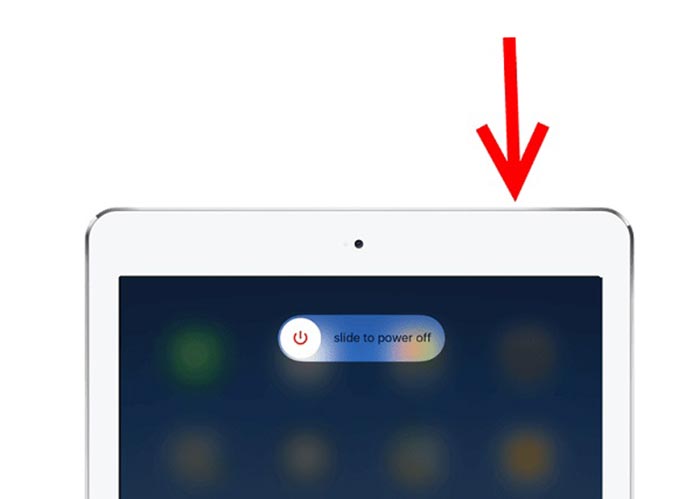
Step 1: Press the Power or Side button for a while until you enter the shut-down screen.
Step 2: Move the slider to right side and your iPad screen will turn black.
Step 3: Wait for at least 20 seconds and hold down the Power button again until the Apple logo appears on your screen. Now, try to play video again.
Solução 3: limpar o cache do iPad
A falta de armazenamento é outro motivo pelo qual o iPad não reproduz vídeos em sites. A solução é muito simples, fechando aplicativos em segundo plano e limpando o cache no Safari.
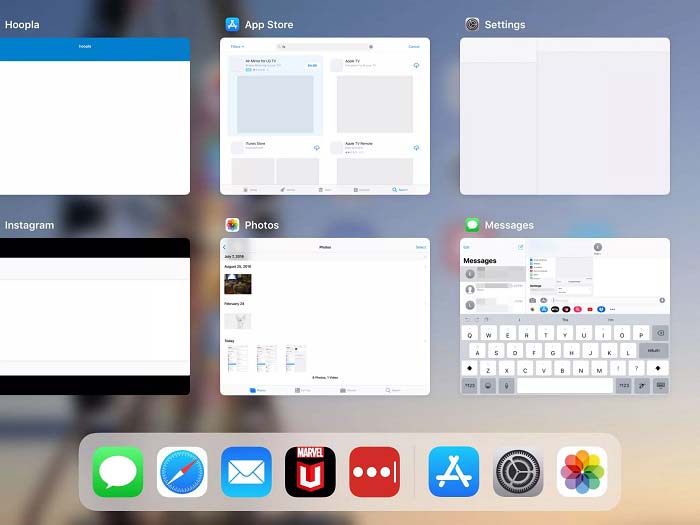
Step 1: Enter the multi-task mode with your fingers, and close all apps running in the background.
Step 2: Open the Settings app, tap Safari and then Clear History and Website Data.
Step 3: Play the video on iPad again and it should work normally.
Solução 4: atualizar o software
Software desatualizado pode causar muitos problemas, incluindo a interrupção da reprodução de vídeos no iPad. Na verdade, é fácil atualizar o software.
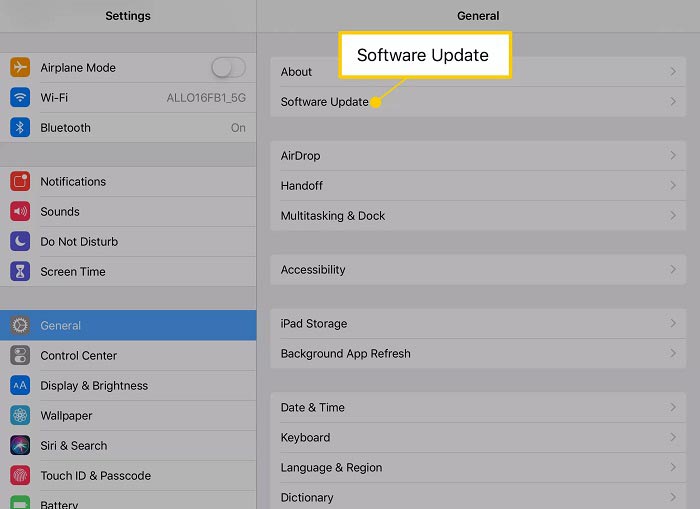
Step 1: Run the Settings app from your home screen, tap General and Software Update.
Step 2: If an update is available, tap the Download and Install button. When prompted, enter your passcode.
Step 3: Wait for the installation to finish and play your video again.
Solução 5: verifique o serviço Apple
Embora seja raro, o serviço da Apple pode estar inativo e os vídeos não serão reproduzidos no iPad nessa situação. Se você tentou as soluções acima e o problema persistir, execute as etapas abaixo para verificá-lo.
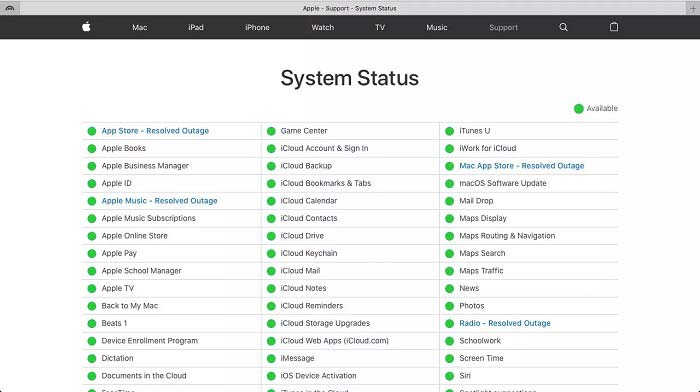
Step 1: Open a website and visit https://www.apple.com/support/systemstatus/.
Step 2: If the status icon on an Apple service turns to yellow or red, it means the service is down. All you can do is to wait for it to on again.
Parte 3: Perguntas frequentes sobre o iPad que não reproduz vídeos
Por que não consigo jogar MKV no meu iPad?
iPad doesn’t support playing MKV videos. You have to change the MKV video to iPad supported video formats, such as MOV and then play them on iPad. Read on 2 Easy Ways to Play MKV Files on iPad to learn more details,
Por que os vídeos do TikTok não estão sendo reproduzidos?
Em primeiro lugar, verifique sua conexão com a Internet quando os vídeos TikTok pararem de ser reproduzidos. Em seguida, atualize seu aplicativo TikTok para a versão mais recente. Além disso, é melhor você assistir ao TikTok com uma rede Wi-Fi, mas não com dados de celular.
Como jogar MP4 no iPad Air?
O iPad Air oferece suporte a vídeos MP4 com codec de áudio AAC. Você pode tentar reproduzi-lo diretamente no seu aparelho.
Conclusão
Esta parte da solução de problemas ajuda a corrigir o problema de que o iPad não está reproduzindo vídeos na memória. FVC Free FLV to MP4 Converter é a melhor solução para vídeos locais que não são reproduzidos. É capaz de ajustar codecs de vídeo e oferecer predefinições para quase todos os dispositivos iPad. Mais importante, o conversor é muito fácil de usar. Se você tiver outros problemas, sinta-se à vontade para deixar uma mensagem na área de comentários abaixo deste post.
-
 3 principais maneiras de jogar MP4 no Chromebook
 Você pode reproduzir vídeos no Chromebook? Como reproduzir arquivos MP4 de USB no Chromebook? Esta postagem compartilha três maneiras de jogar MP4 no Chromebook.
-
 WebM Player Review - 5 melhores softwares para reproduzir arquivos WebM sem problemas
 Se quiser reproduzir um WebM com sucesso em seu dispositivo, você deve aprender mais sobre os 5 melhores reprodutores WebM para Android, iPhone, Windows, Mac neste artigo.
-
 Os 10 melhores reprodutores de vídeo FLV para Windows 10/8/7, Mac, iOS e Android que você deve experimentar (2021 mais recente)
 O FLV player ajuda você a acessar facilmente seus arquivos FLV em seu dispositivo Windows, Mac, Android ou iOS. Confira os melhores reprodutores de arquivos FLV que você pode baixar agora.
