


 Video Converter Ultimate
 Gravador de ecrã
 Reparo de vídeo
Aprenda a reproduzir vídeo ao contrário com o software 3 Elite
A lot of ongoing videos uploaded in all different video sharing platforms already added the reverse effect to make their videos something new to the eye of the viewer. So, in this article we will be going to talk about how to play a video in reverse with detailed steps and different software you can use. So, keep on reading this article to have an idea about reversing video.

Parte 1. Melhor maneira de reproduzir vídeo ao contrário
The phenomenal converter already took the first step on video editing, especially reversing. As a lot of users already use this tool to make their videos outstanding. The Video Converter Ultimate already proved a lot more than they expected to its loyal customer. Moreover, this software provides a lot of advanced features you can use to make your recording something new to the eye of the viewers. So, do you want to know how to play a video on reverse and save it? Then follow the steps below and try it for yourself.
Step 1. Before you can use the Video Converter Ultimate you will need to download it first. Install it and do the quick and easy set-up.
Free DownloadFor Windows 7 or laterSecure Download
Free DownloadFor MacOS 10.7 or laterSecure Download
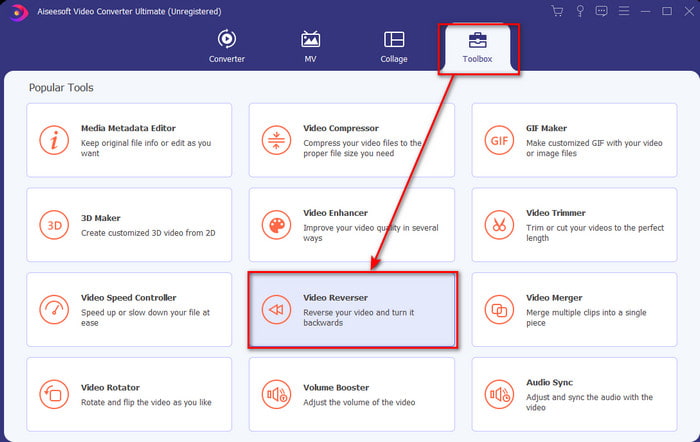
Step 2. Go to the Toolbox and locate the Video Reverser.
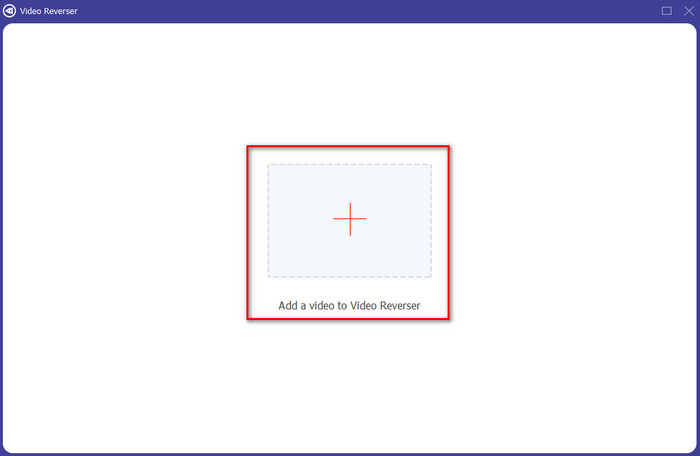
Step 3. To add the file, click the + button and a folder will show. Select the video file and click Open to insert the file.
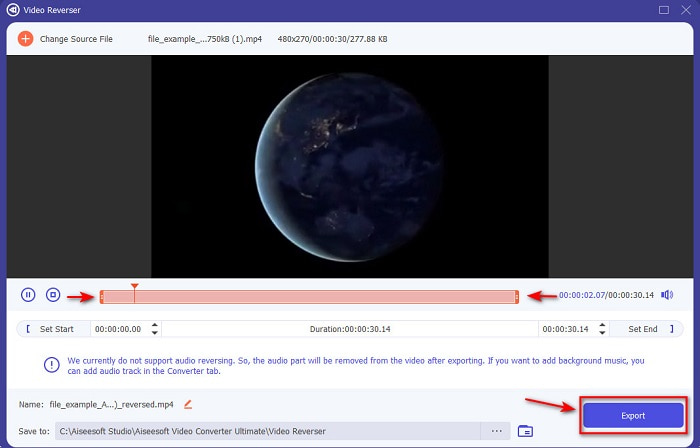
Step 4. Change the playback in and out if you want to make the video short. Then click Export to start the saving of the reverse video to your desktop.
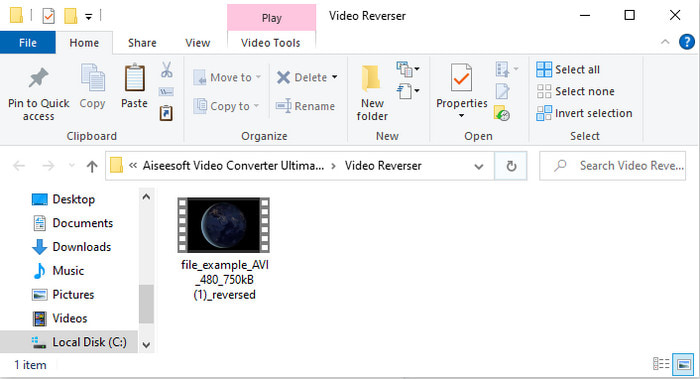
Step 5. After the video has been exported, a folder with the video reverse will show to your screen. Click the file to watch the reversed video.
Prós
- Ele tem muitos recursos avançados e é muito mais fácil de manusear do que o Adobe Premiere Pro.
- Ele suporta todos os formatos de vídeo. Portanto, não precisa se preocupar se o seu vídeo estiver no formato AVI, MP4, MKV, MOV ou outro.
- Adequado para profissionais e iniciantes que desejam ter uma ferramenta simples que fornece um recurso de conversão fenomenal.
Contras
- É pago, mas o preço é muito menor se o compararmos com o software profissional de estreia.
- Antes de poder acessar a ferramenta, você precisará baixá-la primeiro.
Parte 2. Como reproduzir um vídeo ao contrário no iMovie
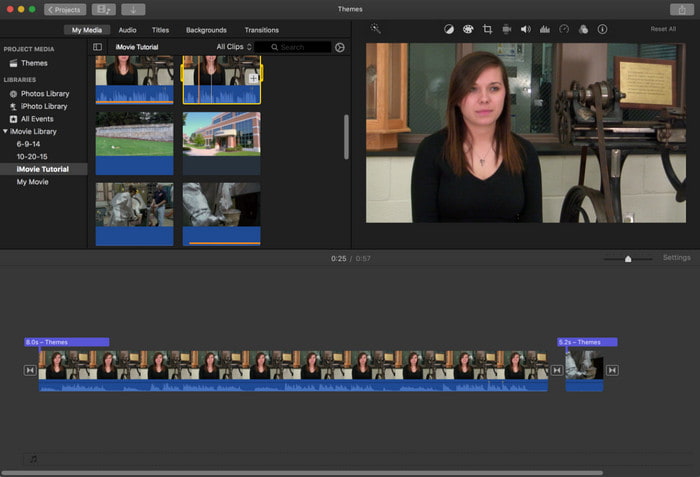
iMovie is the native video editor you can use for free on Mac. This tool is already pre-installed on the drive, so you will not need it to download the tool to access it. So, if you want to know how to play a video in reverse on iMovie then follow the steps below.
Step 1. Open the iMovie on your Mac. Then drag the file to the Timeline.
Step 2. Click the clock like shape button and tick the Reverse. Then adjust the speed of it to Normal, Slow, Fast, and more.
Step 3. To save the output click the Export button and save it to your gallery.
Prós
- Não é necessário fazer download e é gratuito para todos os usuários de Mac.
- Fácil de usar para edições rápidas que você gostaria de fazer imediatamente.
- Possui recursos de salvamento automático, portanto, não há necessidade de comandar + S.
Contras
- Exportar vídeos aqui levaria muito tempo.
- Ele não possui recursos avançados que você precisará como editor profissional.
Parte 3. Como fazer uma reprodução de vídeo ao contrário usando o Adobe Premiere Pro
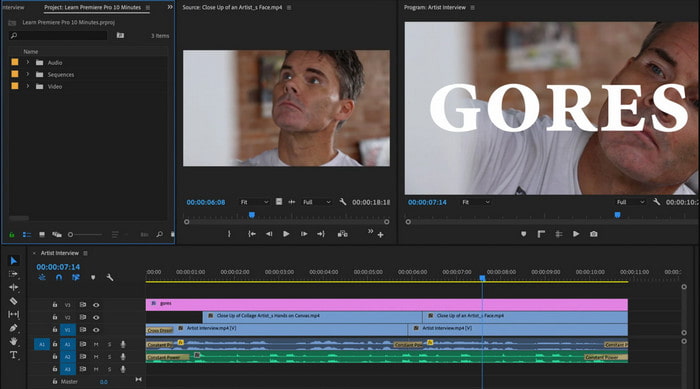
Adobe Premiere Pro is the best editing tool you can use if you want to have the best output as a pro. But the tool is overwhelming to a beginner that doesn't have experience editing videos. So, if you want to learn how to make a video play in reverse Premiere Pro copy the steps below accordingly.
Step 1. Download the Adobe Premiere Pro to your drive and launch the software.
Step 2. Drag and drop the video file into the Media Port then transfer it to the Timeline. Click the video and right click it next then go to the Speed/Duration.
Step 3. Check the Reverse Speed and set your desired duration then click OK.
Prós
- É a melhor escolha para o editor profissional, pois suporta recursos avançados para saída profissional.
- Ele pode fazer edições pesadas e você precisará produzir vídeos editados de alta qualidade.
- Ele suporta quase todos os formatos de vídeo.
Contras
- É muito caro se você quiser apenas reverter ou fazer uma edição simples.
- Aprender a usar isso levará muito tempo. Basicamente, não é amigável.
- Às vezes, o software trava por motivos desconhecidos.
Parte 4. Perguntas frequentes sobre a reprodução de vídeo ao contrário
Como reproduzir um vídeo ao contrário em um iPhone?
iPhone doesn't have a built-in reverse editing feature but you can download apps that can help you to reverse on your iPhone easily. Like the apps you can use here. So, if you want to know more then click this link to go to the other video reverser you can use.
Por que meus vídeos reduzem a qualidade após a reversão?
Pode ser que a saída que você definiu esteja no meio ou no baixo. Mas para evitar isso, você pode definir as configurações como altas para ter um vídeo reverso sem perda de qualidade. No entanto, espere um tamanho de arquivo muito maior do que o de baixa qualidade.
Como posso adicionar sons no meu vídeo reverso?
All of the tools in this reverse your video but the audio is not included. So, if you want to know how to add background music on your video then try to read this article. As we explain how to add audio to your video to make it better.
Conclusão
Now that we know how to play a video in reverse, it is now the right time to make it. With the help of this incredible tool, you can find it on the internet. However, if you want to make an extra ordinary reverse video than iMovie but less expensive than premiere pro then the right tool for you is the Video Ultimate Converter. As per customers demand this software is great in all aspects you want to have in reversing. So, before you begin your journey on reversing video you must choose the right tool that can make your video phenomenal. To know more you must download this tool first and let the tool do the work.
-
 Tutorial Concreto - Como Mesclar Duas Trilhas de Áudio no Audacity
 O Audacity tem fama de editar áudio. Você baixou o Audacity, mas não sabe como mesclar faixas de áudio no Audacity? Este post mostrará como mesclar faixas no Audacity.
-
 2 métodos eficientes para mesclar arquivos MPEG para combinar antigas séries de TV
 Quando você tem alguma série de TV antiga em MPEG, pode aprender mais sobre os 2 métodos eficientes para mesclar arquivos MPEG em um filme de acordo com seus requisitos.
-
 2 maneiras de compactar vídeos AMV em tamanhos menores
 Se você deseja fazer upload ou download de MVs animados online, o tamanho grande do arquivo AMV é uma chatice. Esta postagem compartilha 2 maneiras fáceis de reduzir o tamanho do arquivo AMV no computador para resolver esse problema.
