


 Video Converter Ultimate
 Gravador de ecrã
 Reparo de vídeo
 Secure Download
4 Cortadores de música online e fusões para cortar a música e combinar clipes de áudio
Se você quiser fazer música de fundo para o Tiktok ou YouTube, como cortar e mesclar músicas online? Quando você deseja combinar sua voz com sua música favorita ou cortar a parte desejada para o vídeo, especialmente os arquivos de áudio estão em formatos diferentes, você pode aprender mais sobre os 4 melhores cortadores e fusões de música online. Basta saber mais sobre os recursos e escolher o desejado de acordo com sua necessidade.

Parte 1: 4 melhores métodos para cortar e mesclar músicas online
Método 1: Clideo
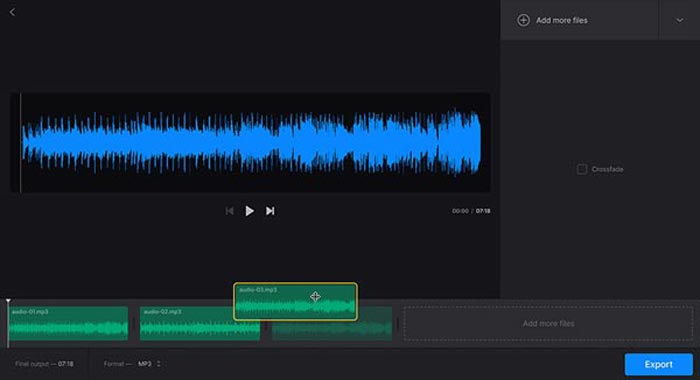
Clideo is one of the most popular methods to cut and merge songs online for MP3, WMV, and more other audio formats. It enables you to upload the audio files from your hard drive, Google Drive, Dropbox, and even URL. Moreover, you can apply crossfade effects for merging the music files.
Step 1: To cut and merge songs online, you can go to the audio joiner or audio cutter and select the audio files from different channels. Moreover, you can also select your file or paste it into the URL.
Step 2: Once you have uploaded the song, you can type in the period to crop the audio, or add more tracks to merge. Then, you can select the desired part to be combined or deleted.
Step 3: Just listen to the songs you have merged or trimmed, you can click the Download button to download the music to your computer or a cloud storage account.
Método 2: Soundtrap
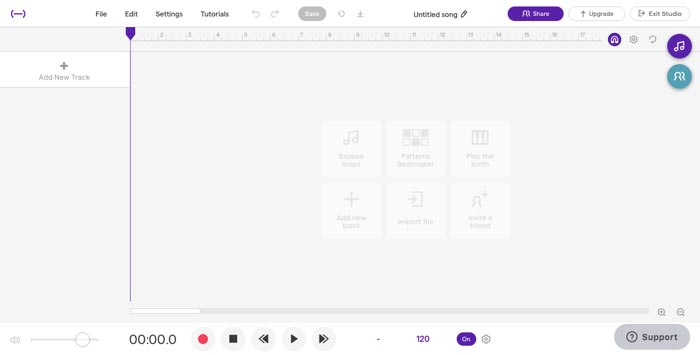
When you need to make stunning music files as a profession, Soundtrap is an excellent online cutter and merger to add voice, microphone, piano, keyboard, guitar, bass, drum, and more others. You can edit music online, in real-time, with your musician friends around the world.
Step 1: Once you have entered the Studio of Soundtrap, you can create a new project and click the Music button to import different audio clips to cut and merge songs online.
Step 2: Select the Edit menu and choose the Split region option, or the Merge region option to edit the music files. Moreover, it enables you to a mute region or an auto-tune the audio files.
Step 3: When you are satisfied with the audio file, you can adjust the audio quality and tweak MIDI settings. Preview the music file online before clicking the Save button to export the file.
Método 3: Audiotool
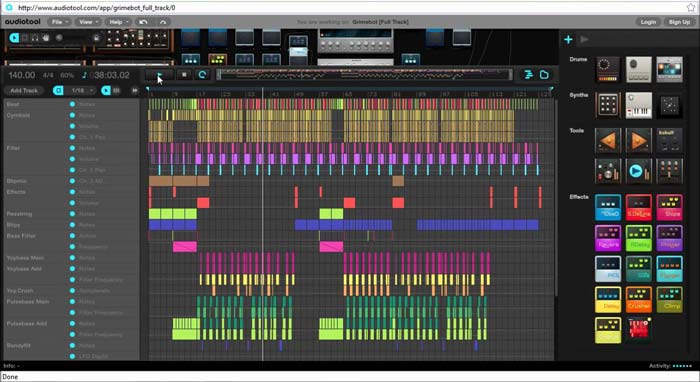
Audiotool has a unique and visually appealing user interface that enables you to cut and merge songs online. The collaborative online music production studio can spice up your music, combine songs, and even import the files right in your browser.
Step 1: When you import the audio files into the online music editor, you can go to the Project menu to create a new file by clicking the New button. After that, you can preview the audio within the program.
Step 2: Then you can choose the desired effects, select the suitable tool, add notes to the files, and more. After that, you can select the desired audio clip to trim and merge the songs online.
Step 3: Once you get the desired files, you can click the Publish option to export the songs to your computer, or share them to social media websites according to your requirements.
Método 4: TwistedWave
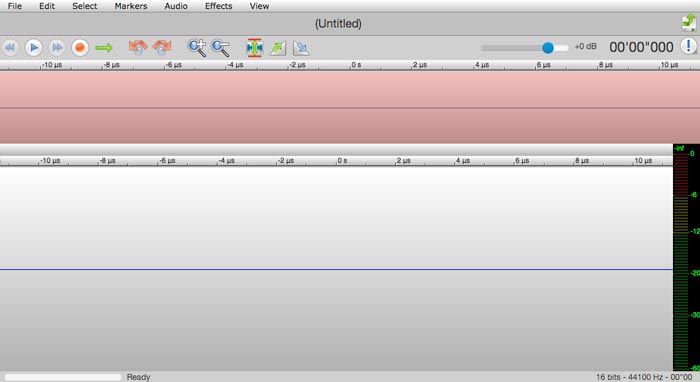
TwistedWave is a web-based audio editor, which not only enables you to cut and merge songs online but also records the audio file from YouTube. It has dozens of effects, such as VST effects, amplify, fade-in, fade-out, remove DC offset, or reverse the audio files.
Step 1: Go to the online music editor, you can import the audio files from Google Drive and more other cloud services. Then you can preview the audio files online directly.
Step 2: When you want to cut the desired part, you can grab and drag two arrows to move the audio in or out of the cut. Moreover, the two arrows are visible on each side of the cut.
Step 3: As for merging audio files online, by using the option or shift-option key combinations while double-clicking, you can add or remove whole channels from the current selection.
Parte 2: Melhor Gravador de Música Online e Alternativa de Fusão
What should you do if you combine the audio from a video? How to combine the different audio files with the best quality? If you want to cut and merge songs online with the best effect, FVC Online Video Converter is the desired audio converter. It enables you to convert the audio and video files, customize the video bitrate, sample, frame rate, as well as resolution.
- 1. Converta os arquivos de vídeo e áudio para os mesmos formatos de áudio.
- 2. Ajuste a taxa de bits de áudio, taxa de amostragem, resolução, volume e muito mais.
- 3. Fornece vários formatos de saída de áudio e vídeo para selecionar.
- 4. Nenhum dado será perdido durante o processo de conversão.
Free DownloadFor Windows 7 or laterSecure Download
Free DownloadFor MacOS 10.7 or laterSecure Download
Parte 3: Perguntas frequentes sobre como recortar e mesclar músicas online
1. É possível cortar e mesclar música de um vídeo?
sim. Você pode simplesmente importar o vídeo para o cortador de música online e mesclar para extrair os arquivos de áudio quando os formatos de vídeo forem compatíveis. Claro, você também pode converter os arquivos de vídeo em formatos de áudio com antecedência.
2. Quando você corta e mescla músicas online?
Diferente de editores de música profissionais, como Adobe Premiere Pro ou Final Cut Pro, você pode cortar e mesclar músicas online de forma conveniente. Você sempre pode usar o programa quando tiver uma conexão sólida com a Internet.
3. Quais são os melhores aplicativos no iOS / Android para cortar e mesclar músicas?
Para cortar e mesclar música em um iPhone ou telefone Android, você também pode usar alguns aplicativos diretamente, como TonePad, Medly, GarageBand, Music Maker Jam e mais outros. Independentemente do seu nível de habilidade, você sempre pode editar e criar sua música de forma conveniente.
Conclusão
Quando você quiser criar algumas músicas impressionantes cortando e mesclando músicas online, você pode aprender mais sobre os 5 melhores métodos do artigo. Se você deseja editar a música como profissão, FVC Free Audio Convert é o melhor companheiro para converter, ajustar a taxa de bits de vídeo, amostra, taxa de quadros, resolução e mais outros parâmetros.
-
 MP3 VS MP4: Qual é a diferença entre MP3 e MP4
 MP3 ou MP4, o que é melhor? Qual é a diferença entre MP3 e MP4? Este artigo irá comparar o MP3 com o MP4 em todos os aspectos que você pode imaginar.
-
 Como adicionar áudio e música ao vídeo gratuitamente em seu computador / telefone
 Este artigo mostra 4 maneiras fáceis de adicionar áudio a vídeo gratuitamente. Não importa qual faixa de áudio você deseja adicionar ao seu vídeo, você pode obter resultados satisfatórios aqui.
-
 Tutorial Concreto - Como Mesclar Duas Trilhas de Áudio no Audacity
 O Audacity goza de reputação na edição de áudio. Você baixou o Audacity, mas não sabe como mesclar faixas de áudio no Audacity? Esta postagem vai lhe dizer como mesclar faixas no Audacity.
