


 Video Converter Ultimate
 Gravador de ecrã
 Reparo de vídeo
 Secure Download
Como inverter um vídeo em um iPhone ou Android tornando a inversão fácil
Vídeos estáticos são chatos, não são? Com essa situação, você deseja adicionar uma nova perspectiva ao seu conteúdo de vídeo e cativar seu público. Nesse caso, é hora de começar a inverter seus vídeos em seu dispositivo Android ou iPhone. Inverter vídeos é uma maneira simples, porém poderosa, de transformar seu conteúdo e criar uma experiência de visualização dinâmica. Com os programas e técnicas certos, você pode virar e girar facilmente seus vídeos para adicionar um toque exclusivo a seus vlogs, postagens de mídia social ou qualquer projeto de vídeo que tenha em mente.
By learning how to mirror a video on an iPhone or Android device, you will be amazed at how flipping your videos can transform your content. That being said, let us get started to get a knowledge of how to flip videos on mobile devices like a pro!

Parte 1. Guia de como inverter um vídeo em um iPhone
O InShot é gratuito para baixar e usar, com muitos de seus recursos disponíveis sem nenhuma compra no aplicativo. Além disso, o aplicativo permite que você vire e gire vídeos sem problemas. Você pode virar ou espelhar vídeos horizontalmente e verticalmente. Além disso, é possível girar clipes em 90 ou 180 graus usando este programa. Para descobrir como inverter um vídeo em um iPhone, siga as etapas fornecidas:
Step 1. If you haven't already, go to the App Store and get the InShot app.
Step 2. To flip a video, open the InShot app and click the plus icon from the main screen. The Flip tool, among other editing options, will emerge. When you select the Flip tool, you can choose between Horizontal and Vertical.
Step 3. Just choose the desired option, and your video will instantly be inverted. With the Play button, you may watch a preview of your flipped video.
Parte 2. Tutorial Como inverter um vídeo em um Android
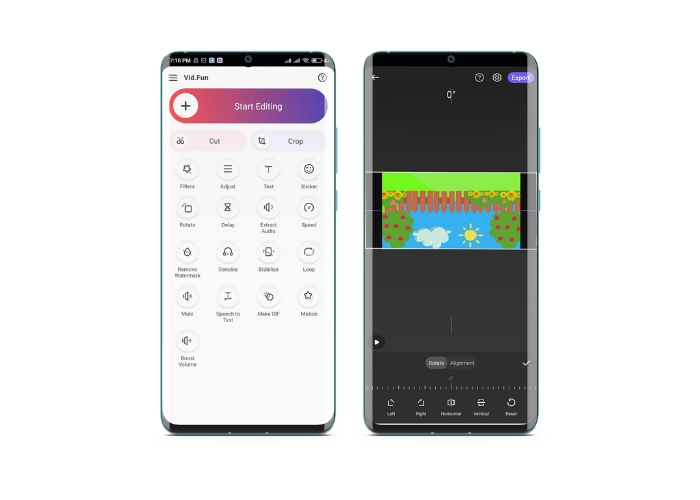
Vid.Fun is a powerful video editing app designed specifically for Android devices. Besides flipping videos horizontally and vertically, you have access to other useful editing tools. That includes trimming, cutting, merging, and splitting your videos. Meanwhile, you can showcase your creativity using the tool's slideshow feature. Nevertheless, here is a step-by-step guide on how to flip a video on an Android device:
Step 1. Launch the app and tap on the Start Editing button to select the video you want to flip. Hit Yes at the bottom of the screen to confirm the selected video.
Step 2. After that, tap All at the bottom right corner, and different editing options will emerge. Now, tap the Motion option.
Step 3. You'll see a range of editing tools appear, including the tool. Tap on the appropriate options between Horizontal and Vertical. Select the option you want, and your video will be flipped accordingly. You can preview your flipped video by tapping the Play button.
Step 4. If you're happy with your flipped video, tap the Export button to save it to your device or share it directly to social media. That is how you use this flip video app.
Bônus: Como inverter um vídeo em um computador
If you're looking for an easy and efficient way to flip videos on your computer, look no further than FVC Video Converter Ultimate. This popular video editing software offers a range of editing tools and features, including the ability to flip and rotate videos with just a few clicks. It supports flipping videos horizontally and vertically or rotating videos. Moreover, the program comes with a toolbox that houses a range of editing tools for your needs.
Step 1. Obtain the program
First and foremost, get the installer of the program by ticking the Free Download button below. Make sure to select the appropriate installer for your computer's operating system. Then, set it up and launch it.
Free DownloadFor Windows 7 or laterSecure Download
Free DownloadFor MacOS 10.7 or laterSecure Download
Step 2. Launch the video rotator
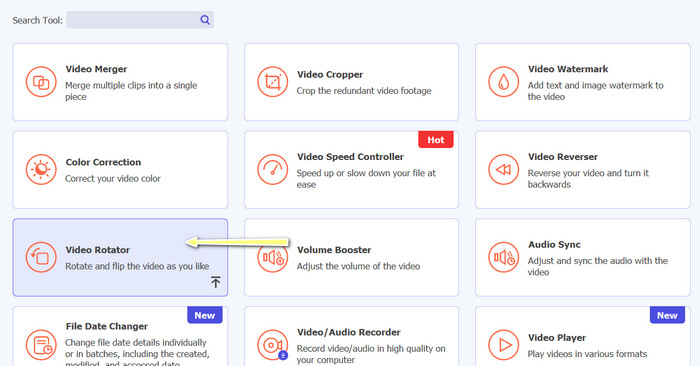
Once the program has been started, you will notice that the primary window has four tabs. Choose Video Rotator from the Toolbox menu. There's also the option of using the search box to look for the instrument and fast accessing it.
Step 3. Insert a video file
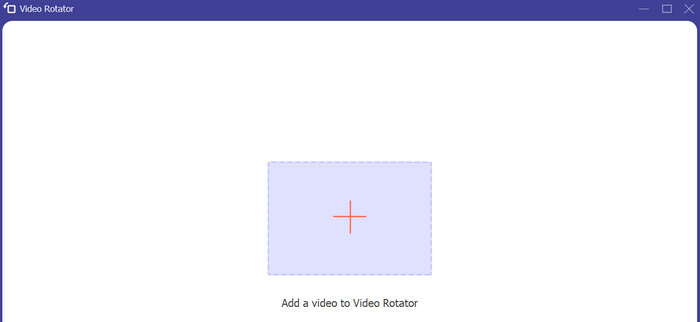
The Video Rotator has a + button for uploading videos. Tick that button, and the interface for flipping will then load.
Step 4. Invert the video
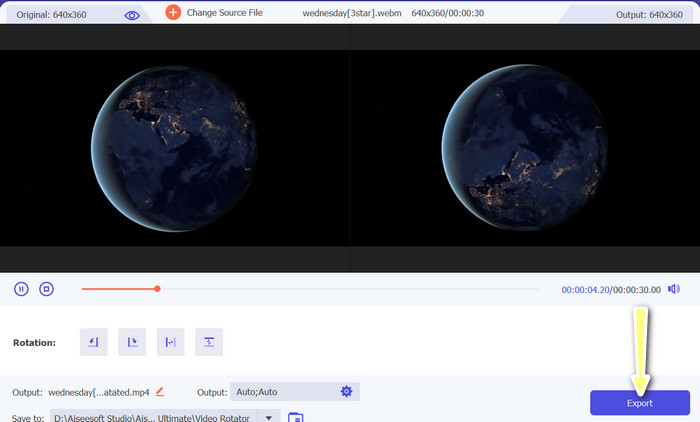
You can use the interface's flipping buttons once it has been displayed. You can choose between playing the video horizontally or vertically. To complete the procedure, click the correct button and then the Export button.
Further Reading:
Easiest Ways on How to Speed Up a Video on Your Android Devices [2023]
How to Shorten A Video on iPhone [Detailed Tutorials]
Parte 3. Perguntas frequentes sobre a inversão de vídeos no Android e no iPhone
Posso virar um vídeo de volta à sua orientação original?
Sim, você pode inverter facilmente um vídeo de volta à sua orientação original usando um aplicativo para inverter o vídeo no Android ou iPhone. Basta aplicar o efeito flip novamente e ele voltará à sua orientação original.
Posso inverter um vídeo usando o aplicativo de câmera integrado no meu dispositivo Android ou iPhone?
Não, o aplicativo de câmera integrado não possui um recurso de inversão de vídeo. Você precisará usar um aplicativo ou software de edição de vídeo para inverter seus vídeos.
Inverter um vídeo reduzirá sua qualidade?
Inverter um vídeo não deve reduzir sua qualidade, mas pode afetar a orientação de qualquer texto ou gráfico no vídeo. Se você está preocupado com a qualidade, é melhor usar um aplicativo ou software de edição de vídeo de alta qualidade.
Conclusão
So why not download one of these apps today and start flipping your videos to create exciting and unique content for your audience? You will surely gain more views and gather more likes after learning how to flip a video on an iPhone or Android device.
-
 Tutorial - 4 maneiras gratuitas de mesclar vídeos do iPhone em um novo
 Leia e obtenha 4 maneiras fáceis de mesclar vídeos no iPhone. Todos os modelos de iPhone e versões iOS são suportados. Você pode combinar 2 ou mais vídeos no iPhone em um novo vídeo rapidamente.
-
 Dicas sobre como alterar metadados de vídeo no iPhone ao seu alcance
 Você tem dificuldades para alterar os metadados de vídeo em dispositivos iPhone? Felizmente, este artigo fala sobre a melhor maneira de alterar os metadados de vídeo no iPhone.
-
 Edite como um profissional: como cortar seus vídeos do iPhone sem esforço
 Se você'está procurando levar suas habilidades de edição de vídeo do iPhone para o próximo nível, os aplicativos de corte de vídeo são uma virada de jogo. Abordaremos alguns dos melhores aplicativos de corte de vídeo para iPhone.
