


 Video Converter Ultimate
 Gravador de ecrã
 Reparo de vídeo
 Secure Download
Como remover adesivos de fotos e vídeos de maneira conveniente
If you love watching videos, it is considered that you don’t want to encounter some disturbance while watching. But unfortunately, there are times when your videos have attached stickers on them, which is frustrating when watching. Also, some photos have stickers, so you can’t appreciate the beauty of the photo because of these irritating stickers. Luckily, this article will offer you the best ways to solve this problem. You will also discover the outstanding tools you can use. Read this article to learn how to remove stickers from your photos and videos.

Parte 1: Melhores métodos para remover adesivos de fotos
One of the greatest photo sticker removers you can try is the FVC Free Watermark Remover. This online tool can help to remove unnecessary elements from your photos, such as watermarks, stickers, logos, signatures, and more. In addition, it supports the most commonly used image formats, like JPEG, PNG, BMP, etc. Also, your photo will be saved in the same format after you remove the stickers. Moreover, this free watermark remover allows you to use your mouse to draw a polygonal outline or lasso on your image to select the area for removing stickers. But wait, there’s more. There is another way to wipe away the stickers from your photo. If the sticker is placed in the edge or corner of the photo, then you can use the Cropping tool function. With a simple interface and process, FVC Free Watermark Remover is convenient for any user, especially non-professional users.
Siga estes guias simples e detalhados para remover um adesivo de suas fotos.
Usando a ferramenta de remoção de marca d'água
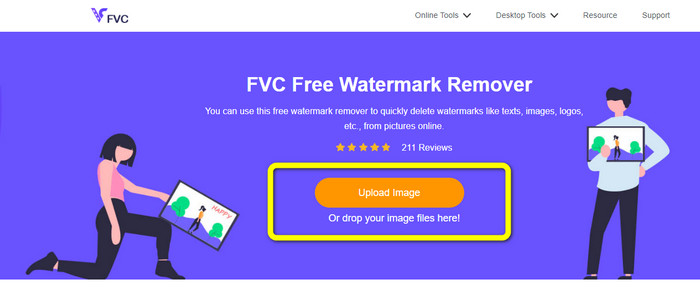
Step 1: Visit the FVC Free Watermark Remover website to remove stickers. Click the Upload Image button to insert the photo with a sticker.
Step 2: After adding the photo, you can use the watermark remover tools to remove the stickers from your photo. You can use the Polygonal tool, Lasso tool, and Brush tool.
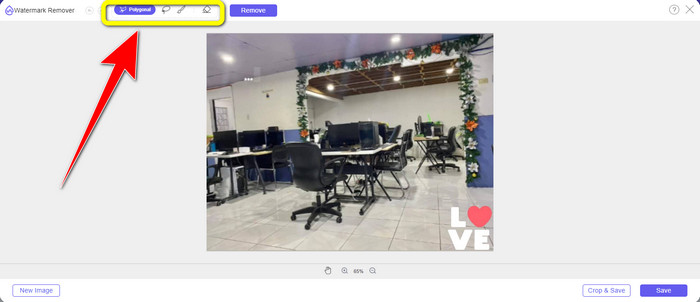
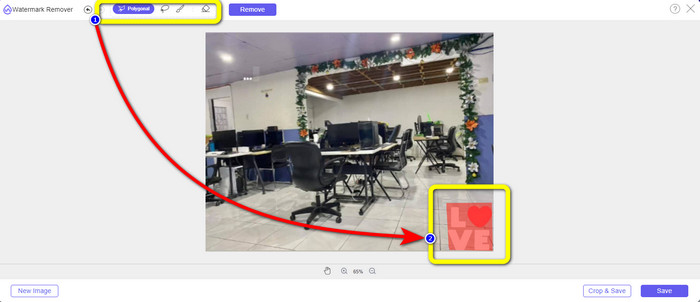
Step 3: Next step is to highlight the sticker from your photo using the watermark remover tools.
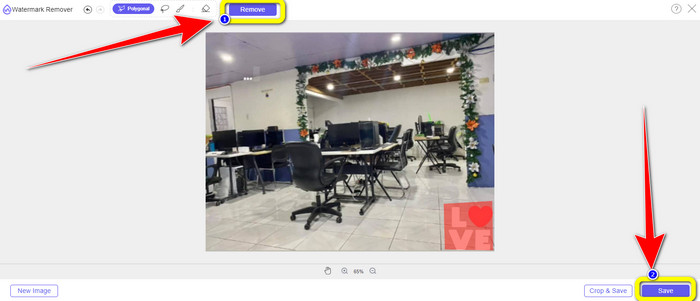
Step 4: When you highlight the sticker from your photo, click the Remove button. Wait for the removal process and click the Save button.click-remove-button-save.jpg
Usando a Ferramenta de Recorte
Siga estas etapas abaixo se quiser recortar sua foto para eliminar o adesivo.
Step 1: After uploading your photo with a sticker, select the Crop & Save button.
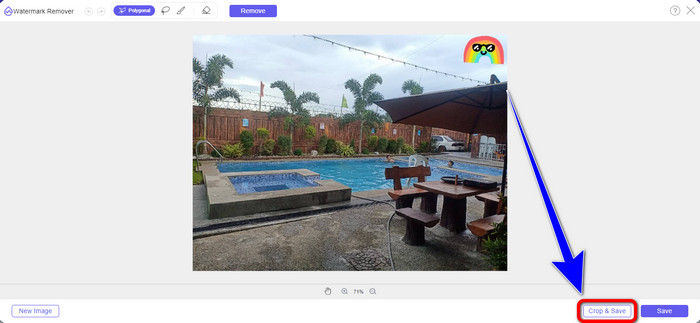
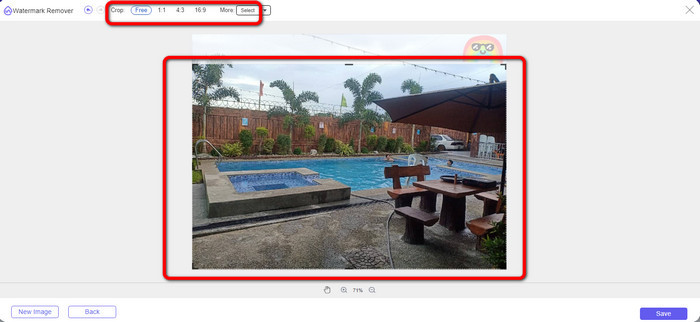
Step 2: You have two ways to crop your photo in this part. You can choose the cropping options on the upper part of your interface on how you crop the photo. You can also select the Free options to crop the photo manually to eliminate the sticker.
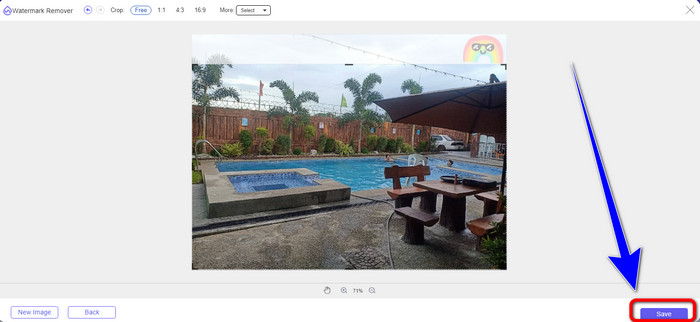
Step 3: When you are done cropping the photo, click the Save button to save your photo.
Usando o Snapseed
Snapseed is the ideal and effective tool for Android and iOS users to remove stickers from pictures. This software offers a healing tool that allows you to remove any undesired objects or elements like watermarks from your photos completely. You can successfully edit out a sticker with just a few clicks. Additionally, you may publish your photo immediately to other social media platforms like Facebook, Instagram, and Twitter while maintaining the original quality. However, you should know about this application because it has many confusing options for new users.
Step 1: Download Snapseed on your Android or iOS.
Step 2: On the interface, click the Plus icon on the screen to add a photo with a sticker.
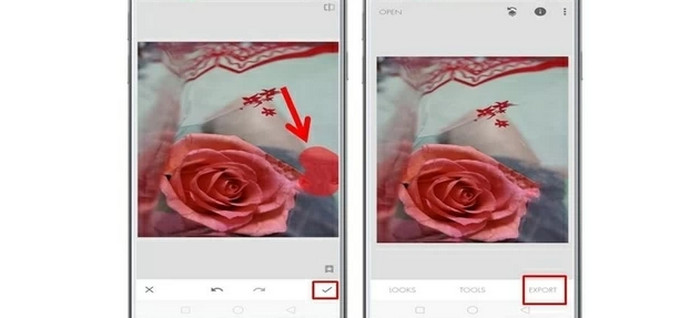
Step 3: Select Tools and choose the Healing icon.
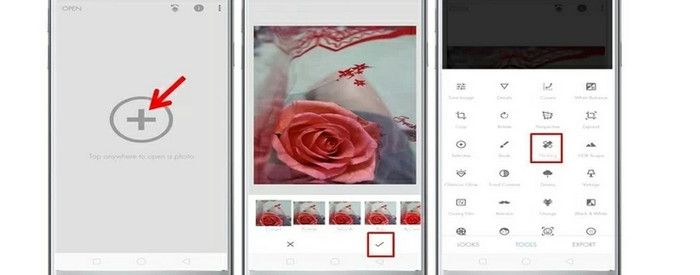
Step 4: Press the Check icon and Export to save your photo.
Parte 2: Como remover adesivos de vídeos
Video Converter Ultimate is the greatest tool if you're looking for the most remarkable and excellent program to remove stickers from your videos. This program may remove distracting elements from your videos, such as stickers, watermarks, logos, signatures, and images. Additionally, you don't have to wait much longer for the saving procedure to complete because, after eliminating the stickers, you may rapidly save your videos. Also, Video Converter Ultimate has a ton of editing tools that you can use. If you plan to trim or cut your video to the perfect length, you can use the Video Trimmer tool. This way, you can freely trim your video.
Além do vídeo, se você deseja converter imagens, ainda pode contar com esta ferramenta. Ele também oferece uma ferramenta Image Converter que suporta vários formatos de imagem, como JPG, PNG, BMP, WEBP, etc. O melhor é que você não precisa mais comprar ou adquirir este aplicativo. Isso pode ser usado sem gastar. Por fim, possui uma interface simples e métodos básicos, perfeitos para todos os usuários. Siga as formas simples abaixo para remover adesivos de seus vídeos.
Step 1: First, download Video Converter Ultimate by clicking the Download button below. If you are a Windows user, select the Windows downloading button and the other button if you are a Mac user. Then, launch the application after the installation process
Free DownloadFor Windows 7 or laterSecure Download
Free DownloadFor MacOS 10.7 or laterSecure Download
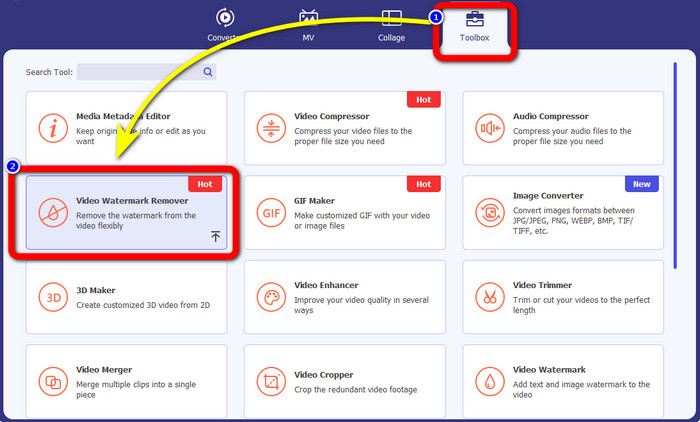
Step 2: Select the Toolbox panel when the interface already shows up. Then, find the Video Watermark Remover, and click it.
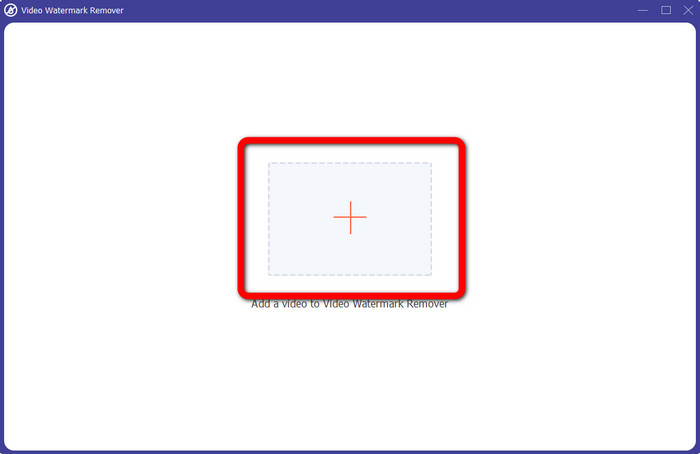
Step 3: Another interface will appear. Click the Plus sign button to attach your video with a sticker.
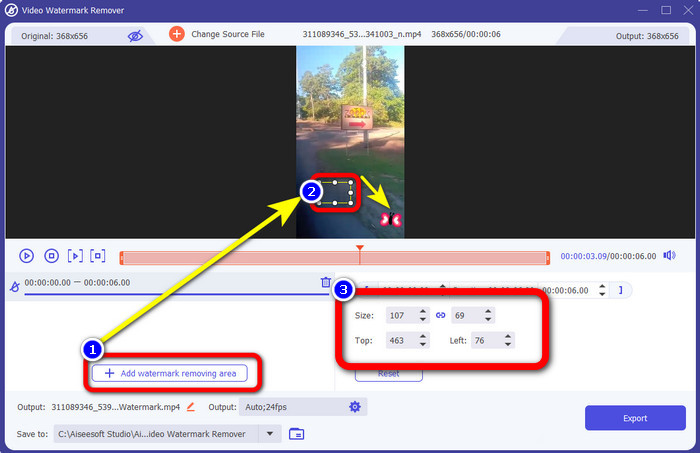
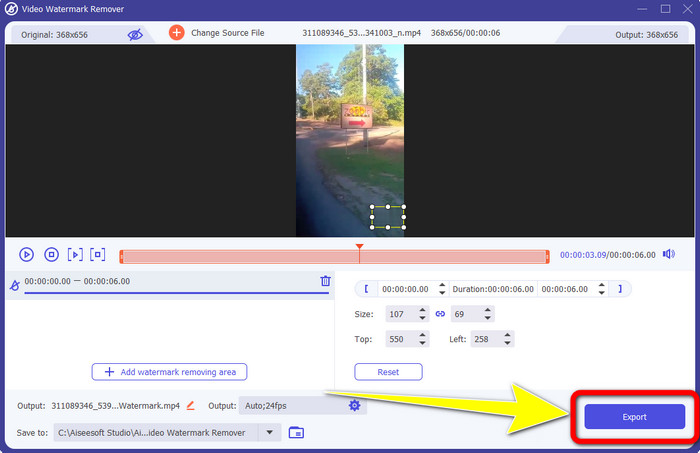
Step 4: After you attach your video, click the Add watermark removing area. A small box will show up on your video. Drag the box to the area of the sticker to cover it. On the third box, you can use it to move the box from your screen. You can also change the size of the box.
Step 5: When you cover the sticker, click the Export button. Wait for the fast removal process, and you can already save your final output.
Parte 3: Perguntas frequentes sobre como remover adesivos de fotos e vídeos
1. Posso retirar o adesivo da minha foto sem perder a qualidade?
Yes, you can! You must use the FVC Free Watermark Remover. With the help of this online application, you can remove the sticker from your images without losing the quality.
2. Você pode remover emojis de um vídeo?
Absolutely, yes! You can easily remove the emoji on the video using the Video Converter Ultimate. All you need to do is to download it and use the video watermark remover.
3. Posso remover o adesivo do meu story do Instagram?
Definitely, yes! You can use a watermark remover, like FVC Free Watermark Remover, to remove the sticker from your Instagram story.
Conclusão
This article shows you many ways to remove stickers from photos and videos using different applications. But some of them need to get the paid version to remove unlimited files. You can use the FVC Free Watermark Remover if you want a free watermark remover.
-
 Como remover pessoas de fotos: processo fácil e rápido
 Você quer se livrar das pessoas da sua foto? Leia este artigo, pois mostramos os melhores e mais fáceis métodos para remover pessoas de fotos usando aplicativos.
-
 Maneiras fáceis de como remover o logotipo da iSkysoft do vídeo
 Leia e aprenda o melhor procedimento para remover o logotipo da iSkysoft usando diferentes aplicativos. Nós lhe daremos a solução mais excelente que você deseja.
-
 Maneiras mais fáceis de como remover o texto do Snapchat da captura de tela
 Vamos remover o texto do Snapchat de fotos e vídeos usando ferramentas confiáveis online e offline. Vamos oferecer-lhe maneiras fáceis. Experimente agora e vamos tentar!
