


 Video Converter Ultimate
 Skärminspelare
 Video reparation
 Säker nedladdning
2 bästa sätten att gå med i MKV-filer för att se film oändligt
Vanligtvis är filmerna du laddar ner från Internet separerade i 2 eller 3 MKV-filer eftersom filmfiler alltid är stora, särskilt de i hög kvalitet. Och TV-serien som kopieras från DVD-skivan är alltid uppdelad i flera MKV-filer. Om du är filmentusiast måste du vara nyfiken på att lära dig att gå med i MKV-filer. Du kanske har försökt ändra den ursprungliga koden för att gå med i MKV-filer enligt instruktionerna från FFmpeg, men det är för komplicerat och svårt för oss att lära oss. I det här fallet kommer följande två professionella verktyg att hjälpa dig att gå med i MKV-filer enkelt och effektivt.

Del 1: Hur man går med i MKV-filer gratis online
FVC Free Online Video Merger är det mest effektiva videofogprogrammet för att hjälpa dig att slå ihop MKV-filer gratis online. Inom tre steg kan du få en komplett MKV-fil med undertexter i rätt ordning.
- 1. Gå med i två eller flera MKV-filer i en med enkla tre steg gratis online.
- 2. Använd alla funktioner inklusive att gå med i MKV-filer utan att ladda ner någon programvara.
- 3. Stöd olika in- och utdataformat inklusive MKV-filmfiler.
- 4. Uppladdade filer raderas inom 24 timmar för att skydda din integritet.
Steg 1: Öppna FVC Free Online Video Merger och klicka på knappen Upload Files to Merge för att starta insticksprogrammet, och klicka sedan på knappen igen för att välja de MKV-filer du vill slå ihop.

Steg 2: Klicka på knappen insert new för att välja fler MKV-filer. Välj sedan 1920x1080-upplösning för att behålla hög kvalitet och välj det ursprungliga MKV-formatet för att behålla den ursprungliga kodningen, vilket säkerställer att undertexterna spelas upp korrekt.

Steg 3: Klicka på knappen Merge Now och välj den önskade mappen att spara i.

Del 2: Använd Video Converter för att gå med i MKV-filer
Free Online Merger kan uppfylla dina behov med några enkla klick utan att du behöver ladda ner någon programvara. Men om du också har problem med röriga undertexter eller låg kvalitet är FVC Video Converter Ultimate mer professionell än onlinetjänster för att slå ihop MKV-filer med hög bild- och ljudkvalitet. Dessutom stöder den högre upplösningar, inklusive HD 1080P, 4K och till och med 8K.
- 1. Kombinera flera MKV-filer i en utan att förlora kvaliteten för att behålla tittarupplevelsen.
- 2. Gå med i MKV-filer till det ursprungliga MKV-formatet med vilken kod som helst inklusive H.264, HEVC och XVID.
- 3. Välj olika undertexter och ljudkanaler som passar dig.
- 4. Stöd redigering av MKV-videor genom att lägga till effekter, filter, vattenstämplar och beskära området.
Gratis nedladdningFör Windows 7 eller senareSäker nedladdning
Gratis nedladdningFör MacOS 10.7 eller senareSäker nedladdning
Steg 1: Ladda ner FVC Video Converter Ultimate för Windows/Mac och starta programmet. Klicka sedan på knappen Add Files i konverteringsverktyget för att välja alla MKV-filer du vill kombinera i rätt ordning.

Steg 2: Klicka på pilen bredvid Convert All to och välj MKV-format i videolistan. Välj sedan inställningen same as source, vilket behåller den ursprungliga bild- och ljudkvaliteten. Om du vill spela upp MKV-videor på andra enheter kan du också välja andra kompatibla format, såsom MP4, AVI och så vidare.
Encoder: Du bör helst välja H.264/HEVC-kodare i inställningarna för att säkerställa att filmerna spelas upp bra på datorer eller tv-apparater.
Subtitle and Audio Track: Om de ursprungliga MKV-filmerna har flera undertexter och ljudspår kan du också välja önskat språk längst ner på varje fil eller ta bort undertexter från MKV.
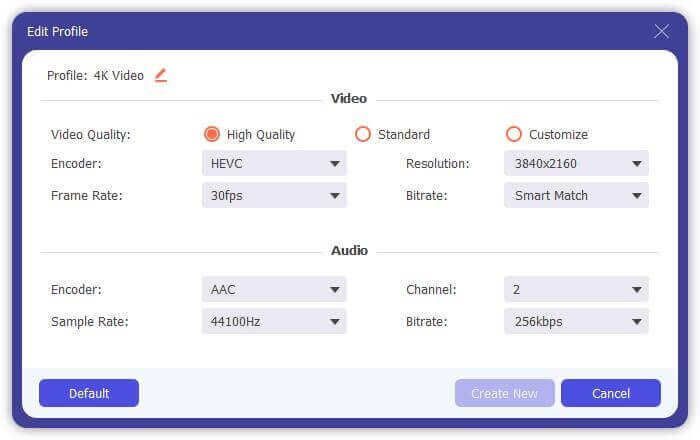
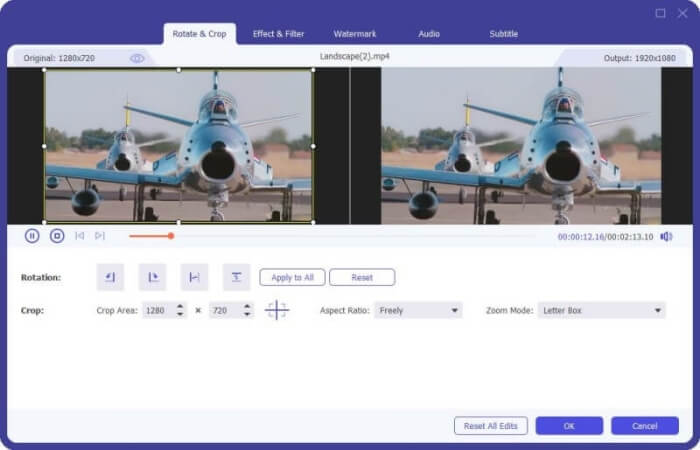
Steg 3: Klicka på knappen Edit längst ner på filerna, där hittar du fem redigeringsverktyg, bland annat för att rotera eller beskära videor samt lägga till effekter och filter. På så sätt kan du skapa en bättre film med specialeffekter. Verktygslådan kan komprimera MKV, redigera metadata-information för MKV, konvertera MKV från 2D till 3D och mycket mer.
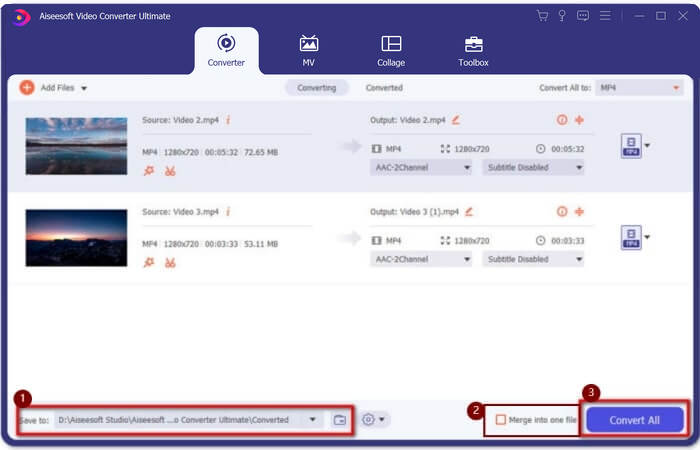
Steg 4: Innan du kombinerar alla MKV-videor kan du dra videofilerna upp och ner och placera dem i rätt ordning för att justera sekvensen. Markera sedan rutan Merge into one file och klicka på knappen Convert All för att slå ihop MKV-filerna och spara den i den angivna lagringsvägen.
Del 3: Vanliga frågor om hur man går med i MKV-filer
1. Vad är MKV?
Normalt sägs MKV vara ett slags videoformat, men faktiskt är MKV ett multimediabehållarformat som kan inkludera ljud-, video- och undertextsfiler med annan kod i en enda fil. Således sparas nästan alla filmer i filer i MKV-format.
2. Kan jag använda handbroms för att gå med i MKV-filer?
Nej, det kan du inte. Handbrake är bara ett slags programvara för videokonvertering för att konvertera MKV-filer. Om du vill gå med i MKV-filer kan du försöka använda gratis online video-kopplare eller andra videokonverterare för att lösa ditt problem.
3. Vilken videospelare stöder MKV-filmfiler?
MKV-formatfilmer behöver inte specialiserade videospelare för att kunna spelas. Du måste dock installera motsvarande MKV-avkodningsplugg. På detta sätt kan nästan alla videospelare inklusive originalvideospelaren på din dator spela MKV-filmfiler.
Slutsats
När du laddar ner en film för att titta på men upptäcker att dessa MKV-filmfiler är uppdelade i flera filer. För att se det oavbrutet kan du använda video-snickare för att kombinera MKV-filer gratis online. Dessutom kan användning av en videokonverterare också hjälpa till att gå med i MKV-filer med hög bild- och ljudkvalitet. Välkommen att lämna dina frågor om att slå samman MKV-filer nedan.
-
 Hur man sammanfogar WebM-filer till en löst på dator
 När du vill slå samman WebM-videofiler för att titta på videor kontinuerligt eller vill skapa en ny video enligt WebM-filerna finns det två effektiva sätt att gå med i WebM-filer utan att tappa kvalitet.
-
 Topp 8 MKV-spelare för att spela MKV-filer med den önskade undertexten
 När du vill spela MKV-videon med önskad undertext kan du lära dig mer om de 8 bästa MKV-filspelarna för PC / Mac och välja önskad enligt dina behov.
-
 MKV till MOV - Hur konverterar man MKV till MOV
 Hur konverterar jag MKV till MOV på Mac? Kan iMovie läsa MKV? Vad betyder MOV-format? Det här inlägget berättar om två enkla sätt att hjälpa dig konvertera MKV till MOV med gratis online och professionella videokonverterare.
