


 Video Converter Ultimate
 Skärminspelare
 Video reparation
Upptäck sätt att spela MKV -filer på PS4
Det är inte bara Xbox One S som stöder uppspelning av filmer. Nu försöker PS4 också hänga med i trenden. Med hjälp av en USB‑kabel och via DLNA kan PS4 numera spela upp MKV, MP4, AVI och mycket mer. Det innebär att MKV ingår bland de filer du kan spela upp. För att se en fullständig lista över vilka format som stöds, besök PS4:s officiella webbplats. Dessutom skulle du inte fortsätta läsa den här artikeln om du inte var intresserad av att spela upp en MKV‑fil på PS4. Fortsätt läsa – ju längre du kommer, desto fler sätt upptäcker du för hur du kan spela MKV på PS4.

Del 1. Kan alla MKV -filer spelas på PS4?
Kan jag spela MKV -filer på PS4? Visst kan du det. MKV -filformat stöds av PS4. Men inte alla MKV -filer kan spelas upp ordentligt. Du kan misslyckas med att spela den. Detta beror på att du måste uppfylla standarden från PS4. Mestadels stöds H.264/MPEG-4 AVC. Samma regler gäller om du ska spela MKV -filer från en USB -enhet. Under tiden stöds för MP3-ljud, AAC LC, AC-3. De flesta av dessa format är Dolby Digital -format. Om du tror att du har uppfyllt standarden kan du fortsätta med stegen om hur du spelar MKV på PS4 direkt.
Steg 1. Ladda ner och installera DivX Media Server och starta spelaren. Aktivera sedan delning på din dator.
Steg 2. Ladda upp eller importera MKV‑filen till servern.
Steg 3. Innan du går vidare till nästa steg ska du se till att både datorn och PS4 är anslutna till samma Wi‑Fi‑nätverk. Ladda sedan ner och installera DivX‑mediaspelaren på din PS4. Öppna därefter PS4:ans mediaspelarapp och välj DivX Media Server från listan över enheter som visas.
Steg 4. Leta slutligen upp Video, markera den video du vill spela upp och börja strömma den.
Del 2. Steg för steg guide om hur du spelar MKV på PS4 från USB
Under tiden, om du använder en USB -lagring, se till att den är antingen FAT- eller exFAT -formaterad, annars upptäcks den inte. Om du tror att du är redo och flash -enheten är kompatibel, kolla in steg -för -steg -guiden nedan.
Steg 1. Sätt på PS4 och anslut USB‑minnet. Gå till huvudmenyn. Välj sedan Video och leta efter namnet på ditt USB‑minne.
Steg 2. När du ser fillistan klickar du på Display All för att se hela listan över filer du sparat på ditt USB‑minne. Kopiera filen och överför den till PS4:an.
Steg 3. Se slutligen till att du har tillräckligt med lagringsutrymme för att slutföra överföringen.
Del 3. Alternativt sätt att spela MKV på PS4 via Plex Server
Förutom DivX finns det också en alternativ spelare som du kan använda för att spela MKV på PS4. Det finns en medieserver för strömning som heter Plex. Den här medieservern låter dig strömma högkvalitativa videor, musik, TV‑program och podcaster från din dator. Även om vissa upplever problem med att spela upp vissa MKV‑filer kan du fortfarande använda den som alternativ. Om du verkligen vill använda Plex och spela upp en inkompatibel fil bör du överväga att konvertera videon. Vissa konverterare kan göra om dina MKV‑filer till ett Plex‑kompatibelt format. Genom att justera videokodek, bildfrekvens, bithastighet och andra parametrar är det möjligt. Finns det ett verktyg som klarar detta? Ja, det gör det – du kan prova Video Converter Ultimate. Ja, det här verktyget klarar det. Prova att använda det för att lösa problemet.
Steg 1. Ladda ner och installera Video Converter Ultimate på din dator.
Gratis nedladdningFör Windows 7 eller senareSäker nedladdning
Gratis nedladdningFör MacOS 10.7 eller senareSäker nedladdning
Steg 2. Lägg till de filer du vill konvertera genom att klicka på Add files eller helt enkelt dra och släpp filen i gränssnittet.
Steg 3. Välj sedan ett format som stöds av Plex genom att klicka på rullgardinsmenyn Convert to All.
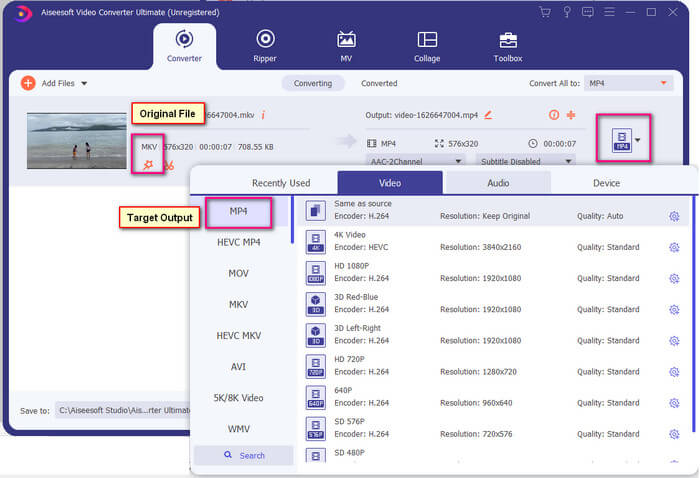
Steg 4. När formatet är valt klickar du på knappen Convert All för att starta konverteringen. När konverteringen är klar öppnas den mapp där filen har sparats automatiskt.
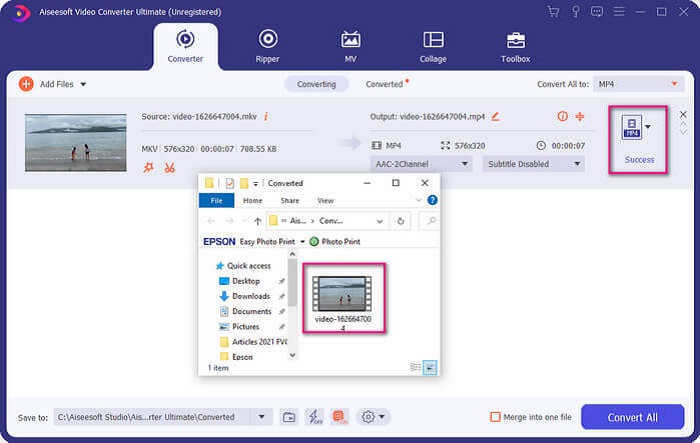
Det finns mer med Ultimate video converter. Du kan kolla listan med fördelar och nackdelar nedan för att lära känna andra bra funktioner som den erbjuder.
● Detta verktyg konverterar så snabbt som tre sekunder.
● Den har accelererande teknik som kan förbättra den konverterade filen.
● Den stöder HD -kvalitet.
● Den har redigeringsfunktioner som att lägga till filter och grundläggande effekter.
● Du kan justera undertexter och ljudspår.
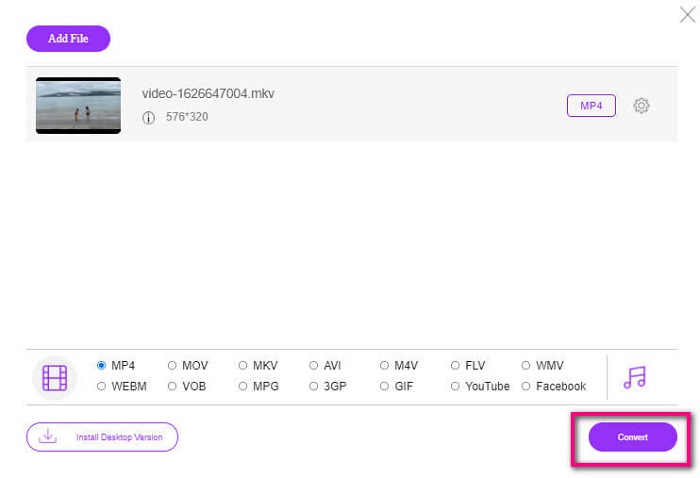
Om du i stället letar efter en gratis konverterare kan du också överväga FVC Free Online Video Converter. Den är kanske inte lika kraftfull som Ultimate Video Converter, men den kan ändå mäta sig hyfsat. Den kan definitivt konvertera filen och göra den kompatibel med Plex eller DivX. Allt du behöver göra är…
Steg 1. Starta verktyget genom att besöka den officiella sidan i beskrivningen.
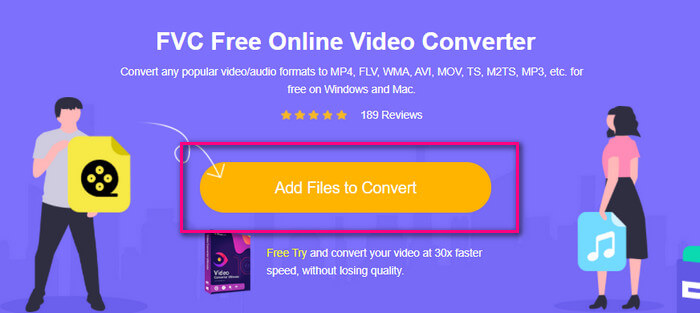
Steg 2. Ladda upp videon genom att klicka på Add Files to Convert.
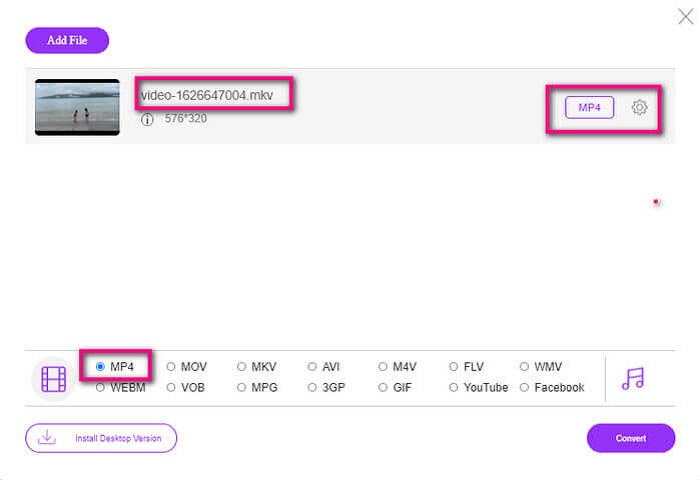
Steg 3. Ändra format genom att markera cirkeln nedanför.
Steg 4. Klicka till sist på knappen Convert och välj den plats där du vill spara filen. Klicka sedan på Okay. Du kan klicka på Folder-ikonen för att se den konverterade filen.
Vidare läsning
Spela MKV i Windows Media Player
Del 4. Mer information om att spela MKV -filer på PS4
Hur mycket kostar en PS4?
Marknadspriset är 399,99 USD i USA och i Kanada 399,99 USD. Priserna kan variera beroende på detaljhandelspriset i ditt land.
Finns det möjlighet att spela CC eller Close Caption MKV på PS4?
Ja, det finns det. Funktionen finns under Accessibility Settings. Gå till din PS4:s Settings, Accessibility och välj sedan Display Closed Captions. Där klickar du på Options för att aktivera textning (closed captions).
Om PS4 stöder MKV, varför spelar inte mina filer upp?
Som nämnts ovan måste du se till att MKV -filen uppfyller standarden för spelaren som du använder. Du måste bara kontrollera kravet på PS4 eller annan medieströmningsserver. De flesta mediaservrar har också klassificering för att spela MKV -filer.
Vilka format stöds av PS4?
Det finns flera filformat som PS4 stöder. Men du kommer att märka att de flesta format är okomprimerade och innehåller en stor fil. Även om det också stöder de okomprimerade som Mp4. Under tiden är här listan över format som vi pratar om: MKV, AVI, MPEG-2 PS, MPEG-2 TS, AVCHD och XAVC och MP4.
Slutsats
Avslutningsvis finns det många sätt att direkt eller indirekt spela MKV -filer på PS4. Det som listades är de vanligaste medierna. DivX Stream Server och Plex är bara några alternativ du kan använda. Det rekommenderas starkt att konvertera filen istället för att undvika krångel och för mycket process.
-
 [Löst] VLC -spelare kommer inte att spela MKV, hur man åtgärdar det
 Stöder VLC-spelare MKV-filer? Varför spelar inte VLC MKV? Det här inlägget delar 4 användbara tips för att fixa VLC-spelare spelar inte MKV-filer.
-
 Hur man spelar MKV-filer på iPad 2025
 Hur spelar man MKV-filer på iPad 2? Kan jag konvertera MKV till MP4 för att spela på iPad Pro / Air / 2? Det här inlägget delar två enkla sätt att spela MKV på iPad.
-
 Hur man laddar ner MKV Codec i Windows Media Player för smidig uppspelning
 Kan du inte spela MKV-video i Windows Media Player? Du kan gratis ladda ner MKV-codec för Windows Media Player. Motsatt konverterar du MKV så att den kan spelas i Windows Media Player.
