


 Video Converter Ultimate
 Skärminspelare
 Video reparation
 Säker nedladdning
Bästa sätten att konvertera HEIC till JPG på Android med appar och online utan ansträngning
As Apple adapts the new image format, HEIC, can't natively support the format because it lacks codecs that support HEIC. Even though you use the newest version of the Android phone, the HEIC format isn't viewable on this device. Since the format isn't compatible with Android, the best approach you can use is to convert it into an image format compatible with all devices, JPEG. So, suppose you receive and want to convert HEIC to JPG on Android to view it. In that case, you must read the following details we add in this write-up as we researched for you to make it more accessible and more efficient than ever.

Del 1. Hur man konverterar HEIC-fil till JPG på Android med hjälp av mobilappar
Dropbox
Dropbox offers you the best way to distribute and upload the files to the cloud storage instead of your local storage so that you can share them with anyone. With a HEIC to JPG converter on Android like this, converting the HEIC format into a JPEG became easy and practical. Although it can convert the image format into a JPEG, it doesn't usually get into the same trouble as the other converter needing a process to finish.
Eftersom det automatiskt ändrar formatet till ett kompatibelt format efter att det delas. Vill du veta hur man konverterar formatet till en JPEG? Följ sedan stegen nedan för att veta hur du gör det.
Step 1. Download and open the Dropbox app on your Android device. Then sign-up to it before using it, but if you already have a Dropbox account, you need to log in here.
Step 2. Tap the Camera Uploads and select the HEIC file you have on your phone.
Step 3. Tap the Save HEIC Photos and select the JPG format to save it with this extension type. Wait for the process, and you can check out the image on the Gallery that it is in this format.
HEIC till JPG Free Converter – Konvertera HEIC till JPEG
HEIC to JPG Free Converter is one of the best HEIC to JPG converter apps on Android that can help you convert the HEIC format you have to a compatible format. With this app, you can turn your HEIC file into a JPEG without worrying about losing the quality and metadata attached to it. Unlike Dropbox, where you will need to log in with this app, you wouldn't need to do it, so it's less hassle because you can directly convert the HEIC without logging in.
Även om du inte skulle behöva logga in när du använder appen, kommer du att märka att popup-annonser visas på din telefon om du använder den. Om detta inte är ett problem för dig, följ stegen nedan för att veta hur du använder det.
Step 1. Search the HEIC to JPG Free Converter on Playstore and, install it, open the app to proceed with using it.
Step 2. Tap Open File and look for the HEIC image on your mobile device, then tap Select to upload it on the converter.
Step 3. On the Convert to, choose the JPG format on the list and click Convert to start converting the HEIC file.
Del 2. Det mest professionella sättet att batchkonvertera HEIC till JPG Android Online
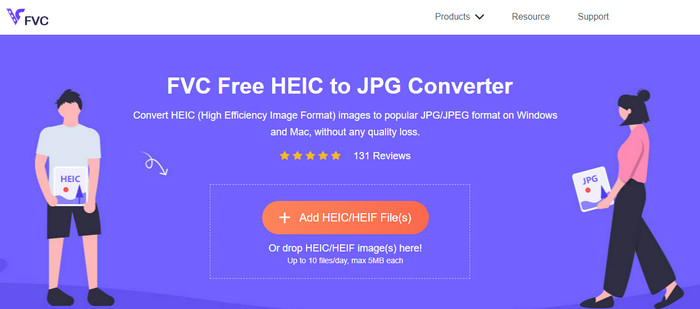
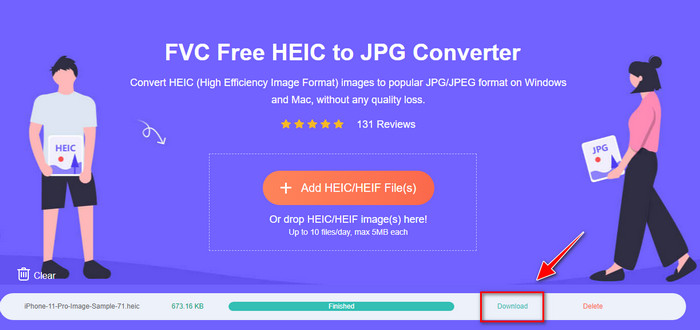
Do you need to know how to convert the HEIC file to JPG in Android without the help of the downloadable app? Then without any doubt, the FVC Free HEIC to JPG Converter is the web tool you will ever need. In a task like this, you will need a professional tool, especially if you want to convert a batch of HEIC files into a JPEG without losing the quality, and that is what this web tool brings.
Till skillnad från de applikationer vi nämnde ovan skulle du med detta inte behöva ladda ner ytterligare data innan du kan använda den, och du skulle inte ens behöva logga in. Istället för att ladda ner appen på din Android och vänta på installationsprocessen , varför testar du inte att använda detta webbverktyg direkt? Om detta onlineverktyg fångade din uppmärksamhet måste du läsa följande detaljer nedan. Att veta hur ett professionellt webbverktyg konverterar HEIC till JPG på din Android online och gratis.
Step 1. To open the professional web tool, you must click this link, and a new tab on your browser will open.
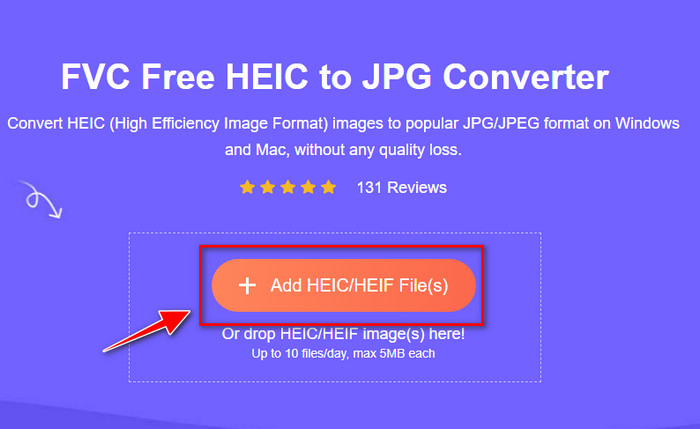
Step 2. While on the web tool, tap the Add HEIC/HEIF File and upload the HEIC file here. You can also upload more HEIC files here and convert them into a JPEG simultaneously.
Step 3. Wait for the conversion to finish, and if the progress bar is complete, you can now save the HEIC files you've uploaded here by clicking the Download button. The file will automatically be held on the downloads; you can check it out to view the image in the JPEG format.
Del 3. Vanliga frågor om att konvertera HEIC till JPG på Android
Kan Google Android Pie se HEIC-filen?
Ja, du kan enkelt se HEIC-bilden här. Denna 16:e version av Android har officiellt HEIC-codec för att se bilden utan att konvertera den till JPEG eller PNG. Så om din Android är i den här versionen behöver du inte konvertera formatet till JPEG eller PNG för att se det, och det är redo att ta emot HEIC-bilden.
Varför kan jag inte konvertera HEIC till JPG på Android?
Först måste du kontrollera omvandlaren du använder på din Android om den stöder konvertering av HEIC till en JPG. Även om vissa appar säger att de stöder konvertering av HEIC, är de flesta av dem clickbait. För att undvika att detta händer måste du läsa recensionerna om dem för att se om de stöder HEIC och om det kan konvertera bildformatet till JPG.
Varför blev HEIC populärt på iOS-enheter?
HEIC became popular on iOS devices because of the compression it provides to the image and its in-detailed color combination, which is far better than the JPEG. If your photo is in this format, it is noticeable that its file size is smaller and better than a JPEG format. That is one of the reasons it became popular on iOS devices.
Slutsats
This article introduces the best HEIC to JPG converter for Android; all of them are accessible on your mobile devices. Even though they can help you convert the format into your Android, their strengths and weakness are what makes them different from one another. Suppose you want to use the professional converter on your Android to convert the HEIC file into a JPG. In that case, we suggest using the FVC Free HEIC to JPG Converter. Although this is web-based, it is still far better than the other aforementioned applications. If you want to test out the web tool on your Android device, then there are steps included above; you can check them out and follow them thoroughly to do it effectively.
-
 Konvertera HEIC till PDF med hjälp av de fyra bästa sätten 2022
 För att veta mer information om den bästa HEIC till PDF-omvandlaren kan du ladda ner denna 2022. Du kan läsa den här artikeln eftersom vi gav en recension om dem.
-
 Bästa gratis och betalda HEIC-konverterare du måste känna till [Uppdaterad 2022]
 Vill du veta vad HEIC-omvandlaren är? Om så är fallet inkluderar vi de 5 bästa gratis och betalda HEIC-omvandlarna som du kan använda för att ändra HEIC-formatet.
-
 HEIC vs. JPG | Vilket är ett bättre bildformat att använda
 Kampen mellan HEIC vs JPG blev mer djupgående men vilket av de två är det bästa bildformatet? För att svara på dina frågor läs den här artikeln.
