


 Video Converter Ultimate
 Skärminspelare
 Video reparation
Lär känna de 7 bästa volymförstärkningsapparna du kan använda på din stationära dator och din telefon
Isn't it irritating if the volume of the video is so low that even if you make your volume adjust it to the highest nothing changes? There are several reasons why the audio volume became low. Instead of stressing out on the video why don't you try to use a booster to make your audio loud and clearer. So today is your lucky day, as we present different volume boosters you can choose on. All of the tools presented in here have been used by the writer of this article. To state the facts about the tools depending on the platform you are currently using. And to proceed let's start our walkthrough to the different sound boosters you can use on Windows, Mac, iPhones and Android.

Del 1. 4 av de bästa volymförstärkarna för Windows PC, Mac & Online
1. Video Converter Ultimate
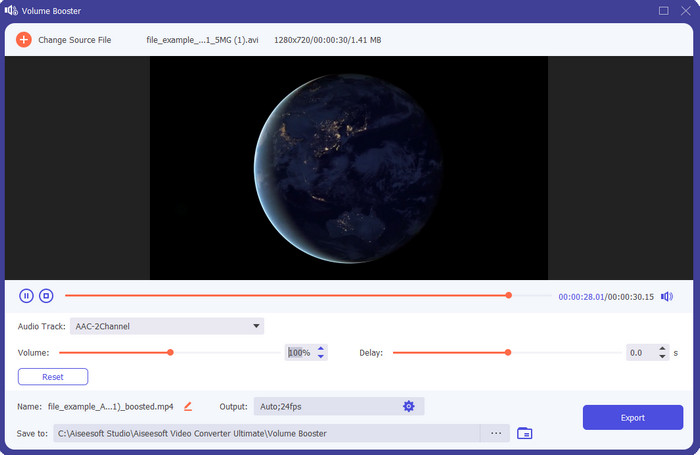
If you're looking for the best volume booster app then the Video Converter Ultimate must be it. This tool can make your audio better in quality without damaging your speakers. So, if you adjust the audio volume with this tool then don't expect crackling on your speakers. Moreover, if you have a problem with low quality audio you can use this tool to enhance it. Even if you are not a pro you can still manage to do the audio boost with this tool. And not only that, this software has a lot of tool features you may like to use if you downloaded this tool. Unlike any audio booster on the list, this tool provides a lot of enhancer to make your audio better in sound. Also, if you have an audio delay problem then you can also use this. It is frankly the phenomenal tool in this list if we were about to compare all of the tools. So, if you want to experience a full blast 8 or 16 D audio then download this tool right now.
Gratis nedladdningFör Windows 7 eller senareSäker nedladdning
Gratis nedladdningFör MacOS 10.7 eller senareSäker nedladdning
Fördelar
- Gör automatiskt justeringen av equalizers och förinställningar för att göra ditt jobb enklare och bättre.
- Det slutliga ljudet blev mycket bättre än tidigare och utan att förstöra din hörsel eller ens högtalarna.
- Det är väldigt intuitivt att även användare som inte har erfarenhet av att öka kan göra det.
Nackdelar
- Den är endast tillgänglig på skrivbordet och ingen telefonversion.
- Köp innan du kan komma åt det men det är inte så dyrt.
2.VLC Media Player
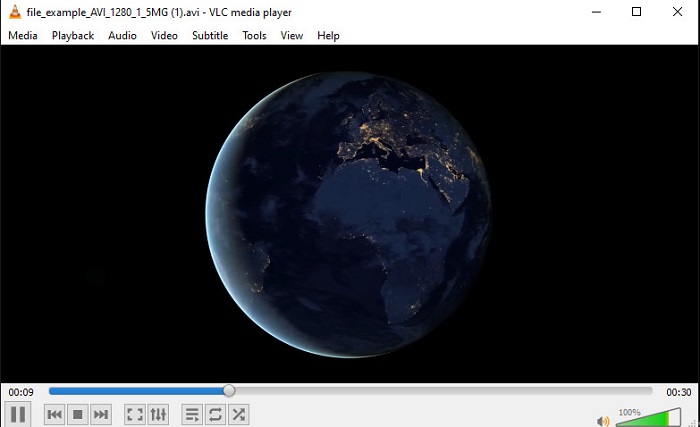
VLC Media Player is one of the best media players you can download on the web. This tool already has a built-in free volume booster on its interface and the audio can go up to 125% percent if you want. However, this desktop tool doesn't monitor how strong your speaker can handle. Which means if you abuse playing your audio into the max level there is a chance that the speaker can go mild crackle in the long run especially to the built-in speakers. But this tool is the only app presented here that has a booster and a player at one. So, if you want to watch and do the boosting of audio at one go then try to use this tool. Although it raises the volume it can't guarantee you to have a great audio quality because you only increase the audio.
Fördelar
- Inbyggd ljudförstärkare.
- Förstärk ditt ljud upp till 125% för att få det att låta högre.
- Gratis att ladda ner på PC eller Mac.
Nackdelar
- Verktyget har ingen inbyggd equalizer för att förbättra kvaliteten på ljudet.
- Den övervakar inte hur högt ditt ljud ska vara.
Relaterat:
How to Fix VLC Won't Play MKV Files
How to Fix VLC Not Playing DVD
3. Bom 3D
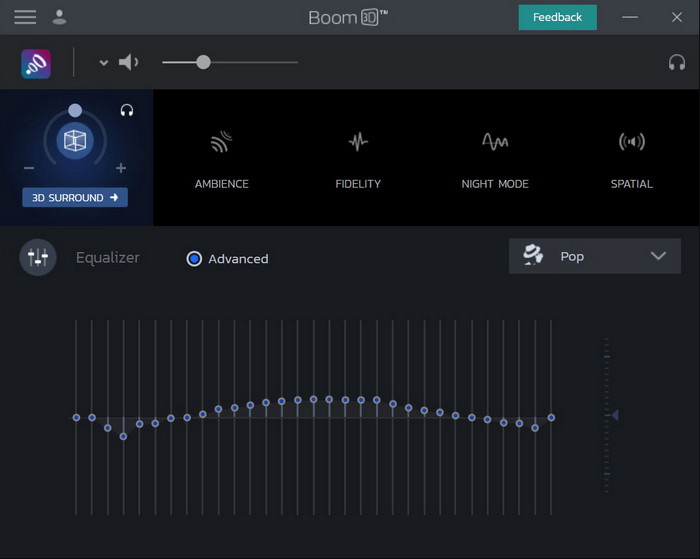
Boom 3D is the most advanced in the line of audio enhancing. This volume booster Windows 10 and Mac specialized a lot of enhancers for you to use on. Also, you can adjust the equalizers and preset manually unlike the Video Converter Ultimate this tool already did it for you automatically. Although the tool looks impressive, there are still disadvantages if you try to use this tool. Especially if you are a beginner, this tool needs to be set-up or in other words the tool is a lot to be handled by the beginner. Nevertheless, studying how to use this tool will take a lot of your time but it will be worth your time.
Fördelar
- Åsidosätt equalizern och förinställningen manuellt.
- Inget internet behövs för att komma åt verktyget.
- Det är bra att användas av proffsen som vill ha bra ljudkvalitet.
Nackdelar
- Det är inte det bästa valet för nybörjare som inte har en aning om vad equalizers och förinställningar är.
- Behöver mycket tid för att studera hur man använder det här verktyget.
4. Volymförstärkare
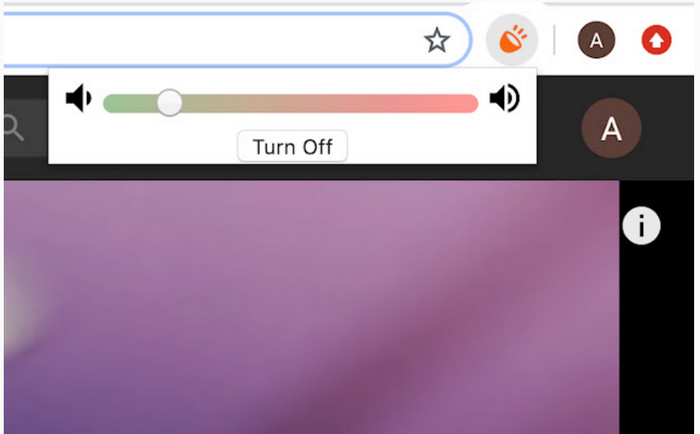
Volume Booster is a volume booster Chromeextension you can easily access if you have the internet. This tool can be used by anyone for free and also the tool is safe because it is from chrome. And if you try to use this tool expect to have a great boost to the audio you were about to listen to. However, you can't use this chrome extension outside the chrome itself. So, if you want to listen to the audio that has been saved to your drive then you can't use this to enhance your audio. Not only that, when we try to make the audio max there are some crackles, we heard so to avoid this make sure you set it too barely minimum.
Fördelar
- Verktyget är säkert eftersom det är en förlängning av krom.
- Användarvänlig.
Nackdelar
- Kan inte användas utanför krom.
- En del knäckande ljud kommer att höras om du vrider den till max.
- Den stöder inte equalizers.
Del 2. Top 3 Volume Booster Apps för iPhone & Android
1. Volymförstärkare – Equalizer FX
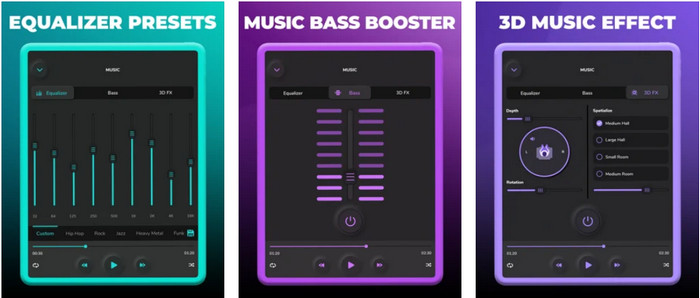
Volume Booster – Equalizer FX pushes the maximum audio limit of your iPhone to make a loud and better audio. This iPhone volume booster has been used by a lot of iOS users to make their own equalizing of audio. And the app already receives a fair rating of 3.9 stars. It is not either bad or any more than good. Also, this tool can't do audio boost on online streaming and the ads are killing this app. Moreover, crashes are still happening in this tool just like the bugs and more. However, if you want a bass boost on an iPhone then this is a must to try.
Fördelar
- Det är en bra booster för iPhone-användare.
- Du kan utföra grundläggande utjämning och ljudjustering.
Nackdelar
- För det mesta kraschar verktyget.
- Den har en begränsning för var du kan använda ljudförstärkningen.
2.AmpMe – Speaker & Music Sync
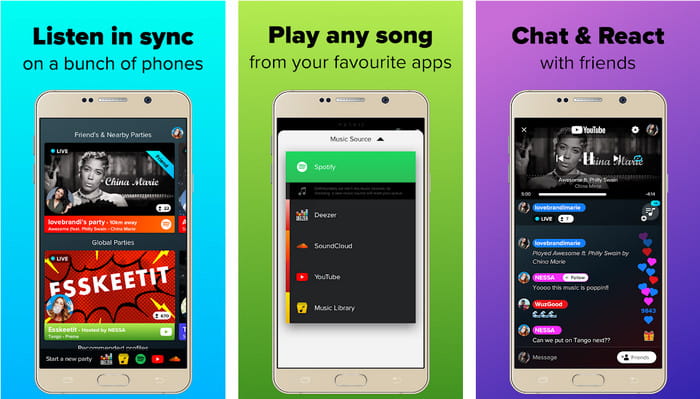
AmpMe - Speaker & Music Sync is a great downloadable audio volume booster for Android devices. This is more than just a booster because you can be the host and play your playlist or join a live party with the app. To make it simpler with this app you can interact with the others while listening and chatting at the same time. Although the tool is impressive there are still some bugs and crashes you will experience while using this tool. Also, some users have a hard time adding music to their playlist which is annoying. And the tool is a bit hard to manage, especially if you don't know the functions of it. But the overall is great to be used by the Android users.
Fördelar
- Du kan vara din egen DJ med AmpMe och dela den med andra människor i närheten med samma app.
- Lyssna och chatta samtidigt.
- Den producerar ljud av hög kvalitet.
Nackdelar
- Prenumerationsavgiften är för mycket att betala för om du vill åka billigare.
- Det är svårt att säga upp prenumerationen även när du raderat kontot.
- Ibland när du går med i en livefest kopplas appen automatiskt bort.
3.Volym Booster GOODEV
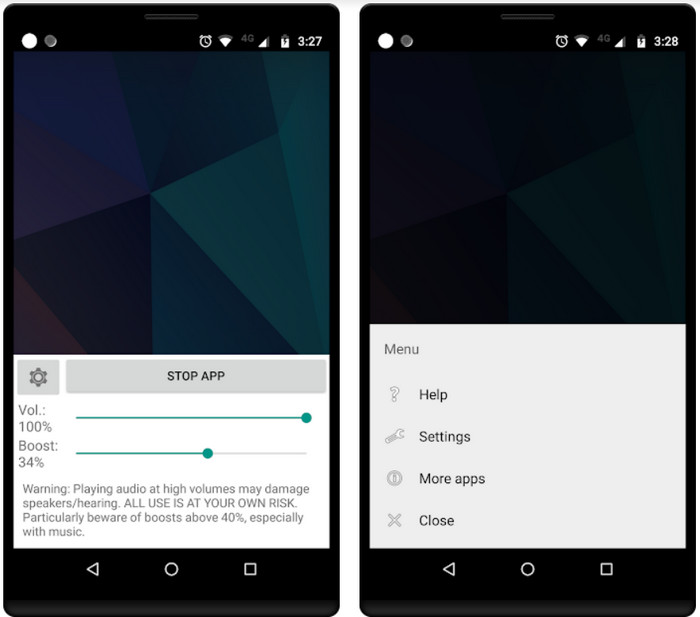
Volume Booster GOODEV has a simple and easy to manage interface. This volume booster has already received a great rating of 4.4 stars from its user. Also, a lot on the review said that this tool is the best for its job. But now there are some crashes happening when you use this tool and most of the time the tool itself doesn't boost your audio anymore even when you launch it. So, to re-activate it you must restart your phone or re-open the app in this way to fix it.
Fördelar
- Lättförståelig ljudförstärkare som enkelt kan laddas ner på din Android-mobiltelefon.
- Användarvänlig.
Nackdelar
- Annonser visas från ingenstans.
- Oftast kraschar appen av sig själv utan okänd anledning.
- Den gamla versionen av denna app är mycket bättre än den uppdaterade versionen.
Del 3. Vilken är den bästa volymförstärkaren
Här är ett jämförelsediagram som presenteras för dig för att jämföra vilka verktygsfunktioner du kan använda med verktyget som det andra verktyget inte har.
| Verktygsfunktion/er | Video Converter Ultimate | VLC Media Player | Bom 3D | Volymförstärkare | Volume Booster – Equalizer FX | AmpMe – Speaker & Music Sync | Volymförstärkare GOODEV |
| Ljudförstärkare |  | | | | | | |
| Audio Enhancer | |  | | | | | |
| Ljud- och videosynkroniseringsfunktion | | | | | | | |
| Användarvänlig | | | | | | | |
| Plattformar som stöds | Desktopbaserat verktyg | Desktopbaserat verktyg | Desktopbaserat verktyg | Chrome Extension Tool | iOS nedladdningsbart verktyg | Android nedladdningsbart verktyg | Android nedladdningsbart verktyg |
| Prisklass | 1 månad: $25.00 Livstidslicens:$55.20 Livstid för fleranvändarlicens/5 datorer: $119.00 | Gratis att ladda ner | $11.99 och $23.99 | Fri | 3 till 20 $ | $0.99 – $99.99 per artikel | Fri |
Del 4. Vanliga frågor om Volume Booster
Skadar hörseln att öka ljudvolymen?
Faktiskt ja. Speciellt om du använder hörlurar eller headset och sätter volymen på ljudet till max och lägg sedan till volymförstärkare. Räkna då med att din hörsel på lång sikt sakta kommer att förstöras i längden. Så, för att undvika detta kan du. Det är vårt förslag att du måste begränsa det till medium eller lågt och inte gå för maximalt.
Vilka är de andra nackdelarna med ljudförstärkning på högtalare?
Vi använder en ljudförstärkare för att höra ljudet mycket bättre om ljudet är lågt. Men föga visste du att högtalare också har en Hertz-gräns som de kan. Ju högre hertz desto högre kan du vara men på vissa inbyggda högtalare klarar de inte ett superhögt ljud. Så det finns chanser att högtalaren kommer att krackelera vilket betyder att ljudet inte kan hanteras av högtalaren.
Vad är skillnaden mellan bas och diskant på högtalare?
Dessa två är de mest kända högtalarna inbyggda men de har sitt eget syfte varför de är i högtalare. För bas kan den hantera en låg frekvens av ljud och kan inte hantera hög frekvens, den är också specialiserad på att få oss att känna musikens boom. Medan diskant fokuserar på höga frekvenser som basen inte kan hantera.
Slutsats
To end, you can not listen to your poor-quality audio if you boost it with the help of the volume booster on PC, Mac, online, and mobile devices. The tools presented in here are great to be used by anyone who wants to experience a new height in music. But there is a tool that helps its customers to make their audio boosting simpler and better. So, instead of learning how to adjust the equalizer and preset the Video Converter Ultimate already did it for you. And to know how brilliant this tool is then try it for yourself and download it on your storage.
-
 Så här lägger du till ljud och musik till video gratis på din dator / telefon
 Den här artikeln visar 4 enkla sätt att lägga till ljud till video gratis. Oavsett vilket ljudspår du vill lägga till i din video kan du få tillfredsställande resultat här.
-
 The Unbiased Cinch Review Audio Recorder och det bästa alternativet
 Cinch Audio Recorder är det bästa sättet att ladda ner musik från strömmande webbplatser. Lär dig bara mer om den opartiska granskningen och det bästa alternativet från artikeln.
-
 Genomförbara sätt att spela in ljud med VLC -spelare
 Lär dig de bästa sätten att spela in ljud med VLC -spelare och andra praktiska verktyg genom att läsa igenom artikeln.
