


 Video Converter Ultimate
 บันทึกหน้าจอ
 ซ่อมวิดีโอ
 ดาวน์โหลดอย่างปลอดภัย
น้ำยาล้างลายน้ำ Photobucket ที่น่าตื่นตาตื่นใจ [วิธีง่าย ๆ ]
Photobucket is an app that people use for image hosting and a photo wallet for personal and business purposes. This software application allows you to embed your photos anywhere and add filters, stickers, annotations, and cropping to your image. Moreover, when you save your photos using Photobucket, the quality of the image will not be affected. However, since the images from Photobucket are shutterstock images, you cannot download images without a watermark. Luckily we have a tool for you where you can remove the Photobucket watermark from your image. Read this article to know the most outstanding Photobucket Watermark Remover.

ส่วนที่ 1 วิธีลบลายน้ำ Photobucket โดยใช้ Watermark Remover ฟรี
หลายคนกำลังประสบปัญหาในการค้นหาน้ำยาล้างลายน้ำที่ใช้งานง่าย การใช้น้ำยาล้างลายน้ำนั้นซับซ้อน เราค้นหาแอพที่ดีที่สุดสำหรับลบลายน้ำ Photobucket บนรูปภาพของคุณ นี่คือเครื่องมือที่ใช้งานได้ฟรีเพื่อลบลายน้ำของ Photobucket บนรูปภาพของคุณโดยไม่ต้องกังวลใจอีกต่อไป
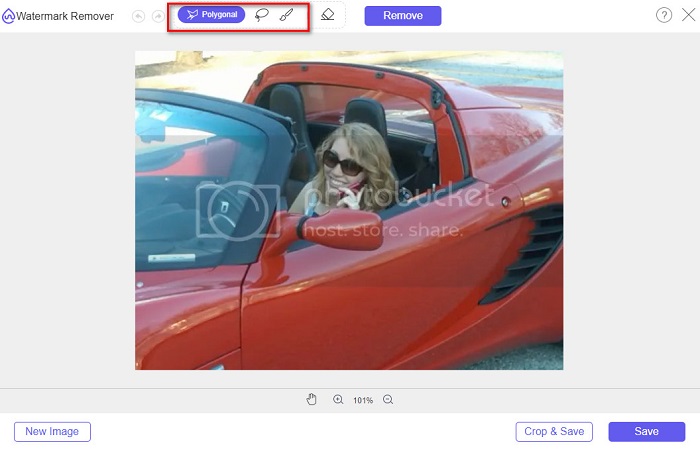
FVC Free Watermark Remover is an online application that allows you to remove watermarks from images or videos. This online watermark remover is easy to use because it has a straightforward user interface and a detailed guide. In addition to that, it does not only remove Photobucket watermarks on your image, and it can also remove watermarks on any JPEG, JPG, PNG, and BMP photos. Also, when you remove the watermark from your image using this tool, it will be saved in the same format. What’s amazing about this online watermark remover is that you can choose what type of removing tool option you will use, polygonal, lasso, or brush. And if you have a mistake in removing the watermark, you can choose to undo it.
ข้อดี
- เป็นเครื่องมือที่ใช้งานง่าย
- ไม่มีโฆษณาต่างจากเครื่องมือออนไลน์อื่นๆ
- มีคุณสมบัติยางลบเมื่อคุณทำผิดพลาด
- เข้าถึงได้ในทุกเบราว์เซอร์ รวมทั้ง Google, Firefox และ Safari
จุดด้อย
- คุณอาจประสบกับกระบวนการทำงานที่ช้าเมื่อการเชื่อมต่ออินเทอร์เน็ตของคุณช้า
Steps on how to remove Photobucket watermark using FVC Free Watermark Remover:
Step 1. On your browser, search FVC Free Watermark Remover. Then click the page that appears first on your search result page. Their webpage looks like this:
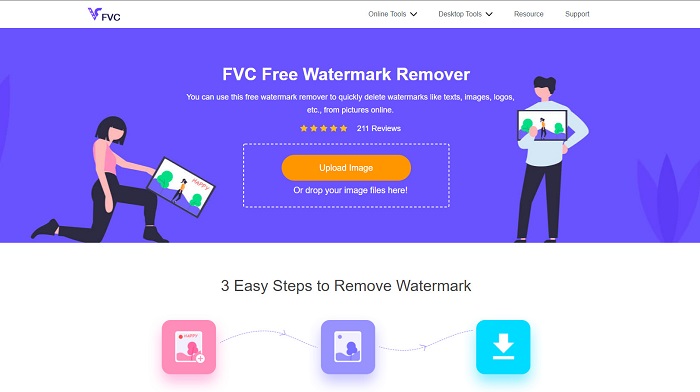
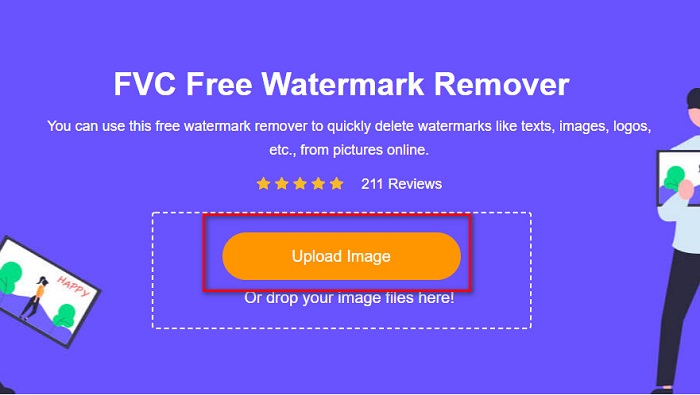
Step 2. And then, on the software’s main interface, click the Upload Image button to upload your Photobucket image. Your computer folders will appear where you will select your Photobucket image, then click Open.
Step 3. Next, select the removing tool you want to use on the options above. You can choose between polygonal, lasso, or brush.
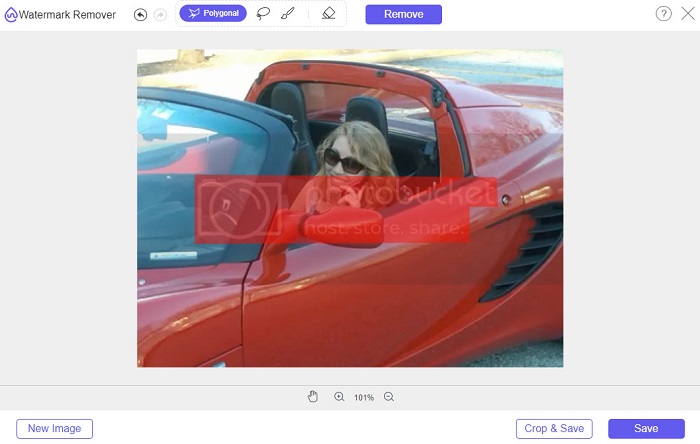
Step 4. Using the polygonal option, draw the part you want to remove, then click Remove
Step 5. Click the Save button; then, your file will save automatically on your computer files.

ง่ายใช่มั้ย? คุณสามารถลบลายน้ำบนภาพถ่าย Photobucket ของคุณได้ในห้าขั้นตอนง่ายๆ
ส่วนที่ 2 วิธีการลบ Photobucket Watermark โดยใช้ Photoshop
Adobe Photoshop is one tool that many people use to edit images. You can also use Adobe Photoshop to remove the watermark on your image. You will know how to remove the watermark on your Photobucket images using Photoshop.
ข้อดี
- มีคุณสมบัติการแก้ไขมากมายที่จะใช้
- เป็นแอปพลิเคชั่นแก้ไขรูปภาพยอดนิยม
- แก้ไขภาพของคุณและลบลายน้ำอย่างมืออาชีพ
จุดด้อย
- ไม่เหมาะสำหรับผู้เริ่มต้น
Step 1. Install Adobe Photoshop on your computer, then run the app. And then open the image on Photoshop.
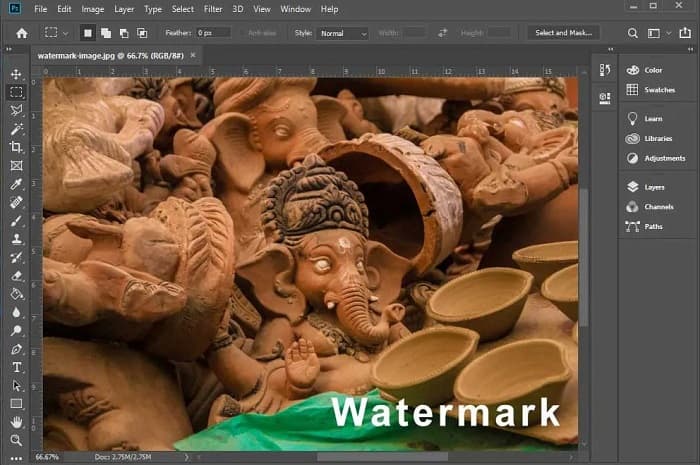
Step 2. And then, click the Magic Wand Tool (W), then zoom to the area of your watermark, then press CTRL +. With the Magic Wand Tool, select the watermark you want to remove.
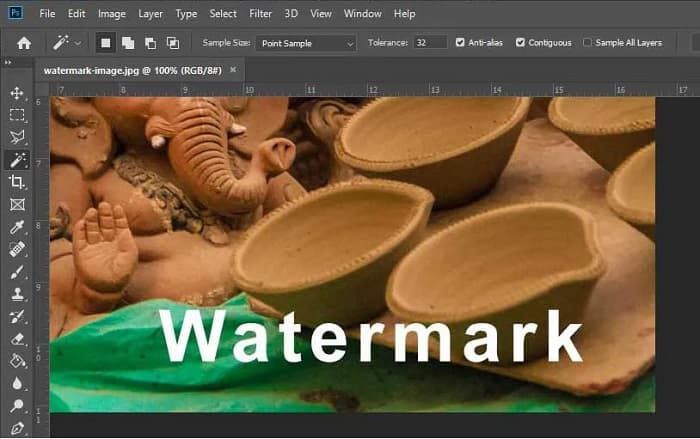
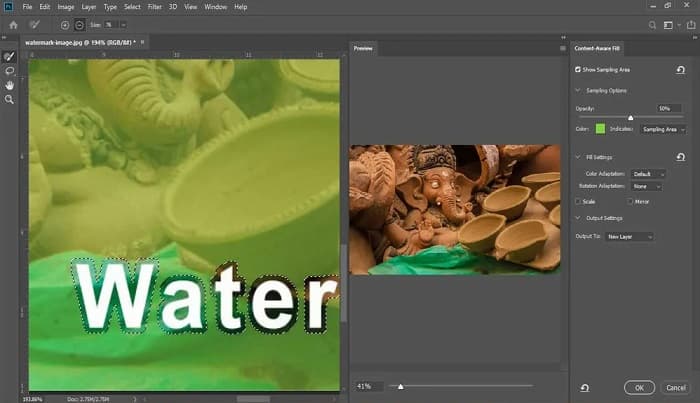
Step 3. Lastly, go to the Edit option, then select Content-Aware Fill. The Content-Aware-Fill will automatically remove the watermark.
ส่วนที่ 3 วิธีการลบ Photobucket Watermark โดยใช้ PixlR
Another Photobucket Watermark Removal tool that you can use is PixlR. PixlR is an online photo editor that you can use for free. This online tool is not just for editing photos; it also enables you to remove watermarks on your photos. This watermark remover supports many image formats, like PSD, PXD, JPEG, PNG, SVG, etc. PixlR has a simple interface, making it easy to remove the watermark in just a few clicks. Furthermore, you can use this app on mobile devices.
ข้อดี
- มีส่วนต่อประสานผู้ใช้ที่เรียบง่าย
- ช่วยให้คุณกำหนดคุณภาพและขนาดของภาพได้
- คุณสามารถเข้าถึงได้ฟรี
จุดด้อย
- กระบวนการทำงานที่ช้าอาจเกิดขึ้นในบางครั้ง
Step 1. Open the PixlR photo editor. To upload your photo, click the Open Image button. You can also use a URL to upload your photo.
Step 2. Click Retouch > Clone Stamp. And then, click the watermark and drag the mouse to remove the watermark on your photo.
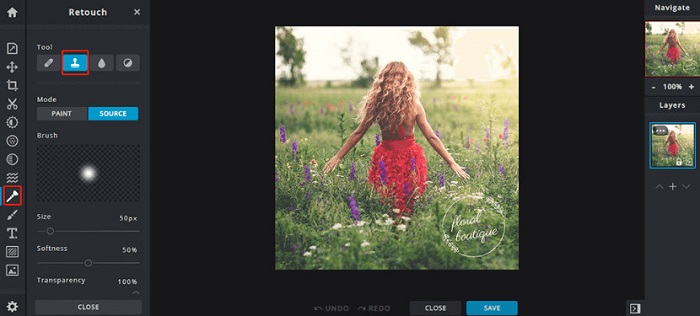
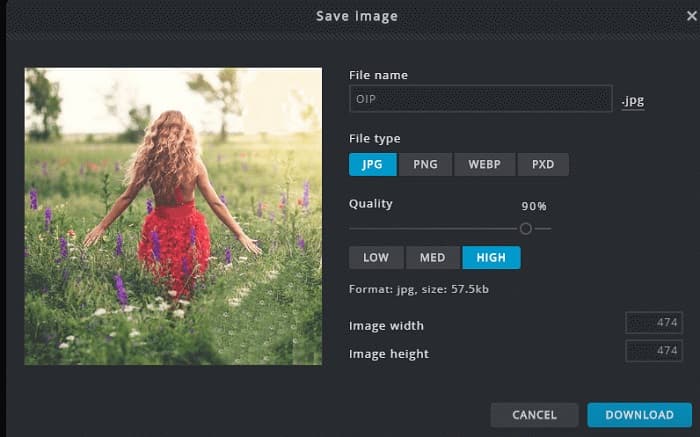
Step 3. Finally, tick the Save button to save your photo on your device. You can also choose the quality and the size of your photo in this step.
ส่วนที่ 4 อีกวิธีในการลบ Photobucket Watermark Online
มีตัวลบลายน้ำออนไลน์อีกมากมายที่คุณจะเห็นบนอินเทอร์เน็ต อย่างไรก็ตาม ไม่ใช่ว่าเครื่องมือลบลายน้ำออนไลน์ทั้งหมดจะปลอดภัยและมีส่วนต่อประสานผู้ใช้ที่เรียบง่าย ดังนั้นเราจึงค้นหาทางเลือกอื่นเพื่อลบลายน้ำ Photobucket
Media.io
Media.io is an online watermark remover that is user-friendly. It has a simple user interface, and it is safe to use. You can also remove the video logo, texts, and stamps easily. Moreover, you can remove the watermark on any image format, like PNG, JPEG, SVG, etc. What’s even amazing about this tool is that you can remove the watermark on your videos with any format available.
ข้อดี
- ช่วยให้คุณสามารถลบลายน้ำออกจากภาพถ่ายและวิดีโอของคุณ
- เป็นโปรแกรมตัดต่อวิดีโอออนไลน์
- ไม่มีโฆษณา
จุดด้อย
- มันขึ้นอยู่กับอินเทอร์เน็ต
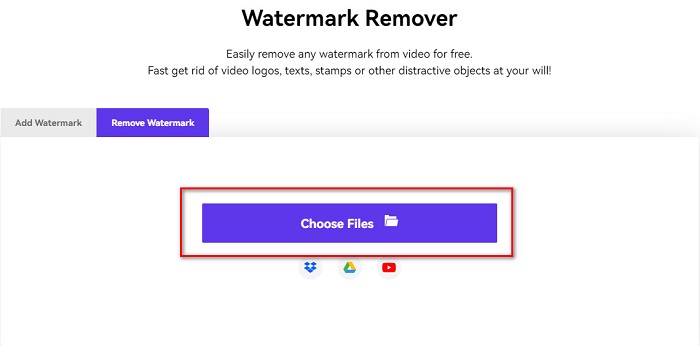
Step 1. Search Media.io watermark remover on your browser. Then, click the Choose Files button on the software’s main interface.
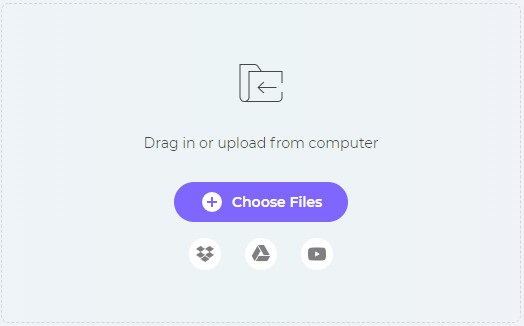
Step 2. And then, drag and drop your photo on the software’s interface to upload your Photobucket image.
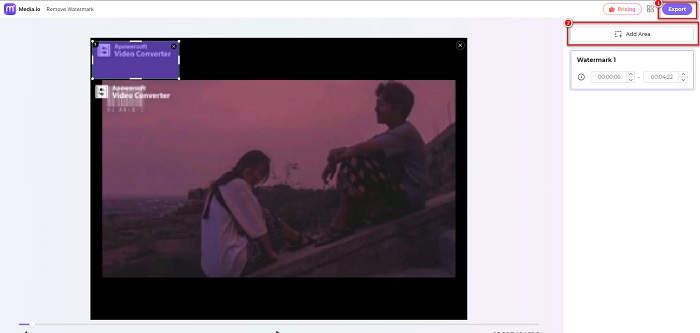
Step 3. Lastly, click the Add Area option, then select the area of the watermark. And then, click the Export button to remove the watermark.
ที่เกี่ยวข้อง:
Add Background to Photo on iPhone, Android, Computer, Online
Convert HEIC to JPG with the 6 Effective Offline & Online Ways
ส่วนที่ 5. คำถามที่พบบ่อยเกี่ยวกับ Photobucket Watermark Remover
ฉันสามารถลบลายน้ำออกจากภาพ JPEG ได้หรือไม่
ใช่. คุณสามารถใช้ตัวลบลายน้ำที่กล่าวถึงข้างต้นเพื่อลบลายน้ำออกจากรูปภาพ JPG/JPEG ของคุณ
คุณสามารถลบลายน้ำออกจากวิดีโอได้หรือไม่?
โชคดีที่ใช่ คุณสามารถลบลายน้ำออกจากวิดีโอของคุณได้ เครื่องมือบางอย่างช่วยให้คุณสามารถลบลายน้ำออกจากรูปแบบวิดีโอใดก็ได้ เช่น FVC Video Converter Ultimate
มีแอพสำหรับ Android ลบลายน้ำไหม?
PicLab เป็นแอปแก้ไขที่สามารถลบลายน้ำบนรูปภาพของคุณได้ แอพนี้พร้อมใช้งานบนแพลตฟอร์ม Android และ iOS
สรุป
Using the Photobucket watermark remover tools listed above will help you easily remove watermarks from your Photobucket image. However, if you want a convenient and easy way to remove watermarks from your photo, use FVC Free Watermark Remover.
-
 วิธีแปลง JPG เป็น HEIC บน Mac และ Windows
 ต้องการทราบวิธีการแปลง JPG เป็น HEIC หรือไม่? บทความนี้จะให้วิธีที่ดีที่สุดในการแปลง JPG เป็น HEIC โดยใช้ตัวแปลง JPG เป็น HEIC ที่ดีที่สุดและฟรี
-
 CopyTrans HEIC รีวิว คุณสมบัติ และทางเลือก
 หากคุณต้องการทราบว่า CopyTrans HEIC สามารถทำอะไรได้บ้าง เราขอเสนอฟีเจอร์ ข้อดี และทางเลือกอื่นๆ ของเครื่องมือให้คุณ
-
 ตัวแปลง PNG เป็น HEIC ที่ดีที่สุด 5 อันดับแรกที่คุณต้องไม่พลาด
 หากคุณต้องการทราบตัวแปลง PNG เป็น HEIC ที่มีการใช้งานสูงสุด เราจะจัดเตรียมตัวแปลง PNG เป็น HEIC ออนไลน์ที่ดีที่สุดให้คุณ อ่านบทความนี้สำหรับข้อมูลเพิ่มเติม
