


 Video Converter Ultimate
 บันทึกหน้าจอ
 ซ่อมวิดีโอ
 ดาวน์โหลดอย่างปลอดภัย
รายการตัวขยาย GIF ที่ดีที่สุดที่คุณไม่ควรพลาด
ไฟล์ GIF ได้รับความนิยมอย่างมากบนแพลตฟอร์มโซเชียลมีเดียอย่าง Facebook, Instagram และ Twitter คุณยังจะเห็นไฟล์ GIF ในโพสต์บล็อก แอปส่งข้อความด่วน และอื่น ๆ อย่างไรก็ตาม บางไฟล์ GIF จำเป็นต้องได้รับการปรับปรุงหรือขยายขนาดเพื่อให้คุณภาพดีขึ้น โชคดีที่มีซอฟต์แวร์มากมายที่คุณสามารถใช้ขยายภาพได้ ทั้งแบบออนไลน์และออฟไลน์ แต่ถ้าคุณต้องการใช้เครื่องมือที่ดีที่สุดในการขยายไฟล์ GIF ของคุณ เราได้คัดสรรมาให้แล้ว อ่านบทความนี้เพื่อดู 5 อันดับเครื่องมือ ขยายขนาด GIF ออนไลน์และออฟไลน์ที่ดีที่สุด.

ส่วนที่ 1 ตัวขยาย GIF ออนไลน์และออฟไลน์ที่ดีที่สุด 4 อันดับแรก
แม้ว่าคุณจะพบเครื่องมือขยายมากมายในท้องตลาด แต่มีเพียงไม่กี่เครื่องมือเท่านั้นที่รองรับรูปแบบ GIF ดังนั้นจึงอาจเป็นเรื่องยากสำหรับคุณที่จะหาตัวขยาย GIF ที่เหมาะกับคุณ โชคดีที่เราพบเครื่องมือขยาย GIF ที่น่าทึ่งที่สุดที่คุณสามารถใช้กับคอมพิวเตอร์ของคุณได้ อ่านส่วนนี้อย่างละเอียดเพื่อทำความคุ้นเคยกับตัวขยาย GIF ออนไลน์และออฟไลน์ที่ดีที่สุดสี่อันดับแรก
AVCLabs AI Image Enlarger (ออฟไลน์)
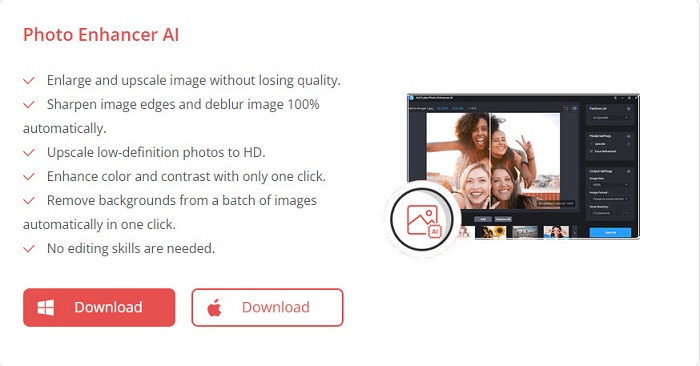
หากคุณกำลังมองหาโปรแกรมดาวน์โหลดเพื่อขยายไฟล์ GIF หรือรูปภาพแบบเคลื่อนไหวแล้ว AVCLabs AI Image Enlarger อาจเป็นแอปพลิเคชันที่คุณต้องการ โปรแกรมขยาย GIF นี้ใช้เทคโนโลยี AI (ปัญญาประดิษฐ์) ที่จะตรวจจับและปรับปรุงส่วนที่มีคุณภาพต่ำของภาพให้โดยอัตโนมัติ คุณยังสามารถใช้ซอฟต์แวร์นี้กับภาพถ่ายเก่าที่ต้องการนำไปโพสต์บน Instagram เพื่อปรับให้คมชัดขึ้นได้เช่นกัน นอกจากนี้ โปรแกรมขยาย GIF หรือรูปภาพนี้ยังสามารถขยายความละเอียดภาพของคุณไปที่ 200%, 300% และ 400% ได้อย่างแม่นยำ โดยยังคงคุณภาพของไฟล์ไว้.
นอกจากนี้ ยังมีคุณสมบัติอื่นๆ เช่น ตัวลบจุดรบกวน ลบพื้นหลัง และการปรับเทียบสี AI ซึ่งคุณสามารถใช้เพื่อปรับปรุง GIF ของคุณได้ สิ่งที่ยอดเยี่ยมเกี่ยวกับเครื่องมือนี้คือคุณสามารถขยายภาพหลายภาพพร้อมกันได้ อย่างไรก็ตาม คุณต้องซื้อแอปก่อนเพื่อใช้คุณสมบัติพิเศษและไม่ซ้ำใคร
ข้อดี
- สามารถขยายภาพความละเอียดต่ำหรือ GIF ได้
- ให้คุณลบพื้นหลังของรูปภาพของคุณ
- มีให้ดาวน์โหลดบนแพลตฟอร์มสื่อเกือบทั้งหมด เช่น Windows และ Mac
จุดด้อย
- คุณต้องทำให้แอปมีประโยชน์ก่อนที่จะเข้าถึงคุณสมบัติการแก้ไขอื่นๆ
ezgif.com
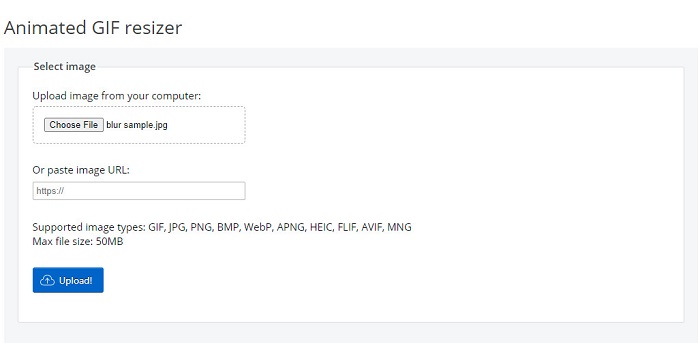
ezgif.com เป็นแอปพลิเคชันออนไลน์ที่คุณสามารถใช้เมื่อคุณต้องการขยายขนาด GIF หรือรูปภาพ เครื่องมือออนไลน์นี้ช่วยให้คุณขยายไฟล์เพื่อให้ได้คุณภาพที่ดีขึ้น นอกจากนี้ยังรองรับเกือบทุกฟอร์แมตภาพ เช่น GIF, JPG, PNG, JPEG, WebP, HEIC, MNG และอื่น ๆ อีกทั้งหากคุณไม่ต้องการดาวน์โหลดอะไรลงอุปกรณ์ คุณก็สามารถใช้ ezgif.com ได้ เครื่องมือออนไลน์นี้ช่วยประหยัดพื้นที่จัดเก็บในอุปกรณ์ของคุณ เพราะใช้งานได้ผ่านเบราว์เซอร์.
นอกจากนี้ คุณสามารถใช้งานได้บนเว็บเบราว์เซอร์เกือบทั้งหมด เช่น Google, Firefox และ Safari ezgif.com ยังมีคุณสมบัติการแก้ไขอื่นๆ เช่น ตัวแปลงที่คุณสามารถแปลงไฟล์วิดีโอของคุณเป็น GIF, ตัวหมุนรูปภาพ, ตัวครอบตัดรูปภาพ และอื่นๆ แต่เมื่อการเชื่อมต่ออินเทอร์เน็ตของคุณช้า คุณก็จะมีกระบวนการอัปโหลดที่ช้า ซึ่งผู้ใช้จำนวนมากพบว่าไม่สะดวก
ข้อดี
- คุณสามารถเข้าถึงได้ฟรี
- เป็นเครื่องมือที่ปลอดภัยต่อการใช้งาน
- มีส่วนต่อประสานกับผู้ใช้ที่ใช้งานง่าย
จุดด้อย
- เป็นแอปพลิเคชันที่ขึ้นอยู่กับอินเทอร์เน็ต
- มีโฆษณาที่น่ารำคาญมากมาย
RedKetchup - ตัวปรับขนาด GIF
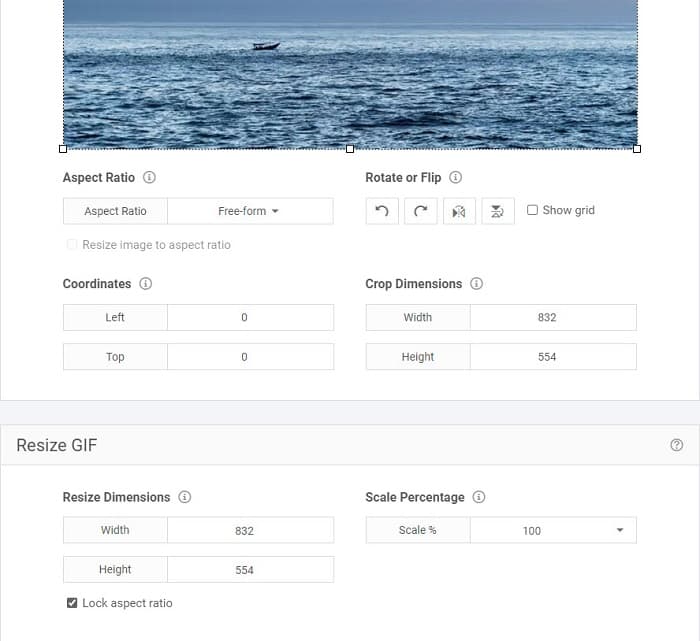
RedKetchup - GIF Resizer เป็นแอปพลิเคชันออนไลน์ที่ให้คุณปรับขนาดหรือขยายไฟล์ GIF ได้ ด้วยตัวปรับขนาด GIF คุณสามารถตั้งค่ามิติภาพและสเกลเปอร์เซ็นต์ของ GIF ได้ ดังนั้นหากคุณต้องการปรับปรุงคุณภาพของ GIF ด้วยการขยายขนาด เครื่องมือนี้ก็อาจช่วยคุณได้ นอกจากนี้ยังมีส่วนติดต่อผู้ใช้ที่เรียบง่าย ทำให้เหมาะกับผู้เริ่มต้นใช้งาน ยิ่งไปกว่านั้น คุณยังสามารถครอปไฟล์ GIF เพื่อเอาส่วนที่ไม่ต้องการออกจาก GIF หรือรูปภาพได้.
นอกจากนี้ คุณสามารถเข้าถึงเครื่องมือนี้ได้บนเว็บเบราว์เซอร์เกือบทั้งหมด เช่น Google และ Firefox และถ้าคุณต้องการส่งออกรูปภาพที่ปรับขนาดของคุณบนแพลตฟอร์มอื่น RedKetchup จะเป็นเครื่องมือที่คุณกำลังค้นหา ดังนั้น หากคุณต้องการขยาย GIF โดยไม่สูญเสียคุณภาพ RedKetchup - GIF Resizer อาจเป็นเครื่องมือที่เหมาะสม
ข้อดี
- ช่วยให้คุณขยายภาพได้พร้อมกัน
- มันมีเครื่องมือแอนิเมชั่น
- ปลอดภัยและใช้งานได้ฟรี
จุดด้อย
- มีโฆษณากวนใจมากมาย
- มันขึ้นอยู่กับอินเทอร์เน็ต
GIFGIFs.com
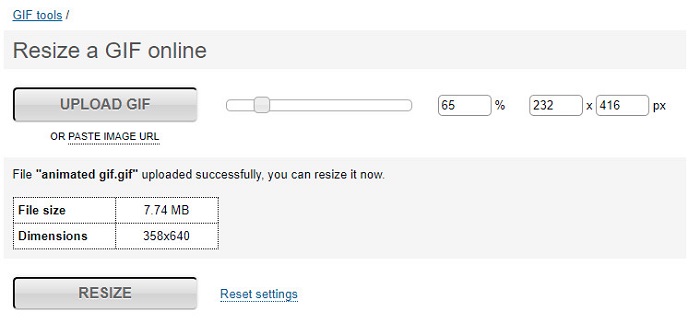
อีกหนึ่งตัวขยายขนาด GIF ออนไลน์ที่คุณสามารถใช้ได้คือ GIFGIFs.com โปรแกรมออนไลน์นี้สามารถปรับขนาดรูปภาพของคุณให้มีคุณภาพดีขึ้น รองรับฟอร์แมตภาพมาตรฐานอย่าง GIF, JPG และ PNG นอกจากนี้ ผู้เริ่มต้นจำนวนมากก็สามารถใช้แอปพลิเคชันนี้ได้ เพราะมีอินเทอร์เฟซที่ใช้งานง่าย ด้วยเครื่องมือขยาย GIF นี้ คุณเพียงแค่เลื่อนแถบสไลเดอร์เพื่อเลือกมิติและจำนวนพิกเซลที่คุณต้องการสำหรับ GIF.
นอกจากนี้ ยังมีฟีเจอร์อื่นๆ ที่คุณสามารถครอบตัด ย้อนกลับ หมุน และแยก GIF ของคุณได้ แม้ว่าจะเป็นเครื่องมือออนไลน์ แต่ก็ไม่สามารถเข้าถึงได้บนเว็บเบราว์เซอร์อื่น อย่างไรก็ตาม มันยังคงเป็นเครื่องมือที่มีประสิทธิภาพสำหรับการขยาย GIF
ข้อดี
- ช่วยให้คุณสามารถเลือกขนาดและพิกเซลของ GIF ได้
- มีอินเทอร์เฟซที่ใช้งานง่าย
- เข้าถึงได้ฟรี
จุดด้อย
- ไม่ปลอดภัยที่จะใช้
- มีโฆษณา
ตอนที่ 2 คำแนะนำ: การขยายภาพที่คุณต้องลอง
หลายคนใช้แอปพลิเคชั่นขยายภาพบ่อยขึ้นเนื่องจากการถ่ายภาพเป็นหนึ่งในเทรนด์ ดังนั้นจึงไม่ต้องสงสัยเลยว่ามีแอปพลิเคชั่นรูปภาพเกิดขึ้นมากมาย รวมถึงตัวขยายและปรับปรุงรูปภาพ หลายคนกำลังมองหาเครื่องขยายภาพเพื่อปรับปรุงคุณภาพของภาพ โชคดีที่เราพบแอปพลิเคชันออนไลน์บนอินเทอร์เน็ตที่โปรแกรมแก้ไขภาพจำนวนมากใช้ อ่านต่อโพสต์นี้เพื่อเรียนรู้การขยายภาพที่ดีที่สุด
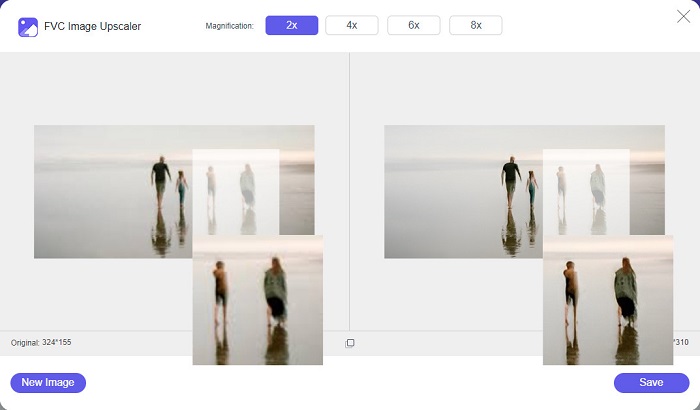
FVC Free Image Upscaler เป็นตัวขยายขนาดรูปภาพประสิทธิภาพสูงสุดที่คุณสามารถใช้ได้บนเว็บเบราว์เซอร์ทุกตัว เช่น Google, Safari และ Firefox นอกจากนี้ คุณยังสามารถขยายภาพได้ที่ระดับ 2x, 4x, 6x และ 8x เพื่อให้ได้ภาพคุณภาพสูง อีกทั้งคุณจะไม่เจอปัญหาในการอัปโหลดภาพในเครื่องมือนี้ เพราะรองรับไฟล์ภาพแทบทุกชนิด เช่น PNG, JPG, JPEG และ BMP สิ่งที่โดดเด่นยิ่งกว่านั้นคือ แอปพลิเคชันนี้สามารถตรวจจับส่วนที่มีคุณภาพต่ำของภาพและปรับปรุงด้วยกระบวนการเทคโนโลยี AI ได้โดยอัตโนมัติ แม้จะเป็นเครื่องมือออนไลน์ แต่ก็ยังสามารถขยายภาพของคุณได้อย่างรวดเร็ว.
ข้อดี
- ใช้งานได้ฟรีและปลอดภัย
- มีส่วนต่อประสานกับผู้ใช้ที่ตรงไปตรงมา
- ช่วยให้คุณดูตัวอย่างภาพที่ขยายขนาดของคุณ
- เข้าถึงได้ในทุกเว็บเบราว์เซอร์
จุดด้อย
- เป็นแอปพลิเคชันบนเว็บ
ที่เกี่ยวข้อง:
วิธีเพิ่มคุณภาพรูปภาพบน Windows และ Mac ได้อย่างง่ายดาย
วิธีเพิ่มความละเอียดของรูปภาพ [5 วิธีในการปรับปรุง]
ส่วนที่ 3 คำถามที่พบบ่อยเกี่ยวกับตัวขยาย GIF
ฉันสามารถปรับขนาด GIF โดยไม่สูญเสียคุณภาพได้หรือไม่
เมื่อปรับขนาด GIF จะไม่สูญเสียคุณภาพและไม่ทำให้ความละเอียดหรือพิกเซลของ GIF ลดลง แต่ถ้าคุณต้องการลดขนาด GIF ของคุณ คาดว่าคุณจะสูญเสียคุณภาพของ GIF ของคุณ
ฉันสามารถแปลง GIF เป็น JPG ได้หรือไม่
ใช่. คุณสามารถค้นหาเครื่องมือมากมายบนอินเทอร์เน็ตที่จะช่วยคุณแปลงไฟล์ GIF เป็นรูปแบบไฟล์ JPG ezgif.com เป็นหนึ่งในโปรแกรมแปลง GIF เป็น JPG ที่เป็นที่รู้จัก
Canva สร้าง GIF หรือไม่
ใช่. คุณสามารถใช้ Canva เพื่อสร้าง GIF แบบเคลื่อนไหวที่คุณต้องการแบ่งปันกับเพื่อนของคุณ เพียงอัปโหลดวิดีโอของคุณไปยังฟีเจอร์สร้าง GIF จากนั้นเลือกเทมเพลตที่คุณต้องการใช้สำหรับ GIF ของคุณ
สรุป
เครื่องมือ ขยายขนาด GIF ทั้งหมดที่กล่าวมาข้างต้นสามารถช่วยให้คุณขยาย GIF ได้อย่างง่ายดาย ไม่ว่าคุณจะใช้ตัวขยาย GIF แบบออฟไลน์หรือออนไลน์ คุณก็ยังจะได้ผลลัพธ์ตามที่ต้องการ หากคุณต้องการปรับขนาดรูปภาพคุณภาพต่ำ ให้ใช้ตัวขยายภาพที่ทรงพลังที่สุดคือ FVC Free Image Upscaler.
บทความที่เกี่ยวข้อง
-
 ตัวขยายรูปภาพออนไลน์และออฟไลน์ที่ดีที่สุด 7 อันดับแรก
 ต้องการเรียนรู้เครื่องมือขยายรูปภาพที่มีประสิทธิภาพสูงสุดสำหรับอุปกรณ์ Windows หรือ Mac ของคุณหรือไม่? อ่านโพสต์นี้เพื่อทราบเครื่องขยายภาพที่ดีที่สุดที่ควรค่าแก่การลอง
-
 ทำให้ความละเอียดภาพถ่ายของ iPhone ดีขึ้นด้วยเครื่องมือเพิ่มประสิทธิภาพสูงสุด
 คุณต้องการปรับปรุงความละเอียดภาพถ่ายของ iPhone หรือไม่? ในบทความนี้เราจะพูดถึงเครื่องมือที่ดีที่สุดที่คุณสามารถใช้ได้และลูกเล่นอื่นๆ ที่คุณต้องรู้!
-
 วิธีแก้ไขคุณภาพของภาพออนไลน์และ Adobe Photoshop
 หากคุณมีรูปภาพคุณภาพต่ำ คุณต้องแก้ไขความละเอียดของรูปภาพ หากคุณต้องการเรียนรู้วิธีแก้ไขคุณภาพของภาพ โปรดอ่านบทความนี้ให้ครบถ้วน
