


 Video Converter Ultimate
 บันทึกหน้าจอ
 ซ่อมวิดีโอ
 ดาวน์โหลดอย่างปลอดภัย
วิธีสร้างวิดีโอขาวดำ: สร้างเอฟเฟกต์ฟิลเตอร์
ผู้กำกับภาพสามารถปรับเปลี่ยนลักษณะของภาพยนตร์ได้ด้วยการใช้ฟิลเตอร์ ปัจจุบันมีฟิลเตอร์มากมายในแอปพลิเคชันหลายประเภท แต่ฟิลเตอร์ขาวดำมักจะมีให้ใช้อยู่เสมอ การทำให้วิดีโอของคุณเป็นโทนขาวดำช่วยสร้างบรรยากาศให้กับงานภาพ เพราะสามารถถ่ายทอดฉากในอดีต ความเศร้า ความคิดถึง และอารมณ์ต่าง ๆ ที่ภาพสีหรือวิดีโอสีไม่อาจสื่อได้ แล้วจะทำวิดีโอให้เป็นขาวดำได้อย่างไร? หากมีเครื่องมือที่เหมาะสมอยู่ในมือ คุณก็สามารถทำได้ไม่ยาก อยู่กับบทความนี้ เราจะสอนวิธีทำให้คุณเอง.

ตอนที่ 1 ฉันจะเพิ่มฟิลเตอร์ขาวดำได้อย่างไร
เครื่องมือแปลงไฟล์มัลติมีเดียแบบออนไลน์ที่มีชื่อว่า Video Converter Ultimate สามารถแปลงไฟล์วิดีโอและเสียงยอดนิยมเกือบทุกชนิดไปเป็นรูปแบบไฟล์ที่คุณต้องการได้ เครื่องมือออนไลน์นี้มีความสามารถมากกว่าที่เห็นในครั้งแรก เพราะนอกจากจะแปลงไฟล์แล้ว ยังให้ผู้ใช้ตัดต่อวิดีโอด้วยเครื่องมือที่มีประโยชน์ รวมถึงฟิลเตอร์ต่าง ๆ และทำงานแปลงรูปแบบอื่น ๆ ได้ด้วย อย่างไรก็ตาม โปรแกรมนี้ไม่มีให้ดาวน์โหลดบน Play Store หรือ App Store ด้านล่างคือวิธีที่มีประสิทธิภาพในการเพิ่มฟิลเตอร์ขาวดำให้กับวิดีโอด้วย Video Converter Ultimate.
ขั้นตอนที่ 1 ติดตั้งโปรแกรม Video Converter Ultimate
คลิกไอคอนด้านล่างเพื่อดาวน์โหลดเครื่องมือลงในคอมพิวเตอร์ Windows หรือ Mac ของคุณ ทำตามขั้นตอนง่ายๆ เพื่อติดตั้งเครื่องมือให้เสร็จสิ้น จากนั้นจึงเปิดใช้งาน
ดาวน์โหลดฟรีสำหรับ Windows 7 ขึ้นไปดาวน์โหลดอย่างปลอดภัย
ดาวน์โหลดฟรีสำหรับ MacOS 10.7 ขึ้นไปดาวน์โหลดอย่างปลอดภัย
ขั้นตอนที่ 2 เพิ่มไฟล์วิดีโอ
นำเข้าไฟล์วิดีโอที่คุณต้องการใส่ฟิลเตอร์ได้โดยคลิกปุ่มเครื่องหมายบวกหรือAdd Files จากนั้นเลือกไฟล์วิดีโอที่ต้องการอัปโหลดแล้วคลิกOpen นอกจากนี้ หากคุณต้องการ คุณยังสามารถเพิ่มไฟล์วิดีโอได้หลายไฟล์ กล่าวคือ โปรแกรมไม่จำกัดจำนวนวิดีโอที่สามารถใส่ฟิลเตอร์ได้.
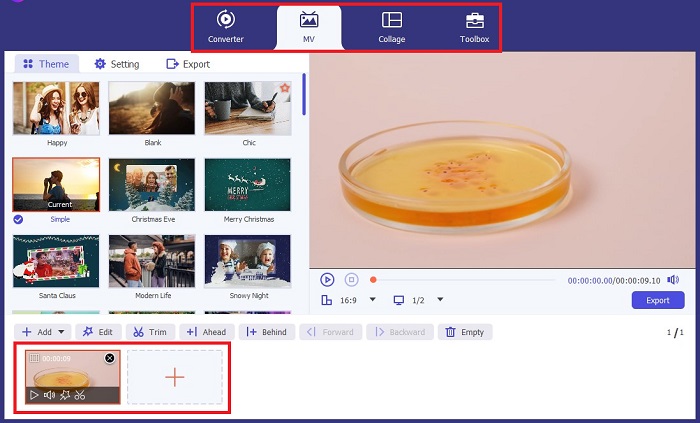
ขั้นตอนที่ 3 เข้าถึงเมนู Filters & Effects
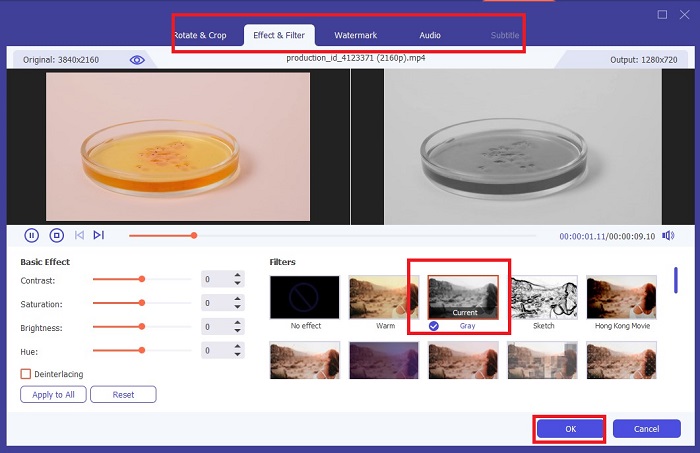
คลิกปุ่มWand เพื่อเปิดหน้าต่างใหม่สำหรับปรับแต่งวิดีโอ หากต้องการใช้ฟิลเตอร์ขาวดำ ให้คลิกFilters & Effects แล้วเลือกฟิลเตอร์ขาวดำ นอกจากนี้ FVC Video Converter Ultimate ยังให้คุณควบคุมค่าเฉดสี (Hue) ความอิ่มตัวสี (Saturation) ความสว่าง (Brightness) และความคอนทราสต์ (Contrast) ของโปรเจกต์ได้ด้วย.
ขั้นตอนที่ 4 บันทึกวิดีโอขาวดำของคุณ
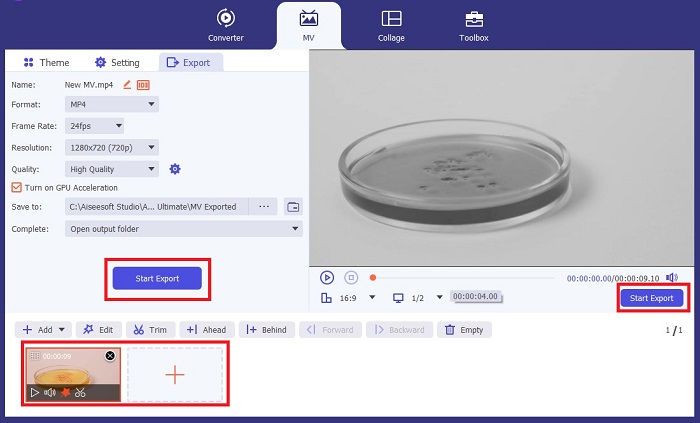
หากคุณพอใจกับวิดีโอแล้ว ให้คลิกOK และแปลงไฟล์เป็นรูปแบบที่คุณต้องการ เมื่อกำหนดค่าทุกอย่างเรียบร้อยแล้ว ให้คลิกปุ่มConvert เพื่อบันทึกไฟล์ผลลัพธ์ลงในอุปกรณ์ของคุณ.
ส่วนที่ 2: วิธีสร้างวิดีโอขาวดำด้วย Premiere Pro
Premiere Pro โดย Adobe เป็นซอฟต์แวร์ตัดต่อวิดีโอชั้นนำของอุตสาหกรรมสำหรับภาพยนตร์ ละครโทรทัศน์ เนื้อหาวิดีโอ และโฆษณา มันกลายเป็นซอฟต์แวร์ที่ผู้สร้างภาพยนตร์ทั่วโลกเลือกใช้ เพราะเมื่อเปรียบเทียบกับซอฟต์แวร์ตัดต่ออื่นๆ แล้ว เครื่องมือนี้มีเครื่องมือสร้างสรรค์มากมายที่จะทำให้วิดีโอของคุณดูสวยงาม ยอดเยี่ยม และเป็นมืออาชีพ
หากคุณต้องการสร้างอารมณ์ให้กับวิดีโอ การใส่ฟิลเตอร์เป็นสิ่งแรกที่คุณสามารถทำได้เพื่อให้บรรลุเป้าหมายนี้ การใส่ฟิลเตอร์ให้กับวิดีโอโดยใช้ Premiere Pro ทำได้ค่อนข้างง่าย นี่คือสี่ขั้นตอนง่ายๆ ในการซ้อนฟิลเตอร์ขาวดำด้วย Premiere Pro
ขั้นตอนที่ 1 เพิ่มวิดีโอที่คุณต้องการทำให้เป็นขาวดำ วิธีทำคือไปที่แผงโปรเจกต์ (Project Panel) หรือTimeline Panel ซึ่งเป็นพื้นที่ทำงานใน Premiere Pro ที่คุณจะใช้ตัดต่อ เพิ่มเสียง จัดเรียงคลิปวิดีโอ ใส่เอฟเฟ็กต์ และอื่น ๆ จากนั้นลากวิดีโอที่ต้องการทำให้เป็นขาวดำมาวาง แล้วคุณก็พร้อมสำหรับขั้นตอนถัดไป.
ขั้นตอนที่ 2 เพื่อเปิดแผงเอฟเฟ็กต์ ให้เลือกเมนู Window > Effects ตอนนี้คุณก็ใกล้จะได้ฟิลเตอร์ขาวดำแล้ว.
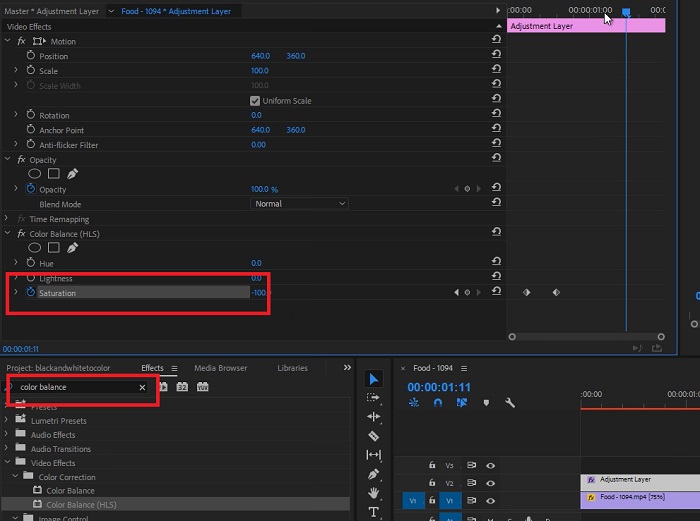
ขั้นตอนที่ 3 หลังจากเปิดแผงEffects แล้ว คุณจะเห็นหมวด Video Effects ให้เลือกและคลิกที่Image Control จากนั้นภายใต้เมนู Image Control ให้เลือกBlack and White button แล้วลากไปวางบนโปรเจกต์ของคุณ.
อ่านเพิ่มเติม:
4 วิธีสุดเจ๋งในการใส่ฟิลเตอร์ให้วิดีโอบน Windows และ macOS
วิธีง่าย ๆ ในการแปลงรูปภาพเป็นขาวดำ
ส่วนที่ 3: การเปรียบเทียบตารางของซอฟต์แวร์
ตอนนี้คุณทำวิดีโอของคุณเป็นขาวดำเสร็จแล้ว เพื่อทำความเข้าใจเพิ่มเติมว่าซอฟต์แวร์ตัดต่อใดที่เหมาะกับคุณ เราได้เปรียบเทียบ Video Converter Ultimate และ Premiere Pro ด้านล่าง
| ซอฟต์แวร์ | ราคา | ระบบปฏิบัติการ | คุณสมบัติ |
| Video Converter Ultimate | สิทธิ์การใช้งาน 1 เดือนมีค่าใช้จ่าย $23.20 | Windows 10, Windows 8, Windows 7, Windows Vista, Windows XP (SP2 หรือใหม่กว่า) macOS 10.7 หรือสูงกว่า | ทำให้ไม่มีลายน้ำแบรนด์เหลืออยู่ เครื่องมือนี้มีกล่องเครื่องมือสำหรับกิจกรรมการแก้ไขเสียงและวิดีโอของคุณ |
| พรีเมียร์ โปร | โปรแกรม Adobe Cloud เสนอการสมัครสมาชิก 1 เดือนสำหรับ $52.99 | macOS Monterey v12.0 หรือใหม่กว่า | เครื่องมือแก้ไขขั้นสูง การตัดต่อวิดีโอ 3 มิติ โปรแกรมแก้ไขเสียง การจัดการเนื้อหา |
ส่วนที่ 4: คำถามที่พบบ่อยเกี่ยวกับการเพิ่มฟิลเตอร์ขาวดำ
Video Converter Ultimate เป็นแพลตฟอร์มที่เชื่อถือได้และปลอดภัยหรือไม่?
ใช่! Video Converter Ultimate รับรองว่าแพลตฟอร์มมีความปลอดภัยและปลอดภัย 100% นอกจากนี้คุณยังสามารถข้ามการลงชื่อเข้าใช้บัญชีของคุณเพื่อเข้าถึงคุณสมบัติของ FVC Video Converter Ultimate ได้
ฉันสามารถใช้ Premiere Pro บนโทรศัพท์ของฉันได้หรือไม่?
น่าเสียดายที่ไม่มี Video Converter Ultimate และ Premiere Pro เข้ากันได้กับอุปกรณ์พีซีเท่านั้น เนื่องจากต้องใช้หน่วยที่สูงในการทำงานและเพื่อการใช้งานที่ราบรื่น
ฉันสามารถแก้ไขรูปภาพใน Video Converter Ultimate และ Premiere Pro ได้หรือไม่
แน่นอน! อย่างไรก็ตาม เนื่องจาก Premiere Pro ให้ความสำคัญกับการตัดต่อวิดีโอมากกว่า คุณอาจถูกจำกัดด้วยเครื่องมือสร้างสรรค์ที่จำเป็นในการแก้ไขรูปภาพของคุณ
Premiere Pro มีลายน้ำมั้ย?
Premiere Pro ไม่ทิ้งลายน้ำ แม้ว่าคุณจะทดลองใช้ Premiere Pro แต่ก็จะไม่ทิ้งลายน้ำไว้ แต่อาจทำให้คุณต้องซื้อบัญชีที่ได้รับใบอนุญาตหลังจากผ่านไป 2-3 วัน
Canva สามารถแก้ไขวิดีโอเป็นขาวดำได้หรือไม่
แน่นอน ใช่แล้ว! เช่นเดียวกับแพลตฟอร์มอื่นๆ Canva สามารถแก้ไขวิดีโอและมีตัวกรองมากมายเพื่อนำไปใช้กับวิดีโอ Raw ของคุณ
สรุป
บทความนี้ได้แสดงขั้นตอนและวิธีการทำวิดีโอให้เป็นขาวดำด้วยโปรแกรม Video Converter Ultimate และ Premiere Pro จาก Adobe หากคุณเป็นมือใหม่และไม่ต้องการการตัดต่อที่ซับซ้อน Video Converter Ultimate ถือว่าเหมาะอย่างยิ่ง แต่หากคุณเป็นคนที่ต้องการซอฟต์แวร์ที่เน้นด้านการตัดต่อโดยเฉพาะ และมีเครื่องมือสร้างสรรค์มากมายเพื่อถ่ายทอดความคิดสร้างสรรค์ของคุณออกมา Premiere Pro คือโปรแกรมที่เหมาะสำหรับคุณมากกว่า.
-
 3 วิธีในการสร้างวิดีโอให้ยาวขึ้นบน iPhone และอุปกรณ์อื่นๆ
 การทำวิดีโอให้ยาวขึ้นค่อนข้างยาก โชคดีที่เราพบสามวิธีในการสร้างวิดีโอให้ยาวขึ้นบน iPhone และอุปกรณ์อื่นๆ
-
 วิธีการที่โดดเด่นในการแบ่งวิดีโออย่างมีประสิทธิภาพ
 บทความนี้จะอธิบายวิธีแบ่งวิดีโอออกเป็นส่วนๆ ดังนั้นหากคุณสนใจ คลิกโพสต์นี้ เนื่องจากเรานำเสนอวิธีทดลองที่ตรงไปตรงมาที่สุดแก่คุณ
-
 การเล่นวิดีโอย้อนหลัง 5 อันดับแรกบนพีซีและ Mac
 คุณกำลังมองหาโปรแกรมสร้างวิดีโอย้อนหลังที่ดีที่สุดบนเว็บหรือไม่? และถ้าเป็นเช่นนั้น ลองอ่านบทความนี้ เพราะเราได้รวบรวมซอฟต์แวร์ต่าง ๆ ให้คุณเลือกใช้งาน
