


 Video Converter Ultimate
 บันทึกหน้าจอ
 ซ่อมวิดีโอ
 ดาวน์โหลดอย่างปลอดภัย
วิธีแปลงวิดีโอ Flash (FLV) สำหรับเล่นบน PSP อย่างง่ายดายและรวดเร็ว
ไฟล์ FLV เป็นไฟล์วิดีโอที่บันทึกในรูปแบบคอนเทนเนอร์ Adobe Flash Video (FLV) คุณสามารถค้นหาวิดีโอ FLV ที่ฝังอยู่บนอินเทอร์เน็ต เช่น YouTube, Hulu, Vimeo และเว็บไซต์อื่นๆ ได้ตลอดเวลา บางครั้งคุณต้องการแปลงไฟล์ FLV ที่คุณชื่นชอบเพื่อเล่นบน PSP ในโพสต์นี้ เราจะแชร์โซลูชันที่มีประสิทธิภาพ 3 วิธีในการแปลงไฟล์ FLV เป็นรูปแบบที่รองรับ PSP บนพีซี Windows และ Mac ของคุณ

ส่วนที่ 1 วิธีการเปลี่ยน Flash Video เป็น PSP Free Online
FVC Free Online Video Converter เป็นเครื่องมือแปลงวิดีโอ FLV เป็น PSP ออนไลน์ฟรี ที่ช่วยแปลงวิดีโอต่าง ๆ รวมถึง FLV ให้เป็น MP4, WMV, AVI, MOV, MP3 ฯลฯ กระบวนการแปลงทั้งหมดทำแบบออนไลน์โดยไม่ต้องดาวน์โหลดซอฟต์แวร์ ไม่ต้องลงทะเบียน และไม่มีโฆษณา คุณสามารถดูขั้นตอนอย่างละเอียดในการแปลงวิดีโอ Flash ให้เป็นรูปแบบที่ PSP รองรับอย่าง MP4 ได้ฟรีบนออนไลน์.
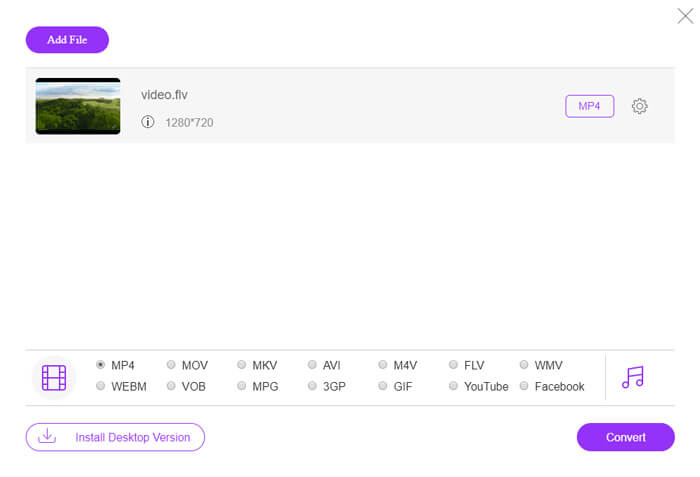
ขั้นตอนที่ 1. ไปที่เว็บไซต์ทางการของ FVC Free Online Video Converter จากนั้นคลิกปุ่ม Add Files to Convert เพื่อดาวน์โหลดและติดตั้งตัวเรียกใช้งาน หลังจากนั้นคุณสามารถเลือกไฟล์วิดีโอ FLV จากคอมพิวเตอร์ของคุณได้.

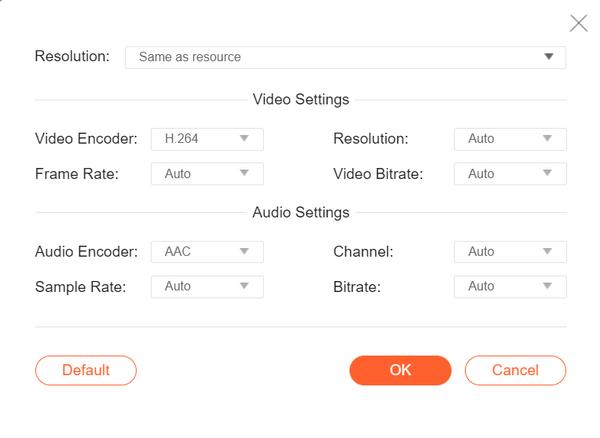
ขั้นตอนที่ 2. เนื่องจาก MP4 เป็นรูปแบบวิดีโอที่แนะนำสำหรับ PSP คุณสามารถเลื่อนไปยังส่วนด้านล่างและทำเครื่องหมายเลือก MP4 เป็นรูปแบบเอาต์พุต หากต้องการปรับการตั้งค่ามากกว่านี้ ให้คลิกไอคอนรูปเฟืองเพื่อปรับตัวเข้ารหัสวิดีโอ ความละเอียด อัตราเฟรม บิตเรต และการตั้งค่าเสียงอื่น ๆ เช่น ตัวเข้ารหัสเสียง แชนเนล อัตราสุ่ม และบิตเรต.
ขั้นตอนที่ 3. จากนั้นคลิกปุ่ม Convert เพื่อเริ่มแปลงวิดีโอ FLV ของคุณเป็นไฟล์ PSP MP4.
ส่วนที่ 2 วิธีแบบมืออาชีพในการแปลง FLV เป็น PSP ฟรี
เครื่องมือระดับมืออาชีพอย่าง FVC Free FLV to PSP Converter จะช่วยแปลงวิดีโอแฟลชของคุณให้เล่นบน PSP ได้ เครื่องมือแปลง FLV ฟรีนี้สามารถแปลงไฟล์ FLV แบบแบตช์เป็น MP4, AVI, WMV, MOV และอื่น ๆ นอกจากนี้ คุณยังสามารถตัดต่อวิดีโอ FLV ด้วยซอฟต์แวร์ตัดต่อวิดีโอที่มีมาให้ภายในโปรแกรมก่อนการแปลงได้.

- ชุดแปลง FLV เป็น MP4, MKV, AVI, WMV ฯลฯ ด้วยความเร็วที่เร็วขึ้น 50x
- แปลงรูปแบบที่รองรับ FLV เป็น PSP บน Windows 10/8/7/Vista/XP และ Mac OS X
- บีบอัด ผสาน และเพิ่มเอฟเฟกต์วิดีโออื่น ๆ ลงในไฟล์ FLV
- เพิ่มธีมพิเศษให้กับวิดีโอแฟลช เช่น วันหยุด ครอบครัว วันเกิด
ดาวน์โหลดฟรีสำหรับ Windows 7 หรือใหม่กว่าดาวน์โหลดอย่างปลอดภัย
ดาวน์โหลดฟรีสำหรับ MacOS 10.7 หรือใหม่กว่าดาวน์โหลดอย่างปลอดภัย
ขั้นตอนที่ 1. เพิ่มไฟล์ FLV
ดาวน์โหลด ติดตั้ง และเปิดใช้งาน FVC Free FLV Converter จากนั้นคลิกปุ่ม Add File(s) เพื่อเพิ่มไฟล์วิดีโอแฟลชของคุณ คุณยังสามารถลากและวางไฟล์ FLV หลายไฟล์ลงในโปรแกรมพร้อมกันได้ด้วย.

ขั้นตอนที่ 2. แก้ไขไฟล์ FLV
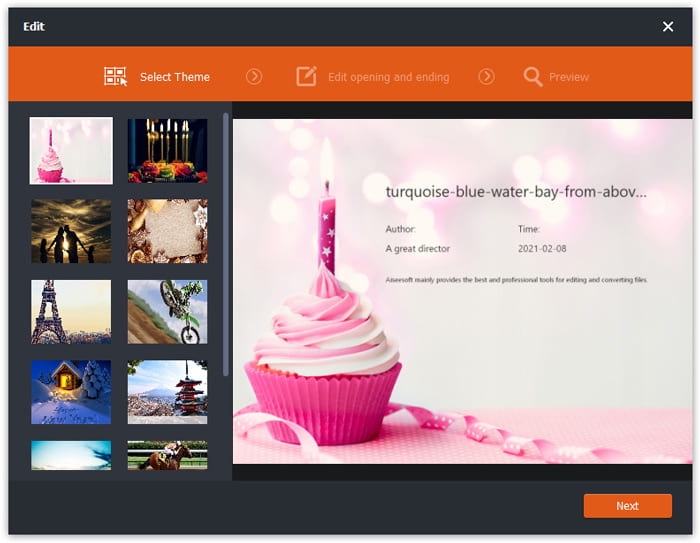
คลิกปุ่ม Edit เพื่อเริ่มตัดต่อไฟล์ FLV ของคุณ คุณสามารถเลือกธีมที่ต้องการ แก้ไขชื่อ ผู้สร้าง เวลาเปิด และเวลาปิดของคลิปวิดีโอ FLV ได้.
ขั้นตอนที่ 3 ตั้งค่ารูปแบบเอาต์พุตสำหรับ PSP
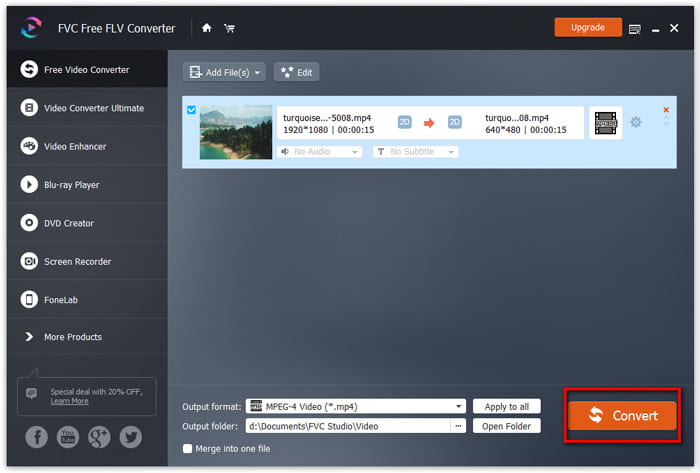
จากนั้นไปที่ส่วน Output format เลื่อนลงเพื่อค้นหาและเข้าไปที่รายการ PSP คุณสามารถเลือก PSP Video MPEG (*mp4), PSP Video h.264 (*.mp4) หรือรูปแบบอื่นเป็นรูปแบบเอาต์พุตได้ มีตัวเลือกมากมายให้เลือกในรายการ PSP.

ขั้นตอนที่ 4 แปลง FLV เป็น PSP
สุดท้าย ไปที่ส่วน Output folder แล้วเลือกโฟลเดอร์ปลายทางที่ต้องการบันทึกไฟล์ FLV ที่แปลงแล้ว จากนั้นคลิกปุ่ม Convert เพื่อเริ่มแปลงวิดีโอ FLV เป็นไฟล์สำหรับ PSP ได้ฟรี.
ส่วนที่ 3 วิธีการแปลง FLV เป็น PSP ฟรีด้วย VLC
นอกจากจะเป็นโปรแกรมเล่นสื่อแล้ว VLC Media Player ยังทำหน้าที่เป็นตัวแปลงวิดีโอ FLV เป็น PSP ที่มาพร้อมฟีเจอร์หลากหลายอีกด้วย ด้วย VLC คุณสามารถแปลงวิดีโอ Flash ให้เป็นวิดีโอสำหรับ PSP ได้ฟรีทั้งบนคอมพิวเตอร์ Windows และ Mac และยังรองรับรูปแบบวิดีโอสำหรับการแปลงได้หลากหลายอีกด้วย โปรแกรมนี้ฟรีและไม่มีข้อจำกัดใด ๆ ทำตามคำแนะนำทีละขั้นตอนเพื่อแปลงไฟล์ FLV ที่คุณชื่นชอบให้เล่นบน PSP.
ขั้นตอนที่ 1. ติดตั้งและเปิด VLC Media Player บนคอมพิวเตอร์ของคุณ จากนั้นคลิกเมนู Media แล้วเลือกปุ่ม Convert/Save.
ขั้นตอนที่ 2. คลิกปุ่ม Add เพื่อเพิ่มไฟล์ FLV ที่คุณต้องการแปลง แล้วคลิกปุ่ม Convert/Save เพื่อดำเนินการต่อ.
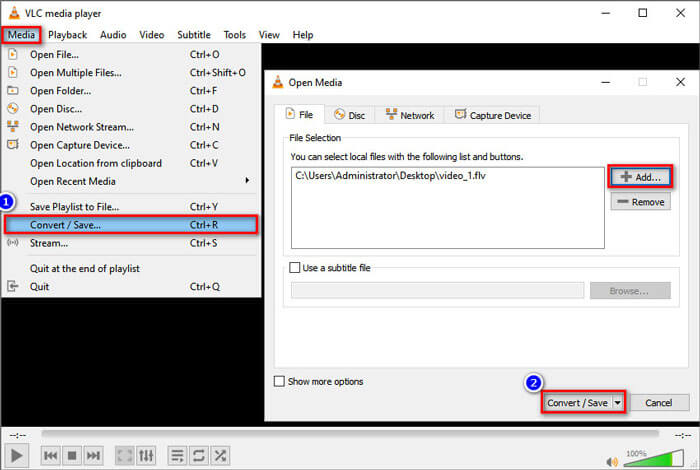
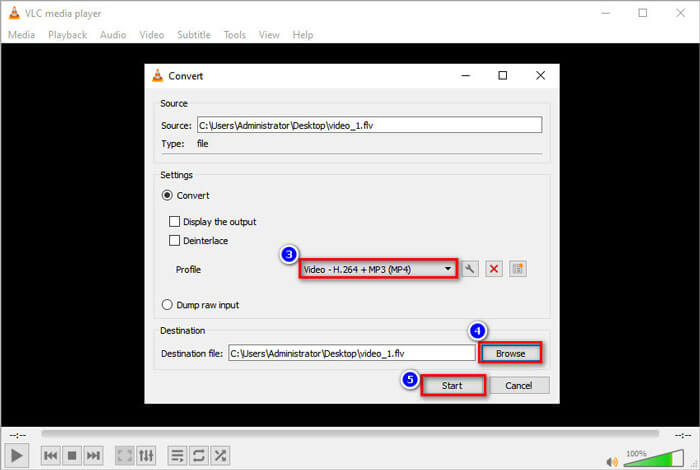
ขั้นตอนที่ 3. ในส่วน Settings ให้เลือก Convert แล้วคลิกลูกศรดรอปดาวน์ถัดจาก Profile เพื่อเลือก Video - H.264 + MP3 (MP4) เป็นรูปแบบเอาต์พุต.
ขั้นตอนที่ 4. จากนั้นไปที่ส่วน Destination แล้วคลิกปุ่ม Browse เพื่อกำหนดโฟลเดอร์ปลายทาง.
ขั้นตอนที่ 5. สุดท้ายให้คลิกปุ่ม Start เพื่อเริ่มแปลงไฟล์ FLV ของคุณเป็นวิดีโอสำหรับ PSP ใน VLC.
ส่วนที่ 4 คำถามที่พบบ่อยเกี่ยวกับการแปลง FLV เป็น PSP
ไฟล์ FLV คืออะไร?
FLV เป็นรูปแบบไฟล์วิดีโอแฟลชที่พัฒนาโดย Adobe สามารถจัดเก็บวิดีโอ เสียง ข้อความ ตัวห้อย และอื่นๆ เป็นรูปแบบมาตรฐานสำหรับวิดีโอบนเว็บไซต์เช่น YouTube, Hulu เป็นต้น
ฉันจะเปิดวิดีโอ FLV ได้อย่างไร
ทั้ง Windows Media Player และ QuickTime ไม่รองรับไฟล์ FLV ดังนั้นคุณจำเป็นต้องใช้โปรแกรมเล่นสื่อของบุคคลที่สามเพื่อเปิดไฟล์ FLV เช่น VLC มีโปรแกรมเล่น FLV มากมายที่คุณสามารถใช้เล่นไฟล์ FLV ได้ เช่น FVC Free Video Player, FLV Media Player, DivX Player, RealPlayer, KMPlayer และอื่น ๆ.
PSP เล่นไฟล์วิดีโอประเภทใดได้บ้าง
PSP รองรับ MP4, H.264, AVI, Motion JPEG และ DivX MP4 เป็นรูปแบบวิดีโอที่แนะนำสำหรับ PSP
สรุป
ในบทความนี้ เราพูดถึง 3 วิธีในการแปลงวิดีโอ Flash เป็น PSP เป็นหลัก หวังว่าพวกเขาทั้งหมดจะช่วยคุณได้มาก คุณสามารถลองใช้ตัวแปลง FVC Free FLV เป็น PSP และเปลี่ยนไฟล์ FLV ของคุณเป็นรูปแบบที่รองรับ PSP เช่น MP4, AVI และอื่นๆ ได้อย่างรวดเร็ว
-
 4 100% วิธีการทำงานเพื่อแปลงไฟล์วิดีโอ FLV เป็นรูปแบบ MP3
 จะแปลงไฟล์ FLV เป็นไฟล์ MP3 ได้อย่างไร? สิ่งที่คุณต้องทำคืออ่านบทความนี้อย่างละเอียดค้นหาวิธีที่คุณชื่นชอบและทำตามคำแนะนำทีละขั้นตอนเพื่อให้ได้สิ่งที่คุณต้องการ
-
 2 วิธีง่ายๆ ในการบีบอัดวิดีโอ FLV เพื่อการอัปโหลดที่รวดเร็ว
 หากคุณล้มเหลวในการอัปโหลดวิดีโอ FLV หรือใช้เวลาในการแชร์ไฟล์ คุณสามารถเรียนรู้รายละเอียดเพิ่มเติมเกี่ยวกับ 2 วิธีง่ายๆ ในการบีบอัดวิดีโอ FLV จากบทความ
-
 คำแนะนำที่เป็นรูปธรรมในการอัปโหลดวิดีโอ FLV ของคุณไปยัง YouTube
 อัปโหลด FLV ไปยัง YouTube แต่ล้มเหลว? คุณสามารถแก้ไขปัญหานี้ด้วยตัวเองและแปลงตัวแปลงสัญญาณ FLV เป็น YouTube ที่รองรับโดยทำตามคำแนะนำทีละขั้นตอนของเรา
