


 Video Converter Ultimate
 บันทึกหน้าจอ
 ซ่อมวิดีโอ
แปลง GIF ของคุณผ่านออนไลน์ด้วย GIF ออนไลน์เหล่านี้เป็น Video Converter
การส่ง GIF ด้วยข้อความกลายเป็นกิจวัตรใหม่สำหรับเราในการแสดงข้อความที่ดีขึ้นมาก อย่างไรก็ตาม แพลตฟอร์มอย่าง Instagram ยังไม่รองรับรูปแบบ GIF รองรับเฉพาะรูปแบบรูปภาพและวิดีโอเท่านั้นไม่ใช่ภาพนิ่ง ดังนั้น หากคุณพยายามเพิ่ม GIF ลงใน Instagram มีโอกาสที่ไฟล์จะไม่โหลดหรือโหลดไม่ได้ ประการที่สอง คุณสามารถรับภาพนิ่งได้ก็ต่อเมื่อโพสต์แล้ว แต่มีอีกวิธีหนึ่งคือการดาวน์โหลดแอปของบุคคลที่สามหรือเข้าถึงออนไลน์เพื่อแปลง GIF เป็นรูปแบบวิดีโอ การเรียนรู้วิธีใช้เครื่องมือเหล่านี้เป็นความรู้ที่ดีในการจดจำ ดังนั้น หากคุณกำลังมองหาโปรแกรมแปลงไฟล์ GIF ออนไลน์เป็นวิดีโอ แสดงว่าคุณมาถูกที่แล้ว อ่านต่อเพื่อดูว่ามีเครื่องมือใดบ้างและจะใช้งานอย่างไรให้เหมาะสม

ด้านบน 1. Ezgif
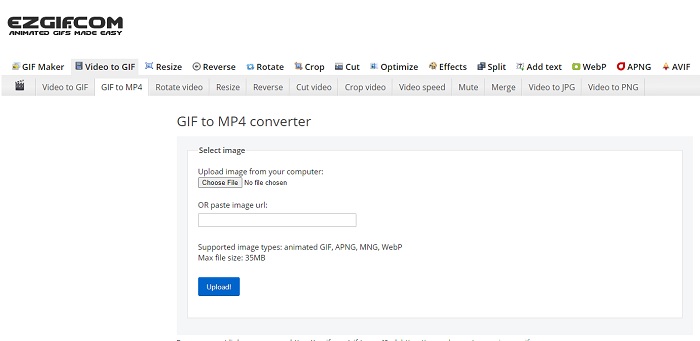
กำลังลำบากกับการทำและแปลงไฟล์ GIF อยู่ใช่ไหม? ไม่ต้องกังวลไป เพราะ Ezgif พร้อมจะช่วยคุณ เครื่องมือออนไลน์ตัวนี้ไม่ได้ทำได้แค่อย่างเดียวเท่านั้น แต่ยังสามารถใช้ตัดต่อแก้ไขไฟล์ GIF ของคุณได้ด้วย แม้ว่าความสามารถด้านการตัดต่อจะไม่ได้โดดเด่นมากนัก แต่ก็ถือว่าได้ตามมาตรฐานทั่วไป นอกจากนี้ยังมีการจำกัดขนาดหรือจำนวนไฟล์ในการสร้างและแปลง GIF ด้วยเช่นกัน.
ข้อดี
- เหมาะอย่างยิ่งที่จะสร้าง GIF
- โฆษณาทั้งหมดบนเว็บไซต์จำกัด PG-13
- คุณสมบัติการแก้ไขอย่างง่ายสำหรับผู้เริ่มต้น
จุดด้อย
- อินเทอร์เฟซเว็บดูน่าเบื่อไปหน่อย
- เฉพาะรูปแบบ MP4 เท่านั้นหากคุณพยายามแปลง GIF
อันดับ 2. Cloudconvert
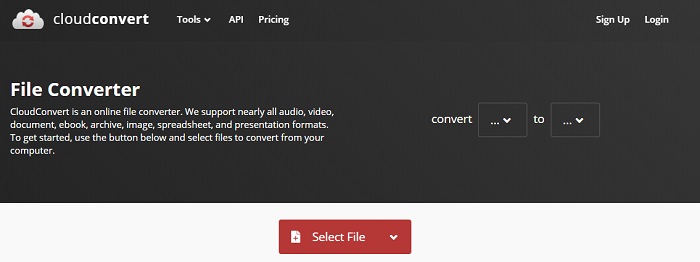
ถ้าพูดถึงการแปลงไฟล์แล้วละก็ ต้องมีชื่อของ Cloudconvert ติดอยู่ในลิสต์แน่นอน เครื่องมือนี้คือ โปรแกรมแปลงไฟล์ GIF เป็นวิดีโอแบบออนไลน์ ที่ถูกออกแบบมาเพื่อแปลงวิดีโอและเสียงให้เป็นรูปแบบไฟล์ที่เล่นได้หลากหลาย อย่างไรก็ตาม เครื่องมือนี้มีข้อจำกัดคือไม่สามารถอัปเกรดหรือเพิ่มคุณภาพของไฟล์ GIF ที่คุณแปลงได้ ดังนั้นคุณจะได้ไฟล์ตามต้นฉบับเท่าที่เป็นอยู่.
ข้อดี
- หนึ่งในผู้แปลงออนไลน์ที่ทรงพลังที่สุด
- คุณสามารถเข้าถึงได้โดยไม่ต้องดาวน์โหลดเครื่องมือ
- การผสมสีที่ยอดเยี่ยมบนอินเทอร์เฟซเว็บ
จุดด้อย
- ไม่สามารถแก้ไขไฟล์ที่คุณแปลงให้เป็นไฟล์ที่ดีกว่าได้
- โอกาสที่จะล้มเหลวในการแปลงมีมาก โดยเฉพาะอย่างยิ่งถ้าอินเทอร์เน็ตของคุณถูกขัดจังหวะ
อันดับ 3 Convertio
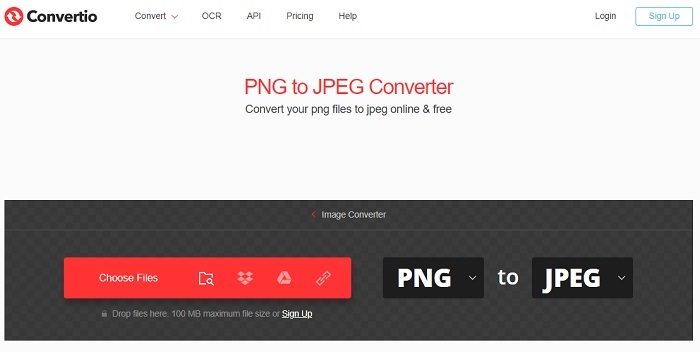
เช่นเดียวกับ Cloudconvert, Convertio ถูกสร้างมาเพื่อการแปลงไฟล์เท่านั้น รองรับรูปแบบไฟล์ได้มากมายไม่แพ้เครื่องมือก่อนหน้า แต่ข้อเสียคือหน้าเว็บไซต์เต็มไปด้วยโฆษณารบกวน ถึงแม้จะมีโฆษณาเยอะ แต่ก็ยังถือเป็นเครื่องมือแปลงไฟล์ที่ดี เหมาะสำหรับใช้ฝึกหรือทดลองแปลงไฟล์ไปเป็นรูปแบบใหม่ ๆ.
ข้อดี
- เครื่องมือเปิดการเข้าถึงที่มีอยู่บนเว็บ
- ไม่จำเป็นต้องดาวน์โหลดไฟล์เพิ่มเติมเพื่อเริ่มการแปลง
- เลือกว่าบิตเรตของไฟล์คืออะไร
จุดด้อย
- ไม่สามารถสร้าง GIF ด้วยเครื่องมือนี้และแก้ไขได้เช่นกัน
- โฆษณามีอยู่ทุกที่ ดังนั้นอย่าเปิดเว็บไซต์ที่ไม่จำเป็น
ด้านบน 4. Zamzar
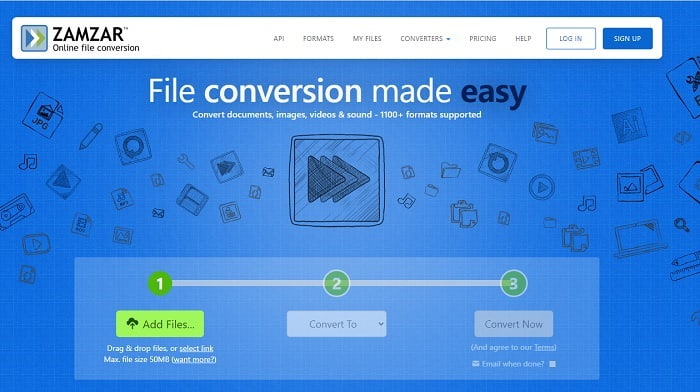
ส่วนติดต่อผู้ใช้ของ Zamzar ดูดีน่าใช้มาก และการใช้งานก็ง่ายสุด ๆ แต่ขนาดไฟล์สูงสุดถูกจำกัดไว้ที่ 50MB หากต้องการใช้ไฟล์ที่ใหญ่กว่านี้จะต้องซื้อเวอร์ชันเสียเงินหรือเข้าสู่ระบบ นอกจากนี้ ระหว่างที่กำลังแปลงไฟล์อยู่ คุณไม่สามารถยกเลิกกระบวนการได้ แม้จะกดปุ่ม x แล้วก็ตาม ดังนั้นควรแน่ใจก่อนว่าเลือกไฟล์ถูกต้อง เพราะเมื่อเริ่มแปลงแล้วจะหยุดไม่ได้.
ข้อดี
- แปลงวิดีโอ รูปภาพ และเสียงทั้งหมดได้ที่นี่
- ไฟล์ทั้งหมดที่นี่ถูกเก็บไว้นานกว่าหนึ่งวัน
- ขนาดไฟล์สูงสุดคือ 50 mb สำหรับไฟล์เดียว
จุดด้อย
- ขั้นตอนการแปลงขึ้นอยู่กับความเร็วอินเทอร์เน็ตของคุณ ดังนั้นหากคุณมีอินเทอร์เน็ต การแปลงจะใช้เวลามาก
- ไม่สามารถแก้ไขวิดีโอที่แปลงเป็นวิดีโอที่ดีกว่าได้
แนะนำ: FVC Video ConverterUltimate - ตัวแปลง GIF ที่ดีที่สุด
ตามที่เขาว่ากันว่า ให้เก็บของดีที่สุดไว้ท้ายสุด และตัวที่ดีที่สุดก็คือ FVC Ultimate Video Converter เครื่องมือพรีเมียมตัวนี้ทำได้มากกว่าโปรแกรมแปลงไฟล์อื่น ๆ ทั้งที่กล่าวถึงไปแล้วหรือแม้แต่ที่ไม่ได้กล่าวถึง หากคุณกำลังมองหาเครื่องมือที่ช่วยยกระดับการแปลงไฟล์ของคุณ และไม่ต้องพึ่งอินเทอร์เน็ต นี่คือคำตอบ จุดเด่นคือเครื่องมือนี้สามารถแปลงไฟล์ ปรับปรุงคุณภาพ สร้างสรรค์ และทำอย่างอื่นได้มากกว่าการแปลงไฟล์เพียงอย่างเดียว ผู้ใช้จึงสามารถสำรวจฟีเจอร์ทั้งหมดที่มี และสร้างผลงานที่ดีกว่าคนอื่นได้ อ่านขั้นตอนต่อไปอย่างละเอียดเพื่อเรียนรู้วิธีใช้ทีละขั้น ตอนหลังจากนั้นคุณสามารถเปิดแถบเครื่องมือเพื่อตกแต่งและปรับปรุงไฟล์ GIF ที่แปลงแล้วได้.
ขั้นตอนที่ 1. ติดตั้งโปรแกรมที่ถูกต้องลงบนฮาร์ดไดรฟ์ของคุณ ทำตามขั้นตอนการตั้งค่าและปรับให้ตรงตามความต้องการ จากนั้นคลิกเสร็จสิ้น (Finish) เพื่อเปิดโปรแกรม.
ดาวน์โหลดฟรีสำหรับ Windows 7 หรือใหม่กว่าดาวน์โหลดอย่างปลอดภัย
ดาวน์โหลดฟรีสำหรับ MacOS 10.7 หรือใหม่กว่าดาวน์โหลดอย่างปลอดภัย
ขั้นตอนที่ 2. หากโปรแกรมกำลังทำงานอยู่เบื้องหลัง คุณจะสังเกตเห็นไอคอนเล็ก ๆ บนแถบงานที่บ่งบอกว่าโปรแกรมถูกเปิดแล้ว และจะมีหน้าต่างอินเทอร์เฟซลักษณะนี้ปรากฏบนหน้าจอของคุณ.
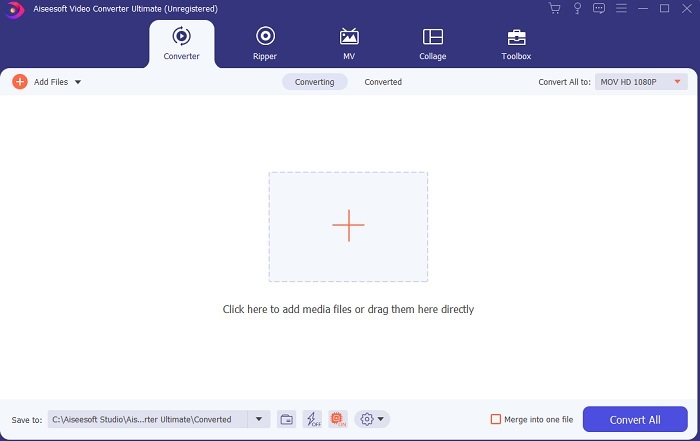
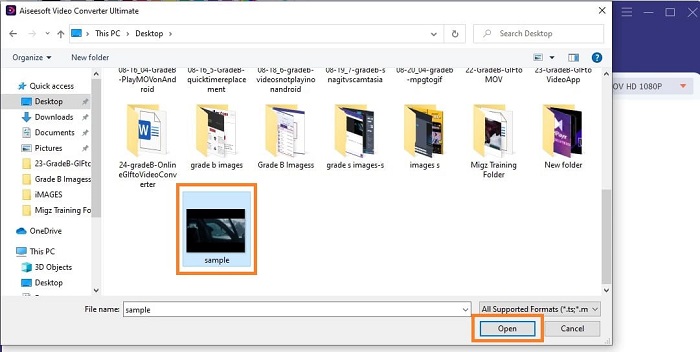
ขั้นตอนที่ 3. เมื่อต้องการเพิ่มไฟล์เข้าโปรแกรมแปลงไฟล์ ให้กดสัญลักษณ์ บวก ตรงกลางหน้าต่างอินเทอร์เฟซ หรือจะลากและวางไฟล์ลงมาทีเดียวหลายไฟล์ เช่น 2 หรือ 3 ไฟล์ก็ได้.
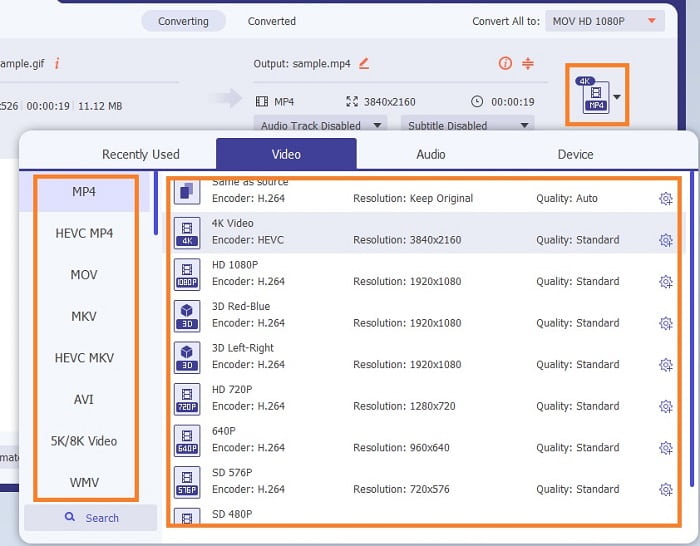
ขั้นตอนที่ 4. เมื่อไฟล์ GIF ปรากฏอยู่ในอินเทอร์เฟซแล้ว ให้กดปุ่ม ดรอปดาวน์ แล้วเลือกจากเมนูย่อยว่าต้องการแปลงเป็นรูปแบบไฟล์ใด จากนั้นคลิก Convert All เพื่อเริ่มกระบวนการแปลงไฟล์.
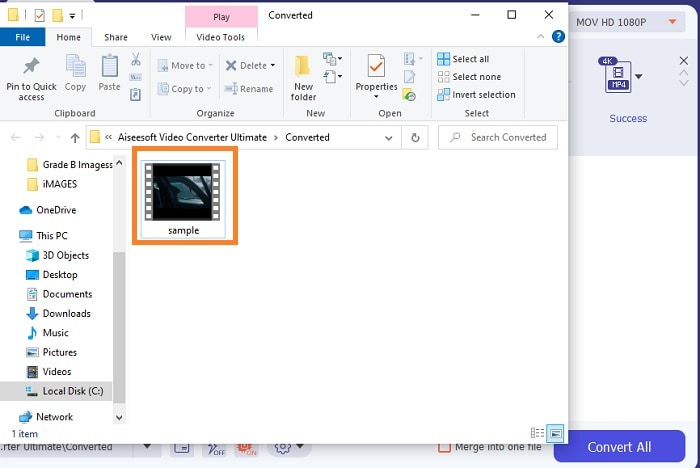
ขั้นตอนที่ 5. เมื่อกระบวนการเสร็จสิ้น หน้าต่างจัดการไฟล์จะเปิดขึ้นโดยอัตโนมัติบนแท็บ และคุณสามารถตรวจสอบไฟล์ได้ทันที หากต้องการปรับแต่งหรือเพิ่มคุณภาพให้ GIF ที่แปลงแล้ว คุณสามารถเข้าไปที่แถบเครื่องมือภายหลังได้.
ข้อดี
- เป็นเครื่องมืออเนกประสงค์ที่ลูกค้าสามารถใช้ได้
- อย่าจำกัดจินตนาการของคุณด้วยการเพิ่มเอฟเฟกต์และอื่น ๆ ให้กับผลงานสุดท้ายของคุณเพื่อให้ดูดีกว่าคนอื่น ๆ
- กระบวนการแปลงนั้นเร็วกว่าเครื่องมือใด ๆ ทางออนไลน์และออฟไลน์
จุดด้อย
- เครื่องมือจ่ายต่อการใช้งาน ซึ่งหมายความว่าคุณไม่สามารถเข้าถึงเครื่องมือได้ฟรี แต่ไม่แพงขนาดนั้น
- เครื่องมือที่ดาวน์โหลดได้ หมายความว่าคุณต้องการไฟล์พิเศษในการเปิดเครื่องมือเท่านั้น แต่ถึงอย่างนั้นคุณก็ใช้เครื่องมือนี้ได้โดยไม่ต้องกังวลว่าอินเทอร์เน็ตจะถูกขัดจังหวะหรือไม่
คำถามที่พบบ่อยเกี่ยวกับ GIF ออนไลน์เป็น Video Converter
ฉันสามารถบันทึกในรูปแบบ GIF ได้หรือไม่?
จริง ๆ แล้ว คำตอบคือทำได้ คุณสามารถอัดหน้าจอเป็น GIF ของตัวเองได้ หากคุณใช้โปรแกรมบันทึก GIF ที่ทรงพลังแต่มีขนาดเล็กเบาเครื่อง หรือใช้โปรแกรมบันทึกหน้าจออื่น ๆ ที่รองรับการบันทึกออกมาเป็นไฟล์ GIF เช่นกัน อ่านต่อที่ รีวิวโปรแกรมบันทึก GIF ที่ดีที่สุด เพื่อเรียนรู้วิธีบันทึกหน้าจอในรูปแบบไฟล์ GIF.
ข้อใดเป็นทางเลือกที่ดีที่สุดสำหรับ GIF WebM หรือ APNG?
GIF เป็นรูปแบบเก่าที่รองรับภาพเคลื่อนไหวและภาพนิ่ง แต่เมื่อเวลาผ่านไป ขณะนี้มีคู่แข่งอย่าง WebM และ APNG ให้เปรียบเทียบทั้งสอง WebM เป็น GIF ใหม่ที่รองรับภาพเคลื่อนไหวบนเว็บไซต์ แต่ถ้าคุณพยายามใช้เสิร์ชเอ็นจิ้นรุ่นเก่า WebM จะไม่รองรับ ในทางกลับกัน APNG เป็นที่รู้จักกันในชื่อว่าดึงดูดสายตามากกว่าทั้งสองเพราะรองรับสี 24 บิตและความโปร่งใส แต่บางแพลตฟอร์มโซเชียลมีเดียไม่รองรับ APNG สำหรับตอนนี้
GIF ย่อมาจากอะไร?
GIF ในข้อความหมายถึงรูปแบบการแลกเปลี่ยนกราฟิก
สรุป
สุดท้ายนี้ ง่ายกว่าที่จะเข้าใจว่าอะไรคือ GIF แบบออฟไลน์และออนไลน์ที่ดีที่สุดสำหรับตัวแปลงวิดีโอที่คุณอาจใช้ การรู้วิธีใช้เครื่องมือนี้เป็นทักษะที่ยอดเยี่ยมในการพัฒนา และบางทีในอนาคต คุณสามารถใช้สิ่งนี้เพื่อรับเงินได้เช่นกัน หากคุณต้องการประสิทธิภาพสูงสุด คุณต้องเลือกเครื่องมือที่ดีที่สุด FVC Ultimate Video Converter เป็นเครื่องมือที่ดีที่สุดในการแปลงวิดีโอและเพิ่มประสิทธิภาพเพื่อสร้างความประทับใจที่ดีให้กับผู้อื่นหรือผู้ที่จะนำเสนอ อย่างที่พวกเขาพูด อย่าคาดหวังอะไรมากไปกว่านี้เพราะเครื่องมือนี้มีมากกว่าความหมายของชื่อ
-
 WebM to GIF – 3 ฟรี WebM to GIF Converters เพื่อสร้าง GIF ของคุณเอง
 WebM เป็น GIF หรือไม่ จะเปลี่ยนวิดีโอเป็น GIF ได้อย่างไร? มีตัวแปลง WebM เป็น GIF ฟรีหรือไม่ โพสต์นี้แบ่งปัน 3 วิธีฟรีเพื่อช่วยคุณแปลง WebM เป็น GIF
-
 วิธีแปลงวิดีโอ MKV เป็น GIF แบบเคลื่อนไหวโดยไม่ต้องใช้ Photoshop/FFmpeg
 หลังจากดาวน์โหลดและดูภาพยนตร์ MKV บนคอมพิวเตอร์ของคุณแล้ว คุณอาจต้องการแบ่งปันช่วงเวลาที่ยอดเยี่ยมกับเพื่อน ๆ หรือบนอินเทอร์เน็ตในรูปแบบ GIF ในบทความนี้ คุณสามารถเรียนรู้เกี่ยวกับ 2 วิธีที่ง่ายที่สุดในการแปลง MKV เป็น GIF
-
 สร้าง GIF เคลื่อนไหวที่ดีที่สุดของคุณผ่าน Online GIF Maker [2021]
 บทวิจารณ์ที่ให้ข้อมูลเกี่ยวกับวิธีการสร้าง GIF โดยใช้เครื่องสร้าง GIF ออนไลน์แบบง่ายๆ ที่คุณเคยพบเห็นหรือไม่ผ่านทางเว็บ
