


 Video Converter Ultimate
 บันทึกหน้าจอ
 ซ่อมวิดีโอ
 ดาวน์โหลดอย่างปลอดภัย
แปลง HEIC เป็น SVG อย่างน่าอัศจรรย์ด้วยตัวแปลงที่ดีที่สุดและเร็วที่สุด
ไฟล์ HEIC เป็นรูปแบบไฟล์ภาพที่มีขนาดเล็กแต่ยังคงความละเอียดคุณภาพสูงไว้ได้ อย่างไรก็ตาม หากคุณกำลังเขียนเว็บไซต์หรือสร้างโลโก้สำหรับหน้าเพจของคุณ คุณอาจต้องพิจารณาใช้รูปแบบไฟล์ภาพประเภทอื่น รูปแบบไฟล์ภาพที่เหมาะที่สุดสำหรับเว็บไซต์คือไฟล์ภาพแบบ SVG ดังนั้นในบทความนี้ คุณจะได้รู้จักเครื่องมือที่ดีที่สุดที่จะช่วยคุณแปลงรูปแบบภาพจาก HEIC เป็น SVG ได้.

ส่วนที่ 1 HEIC กับ SVG
HEIC เป็นรูปแบบไฟล์ภาพที่พัฒนาโดย Apple ด้วยความที่ให้ความละเอียดสูงและไม่เปลืองพื้นที่จัดเก็บบนอุปกรณ์ จึงกลายเป็นหนึ่งในรูปแบบภาพที่ใช้กันอย่างแพร่หลายในปัจจุบัน นอกจากนี้ คุณยังสามารถเปิดไฟล์ภาพ HEIC บนอุปกรณ์ของ Apple เช่น iPhone และ Mac ได้โดยตรง อย่างไรก็ตาม หากคุณใช้คอมพิวเตอร์ระบบ Windows คุณจะไม่สามารถดูภาพ HEIC ได้ ต่างจากรูปแบบอื่น ๆ รูปแบบภาพ SVG จะจัดเก็บภาพในลักษณะเวกเตอร์.
รูปแบบรูปภาพเหล่านี้สามารถขยายและย่อขนาดได้โดยไม่สูญเสียคุณภาพ นอกจากนี้ รูปภาพ SVG ยังมักใช้ในเว็บไซต์ โลโก้ ไอคอน และอินโฟกราฟิกระดับมืออาชีพ นอกจากนี้ เว็บเบราว์เซอร์ทั้งหมดยังรองรับไฟล์ SVG; ดังนั้นการเปิดไฟล์ SVG จึงไม่ใช่เรื่องยากสำหรับคุณ
ส่วนที่ 2 แปลง HEIC เป็น SVG ได้อย่างง่ายดายด้วยตัวแปลงออนไลน์ที่ดีที่สุด
ผู้แปลงออนไลน์จำนวนมากสามารถแปลง HEIC เป็น SVG; อย่างไรก็ตาม ไม่ใช่ว่าตัวแปลงทั้งหมดจะใช้งานง่ายและปลอดภัย ดังนั้นในส่วนนี้ คุณจะรู้จักตัวแปลงที่ดีที่สุดที่ใช้งานง่ายและปลอดภัย ดังนั้น เอนหลังและผ่อนคลาย เพราะคุณจะได้เรียนรู้วิธีแปลง HEIC เป็น SVG อย่างง่ายดาย
Aconvert.com
Aconvert.com เป็นหนึ่งในตัวแปลงออนไลน์ที่ได้รับความนิยมมากที่สุดบนอินเทอร์เน็ต เครื่องมือนี้ช่วยให้คุณแปลง HEIC เป็น SVG โดยไม่ต้องกังวลเกี่ยวกับคุณภาพ คุณสามารถแปลงไฟล์ HEIC เป็น SVG ได้อย่างง่ายดายด้วยกระบวนการแปลงที่รวดเร็ว อย่างไรก็ตาม เนื่องจากเป็นแอปพลิเคชันบนเว็บ จึงมีโฆษณาที่อาจรบกวนคุณ อย่างไรก็ตาม หลายคนใช้ตัวแปลงออนไลน์นี้เป็นบรรทัดแรกที่พวกเขาเลือก
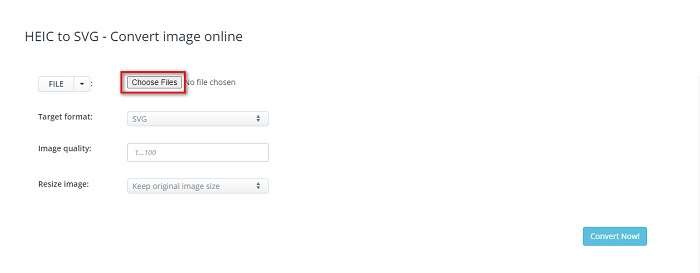
ขั้นตอนที่ 1. บนเบราว์เซอร์ของคุณ ให้ค้นหา Aconvert.com จากนั้นคลิกปุ่ม Choose Files บนหน้าหลักของซอฟต์แวร์ หน้าต่างไฟล์ในคอมพิวเตอร์ของคุณจะปรากฏขึ้น ให้เลือกไฟล์ภาพ HEIC จากนั้นคลิก Open เพื่ออัปโหลด.
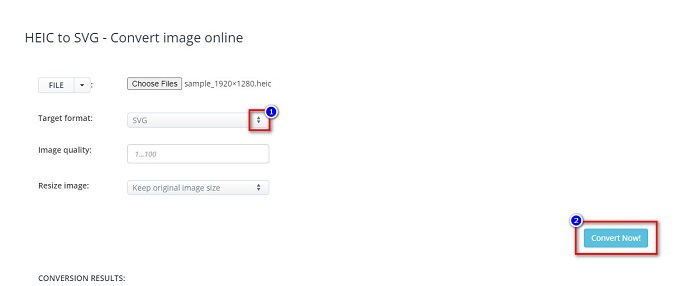
ขั้นตอนที่ 2. หลังจากอัปโหลดไฟล์ HEIC แล้ว ให้คลิกปุ่ม up-down เพื่อเลือกประเภทไฟล์ผลลัพธ์ที่คุณต้องการ จากนั้นคลิกปุ่ม Convert Now.
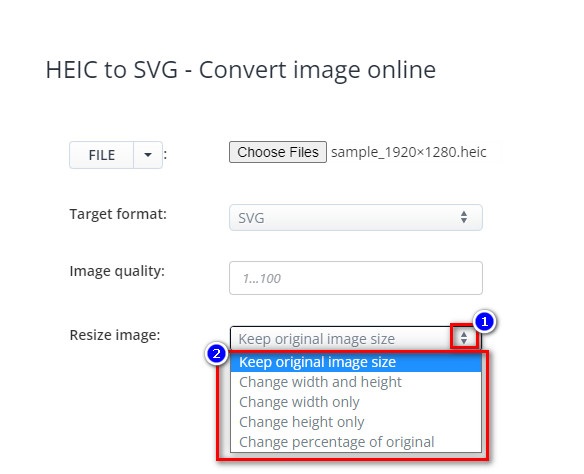
คุณสามารถปรับขนาดรูปภาพของคุณได้โดยคลิกปุ่ม up-down ถัดจาก Resize Image.
ขั้นตอนที่ 3. สุดท้าย ให้คลิกไอคอน Save เพื่อดาวน์โหลดรูปภาพ SVG ของคุณ.

ข้อดี
- สามารถแปลง HEIC เป็น SVG ได้อย่างรวดเร็ว
- ช่วยให้คุณสามารถปรับขนาดภาพและปรับคุณภาพได้
- เข้าถึงได้บนเว็บเบราว์เซอร์เกือบทั้งหมด เช่น Google, Safari, Firefox และ Edge
จุดด้อย
- มันมีโฆษณา
FreeConvert.com
FreeConvert.com เป็นอีกหนึ่งเครื่องมือออนไลน์ที่สามารถแปลงภาพ HEIC ให้เป็นภาพ SVG ได้ ตัวแปลงไฟล์นี้มีอินเทอร์เฟซที่ใช้งานง่าย ทำให้เหมาะกับผู้เริ่มต้น นอกจากนี้ คุณยังสามารถปรับสีพื้นหลังและจำนวนสีของภาพได้ด้วยฟีเจอร์ขั้นสูงของมัน แต่หากการเชื่อมต่ออินเทอร์เน็ตของคุณช้า คุณอาจพบว่ากระบวนการแปลงไฟล์ล่าช้าได้.
ขั้นตอนที่ 1. อันดับแรก ให้ค้นหา FreeConvert.com บนเบราว์เซอร์ของคุณ จากนั้นบนหน้าหลักของซอฟต์แวร์ ให้คลิกปุ่ม Choose Files เมื่อมีหน้าต่างไฟล์ของคอมพิวเตอร์ปรากฏขึ้น ให้เลือกไฟล์ภาพ HEIC ของคุณ.

ขั้นตอนที่ 2. ต่อไป ให้คลิกปุ่มดรอปดาวน์ถัดจาก Output จากนั้นเลือกประเภทไฟล์ภาพผลลัพธ์ที่คุณต้องการ.
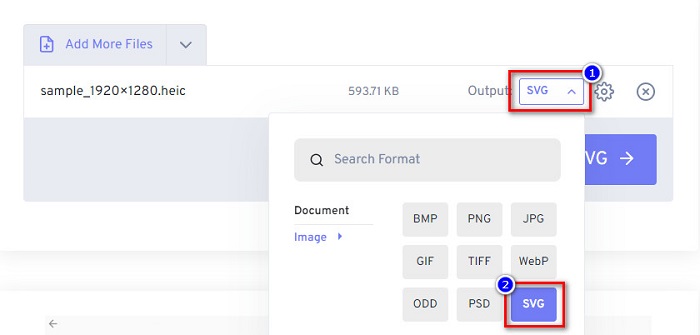
ขั้นตอนที่ 3. สุดท้าย ให้คลิกปุ่ม Convert to SVG รอจนกว่าไฟล์ของคุณจะแปลงเสร็จ จากนั้นคลิกปุ่ม Download.
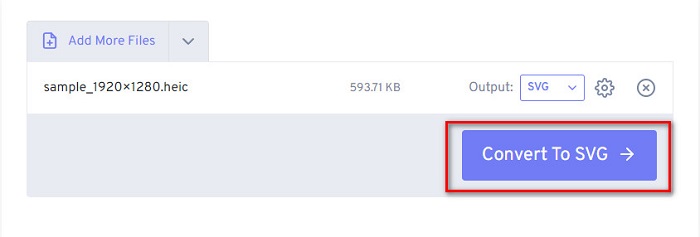
ข้อดี
- มีความปลอดภัยในการใช้งาน
- ช่วยให้คุณแปลง HEIC เป็น SVG ได้อย่างรวดเร็ว
- มีส่วนต่อประสานผู้ใช้ที่เรียบง่าย
จุดด้อย
- มันมีโฆษณาที่น่ารำคาญ
MConverter
ตัวแปลงออนไลน์อื่นที่ควรใช้คือ MConverter ตัวแปลง HEIC เป็น SVG ออนไลน์นี้มีอินเทอร์เฟซซอฟต์แวร์ที่ตรงไปตรงมา คุณไม่จำเป็นต้องกังวลเกี่ยวกับข้อมูลของคุณเพราะเครื่องมือนี้ปลอดภัยต่อการใช้งาน นอกจากนี้ยังรองรับรูปแบบรูปภาพมากมาย รวมถึง HEIC, SVG, BMP, GIF, PNG เป็นต้น อย่างไรก็ตาม สามารถแปลงรูปภาพที่มีขนาดไฟล์ต่ำกว่า 200MB เท่านั้น
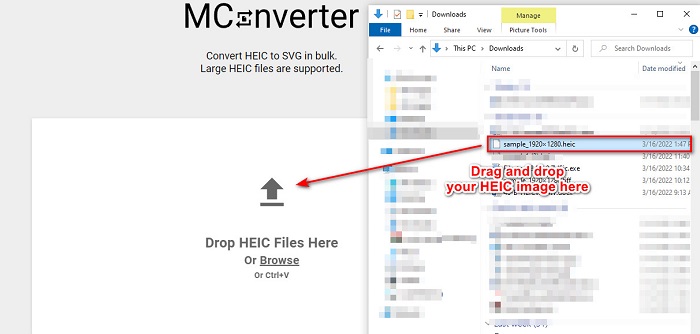
ขั้นตอนที่ 1. บนเบราว์เซอร์ของคุณ ให้ค้นหา MConverter จากนั้นลากและวางไฟล์ภาพ HEIC ของคุณลงบนหน้าหลักของซอฟต์แวร์.
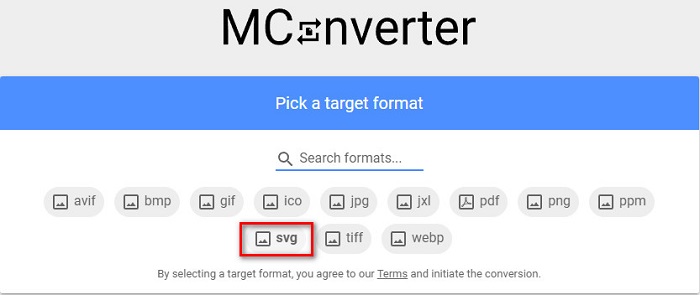
ขั้นตอนที่ 2. บนหน้าอินเทอร์เฟซถัดไป ให้คลิกเลือกประเภทไฟล์ภาพ SVG เป็นไฟล์ผลลัพธ์ จากนั้นไฟล์ภาพของคุณจะเริ่มกระบวนการแปลง.
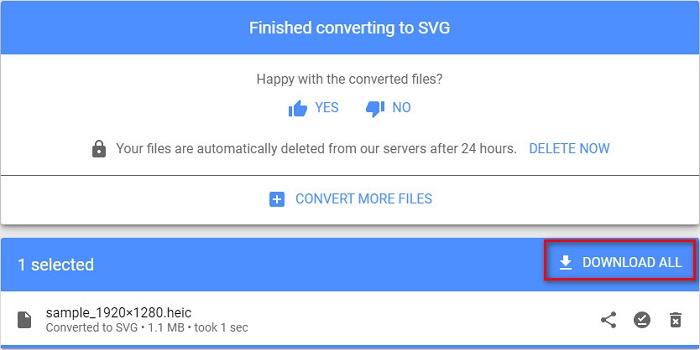
ขั้นตอนที่ 3. จากนั้นให้คลิกปุ่ม Download All เพื่อดาวน์โหลดภาพ SVG ของคุณ.
ข้อดี
- มีอินเทอร์เฟซซอฟต์แวร์ที่ใช้งานง่าย
- รองรับไฟล์รูปแบบต่างๆ รวมถึง HEIC, SVG, BMP, JPG, PNG เป็นต้น
- มีความปลอดภัยในการใช้งาน
จุดด้อย
- มันมีโฆษณาที่รบกวน
ส่วนที่ 3 คำแนะนำ: แปลงไฟล์ HEIC ของคุณด้วยตัวแปลง HEIC ที่ดีที่สุด
เครื่องมือที่กล่าวถึงข้างต้นนั้นยอดเยี่ยมมาก แต่ถ้าคุณกำลังค้นหาตัวแปลงที่ไม่ใช่แบบเว็บและมีความเร็วในการแปลงที่รวดเร็ว คุณอาจต้องการดาวน์โหลดแอปพลิเคชันนี้ Aiseesfoft HEIC Converter เป็นตัวแปลง HEIC ออฟไลน์ ช่วยให้คุณสามารถแปลงภาพ HEIC เป็นรูปแบบภาพมาตรฐานเช่น JPG และ PNG ดังนั้น หากคุณกำลังค้นหาวิธีดูภาพ HEIC บน Windows ตัวแปลงนี้ดีที่สุด นอกจากนี้ยังมีคุณสมบัติที่ช่วยให้คุณสามารถแปลงไฟล์ HEIC เป็นภาพ JPG และ PNG แบบแบตช์
สิ่งที่น่าทึ่งไปกว่านั้นคือจะเก็บข้อมูล EXIF ของคุณไว้เมื่อคุณทำการแปลง ซึ่งตัวแปลงอื่นไม่สามารถทำได้ คุณยังสามารถปรับคุณภาพของภาพได้โดยใช้ตัวแปลงนี้
คุณสมบัติของ Aiseesoft HEIC Converter:
- ช่วยให้คุณสามารถแปลงรูปแบบ HEIC เป็น PNG และ JPG
- มีกระบวนการแปลงที่รวดเร็วเป็นพิเศษ
- สามารถเก็บข้อมูล EXIF ของไฟล์ของคุณได้
- ดาวน์โหลดบนแพลตฟอร์มข้ามสื่อทั้งหมด รวมทั้ง Windows และ Mac
ส่วนที่ 4 คำถามที่พบบ่อยเกี่ยวกับการแปลง HEIC เป็น SVG
รูปแบบภาพใดดีกว่า HEIC หรือ SVG
HEIC และ SVG มีความละเอียดคุณภาพสูงและขนาดไฟล์เล็ก อย่างไรก็ตาม HEIC เข้ากันไม่ได้กับอุปกรณ์อื่นนอกเหนือจากอุปกรณ์ Apple ต่างจาก SVG ที่เข้ากันได้กับอุปกรณ์เกือบทั้งหมดและแอปพลิเคชั่นแก้ไขภาพ
SVG เป็นไฟล์แบบไม่สูญเสียข้อมูลหรือไม่
ใช่. อิมเมจ SVG มีการบีบอัดไฟล์แบบไม่สูญเสียข้อมูล จึงไม่สูญเสียข้อมูลเมื่อคุณบีบอัด
ข้อเสียของการใช้ไฟล์ SVG คืออะไร?
SVG เป็นรูปแบบภาพเวกเตอร์ ซึ่งหมายความว่าจะไม่เป็นแบบพิกเซล แต่ใช้ภาพเป็นเวกเตอร์แทน อย่างไรก็ตาม เนื่องจากใช้จุดและเส้นทางแทนพิกเซล จึงไม่แสดงรายละเอียดของภาพ
สรุป
ข้อมูลทั้งหมดข้างต้นเป็นข้อมูลที่ถูกต้องและเชื่อถือได้ เครื่องมือแปลงไฟล์ HEIC เป็น SVG ออนไลน์เหล่านี้จะช่วยให้คุณแปลงไฟล์ HEIC เป็นไฟล์ SVG ได้อย่างง่ายดาย อย่างไรก็ตาม ตัวแปลงแต่ละตัวที่แนะนำไปไม่ได้มีฟีเจอร์เหมือนกันทั้งหมด จึงขึ้นอยู่กับคุณในการเลือกใช้ แต่หากคุณกำลังมองหาโปรแกรมแปลงไฟล์ที่สามารถ แปลง HEIC เป็น JPG หรือ PNG แบบออฟไลน์และใช้งานได้ฟรีแล้วล่ะก็ Aiseesoft HEIC Converter คือเครื่องมือที่เหมาะที่สุดสำหรับคุณ ดังนั้นดาวน์โหลดมาใช้ได้เลย แล้วเพลิดเพลินไปกับฟีเจอร์เฉพาะตัวของโปรแกรมนี้.
-
 แปลง HEIC เป็น PDF โดยใช้วิธีปรับปรุง 4 อันดับแรกในปี 2022
 หากต้องการทราบข้อมูลเพิ่มเติมเกี่ยวกับตัวแปลง HEIC เป็น PDF ที่ดีที่สุด คุณสามารถดาวน์โหลด 2022 นี้ได้ คุณสามารถอ่านบทความนี้ในขณะที่เราให้คำวิจารณ์ไว้
-
 5 ตัวแปลง HEIC เป็น JPG ที่ดีที่สุดเลือกในปี 2022
 ด้วยตัวแปลง HEIC เป็น JPC คุณสามารถเปลี่ยนรูปแบบภาพเป็น JPG แบบพกพาได้อย่างง่ายดาย อยากทราบว่า 5 เครื่องมือนี้คืออะไร? อ่านบทความนี้
-
 ตัวแปลง HEIC ฟรีและจ่ายเงินที่ดีที่สุดที่คุณต้องรู้จัก [อัปเดต 2022]
 คุณต้องการทราบว่าตัวแปลง HEIC คืออะไร? หากเป็นเช่นนั้น เราจะรวมตัวแปลง HEIC ฟรีและจ่ายเงิน 5 อันดับแรกที่คุณสามารถใช้เพื่อเปลี่ยนรูปแบบ HEIC
