


 Video Converter Ultimate
 บันทึกหน้าจอ
 ซ่อมวิดีโอ
 ดาวน์โหลดอย่างปลอดภัย
วิธีที่ดีที่สุดในการแปลง TIFF เป็น HEIC บน Windows และ Mac
TIFF หรือ Tag Image File Format เป็นรูปแบบไฟล์ภาพที่ได้รับความนิยมอย่างมากในหมู่ช่างภาพ รูปแบบไฟล์ภาพชนิดนี้สามารถเก็บคุณภาพภาพได้สูงและเป็นไฟล์แบบไม่สูญเสียข้อมูล (lossless) อย่างไรก็ตาม ไฟล์ TIFF มีขนาดใหญ่ ทำให้แชร์ไปยังอุปกรณ์หรือแอปพลิเคชันอื่นได้ค่อนข้างลำบาก ดังนั้น หากคุณต้องการไฟล์ภาพที่มีคุณภาพสูงแต่ขนาดไฟล์ไม่ใหญ่จนเกินไป ทางออกที่ดีที่สุดคือการแปลง TIFF เป็น HEIC.

ส่วนที่ 1 วิธีแปลง TIFF เป็น HEIC ออนไลน์และออฟไลน์
การแปลง TIFF เป็น HEIC อาจฟังดูยาก แต่มันง่ายมากด้วยความช่วยเหลือของตัวแปลง TIFF เป็น HEIC ออนไลน์เหล่านี้ และถ้าคุณต้องการทราบตัวแปลงออนไลน์ที่ดีที่สุดเหล่านี้ ส่วนนี้จะนำเสนอตัวแปลง TIFF เป็น HEIC ที่โดดเด่นและฟรีที่สุดให้คุณ
XConvert
XConvert เป็นตัวแปลงออนไลน์จาก TIFF เป็น HEIC ที่ช่วยแปลงไฟล์ TIFF เป็น HEIC ได้อย่างง่ายดาย เครื่องมือนี้ใช้งานได้ฟรีและมีความปลอดภัย คุณจึงไม่ต้องกังวลเกี่ยวกับข้อมูลของคุณ นอกจากนี้ คุณยังสามารถแปลงไฟล์ TIFF หลายไฟล์เป็น HEIC ได้ภายในไม่กี่คลิก พร้อมทั้งปรับความละเอียดและขนาดไฟล์ของรูปภาพได้ด้วย แม้ว่าจะมีโฆษณาจำนวนมาก แต่ก็ยังสามารถแปลงไฟล์ TIFF ของคุณเป็น HEIC ได้อย่างรวดเร็ว.
ขั้นตอนที่ 1. เปิดเบราว์เซอร์ของคุณแล้วค้นหา XConvert TIFF to HEIC converter จากนั้นในหน้าหลักของโปรแกรม ให้คลิกปุ่ม Add Files จากนั้นจะมีโฟลเดอร์บนคอมพิวเตอร์คุณปรากฏขึ้นเพื่อให้เลือกไฟล์ TIFF ที่ต้องการอัปโหลด.
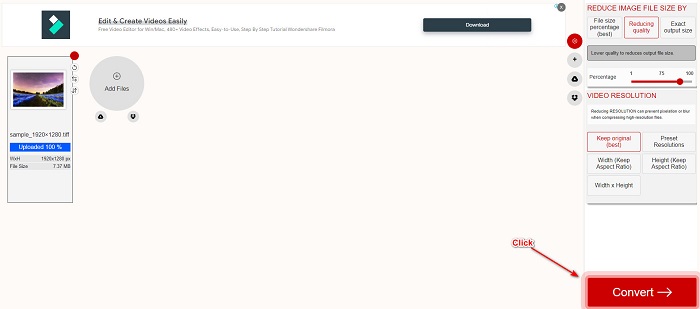
ขั้นตอนที่ 2. เมื่อไฟล์ TIFF ของคุณอัปโหลดเสร็จแล้ว ให้คลิกปุ่ม Convert เพื่อเริ่มแปลงไฟล์ TIFF ของคุณเป็นไฟล์รูปแบบ HEIC จากนั้นเพียงรอให้ไฟล์ของคุณดาวน์โหลดเสร็จและไปขั้นตอนถัดไป.
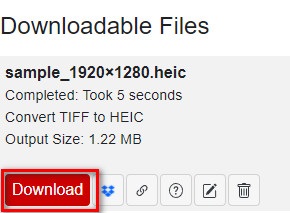
ขั้นตอนที่ 3. ขั้นตอนสุดท้าย ให้คลิกปุ่ม Download เพื่อดาวน์โหลดไฟล์ HEIC ของคุณ.
ข้อดี
- มีความปลอดภัยในการใช้งาน
- มีส่วนต่อประสานผู้ใช้ที่เรียบง่าย
- มีกระบวนการแปลงที่รวดเร็ว
จุดด้อย
- มันมีโฆษณาที่น่ารำคาญที่อาจรบกวนคุณ
Convertio
Convertio เป็นหนึ่งในตัวแปลงไฟล์ออนไลน์ที่เป็นที่รู้จักมากที่สุดบนเว็บ และยังสามารถแปลงไฟล์ TIFF เป็น HEIC ได้อย่างง่ายดาย อีกทั้งยังมีส่วนติดต่อผู้ใช้ที่ใช้งานง่าย และมีโฆษณาไม่มากเท่าเครื่องมือที่กล่าวถึงข้างต้น นอกจากนี้ ยังรองรับรูปแบบไฟล์ภาพหลากหลาย เช่น TIFF, HEIC, JPG, PNG, GIF และอื่น ๆ อย่างไรก็ตาม เนื่องจากเป็นแอปพลิเคชันบนเว็บ คุณอาจพบว่าการแปลงและดาวน์โหลดไฟล์ช้าลงเมื่อการเชื่อมต่ออินเทอร์เน็ตของคุณไม่เสถียร.
ขั้นตอนที่ 1. บนเบราว์เซอร์ของคุณ ให้ค้นหา Convertio online converter จากนั้นในหน้าหลักของโปรแกรม ให้คลิกปุ่ม Choose File เพื่ออัปโหลดไฟล์ TIFF ของคุณ.

ขั้นตอนที่ 2. จากนั้นคลิกปุ่ม drop-down เพื่อเลือกฟอร์แมตเอาต์พุตที่คุณต้องการคือ HEIC.
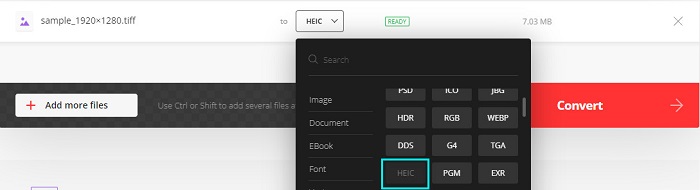
ขั้นตอนที่ 3. ขั้นตอนสุดท้าย ให้คลิกปุ่ม Convert เพื่อเริ่มกระบวนการแปลงไฟล์ จากนั้นจะมีหน้าต่างใหม่ปรากฏขึ้นสำหรับดาวน์โหลดภาพ HEIC ของคุณ.

ข้อดี
- รองรับรูปแบบไฟล์มากมาย เช่น TIFF, HEIC, JPG, PNG, GIF และอื่นๆ
- มีอินเทอร์เฟซซอฟต์แวร์ที่ใช้งานง่าย
- เข้าถึงได้บนเว็บเบราว์เซอร์เกือบทั้งหมด รวมทั้ง Google, Firefox และ Safari
จุดด้อย
- คุณอาจพบว่ามีกระบวนการแปลงที่ช้าเมื่อการเชื่อมต่ออินเทอร์เน็ตของคุณช้า
- มันมีโฆษณา
Filestar
Filestar เป็นตัวแปลง TIFF เป็น HEIC ออฟไลน์ ตัวแปลงนี้สามารถดาวน์โหลดได้ฟรีและเข้าถึงได้ง่าย นอกจากนี้ยังมีส่วนต่อประสานผู้ใช้ที่เรียบง่ายทำให้เป็นเครื่องมือที่เป็นมิตรกับผู้เริ่มต้น ที่น่าตื่นตาตื่นใจไปกว่านั้นคือมันมีคุณสมบัติมากมายที่จะนำเสนอ ตัวแปลงนี้สามารถปรับขนาด สร้างภาพเคลื่อนไหว และบีบอัดไฟล์ของคุณได้ นอกจากนี้ยังรองรับรูปแบบไฟล์มากมาย เช่น TIFF, HEIC, JPEG, PNG, WEBPM, MP4 และอื่นๆ
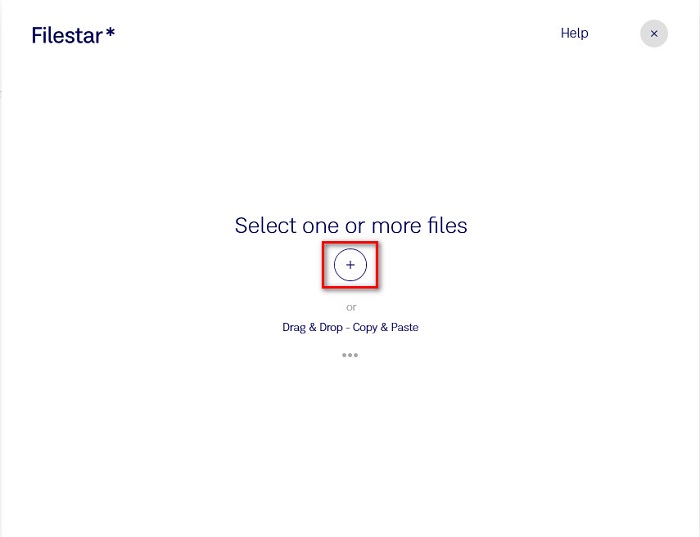
ขั้นตอนที่ 1. ดาวน์โหลด Filestar ลงในเดสก์ท็อปของคุณ จากนั้นรันโปรแกรม คลิกปุ่มสัญลักษณ์ + เพื่ออัปโหลดไฟล์ TIFF ของคุณในหน้าหลักของโปรแกรม.
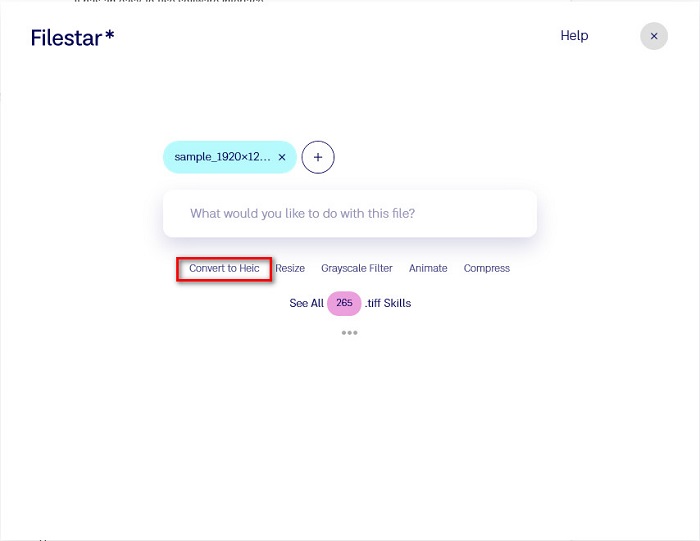
ขั้นตอนที่ 2. จากนั้นในหน้าต่อไป ให้คลิกตัวเลือก Convert to HEIC.
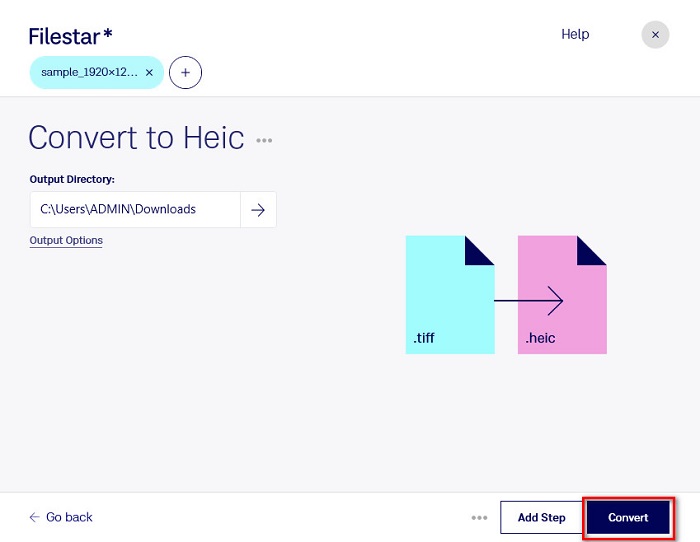
ขั้นตอนที่ 3. สำหรับขั้นตอนสุดท้าย ให้คลิกปุ่ม Convert เพื่อแปลงไฟล์ TIFF ของคุณเป็น HEIC.
ข้อดี
- มีส่วนต่อประสานผู้ใช้ที่ใช้งานง่าย
- ช่วยให้คุณสามารถปรับขนาดและบีบอัดไฟล์ TIFF ของคุณได้
- มันสามารถแปลงไฟล์ TIFF ของคุณเป็นรูปแบบไฟล์ HEIC ได้
จุดด้อย
- ใช้ได้เฉพาะบน Windows
ส่วนที่ 2 คำแนะนำ: แปลงไฟล์ HEIC โดยใช้ตัวแปลง HEIC ที่ดีที่สุด
หากคุณมีปัญหาในการเปิดดูไฟล์ HEIC บนพีซี Windows เรามีทางแก้ไขให้ วิธีที่ดีที่สุดในการเปิดดูไฟล์ HEIC บน Windows หรือบนโปรแกรมแก้ไขอื่น ๆ คือการแปลงไฟล์ HEIC ของคุณให้เป็นไฟล์ JPG หรือ PNG ซึ่ง Windows และโปรแกรมอื่น ๆ รองรับ นอกจากนี้ ยังมีฟีเจอร์สำหรับแปลงไฟล์ HEIC เป็น PNG แบบแบตช์ หรือ JPG ได้อีกด้วย และยังมีส่วนติดต่อผู้ใช้ที่เรียบง่าย ทำให้เป็นเครื่องมือที่เหมาะกับผู้เริ่มต้นใช้งาน หากคุณสนใจอยากรู้รายละเอียดเกี่ยวกับเครื่องมือนี้เพิ่มเติม โปรดอ่านคำอธิบายด้านล่างนี้.
ดาวน์โหลดฟรีสำหรับ Windows 7 หรือใหม่กว่าดาวน์โหลดอย่างปลอดภัย
ดาวน์โหลดฟรีสำหรับ MacOS 10.7 หรือใหม่กว่าดาวน์โหลดอย่างปลอดภัย
Aiseesoft HEIC Converter:
- ใช้งานได้ฟรี 100%
- มีส่วนต่อประสานผู้ใช้ที่เรียบง่าย
- สามารถแบทช์แปลงไฟล์ HEIC เป็น JPG และ PNG
- พร้อมใช้งานบนแพลตฟอร์มข้ามสื่อทั้งหมด รวมทั้ง Windows และ Mac
ส่วนที่ 3 ความแตกต่างระหว่าง TIFF และ HEIC
TIFF และ HEIC ไม่มีคุณสมบัติเหมือนกัน ดังนั้น หากคุณยังไม่แน่ใจว่าคุณจะแปลง TIFF เป็น HEIC หรือไม่ ส่วนนี้จะช่วยคุณได้
รูปแบบไฟล์รูปภาพ TIFF หรือแท็กเป็นไฟล์รูปภาพที่ยืดหยุ่นและมีความละเอียดสูง ช่างภาพและนักออกแบบกราฟิกมักใช้ไฟล์รูปภาพนี้สำหรับรูปภาพของตน เนื่องจากคุณสามารถถ่ายโอนไปยังอุปกรณ์อื่นๆ และแอปพลิเคชันแก้ไขรูปภาพอื่นๆ เช่น Adobe Photoshop ได้อย่างง่ายดาย นอกจากนี้ ไฟล์รูปภาพเหล่านี้ยังมีการบีบอัดแบบไม่สูญเสียข้อมูล ซึ่งหมายความว่าจะไม่สูญเสียคุณภาพและข้อมูล สิ่งที่น่าประทับใจกว่าเกี่ยวกับไฟล์นี้คือมันสามารถทำหน้าที่เป็นที่เก็บไฟล์สำหรับภาพ JPEG ขนาดเล็ก นอกจากนี้ อุปกรณ์และแพลตฟอร์มสื่อจำนวนมากยังรองรับไฟล์ประเภทนี้
ในทางตรงกันข้าม ไฟล์ HEIC เป็นรูปแบบไฟล์ภาพที่พัฒนาโดย Apple เนื่องจากพัฒนาโดย Apple จึงสามารถเปิดดูได้เฉพาะบนอุปกรณ์ของ Apple เช่น iPhone, Mac และ iPad แม้จะเป็นเช่นนั้น รูปแบบไฟล์ภาพนี้ก็มีคุณภาพสูง เหมาะอย่างยิ่งสำหรับการถ่ายภาพ นอกจากนี้ ไฟล์ HEIC ยังเป็นไฟล์ที่ถูกบีบอัด ทำให้มีขนาดไฟล์เล็ก.
ส่วนที่ 4 คำถามที่พบบ่อยเกี่ยวกับวิธีการแปลง TIFF เป็น HEIC
คุณสามารถดูภาพ TIFF บน Mac ได้หรือไม่?
ใช่. เมื่อใช้แอพแสดงตัวอย่างบน Mac คุณสามารถเปิดภาพ TIFF บนอุปกรณ์ Mac ได้
อันไหนดีกว่า TIFF หรือ HEIC
ภาพ TIFF และ HEIC ทั้งคู่มีความละเอียดคุณภาพสูง อย่างไรก็ตาม มันปลอดภัยที่จะบอกว่า HEIC ดีกว่าเพราะรูปภาพ HEIC มีขนาดไฟล์ที่บีบอัด
คุณสามารถแปลงรูปแบบ TIFF เป็น JPG ได้หรือไม่
แน่นอนใช่ ตัวแปลงบางตัวรองรับตัวแปลง TIFF เป็น JPG นอกจากนี้ ตัวแปลงบางตัวที่กล่าวถึงข้างต้นยังสามารถแปลง TIFF เป็น JPG ได้อีกด้วย
สรุป
ที่นั่นคุณมีมัน! มีหลายวิธีในการแปลง TIFF ของคุณเป็นไฟล์ HEIC แต่โปรแกรมแปลงไฟล์ทั้งหมดที่นำเสนอข้างต้นมีคุณสมบัติที่แตกต่างออกไป ตอนนี้อยู่ในมือของคุณแล้วว่าจะใช้ตัวแปลงอะไรในการแปลงไฟล์ TIFF เป็นรูปแบบไฟล์ HEIC แต่ถ้าคุณกำลังมองหาตัวแปลง HEIC ที่มีคุณสมบัติที่ดีที่สุด เครื่องมือที่ดีที่สุดที่จะใช้คือ Aiseesoft HEIC Converter ดังนั้นสิ่งที่คุณรอ? ดาวน์โหลดฟรีเพื่อสัมผัสกับสุดยอดเครื่องมือแปลง HEIC
-
 แปลง HEIC เป็น PDF โดยใช้วิธีปรับปรุง 4 อันดับแรกในปี 2022
 หากต้องการทราบข้อมูลเพิ่มเติมเกี่ยวกับตัวแปลง HEIC เป็น PDF ที่ดีที่สุด คุณสามารถดาวน์โหลด 2022 นี้ได้ คุณสามารถอ่านบทความนี้ในขณะที่เราให้คำวิจารณ์ไว้
-
 5 ตัวแปลง HEIC เป็น JPG ที่ดีที่สุดเลือกในปี 2022
 ด้วยตัวแปลง HEIC เป็น JPC คุณสามารถเปลี่ยนรูปแบบภาพเป็น JPG แบบพกพาได้อย่างง่ายดาย อยากทราบว่า 5 เครื่องมือนี้คืออะไร? อ่านบทความนี้
-
 ตัวแปลง HEIC ฟรีและจ่ายเงินที่ดีที่สุดที่คุณต้องรู้จัก [อัปเดต 2022]
 คุณต้องการทราบว่าตัวแปลง HEIC คืออะไร? หากเป็นเช่นนั้น เราจะรวมตัวแปลง HEIC ฟรีและจ่ายเงิน 5 อันดับแรกที่คุณสามารถใช้เพื่อเปลี่ยนรูปแบบ HEIC
