


 Video Converter Ultimate
 บันทึกหน้าจอ
 ซ่อมวิดีโอ
สุดยอดเครื่องมือแปลง OGV เป็น MOV เพื่อแปลงไฟล์ OGV บน Mac
หนึ่งในรูปแบบวิดีโอแบบสูญเสียข้อมูล (lossy) ที่ได้รับความนิยมและมักใช้ในการเก็บเนื้อหาวิดีโอบนหน้าเว็บคือไฟล์ OGV รูปแบบนี้มีโครงสร้างเกือบเหมือนไฟล์ OGG แต่จะแตกต่างตรงที่มีวิดีโออยู่ภายใน แม้รูปแบบนี้จะสามารถเก็บไฟล์มีเดียและส่งผ่านทางอินเทอร์เน็ตได้ แต่ก็ยังไม่ได้รับการรองรับอย่างแพร่หลายจากโปรแกรมเล่นสื่อและโปรแกรมตัดต่อวิดีโอ เพื่อให้ไฟล์นี้ใช้งานได้ตามมาตรฐานของโปรแกรมเล่นวิดีโอหรือโปรแกรมตัดต่อบน Mac คุณจำเป็นต้องแปลงไฟล์ OGV ให้เป็นรูปแบบที่รองรับ เช่น MOV โชคดีที่เรามีขั้นตอนที่คุณสามารถทำได้ง่าย ๆ เพื่อแปลง OGV เป็น MOV โดยไม่ทำให้คุณภาพลดลง.

ส่วนที่ 1 แปลง OGV เป็น MOV บน Mac ด้วยตัวแปลง OGV เป็น MOV ที่ดีที่สุด
อยากรู้ไหมว่าตัวแปลง OGV เป็น MOV บน Mac แบบขั้นสุดคืออะไร? ถ้านั่นคือสิ่งที่คุณกำลังมองหา ให้ใช้ FVC Video Converter Ultimate ทำไมต้องตัวนี้? เพราะนี่คือโปรแกรมแปลงไฟล์ชั้นยอดที่ช่วยให้การเข้ารหัสและถอดรหัสไฟล์ OGV ของคุณง่ายเหมือนนับหนึ่งถึงสาม นอกจากนี้ คุณยังสามารถแปลงไฟล์ให้เสร็จได้ภายในไม่ถึงนาที หรือเพียงไม่กี่วินาที เมื่อเทียบกับตัวแปลงไฟล์ออนไลน์และออฟไลน์ตัวอื่น ๆ.
ยังไม่หมดเท่านั้น คุณยังสามารถตัดต่อวิดีโอ รวมไฟล์ สร้าง GIF เร่งความเร็ววิดีโอ หรือทำให้ช้าลง และอีกหลายฟังก์ชันโดยไม่จำกัด อย่างไม่ต้องสงสัย นี่คือโปรแกรมแปลงไฟล์ขั้นเทพที่ช่วยผู้ใช้มาแล้วจำนวนมาก และคนถัดไปก็คือคุณ เพื่อแก้ปัญหาของคุณ มาดูบทเรียนวิธีใช้โปรแกรมตัวนี้กันต่อเลย.
ขั้นตอนที่ 1. หากต้องการใช้เครื่องมือนี้บน Mac คุณต้องดาวน์โหลดมาก่อน แล้วจึงติดตั้ง หลังจากนั้นหน้าต่างต้อนรับจะปรากฏขึ้น ให้คลิก Start Now.
ดาวน์โหลดฟรีสำหรับ Windows 7 หรือใหม่กว่าดาวน์โหลดอย่างปลอดภัย
ดาวน์โหลดฟรีสำหรับ MacOS 10.7 หรือใหม่กว่าดาวน์โหลดอย่างปลอดภัย
ขั้นตอนที่ 2. นำไฟล์ .ogv ของคุณมาใส่ในโปรแกรม จากนั้นค้นหาไฟล์ในโฟลเดอร์โดยคลิกที่ Add Files หรือ +.
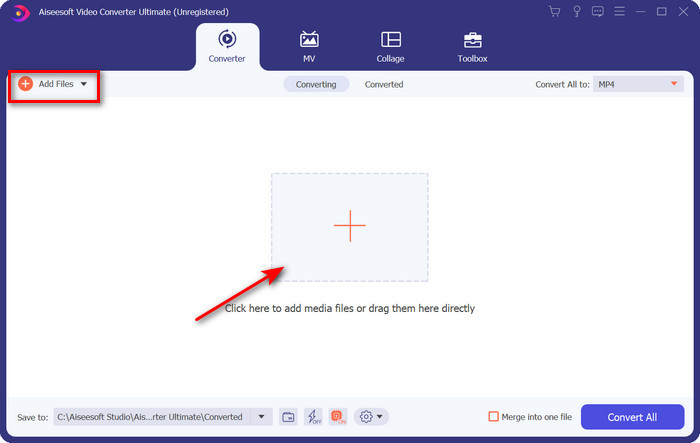
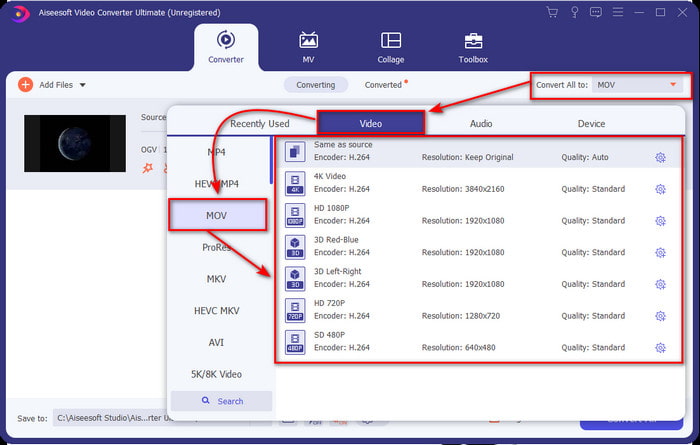
ขั้นตอนที่ 3. หลังจากอัปโหลดไฟล์แล้ว ให้เปลี่ยนรูปแบบไฟล์เป็น MOV ใต้ตัวเลือก Convert All.
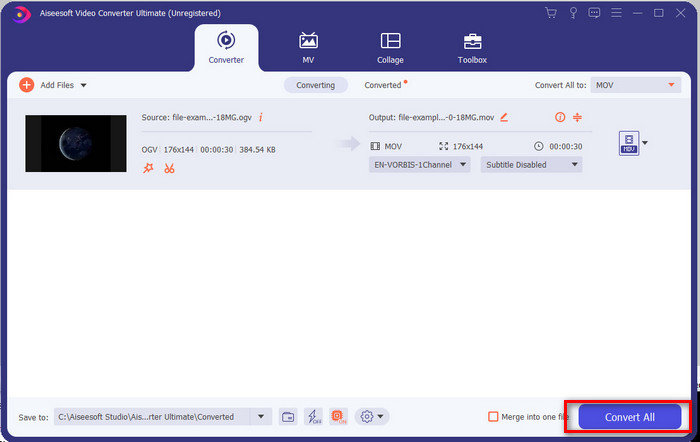
ขั้นตอนที่ 4. เริ่มกระบวนการแปลงไฟล์โดยคลิกปุ่ม Convert All.
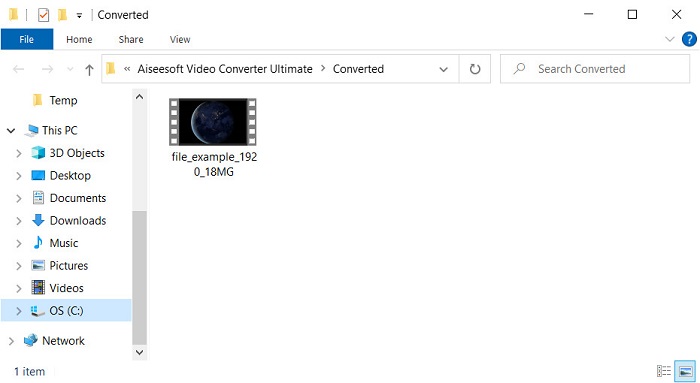
ขั้นตอนที่ 5. เมื่อแปลง OGV เป็น MOV เสร็จแล้ว จะมีหน้าต่างโฟลเดอร์เด้งขึ้นมาแสดงตำแหน่งไฟล์ของคุณ คุณสามารถคลิกเปิดไฟล์เพื่อดูหรือแก้ไขสื่อในรูปแบบ MOV ใหม่ได้ทันที.
ข้อดี
- ตัวแปลงระดับถัดไปที่คุณสามารถใช้ได้บน Mac หรือแม้แต่บนพีซี
- คุณสมบัติขั้นสูง เช่น การแก้ไข การรวม การตัด การครอบตัด และอื่นๆ อยู่ใน Toolbox
- ตัวเลือกที่ดีโดยผู้ใช้ที่ทำการแปลงเสมอเพราะว่าซอฟต์แวร์นี้มีน้ำหนักเบาเพียงใด
- แปลงไฟล์ OGV, MOV, AVI, MKV, MP4, รูปแบบอื่นๆ อีกกว่า 200 รูปแบบได้ที่นี่
จุดด้อย
- ชำระเงินเพื่อใช้ซอฟต์แวร์
ส่วนที่ 2 แปลง OGV เป็น MOV ออนไลน์ด้วยตัวแปลงฟรีและใช้งานง่าย
ไม่อยากยุ่งยากกับการดาวน์โหลด ติดตั้ง และตั้งค่าโปรแกรมแปลงไฟล์ใช่ไหม? งั้นลองใช้ตัวแปลง OGV เป็น MOV แบบออนไลน์ตัวนี้ที่สามารถค้นหาได้จากทุกเครื่องมือค้นหา FVC Free Video Converter Online เป็นตัวแปลงวิดีโอออนไลน์ที่ล้ำสมัย ใช้เพื่อเปลี่ยนรูปแบบไฟล์ที่ไม่รองรับให้กลายเป็นไฟล์ที่เล่นได้ มีผู้ใช้อินเทอร์เน็ตจำนวนมากที่พึงพอใจกับประสิทธิภาพโดยรวมของเว็บทูลตัวนี้ นอกจากนี้ เครื่องมือนี้ไม่ต้องลงทะเบียนก่อนใช้งาน และไม่มีโฆษณาน่ารำคาญบนเว็บไซต์มาคอยรบกวนการแปลงไฟล์ แต่คุณจะไม่สามารถใช้เครื่องมือนี้ได้หากไม่มีการเชื่อมต่ออินเทอร์เน็ต ดังนั้น หากคุณอยากเปลี่ยนจากตัวแปลงไฟล์ที่ใช้ประจำ ลองใช้ตัวนี้และทำตามขั้นตอนด้านล่าง.
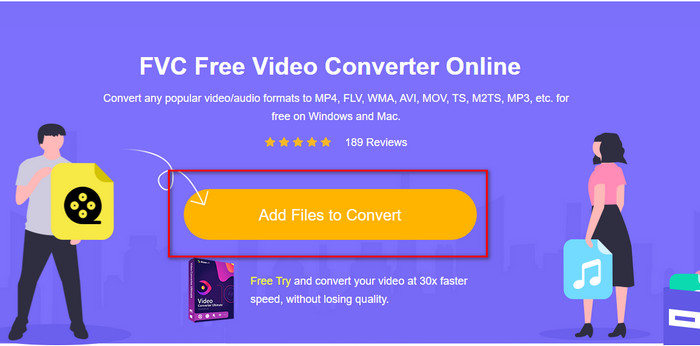
ขั้นตอนที่ 1. คลิกที่ลิงก์ FVC Free Video Converter Online เพื่อไปยังเว็บไซต์ของเว็บทูล.
ขั้นตอนที่ 2. บนหน้าเว็บอินเทอร์เฟซ ให้คลิก Add Files to Convert จากนั้นจะมีหน้าต่างโฟลเดอร์เด้งขึ้นมา คุณสามารถค้นหาไฟล์ OGV แล้วคลิก Open.
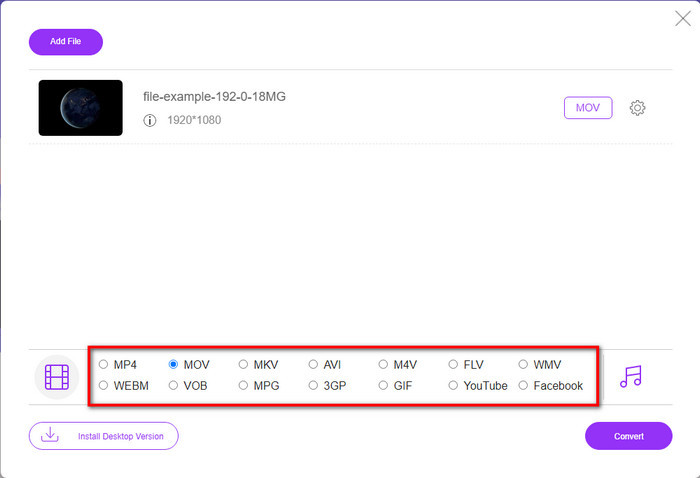
ขั้นตอนที่ 3. เลือกรูปแบบ MOV ด้านล่าง หรือเลือกรูปแบบอื่นที่คุณต้องการให้เป็นผลลัพธ์สุดท้าย.
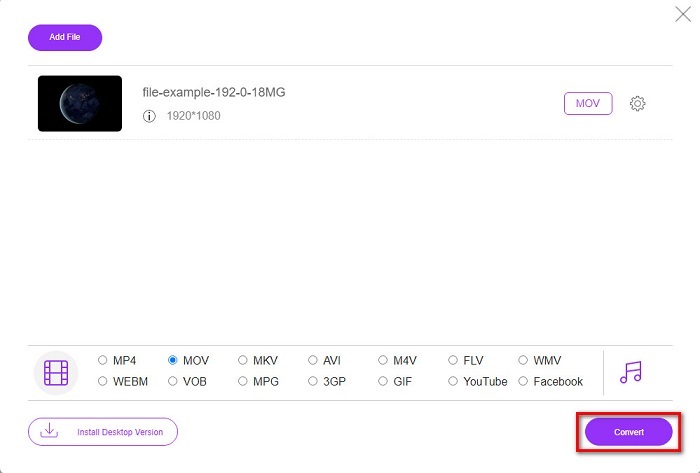
ขั้นตอนที่ 4. ติ๊กเลือก Convert เพื่อเริ่มกระบวนการแปลงไฟล์.
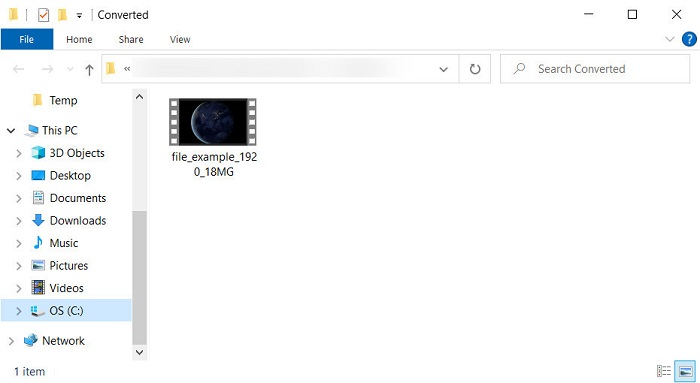
ขั้นตอนที่ 5. หลังจากแปลงเสร็จ หน้าต่างตัวจัดการไฟล์ (File Explorer) จะปรากฏขึ้น โดยมีไฟล์ที่คุณเพิ่งแปลงอยู่ในนั้น ให้คลิกไฟล์เพื่อเปิดดู.
ข้อดี
- รองรับรูปแบบช่วงกลางและเข้ากันได้กับทุกเว็บเบราว์เซอร์
- ใช้งานฟรีและไม่ต้องลงทะเบียน
- โฆษณาที่น่ารำคาญจะไม่แสดงในเครื่องมือเว็บและขณะทำการแปลง
จุดด้อย
- ขึ้นอยู่กับอินเทอร์เน็ต
- ไม่รองรับการแปลงแบทช์
ส่วนที่ 3 OGV กับ MOV
OGV เป็นรูปแบบไฟล์มัลติมีเดียที่ใช้ตัวแปลงสัญญาณหลายตัว เช่น Theora, Dirac หรือ Daala สำหรับแท็กวิดีโอ HTML 5 แต่เมื่อคุณใช้กับ HTML จะเรียกว่า .ogg แม้ว่าไฟล์จะมีเนื้อหาวิดีโออยู่ก็ตาม เนื่องจากมันอยู่บนเว็บไซต์ การเล่นบนโปรแกรมเล่นสื่อเริ่มต้นจึงเป็นสิ่งที่ท้าทายเนื่องจากโครงสร้างที่เป็นเอกลักษณ์ของรูปแบบและตัวแปลงสัญญาณหลายตัว แต่ถ้าคุณต้องการเพิ่มภาพและเสียงที่ยอดเยี่ยมบนเว็บไซต์ของคุณ นี่คือสิ่งที่คุณต้องใช้
MOV คือรูปแบบที่ Apple สร้างขึ้นเพื่อจัดเก็บแทร็กและข้อมูลสื่อหลายรายการในขณะที่รักษาคุณภาพของเสียง วิดีโอ และคำบรรยาย นอกจากนี้ คุณสามารถซิงโครไนซ์แทร็กสื่อที่เข้ารหัสเป็น MPEG-4 หรือกับตัวแปลงสัญญาณอื่นๆ แม้ว่ารูปแบบจะเป็นสำหรับ Quicktime คุณยังคงสามารถเล่นได้บน Windows Media Player เนื่องจากได้รับการสนับสนุน
เพื่อสรุป หากคุณต้องการแทรกวิดีโอและเสียงบนเว็บไซต์ของคุณและถ่ายโอนข้อมูลเร็วขึ้น ให้ไปที่ OGV แต่ถ้าคุณต้องการแก้ไขวิดีโอก่อนและเล่นบน Mac ของคุณ อย่าใช้ OGV เพราะไม่รองรับ ให้ใช้ MOV แทนเพราะเข้ากันได้กับอุปกรณ์ Apple ทั้งหมด ไม่ว่าจะเป็น Mac, iPhone, iPod หรือ iPad การแปลง OGV เป็น MOV เป็นสิ่งจำเป็นเพื่อให้เข้ากันได้กับโปรแกรมเล่น Quicktime, iMovie หรือเครื่องมืออื่นๆ ที่คุณสามารถหาได้ใน Apple
ส่วนที่ 4 คำถามที่พบบ่อยเกี่ยวกับการแปลง OGV เป็น MOV
ฉันสามารถบีบอัด OGV ได้หรือไม่
การบีบอัดไฟล์เป็นสิ่งจำเป็น โดยเฉพาะหากคุณต้องการส่งไฟล์ทางอีเมล เพราะการส่งไฟล์มีเดียนั้นมีข้อจำกัดด้านขนาดไฟล์ ดังนั้น หากคุณต้องการทำให้ขนาดไฟล์เล็กลง โปรดอ่านบทความนี้เพื่อเรียนรู้วิธีบีบอัดไฟล์ OGV.
VLC รองรับการเล่นไฟล์ OGV หรือไม่
แม้ว่าจุดประสงค์ของรูปแบบนี้จะอยู่บนแท็ก HTML 5 คุณยังคงสามารถใช้โปรแกรมเล่น VLC เพื่อดูไฟล์ OGV ที่ดาวน์โหลดมา แต่คุณรู้หรือไม่ว่ามีทางเลือกอื่นของ VLC ที่คุณสามารถใช้เล่นรูปแบบนี้ได้ หากคุณต้องการทราบว่าโปรแกรมเล่นสื่อทางเลือกสำหรับ VLC คืออะไร ให้คลิกที่ลิงก์นี้
คุณภาพของ OGV จะเปลี่ยนไปหลังจากการแปลงหรือไม่
หลังจากแปลงไฟล์ OGV แล้ว คุณภาพของไฟล์ควรคงเดิม แต่คุณสามารถสร้างอัตราวิดีโอให้สูงขึ้นหรือต่ำลงได้ด้วยความช่วยเหลือของ FVC Video Converter Ultimate ไม่เหมือนกับตัวแปลงอื่น ๆ ที่ไม่ได้ให้คุณภาพตามที่คุณต้องการ นอกจากนี้ คุณสามารถตั้งค่าเป็น 1080 หรือ 4k หากคุณต้องการวิดีโอความละเอียดสูง
สรุป
จากผลการวิจัยพบว่า การแปลงไฟล์ OGV ที่ดาวน์โหลดมาเป็นสิ่งที่จำเป็น ก่อนที่คุณจะสามารถเล่นหรือแก้ไขได้ คราวนี้ถึงมือคุณแล้วในการเลือกวิธีใช้งานและแปลงไฟล์ OGV เป็น MOV หากต้องการสรุปสั้นๆ หากคุณต้องการแปลงไฟล์ออนไลน์ฟรีและไม่ถูกรบกวน ให้ใช้ FVC Free Video Converter Online อย่างไรก็ตาม หากคุณต้องการสัมผัสประสบการณ์ใหม่ของการแปลง คุณต้องดาวน์โหลด FVC Video Converter Ultimate เลือกตัวแปลงที่ดีที่สุดที่จะช่วยคุณแก้ปัญหารูปแบบ OGV
-
 4 วิธีในการแปลง DivX เป็น MOV ฟรี [ออนไลน์และออฟไลน์]
 คุณมีปัญหากับข้อจำกัดของ DivX หรือคุณไม่มีเครื่องเล่นสื่อเพื่อเข้าถึงวิดีโอในรูปแบบนี้ หากคุณต้องการแปลงเป็นรูปแบบ MOV ให้อ่านบทความนี้ต่อเพื่อเติมช่องว่าง
-
 ฟรี M4V เพื่อแปลง MOV – วิธีการแปลง M4V เป็น MOV
 หากเครื่องเล่นมีเดียของคุณ'ไม่รองรับ M4V คุณเคยลำบากในการดูภาพยนตร์บน iPhone หรือไม่? หัวข้อหลักของบทความนี้คือการแปลงเป็นไฟล์วิดีโอ MOV
-
 3 วิธีที่มีประสิทธิภาพในการแปลง MPEG เป็น MOV [ออฟไลน์ & ออนไลน์]
 คุณเบื่อที่จะหาเครื่องเล่นสื่อเพื่อเล่นรูปแบบวิดีโอ MPEG ของคุณหรือไม่? ลองแปลงเป็นรูปแบบอื่นที่น่าจะเล่นได้ โดยเฉพาะบน Mac เช่น รูปแบบวิดีโอ MOV อ่านบทความนี้เพื่อทราบข้อมูลเพิ่มเติม
