


 Video Converter Ultimate
 บันทึกหน้าจอ
 ซ่อมวิดีโอ
 ดาวน์โหลดอย่างปลอดภัย
การเปรียบเทียบตัวแปลง MOV เป็น MP4 สำหรับผู้ใช้เดสก์ท็อปและมือถือ
การแปลงไฟล์ MOV เป็นรูปแบบ MP4 เป็นข้อกำหนดทั่วไปสำหรับผู้ใช้จำนวนมาก เนื่องจากปัญหาความเข้ากันได้หรือความต้องการเฉพาะ ไฟล์ MOV ซึ่งมักเกี่ยวข้องกับอุปกรณ์ Apple อาจได้รับการสนับสนุนอย่างกว้างขวางจากเครื่องเล่นมีเดียและอุปกรณ์บางประเภทเท่านั้น ทำให้จำเป็นต้องแปลงเป็นรูปแบบ MP4 ที่เป็นที่ยอมรับในระดับสากล โชคดีที่ตัวเลือกซอฟต์แวร์หลายตัวสามารถแปลงไฟล์ MOV เป็น MP4 ได้อย่างมีประสิทธิภาพ ทำให้ผู้ใช้มีความยืดหยุ่นและสะดวกสบายมากขึ้น
ในการรีวิวเชิงลึกนี้ เราจะพาคุณไปสำรวจโปรแกรมแปลงไฟล์ MOV เป็น MP4 ที่ดีที่สุด โดยการวิเคราะห์จุดเด่นและจุดด้อยของแต่ละตัว โปรแกรมเหล่านี้จะช่วยให้คุณค้นหาเครื่องมือที่ตรงตามความต้องการเฉพาะของคุณ และยังมอบประสบการณ์การแปลงไฟล์ที่ราบรื่นและน่าพึงพอใจอีกด้วย มาดูรายละเอียดและทำความรู้จักกับตัวเลือกชั้นนำในการแปลงไฟล์ MOV เป็น MP4 กันเลย.

ส่วนที่ 1 การเปรียบเทียบตัวแปลง MOV เป็น MP4
นี่คือแผนภูมิเปรียบเทียบของตัวแปลง MOV เป็น MP4 ที่กล่าวถึงด้านล่าง:
| โปรแกรมแปลง | Video Converter Ultimate | โปรแกรมแปลงวิดีโอ Movavi | แปลงวิดีโอใด ๆ | Freemake Video Converter | แปลงวิดีโอออนไลน์ฟรี | VidCompact | iConv |
| ความเร็วในการแปลง | เร็ว | เร็ว | เฉลี่ย | เฉลี่ย | แตกต่างกันไป | เร็ว | แตกต่างกันไป |
| คุณสมบัติการตัดต่อวิดีโอ | ใช่ | ใช่ | ใช่ | ใช่ | ไม่ | ใช่ | ไม่ |
| การแปลงแบทช์ | ใช่ | ใช่ | ใช่ | ใช่ | ใช่ | ใช่ | ไม่ |
| การสูญเสียคุณภาพ | น้อยที่สุด | น้อยที่สุด | น้อยที่สุด | น้อยที่สุด | แตกต่างกันไป | น้อยที่สุด | แตกต่างกันไป |
ส่วนที่ 2. ตัวแปลง MOV เป็น MP4 สำหรับเดสก์ท็อปและออนไลน์
1. Video Converter Ultimate
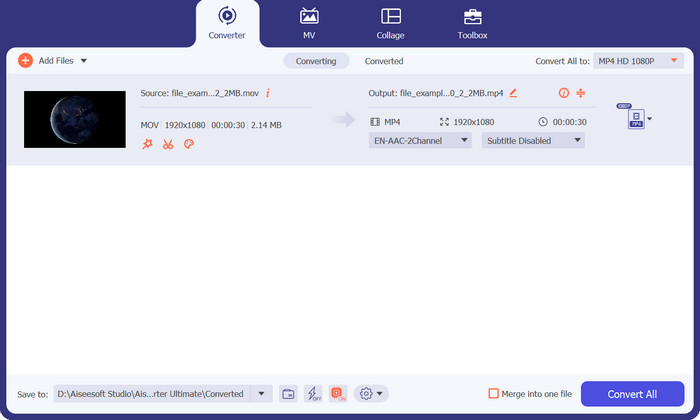
ด้วยโปรแกรม Video Converter Ultimate คุณสามารถแปลงวิดีโอ MOV เป็น MP4 ได้อย่างง่ายดาย พร้อมคงคุณภาพต้นฉบับเอาไว้ ตัวโปรแกรมรองรับการแปลงแบบแบตช์ ทำให้คุณประมวลผลไฟล์หลายไฟล์ได้พร้อมกัน ช่วยประหยัดทั้งเวลาและแรงของคุณ อินเทอร์เฟซที่ใช้งานง่ายและเป็นมิตรต่อผู้ใช้ช่วยให้การใช้งานเป็นไปอย่างราบรื่น แม้สำหรับผู้ที่เพิ่งเริ่มต้นใช้โปรแกรมแปลงวิดีโอ.
นอกจากนี้ Video Converter Ultimate ยังให้ความเร็วในการแปลงที่รวดเร็วและมีประสิทธิภาพ ทำให้มั่นใจได้ว่าคุณสามารถแปลงไฟล์ MOV เป็นรูปแบบ MP4 ได้อย่างรวดเร็วและง่ายดาย ซอฟต์แวร์นี้ใช้อัลกอริทึมขั้นสูงและเทคโนโลยีการเร่งด้วยฮาร์ดแวร์เพื่อเพิ่มประสิทธิภาพกระบวนการแปลงและให้ผลลัพธ์ที่น่าประทับใจ
ดาวน์โหลดฟรีสำหรับ Windows 7 ขึ้นไปดาวน์โหลดอย่างปลอดภัย
ดาวน์โหลดฟรีสำหรับ MacOS 10.7 หรือใหม่กว่าดาวน์โหลดอย่างปลอดภัย
แพลตฟอร์ม: Video Converter Ultimate เป็นโปรแกรมที่มีความยืดหยุ่น รองรับหลายแพลตฟอร์ม สามารถใช้งานได้ทั้งบนระบบปฏิบัติการ Windows และ macOS ไม่ว่าคุณจะใช้คอมพิวเตอร์ Windows หรือ Mac ก็สามารถใช้ฟีเจอร์และความสามารถของ Video Converter Ultimate สำหรับการแปลงไฟล์ MOV เป็น MP4 ได้อย่างเต็มที่.
แนะนำสำหรับ: Video Converter Ultimate เป็นโปรแกรมแปลงวิดีโอ MOV เป็น MP4 ที่แนะนำสำหรับผู้ใช้กลุ่มกว้างที่ต้องการโซลูชันการแปลงไฟล์ที่เชื่อถือได้และอัดแน่นด้วยฟีเจอร์ ไม่ว่าจะเป็นคอนเทนต์ครีเอเตอร์ มืออาชีพด้านสื่อ ผู้ใช้ทั่วไป ผู้ที่ชื่นชอบมัลติมีเดีย ไปจนถึงมืออาชีพด้านธุรกิจที่มองหาโซลูชันการแปลง MOV เป็น MP4 ที่ครบวงจร มีประสิทธิภาพ และยืดหยุ่น.
ข้อดี
- มีความสามารถในการตัดต่อวิดีโอขั้นสูง
- ปรับพารามิเตอร์วิดีโอ
- รักษาคุณภาพวิดีโอต้นฉบับ
- ใช้เทคโนโลยีการเร่งด้วยฮาร์ดแวร์
จุดด้อย
- เวอร์ชันเต็มมีค่าใช้จ่าย
- รุ่นทดลองใช้ฟรีอาจมีข้อจำกัดเกี่ยวกับฟังก์ชันการทำงานหรือเวลาในการแปลง
2. โปรแกรมแปลงวิดีโอ Movavi
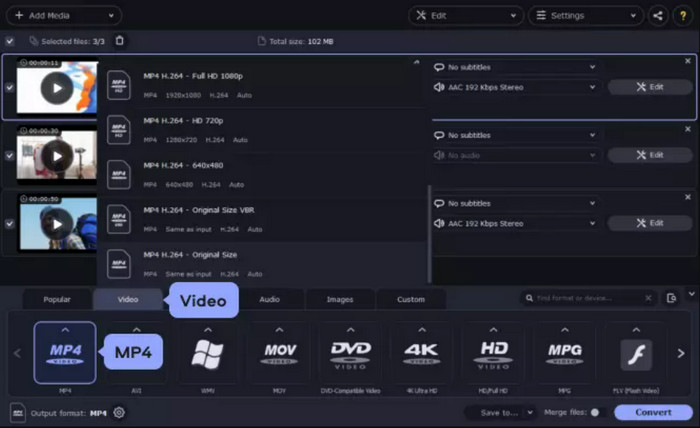
Movavi Video Converter ย่อมาจากซอฟต์แวร์ที่มีประสิทธิภาพและใช้งานง่าย ซึ่งเชี่ยวชาญในการแปลงไฟล์ MOV เป็นรูปแบบ MP4 ด้วยอินเทอร์เฟซที่ใช้งานง่ายและคุณสมบัติมากมาย Movavi Video Converter มอบประสบการณ์ที่ไม่เหมือนใครสำหรับผู้ใช้ที่กำลังมองหาโซลูชันการแปลงที่เชื่อถือได้
คุณสมบัติเด่นอย่างหนึ่งของ Movavi Video Converter คือความเรียบง่าย ออกแบบโดยคำนึงถึงการใช้งานง่าย ซอฟต์แวร์รองรับทั้งผู้ใช้มือใหม่และผู้ใช้ขั้นสูง
แพลตฟอร์ม: ไม่ว่าคุณจะใช้คอมพิวเตอร์ Windows หรือ Mac คุณก็สามารถใช้ความสามารถของ Movavi Video Converter ในการแปลงไฟล์ MOV เป็น MP4 ได้อย่างง่ายดาย การรองรับหลายแพลตฟอร์มช่วยให้ผู้ใช้จากระบบปฏิบัติการต่าง ๆ สามารถใช้ฟีเจอร์และความสามารถของโปรแกรมนี้ได้อย่างเต็มประสิทธิภาพ.
แนะนำสำหรับ: แอปแปลง MOV เป็น MP4 ตัวนี้เหมาะสำหรับผู้ใช้ทั่วไป คอนเทนต์ครีเอเตอร์ ผู้สร้างภาพยนตร์ นักตัดต่อวิดีโอ มืออาชีพด้านธุรกิจ และผู้ที่ชื่นชอบสื่อวิดีโอที่ต้องการโซลูชันการแปลงไฟล์ MOV เป็น MP4 ที่ใช้งานง่ายและเชื่อถือได้.
ข้อดี
- ส่วนต่อประสานที่ใช้งานง่ายและใช้งานง่าย
- การสูญเสียรายละเอียดหรือความละเอียดน้อยที่สุด
- นำเสนอค่าที่ตั้งไว้ล่วงหน้าสำหรับอุปกรณ์ต่างๆ
จุดด้อย
- เอาต์พุตที่มีลายน้ำและฟังก์ชันการทำงานที่ถูกจำกัด
- ผู้ใช้บางคนพบว่าโปรแกรมนี้ค่อนข้างแพง
3. ตัวแปลงวิดีโอใด ๆ
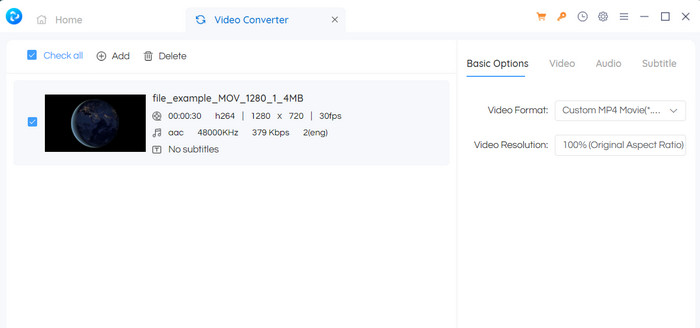
Any Video Converter โดดเด่นด้วยการรองรับรูปแบบที่หลากหลาย ช่วยให้ผู้ใช้สามารถแปลงวิดีโอ MOV เป็น MP4 รวมถึงรูปแบบอื่น ๆ ได้หลากหลาย ความสามารถรอบด้านนี้ช่วยให้มั่นใจได้ถึงความเข้ากันได้กับอุปกรณ์ เครื่องเล่นมีเดีย และแพลตฟอร์มออนไลน์ต่างๆ ทำให้ผู้ใช้มีความยืดหยุ่นในการปรับวิดีโอให้เข้ากับความต้องการหรือความต้องการเฉพาะ
นอกจากนี้ Any Video Converter ยังมีตัวเลือกการปรับแต่งขั้นสูง ทำให้ผู้ใช้สามารถปรับแต่งการตั้งค่าวิดีโอได้อย่างละเอียดตามความต้องการ ผู้ใช้สามารถปรับพารามิเตอร์ต่างๆ เช่น ความละเอียด บิตเรต อัตราเฟรม และการตั้งค่าเสียงเพื่อให้ได้คุณภาพเอาต์พุตและขนาดไฟล์ที่ต้องการ การควบคุมระดับนี้มีประโยชน์อย่างยิ่งสำหรับมืออาชีพและผู้ใช้ขั้นสูงที่ต้องการการปรับแต่งวิดีโอที่แม่นยำ
แพลตฟอร์ม: Any Video Converter รองรับหลายแพลตฟอร์ม ทั้ง Windows และ macOS สำหรับ Windows รองรับตั้งแต่ Windows 7 รวมถึง Windows 8, Windows 8.1 และ Windows 10 ส่วนผู้ใช้ macOS สามารถใช้ได้ตั้งแต่ Mac OS X 10.10 ขึ้นไป การรองรับข้ามแพลตฟอร์มนี้ช่วยให้ผู้ใช้ทั้งบน Windows และ macOS สามารถใช้ฟีเจอร์และความสามารถของ Any Video Converter สำหรับการแปลง MOV เป็น MP4 ได้อย่างสะดวก.
แนะนำสำหรับ: Any Video Converter เหมาะสำหรับผู้ใช้ทั่วไป คอนเทนต์ครีเอเตอร์ ผู้ที่ชื่นชอบสื่อวิดีโอ มืออาชีพ ครูอาจารย์ และผู้นำเสนอ ที่กำลังมองหาโซลูชันการแปลง MOV เป็น MP4 ที่ยืดหยุ่นและใช้งานง่าย ด้วยฟีเจอร์หลากหลาย ตัวเลือกการปรับแต่ง และการเข้าถึงที่สะดวก ทำให้เป็นเครื่องมือที่มีคุณค่าสำหรับผู้ใช้กลุ่มต่าง ๆ ที่มีความต้องการแปลงไฟล์หลากหลายรูปแบบ.
ข้อดี
- ช่วยให้สามารถแปลงเป็นชุดได้
- มันมีความสามารถในการแก้ไขวิดีโอขั้นพื้นฐาน
- โปรแกรมเสนอการตั้งค่าการปรับแต่งสำหรับพารามิเตอร์วิดีโอ
จุดด้อย
- ความเร็วในการแปลงอาจค่อนข้างช้า
- ไม่มีตัวเลือกการปรับแต่งมากมายสำหรับอินเทอร์เฟซ
4. แปลงวิดีโอ Freemake
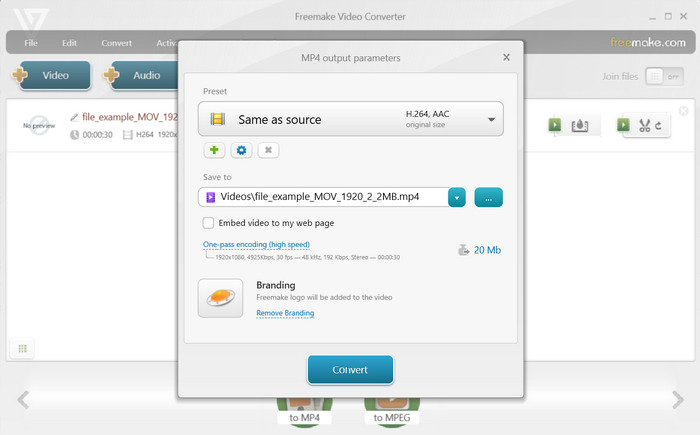
Freemake Video Converter นำเสนออินเทอร์เฟซที่สะอาดตาและตรงไปตรงมา ทำให้ผู้ใช้ทุกระดับสามารถเข้าถึงได้ การออกแบบที่เป็นมิตรต่อผู้ใช้ของซอฟต์แวร์ช่วยให้นำทางได้ง่ายและกระบวนการแปลงที่รวดเร็ว ไม่จำเป็นต้องมีความเชี่ยวชาญด้านเทคนิค
หนึ่งในคุณสมบัติที่โดดเด่นของ Freemake Video Converter คือการรองรับรูปแบบกว้าง นอกเหนือจากการแปลง MOV เป็น MP4 แล้ว ยังรองรับรูปแบบวิดีโอที่หลากหลาย ทำให้ผู้ใช้สามารถแปลงวิดีโอเป็นและจากรูปแบบต่างๆ ตามความต้องการเฉพาะของพวกเขา
แพลตฟอร์ม: Freemake Video Converter รองรับระบบปฏิบัติการ Windows โดยสนับสนุน Windows 10, 8, 7, Vista และ XP SP3 ซอฟต์แวร์นี้ออกแบบมาโดยเฉพาะสำหรับผู้ใช้ Windows เพื่อมอบประสบการณ์การใช้งานและฟังก์ชันการทำงานที่ราบรื่นในสภาพแวดล้อมของ Windows อย่างไรก็ตาม Freemake Video Converter ไม่รองรับ macOS หรือระบบปฏิบัติการอื่น.
แนะนำสำหรับ: Freemake Video Converter เหมาะสำหรับผู้ใช้ทั่วไป คอนเทนต์ครีเอเตอร์ ผู้ที่ชื่นชอบสื่อวิดีโอ มืออาชีพด้านธุรกิจ ครูอาจารย์ และนักเรียนที่ต้องการโซลูชันการแปลง MOV เป็น MP4 ที่ใช้งานง่ายและยืดหยุ่น ด้วยฟีเจอร์ที่หลากหลาย ใช้งานไม่ซับซ้อน และการรองรับที่เหมาะกับหลายกลุ่มผู้ใช้ ทำให้เป็นเครื่องมือที่มีประโยชน์สำหรับผู้ใช้ที่มีความต้องการแปลงไฟล์แตกต่างกัน.
ข้อดี
- มีเวอร์ชันฟรี
- ประกอบด้วยคุณสมบัติการตัดต่อวิดีโอขั้นพื้นฐาน
จุดด้อย
- โฆษณาและลายน้ำในเวอร์ชันฟรี
- ความเข้ากันได้ของ Windows เท่านั้น
5. โปรแกรมแปลงวิดีโอออนไลน์ฟรี
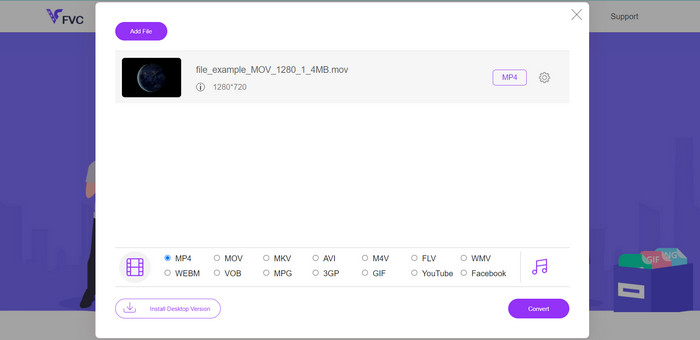
Free Video Converter Online เป็นโซลูชันออนไลน์ที่สะดวกสำหรับการแปลงไฟล์ MOV เป็น MP4 ในรูปแบบเว็บแอปพลิเคชัน ผู้ใช้สามารถแปลงวิดีโอได้โดยไม่ต้องติดตั้งซอฟต์แวร์ใด ๆ ช่วยให้การแปลงไฟล์เป็นเรื่องง่ายและไม่ยุ่งยาก.
การใช้โปรแกรมแปลงไฟล์ MOV เป็น MP4 ฟรีนั้นตรงไปตรงมา ผู้ใช้สามารถเยี่ยมชมเว็บไซต์ อัปโหลดไฟล์ MOV เลือกรูปแบบเอาต์พุตที่ต้องการ (MP4) และเริ่มกระบวนการแปลง ซึ่งช่วยขจัดความจำเป็นในการติดตั้งซอฟต์แวร์หรือข้อกังวลเกี่ยวกับความเข้ากันได้ของระบบ ทำให้สามารถเข้าถึงได้จากอุปกรณ์และระบบปฏิบัติการต่างๆ
แพลตฟอร์ม: ในฐานะที่เป็นบริการบนเว็บ Free Video Converter Online จึงรองรับการใช้งานข้ามแพลตฟอร์ม ทำให้ผู้ใช้บนระบบปฏิบัติการต่าง ๆ สามารถใช้ตัวแปลงไฟล์นี้ได้อย่างราบรื่น เพียงมีเว็บเบราว์เซอร์ที่รองรับและการเชื่อมต่ออินเทอร์เน็ตที่เสถียร ก็สามารถเข้าใช้งานและแปลงไฟล์ได้ทันที.
แนะนำสำหรับ: โปรแกรมแปลง MOV เป็น MP4 ออนไลน์ฟรีนี้เหมาะสำหรับผู้ใช้ที่ต้องการวิธีการแปลงไฟล์ที่รวดเร็วและสะดวก โดยไม่ต้องติดตั้งซอฟต์แวร์ สรุปแล้ว Free Video Converter Online เหมาะสำหรับผู้ใช้ทั่วไป ผู้ใช้ที่ต้องใช้งานนอกสถานที่ ผู้ใช้มือถือ ผู้ที่มีพื้นที่เก็บข้อมูลจำกัด และผู้ที่มีความต้องการแปลงวิดีโอเป็นครั้งคราว ลักษณะการทำงานผ่านเว็บช่วยให้ใช้งานได้สะดวกและเข้าถึงง่าย สำหรับการแปลง MOV เป็น MP4 แบบง่าย ๆ และรวดเร็วโดยไม่ต้องติดตั้งโปรแกรม.
ข้อดี
- ทำงานโดยตรงภายในเว็บเบราว์เซอร์
- ขั้นตอนการแปลงนั้นตรงไปตรงมา
- ไม่มีการติดตั้งซอฟต์แวร์เมื่อใช้ซอฟต์แวร์ฟรีที่ดีที่สุดในการแปลงไฟล์ MOV เป็น MP4
จุดด้อย
- ผู้ใช้ต้องการการเชื่อมต่ออินเทอร์เน็ตที่เสถียร
- ตัวเลือกการแก้ไขที่จำกัด
ส่วนที่ 3 MOV เป็น MP4 Converter สำหรับมือถือ
1. วิดคอมแพค
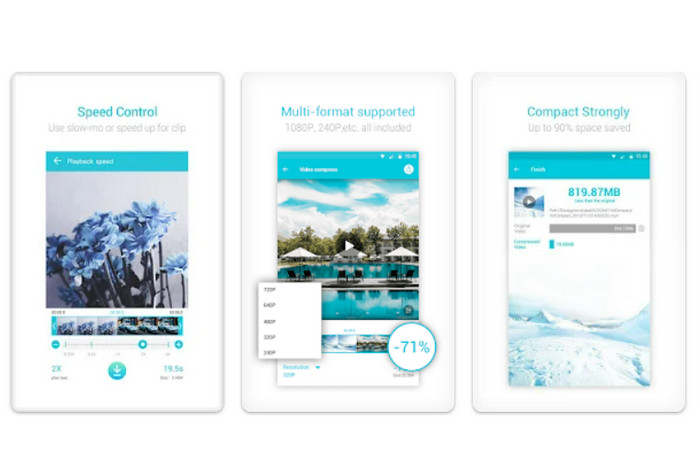
VidCompact เป็นแอปแปลงวิดีโอที่มีประสิทธิภาพสำหรับทั้งอุปกรณ์ Android และ iOS รองรับรูปแบบวิดีโอที่หลากหลาย รวมถึง MOV และ MP4 และมีอินเทอร์เฟซที่เรียบง่ายและเป็นมิตรกับผู้ใช้สำหรับการแปลงที่ง่ายดาย นอกจากนี้ยังมีตัวเลือกสำหรับการปรับคุณภาพและความละเอียดของวิดีโอ
แพลตฟอร์ม: VidCompact ซึ่งเป็นแอปแปลง MOV เป็น MP4 ยอดนิยม รองรับทั้งแพลตฟอร์ม Android และ iOS คุณสามารถดาวน์โหลดและติดตั้ง VidCompact ได้จาก Google Play Store สำหรับอุปกรณ์ Android หรือจาก App Store สำหรับอุปกรณ์ iOS การรองรับข้ามแพลตฟอร์มนี้ช่วยให้ผู้ใช้ทั้ง Android และ iOS สามารถใช้ฟีเจอร์และความสามารถของ VidCompact ในการแปลง MOV เป็น MP4 และแปลงวิดีโอรูปแบบอื่น ๆ บนอุปกรณ์พกพาได้.
แนะนำสำหรับ: VidCompact เหมาะสำหรับผู้ใช้มือถือ สายโซเชียลมีเดีย คอนเทนต์ครีเอเตอร์ ผู้ใช้ทั่วไป รวมถึงนักเดินทางหรือผู้ที่ชอบทำกิจกรรมกลางแจ้ง ที่ต้องการวิธีการแปลงวิดีโอ MOV เป็น MP4 บนอุปกรณ์ Android หรือ iOS ของตนอย่างสะดวกและมีประสิทธิภาพ.
ข้อดี
- การแปลงที่รวดเร็วและมีประสิทธิภาพ
- รักษาคุณภาพวิดีโอต้นฉบับ
จุดด้อย
- ออกแบบมาสำหรับอุปกรณ์พกพาเป็นหลัก
- ไม่มีคุณสมบัติการแก้ไขขั้นสูงที่หลากหลายเช่นเดียวกัน
2. iConv - โปรแกรมแปลงวิดีโอ
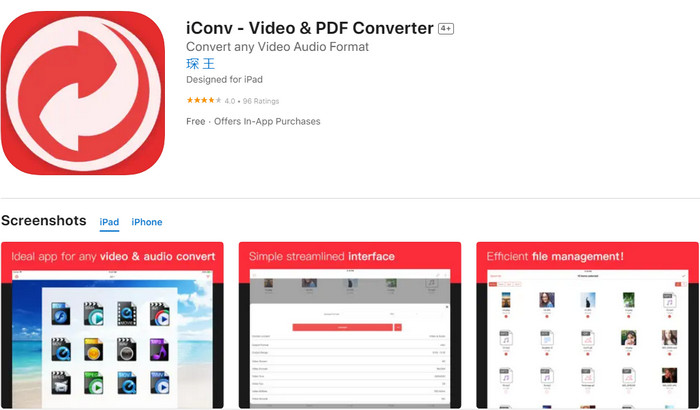
iConv เป็นแอป iOS ที่มีความสามารถในการแปลงวิดีโอ ซึ่งช่วยให้คุณแปลงไฟล์ MOV เป็น MP4 ได้โดยตรงบน iPhone หรือ iPad ของคุณ รองรับรูปแบบวิดีโอที่หลากหลายและมีตัวเลือกสำหรับการปรับพารามิเตอร์วิดีโอ เช่น ความละเอียด บิตเรต และอัตราเฟรม
แพลตฟอร์ม: iConv เป็นแอปแปลงวิดีโอที่รองรับอุปกรณ์ iOS ออกแบบมาโดยเฉพาะสำหรับ iPhone และ iPad ที่ใช้ระบบปฏิบัติการ iOS ผู้ใช้สามารถดาวน์โหลดและติดตั้ง iConv ได้จาก App Store บนอุปกรณ์ iOS ของตน ทั้งนี้ iConv ยังไม่รองรับ Android หรือแพลตฟอร์มอื่น.
แนะนำสำหรับ: แอปแปลง MOV เป็น MP4 นี้เหมาะอย่างยิ่งสำหรับผู้ใช้ iOS ที่ต้องการแอปแปลงวิดีโอที่เชื่อถือได้และใช้งานง่ายบน iPhone และ iPad ไม่ว่าคุณต้องการแปลงไฟล์ MOV เป็น MP4 เพื่อให้เล่นบนอุปกรณ์ iOS ได้ลื่นไหล หรือเพื่อเตรียมวิดีโอสำหรับการแชร์บนโซเชียลมีเดียหรือการตัดต่อ iConv ก็มีโซลูชันที่ตอบโจทย์ ด้วยอินเทอร์เฟซที่ใช้งานง่ายและการรองรับไฟล์วิดีโอหลากหลายรูปแบบ iConv จึงเหมาะสำหรับผู้ใช้ที่ให้ความสำคัญกับความเรียบง่ายและประสิทธิภาพ.
ข้อดี
- รับประกันการแปลงที่รวดเร็วและมีประสิทธิภาพ
- มีตัวเลือกสำหรับการปรับพารามิเตอร์วิดีโอ
จุดด้อย
- iConv ใช้งานได้กับอุปกรณ์ iOS เท่านั้น
- ต้องมีการซื้อในแอป
อ่านเพิ่มเติม:
MOV กับ MP4 – ควรเลือกแบบไหนดี?
4 วิธีที่ดีที่สุดในการแปลง MOV เป็น MP3 บน Windows และ Mac ได้อย่างง่ายดาย
ส่วนที่ 4 คำถามที่พบบ่อยเกี่ยวกับตัวแปลง MOV เป็น MP4
ตัวแปลง MOV เป็น MP4 ทำงานอย่างไร
ตัวแปลง MOV เป็น MP4 ทำงานโดยนำไฟล์ MOV อินพุตและแปลงรหัสสตรีมวิดีโอและเสียงเป็นรูปแบบ MP4 นอกจากนี้ยังอาจมีตัวเลือกในการปรับพารามิเตอร์วิดีโอ เช่น ความละเอียด บิตเรต และอัตราเฟรม เพื่อปรับแต่งเอาต์พุตตามความต้องการของคุณ
ฉันสามารถแปลงไฟล์ MOV หลายไฟล์เป็น MP4 พร้อมกันได้หรือไม่
ใช่ ตัวแปลงหลายตัวรองรับการแปลงเป็นชุด เช่น Video Converter Ultimate ทำให้คุณสามารถแปลงไฟล์ MOV หลายไฟล์เป็น MP4 ได้พร้อมกัน คุณลักษณะนี้ช่วยประหยัดเวลาและแรง โดยเฉพาะอย่างยิ่งเมื่อต้องจัดการกับไฟล์จำนวนมากหรือคอลเลกชันวิดีโอ
คุณภาพวิดีโอแตกต่างกันเมื่อแปลงจาก MOV เป็น MP4 หรือไม่
คุณภาพของวิดีโอที่แปลงแล้วขึ้นอยู่กับการตั้งค่าและตัวเลือกที่เลือกระหว่างกระบวนการแปลง ตัวแปลงที่เชื่อถือได้ควรรักษาคุณภาพของวิดีโอต้นฉบับ ลดการสูญเสียความละเอียดหรือความคมชัดให้เหลือน้อยที่สุด
มีข้อจำกัดเกี่ยวกับขนาดไฟล์หรือระยะเวลาเมื่อใช้ตัวแปลง MOV เป็น MP4 หรือไม่
ตัวแปลงบางตัวอาจกำหนดข้อจำกัดเกี่ยวกับขนาดไฟล์หรือระยะเวลา โดยเฉพาะอย่างยิ่งสำหรับเวอร์ชันฟรี ขอแนะนำให้ตรวจสอบข้อกำหนดหรือข้อกำหนดของตัวแปลงเพื่อให้แน่ใจว่าไฟล์ของคุณอยู่ในขอบเขตที่อนุญาต
ฉันสามารถเลือกโฟลเดอร์หรือตำแหน่งเฉพาะเพื่อบันทึกไฟล์ MP4 ที่แปลงแล้วได้หรือไม่
ได้ ตัวแปลง MOV เป็น MP4 ส่วนใหญ่อนุญาตให้คุณระบุโฟลเดอร์เอาต์พุตหรือตำแหน่งที่จะบันทึกไฟล์ MP4 ที่แปลงแล้ว ซึ่งช่วยให้คุณควบคุมการจัดระเบียบและจัดการวิดีโอที่แปลงแล้วได้
สรุป
โปรแกรมแปลง MOV เป็น MP4 เป็นโซลูชันที่ช่วยให้คุณแปลงไฟล์วิดีโอจากรูปแบบ MOV ไปเป็นรูปแบบ MP4 ซึ่งรองรับการใช้งานอย่างแพร่หลาย โดยโปรแกรมเหล่านี้มาพร้อมฟีเจอร์ต่าง ๆ ให้เลือกใช้.
-
 2 วิธีง่ายๆ ในการแปลงไฟล์ MOV เป็น FLV บน Windows/Mac
 วิธีแปลง MOV เป็น FLV ฟรี นี่คือตัวแปลงวิดีโอที่ดีที่สุดบนเดสก์ท็อปและออนไลน์เพื่อแปลงไฟล์ MOV ของคุณเป็น FLV ในไม่กี่วินาทีโดยไม่ต้องเสียเงิน
-
 วิธีที่ดีที่สุดในการเพิ่มปริมาณ MP4 ออนไลน์และออฟไลน์
 คุณมีปัญหาในการได้ยินเสียงของคลิปวิดีโอของคุณหรือไม่? อ่านบทความด้านล่างเพื่อทราบวิธีเพิ่มปริมาณ mp4 ในรูปแบบต่างๆ
-
 ตัวแปลง 3GP เป็น MP4 ที่เชื่อถือได้: แปลงวิดีโอของคุณได้อย่างราบรื่น
 ปลดล็อกพลังของการแปลงไฟล์ 3GP เป็น MP4 ได้ง่ายๆ วันนี้ สัมผัสกับการแปลงที่รวดเร็วและเชื่อถือได้ด้วยตัวแปลงอันดับต้น ๆ ของเรา เพื่อให้มั่นใจในคุณภาพการเล่นที่ดีที่สุด
