


 Video Converter Ultimate
 บันทึกหน้าจอ
 ซ่อมวิดีโอ
 ดาวน์โหลดอย่างปลอดภัย
วิธีการแปลง MP4 เป็น 3GP ออนไลน์และออฟไลน์
MP4 เป็นรูปแบบวิดีโอยอดนิยมที่สามารถเล่นบนเครื่องเล่น MP4 โทรศัพท์มือถือและแท็บเล็ต ภาพยนตร์ที่เราดาวน์โหลดจากเว็บไซต์มักจะอยู่ในรูปแบบ MP4 แต่โทรศัพท์มือถือบางรุ่นรองรับการเล่นวิดีโอ 3GP เท่านั้น บทความนี้จะแสดงตัวแปลง MP4 เป็น 3GP ฟรี 3 ตัวและคุณสามารถแปลง MP4 เป็น 3GP ได้โดยไม่ต้องยุ่งยาก

ส่วนที่ 1 วิธีการแปลง MP4 เป็น 3GP บน Windows และ Mac
หากคุณต้องการแปลงไฟล์ MP4 เป็น 3GP แบบออฟไลน์ คุณสามารถใช้โปรแกรมแปลงไฟล์ MP4 เป็น 3GP บนเดสก์ท็อปได้ FVC Free FLV to 3GP Converter เป็นซอฟต์แวร์แปลงวิดีโอฟรี ใช้งานง่าย สำหรับ Windows และ Mac สามารถแปลงวิดีโอต่าง ๆ เช่น FLV, MP4, MOV, MKV, MTS, M2TS เป็นต้น เป็น 3GP ได้อย่างสะดวก นอกจากนี้ยังมีฟีเจอร์ตัดต่อเพื่อใส่ธีม ปรับชื่อผู้สร้าง เวลา ผู้ให้บริการ ในส่วนต้น/ท้ายของวิดีโอได้ด้วย.

- แปลงวิดีโอในรูปแบบ MP4, MKV, AVI, MOV, MP3, AAC, AIFF และอื่น ๆ เป็น 3GP
- ส่งออกวิดีโอ 3GP และไฟล์เสียงแบบไม่สูญเสียจากไฟล์ MP4 ในคลิกเดียว
- อนุญาตให้ผู้ใช้แก้ไขผู้ให้บริการชื่อผู้แต่งเวลาและเพิ่มธีม
- Batch แปลง MP4 เป็น 3GP สำหรับเล่นบนโทรศัพท์มือถือบางรุ่น
ดาวน์โหลดฟรีสำหรับ Windows 7 ขึ้นไปดาวน์โหลดอย่างปลอดภัย
ดาวน์โหลดฟรีสำหรับ MacOS 10.7 ขึ้นไปดาวน์โหลดอย่างปลอดภัย
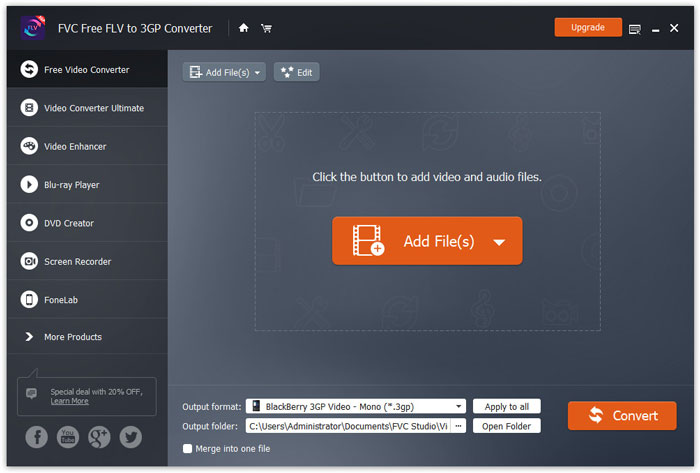
ขั้นตอนที่ 1. ดาวน์โหลดฟรี ติดตั้ง และเปิดใช้งาน FVC Free FLV to 3GP Converter บน Windows หรือ Mac ของคุณ คลิกปุ่ม Add Files เพื่อโหลดไฟล์ MP4 จากคอมพิวเตอร์ คุณสามารถแปลงไฟล์ MP4 ได้มากกว่าหนึ่งไฟล์ในเวลาเดียวกัน.
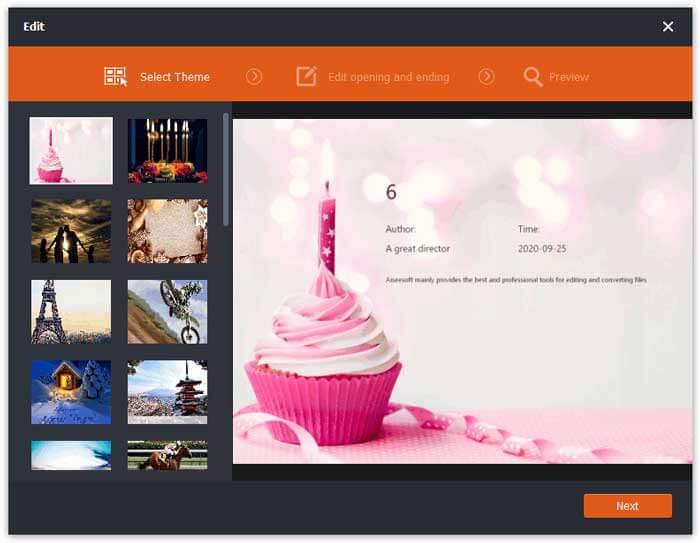
ขั้นตอนที่ 2. คลิกเลือกไฟล์ MP4 ของคุณ แล้วคลิกปุ่ม Edit คุณสามารถเพิ่มธีมให้กับไฟล์ MP4 และแก้ไขเนื้อหาในส่วนเปิดเรื่องและปิดเรื่องได้ จากนั้นคลิก Next เพื่อพรีวิวและบันทึกการเปลี่ยนแปลง.
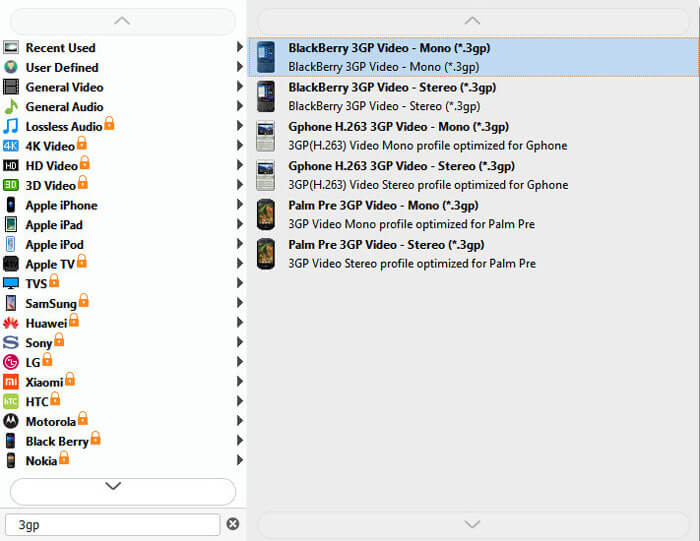
ขั้นตอนที่ 3. เลือก 3GP จากเมนูดรอปดาวน์ของ Output format ที่ด้านล่าง คุณสามารถเลือก BlackBerry 3GP Video - Mono (*.3gp) หรือรูปแบบอื่นที่ต้องการได้.
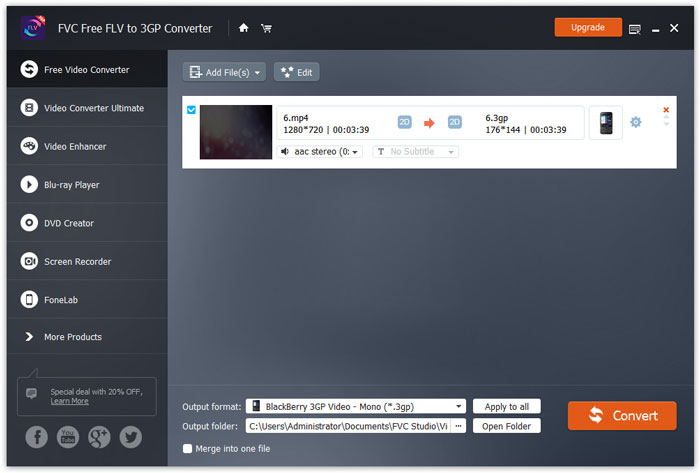
ขั้นตอนที่ 4. สุดท้าย เลือกโฟลเดอร์ปลายทางบนคอมพิวเตอร์ของคุณ และคลิกปุ่ม Convert เพื่อเริ่มแปลงไฟล์ MP4 เป็น 3GP.
ส่วนที่ 2 ส่งออก 3GP จาก MP4 พร้อมตัวแปลง 3GP ออนไลน์ 2 ตัว
เมื่อเทียบกับการติดตั้งตัวแปลง 3GP บนเดสก์ท็อปการใช้ตัวแปลงบนเว็บนั้นง่ายกว่าและง่ายกว่ามากสำหรับการแปลง MP4 เป็น 3GP ในส่วนนี้เราจะแบ่งปันตัวแปลง 3GP ออนไลน์ 2 ตัวเพื่อช่วยให้คุณแปลง MP4 เป็น 3GP ได้อย่างไม่ยากเย็น
1. FVC แปลงวิดีโอออนไลน์ฟรี
FVC Free Online Video Converter เป็นแพลตฟอร์มแปลงวิดีโอออนไลน์ที่เป็นที่รู้จัก ซึ่งคุณสามารถแปลงวิดีโอและไฟล์เสียงยอดนิยมต่าง ๆ เป็น 3GP, MKV, MOV, WMV, AVI, MP3 และอื่น ๆ ได้.
ขั้นตอนที่ 1. ไปยังเว็บไซต์อย่างเป็นทางการของ FVC Free Video Converter คลิกปุ่ม Add Files to Convert เพื่อดาวน์โหลดและติดตั้งตัวเรียกใช้งาน (launcher).
ดาวน์โหลดเวอร์ชันเดสก์ท็อปเพื่อแปลงไฟล์แบบเป็นชุดได้.

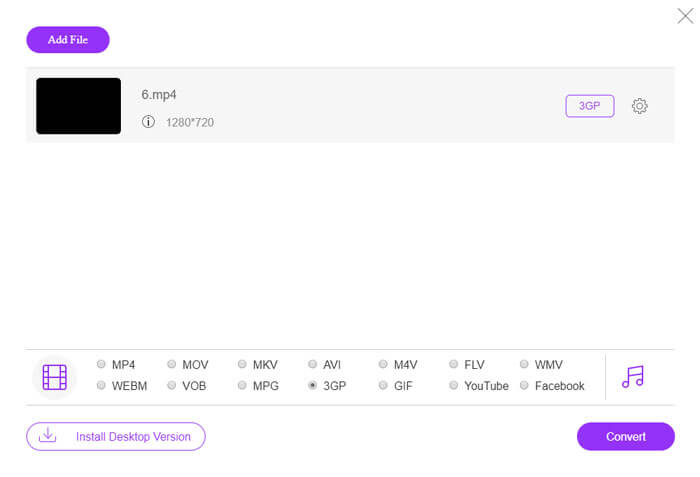
ขั้นตอนที่ 2. เลือกไฟล์ MP4 จากคอมพิวเตอร์เครื่องท้องถิ่น คุณสามารถคลิกไอคอนรูปเฟืองเพื่อปรับบิตเรตวิดีโอ อัตราสุ่มเฟรมวิดีโอ ความละเอียด และระดับเสียงได้.

ขั้นตอนที่ 3. ตั้งค่ารูปแบบเอาต์พุตเป็น 3GP ที่ด้านล่าง จากนั้นคลิกปุ่ม Convert เพื่อเริ่มแปลง MP4 เป็น 3GP คุณสามารถแปลงไฟล์ MP4 หลายไฟล์เป็น 3GP พร้อมกันได้.
2. ซัมซาร์
Zamzar เป็นโปรแกรมแปลงวิดีโอออนไลน์ตัวแปลงเสียงตัวแปลงรูปภาพและตัวแปลง eBook สะดวกในการแปลง MP4 เป็นรูปแบบอื่น ๆ โดยใช้ Zamzar ต่อไปนี้เป็นขั้นตอนง่ายๆในการแปลง MP4 เป็น 3GP
ขั้นตอนที่ 1. ไปที่ zamzar.com/convert/mp4-to-3gp/ แล้วคลิกปุ่ม Add Files เพื่ออัปโหลดไฟล์ MP4 ของคุณ.
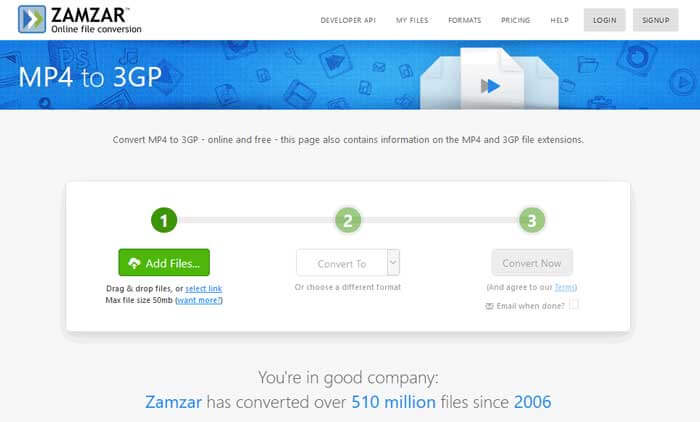
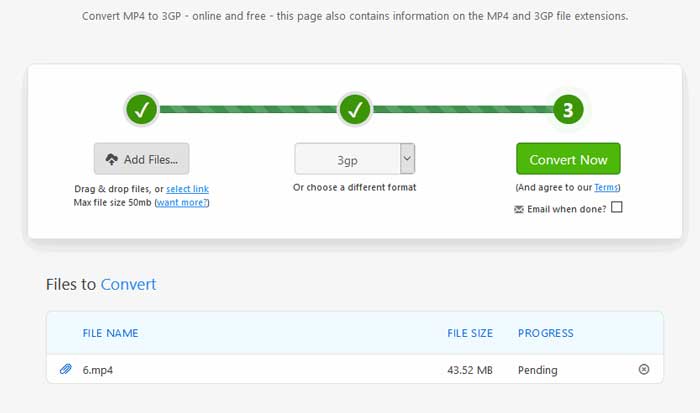
ขั้นตอนที่ 2. คุณสามารถเลือกเปลี่ยนรูปแบบเอาต์พุตได้ โดยทั่วไประบบจะตั้งค่า 3gp เป็นรูปแบบเอาต์พุตเริ่มต้น คลิกปุ่ม Convert Now เพื่อเริ่มแปลง MP4 เป็น 3GP.
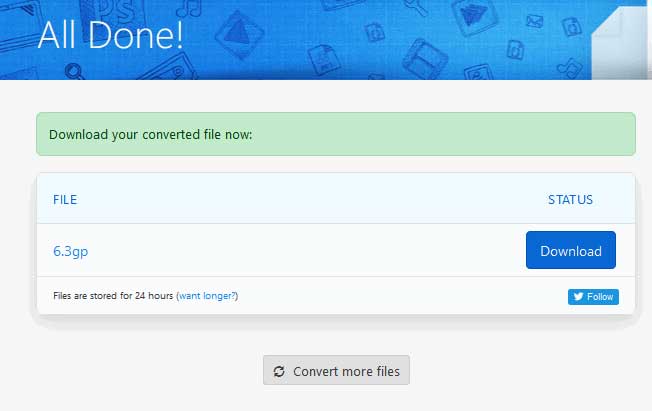
ขั้นตอนที่ 3. จากนั้นระบบจะเปลี่ยนไปยังหน้าอื่น คุณสามารถคลิกปุ่ม Download เพื่อบันทึกไฟล์ 3GP ที่แปลงแล้วลงในคอมพิวเตอร์ของคุณ.
ถ้าไฟล์ MP4 ของคุณมีขนาดใหญ่มาก ทำอย่างไรดี? ดูวิธี บีบอัดไฟล์ MP4 ได้ที่นี่.
MP4 เทียบกับ 3GP
เผยแพร่โดยกลุ่มผู้เชี่ยวชาญด้านภาพเคลื่อนไหว (MPEG) ในปี 2544 รูปแบบ MP4 สามารถช่วยคุณบันทึกวิดีโอ เสียง คำบรรยาย และข้อมูลภาพในแทร็กแยกกัน ย่อมาจาก MPEG-4 Part 14 นอกจากนี้ยังเป็นหนึ่งในรูปแบบที่นิยมใช้มากที่สุดสำหรับการสตรีมและแชร์วิดีโอ
โครงการความร่วมมือรุ่นที่ 3 (3GPP) สร้างรูปแบบ 3GP/3GPP เป็นรูปแบบคอนเทนเนอร์มัลติมีเดีย มันขึ้นอยู่กับรูปแบบไฟล์สื่อ ISO เรามักใช้เพื่อบันทึกสตรีมวิดีโอ/เสียงที่ส่งระหว่างโทรศัพท์มือถือ 3G และออนไลน์
ส่วนที่ 3 คำถามที่พบบ่อยเกี่ยวกับการแปลง MP4 เป็น 3GP
1. 3GP ดีกว่า MP4 หรือไม่?
3GP ถูกออกแบบมาสำหรับโทรศัพท์มือถือเครือข่าย 3G คุณสามารถเล่นไฟล์ 3GP ได้ในโปรแกรมเล่นวิดีโออย่างเช่น QuickTime, VLC และ RealPlayer ส่วน MP4 มีความเข้ากันได้สูงกว่า 3GP มาก รองรับอย่างแพร่หลายโดย เครื่องเล่นมีเดีย แบบพกพาและสมาร์ตโฟนหลากหลายรุ่น.
2. 3GP คืออะไร?
3GP เป็นรูปแบบมัลติมีเดียคอนเทนเนอร์ที่กำหนดโดยรุ่นที่ 3 สามารถจัดเก็บวิดีโอและสตรีมเสียงที่เล่นบนโทรศัพท์มือถือ 3G แต่ยังสามารถเล่นบนโทรศัพท์ 2G หรือ 4G บางรุ่นได้
3. ฉันจะแปลง MP4 เป็น FLV ได้อย่างไร?
ด้วยความช่วยเหลือของ FVC Free Online Video Converter คุณสามารถ แปลง MP4 เป็น FLV ออนไลน์ได้อย่างง่ายดาย ไปที่เว็บไซต์ออนไลน์นี้แล้วคลิกปุ่ม Add Files to Convert เพื่อติดตั้งตัวเรียกใช้งาน จากนั้นเลือกไฟล์ MP4 จากคอมพิวเตอร์ และเลือก FLV เป็นรูปแบบเอาต์พุต คลิกปุ่ม Convert เพื่อแปลง MP4 เป็น FLV.
สรุป
เราพูดถึง 3 วิธีในการแปลง MP4 เป็น 3GP บน Windows และ Mac เป็นหลัก หากคุณต้องการโซลูชันออนไลน์คุณสามารถลอง FVC Free Online Video Converter หรือ Zamzar ออนไลน์ได้ หากคุณต้องการแก้ไขไฟล์ MP4 ของคุณเพื่อความสมบูรณ์แบบยิ่งขึ้นคุณสามารถใช้ Free FLV to 3GP Converter แทนได้ หากคุณมีวิธีแก้ไขที่ดีกว่านี้โปรดอย่าลังเลที่จะแสดงความคิดเห็น
-
 วิธีฟรี 3 อันดับแรกในการแปลง MP4 เป็น VOB อย่างรวดเร็ว
 จะแปลง MP4 เป็น VOB บน Windows PC และ Mac ได้อย่างไร เพื่อแก้ปัญหานี้โพสต์นี้จะแบ่งปัน 3 วิธีที่ดีที่สุดในการช่วยคุณแปลง MP4 เป็น VOB ได้ฟรี
-
 ฟรี | 3 วิธีที่ดีที่สุดในการแปลง MP4 เป็น WMV โดยไม่สูญเสียคุณภาพ
 โพสต์นี้แชร์วิธีการแปลงวิดีโอ MP4 เป็นรูปแบบ WMV บน Mac หรือ Windows นอกจากนี้เรายังมีตัวเลือกมากมายให้คุณรวมทั้งซอฟต์แวร์เดสก์ท็อปและตัวแปลงออนไลน์บนเว็บ พร้อมที่จะรู้จักเครื่องมือแปลง MP4 เป็น WMV ที่ดีที่สุดแล้วหรือยัง?
-
 3 วิธีในการแปลง MP3 เป็น MP4 ด้วยรูปภาพ
 วิธีแปลง MP3 เป็น MP4 คุณภาพสูง? โพสต์นี้แสดง 3 วิธีที่มีประสิทธิภาพและฟรีในการเปลี่ยน MP3 เป็น MP4 ด้วยรูปภาพบน Windows และ Mac

