


 Video Converter Ultimate
 บันทึกหน้าจอ
 ซ่อมวิดีโอ
5 เครื่องตัด MP4 ที่ยิ่งใหญ่ที่สุด: เรียนรู้วิธีตัดวิดีโอบนพีซี, Mac และอุปกรณ์มือถือ
หากคุณเป็น vlogger หรือเป็นคนหนึ่งที่ใฝ่ฝัน การถ่ายวิดีโอของตัวเองถือเป็นเรื่องปกติ การดำเนินการนี้ต้องใช้ความพยายามและความมั่นใจเป็นอย่างมาก เช่นเดียวกับการถ่ายภาพหน้ากล้อง นอกจากนี้ สิ่งที่พบได้บ่อยที่สุดที่มือโปรและมือใหม่สำหรับ vlog คือข้อผิดพลาดที่คุณทำ แทนที่จะถ่ายวิดีโอใหม่ พวกเขามักจะตัดและรวมเข้ากับวิดีโอต้นฉบับ ในการสร้างวิดีโอใหม่ทั้งหมดซึ่งประกอบด้วยมุม มุมมอง การตัดต่อ และอื่นๆ อีกมากมาย พวกเขาจึงตัดวิดีโอจากวิดีโอต่างๆ และเพิ่มเป็นวิดีโอเดียว แต่สำหรับมือใหม่สำหรับงานประเภทนี้หรือแม้แต่มือโปร การเลือกทริมเมอร์ที่เหมาะสมนั้นยาก เพราะไม่ใช่ทุกฟังก์ชันตามที่โฆษณาเครื่องมือไม่อยู่ในเครื่องมือ แทนที่จะไปอ่านบทความอื่นและอ่านคำแนะนำ ทำไมคุณไม่เรียนรู้จากสิ่งนี้ก่อน เนื่องจากเรารวบรวมแต่หลักฐานที่แท้จริงเพื่อผลประโยชน์ของท่านเอง ดังนั้น ในรายการคือเครื่องมือตัด MP4 ที่คุณสามารถใช้เพื่อเริ่มการทำ vlog จดจ่ออยู่เสมอเพื่อดูว่าอะไรคือเครื่องตัดหญ้าที่ดีที่สุดที่คุณสามารถใช้ได้ ซึ่งให้มุมมองที่เรียบง่ายแต่เป็นมืออาชีพสำหรับวิดีโอของคุณ

ส่วนที่ 1 ดาวน์โหลดซอฟต์แวร์ตัดวิดีโอ MP4 ที่ดีที่สุดบนพีซีและ Mac
หากเราจะพูดถึงตัวเลือกที่ดีที่สุด คุณควรให้ความสำคัญกับการอ่านส่วนนี้ก่อน ดังที่ได้กล่าวไปแล้ว การทำวล็อกนั้นยากกว่าที่เราคิด ไม่ใช่แแค่ต้องมีความมั่นใจในการเผชิญหน้ากล้องและโพสต์วิดีโอเท่านั้น แต่คุณยังต้องคำนึงถึงการมีเครื่องมือสารพัดประโยชน์ด้วย เพื่อให้ได้วิดีโอที่ดึงดูดสายตาผู้ชมทุกคน FVC Video Converter Ultimate มีฟีเจอร์การตัดต่อที่สุดยอดและฟังก์ชันการแปลงไฟล์ที่ทุกคนสามารถใช้ได้ ไม่ว่าคุณจะเป็นมือใหม่หรือมือโปร เราควรให้ความสำคัญกับการมองหาตัวที่ดีที่สุดในตลาด แม้ซอฟต์แวร์นี้จะเป็นแบบเสียเงิน แต่ก็ยังให้สิ่งที่ยอดเยี่ยมที่สุดที่คุณต้องการ และหากคุณเลือกใช้ตัวนี้เป็นตัวเลือกส่วนตัวของคุณ ก็เท่ากับว่ามีอนาคตที่สดใสรออยู่ คุณอยากเริ่มทำวล็อกวันนี้เลยไหม? ถ้าใช่ ให้ทำตามขั้นตอนเหล่านี้ในการใช้ ตัวตัดวิดีโอ MP4 ตัวนี้.
ขั้นตอนที่ 1 คลิกปุ่มดาวน์โหลดด้านล่างและติดตั้งลงบน PC หรือ Mac ของคุณ ทำตามขั้นตอนการติดตั้งเครื่องมือ จากนั้นคลิกเสร็จสิ้น (Finish) เพื่อเปิดซอฟต์แวร์.
ดาวน์โหลดฟรีสำหรับ Windows 7 หรือใหม่กว่าดาวน์โหลดอย่างปลอดภัย
ดาวน์โหลดฟรีสำหรับ MacOS 10.7 หรือใหม่กว่าดาวน์โหลดอย่างปลอดภัย
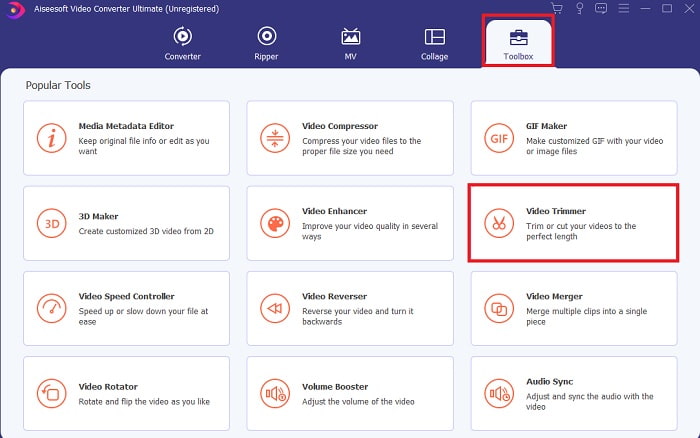
ขั้นตอนที่ 2 หากหน้าจอนี้แสดงขึ้น ให้คลิกที่ Toolbar แล้วมองหา Video Trimmer ด้านล่าง.
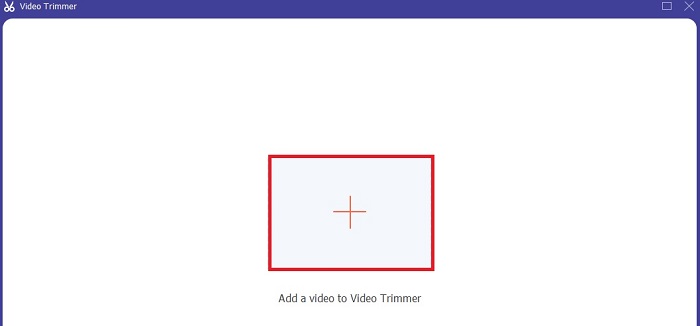
ขั้นตอนที่ 3 คลิกปุ่ม บวก เพื่อเพิ่มไฟล์ เลือกไฟล์ในไดรฟ์ที่คุณต้องการตัด แล้วคลิก open เพื่อใส่วิดีโอลงไป.
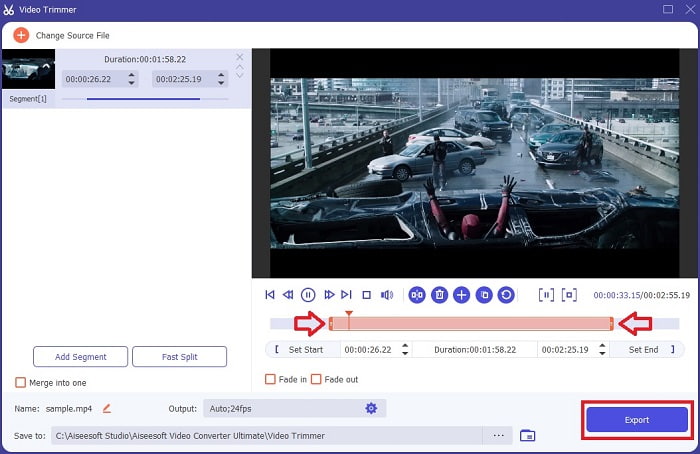
ขั้นตอนที่ 4 ปรับจุดเริ่มต้นและจุดสิ้นสุดของวิดีโอของคุณ โดยเลื่อน playback in และ out เพื่อกำหนดระยะเวลาที่คุณต้องการ จะเพิ่มเอฟเฟกต์เฟดเข้าและเฟดออกก็ได้เช่นกัน นอกจากนี้ คุณยังสามารถเปลี่ยนรูปแบบไฟล์เอาต์พุตได้ หากคลิกที่ปุ่มรูป เฟือง (cog) เมื่อทุกอย่างเรียบร้อยแล้ว ให้คลิกปุ่ม Export เพื่อเริ่มกระบวนการตัดวิดีโอ.
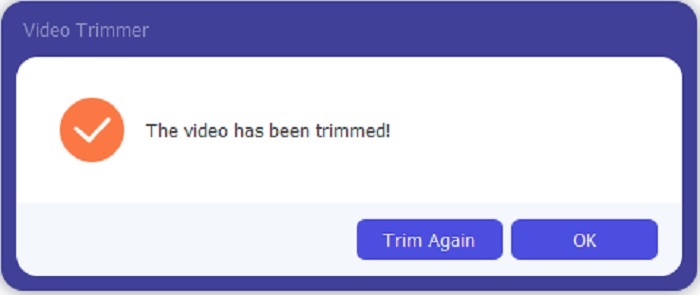
ขั้นตอนที่ 5 รอเพียงชั่วครู่ วิดีโอของคุณก็จะถูกตัดเรียบร้อย จากนั้นคลิก OK หรือ Trim Again หากคุณต้องการตัดวิดีโออื่นเพิ่ม ถ้าคุณอยากปรับแต่งวิดีโอที่เพิ่งทำเสร็จ ให้คลิก Toolbar อีกครั้งแล้วมองหา Video Enhancer.
ข้อดีของการมีเครื่องมือผสานที่จัดเตรียมโดย FVC Video Converter Ultimate พร้อมขั้นตอน
ไม่เหมือนกับแอปอื่น ๆ การผสานวิดีโอใน FVC Video Converter Ultimate ทำได้ง่ายมาก นี่เป็นคุณสมบัติโบนัสหากคุณได้รับเครื่องมือนี้ ดังที่กล่าวไปแล้ว เครื่องมือนี้ใช้งานได้หลากหลาย ดังนั้นโดยไม่ต้องกังวลใจอีกต่อไป มาเริ่มรวมวิดีโอต่างๆ เข้าด้วยกันเป็นหนึ่งเดียว
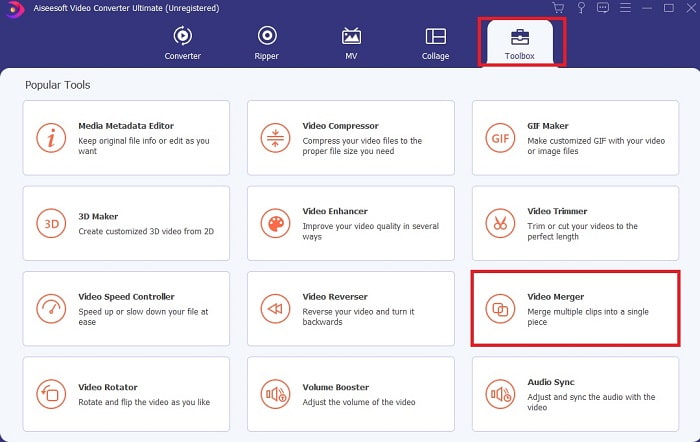
ขั้นตอนที่ 1 เปิดซอฟต์แวร์ ไปที่ Toolbar จากนั้นหาและคลิกที่ Video Merger.
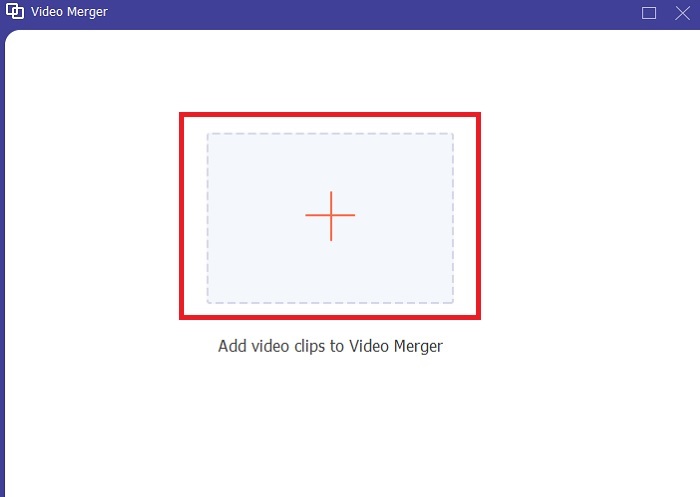
ขั้นตอนที่ 2 คลิกปุ่ม add แล้วเลือกวิดีโอที่คุณต้องการรวม จากนั้นคลิก open เพื่อดำเนินการต่อ หลังจากเลือกไฟล์แรกแล้ว ให้คลิกสัญลักษณ์บวกเพื่อเพิ่มไฟล์อื่นที่คุณต้องการรวม.
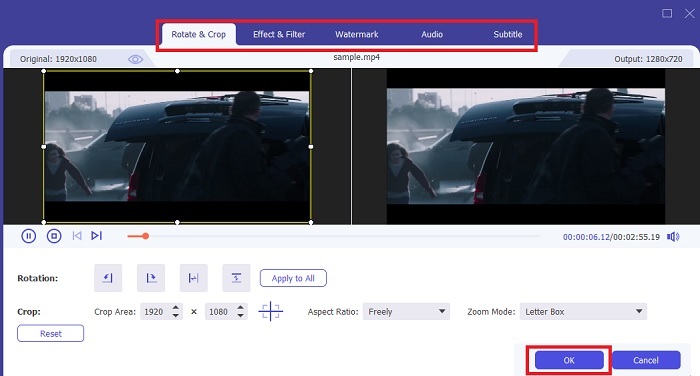
ขั้นตอนที่ 3 ในหน้าต่างโปรแกรม ให้คลิกปุ่มรูป ไม้กายสิทธิ์ (wand) เพื่อเพิ่มเอฟเฟกต์ เพิ่มคุณภาพเสียง หมุนหรือครอบตัด และเพิ่มซับไตเติล ได้เช่นกัน เมื่อต้องการบันทึกการแก้ไขที่คุณทำ ให้คลิก OK หากต้องการ คุณสามารถทำขั้นตอนเดียวกันนี้กับวิดีโออื่น ๆ ได้ด้วย.
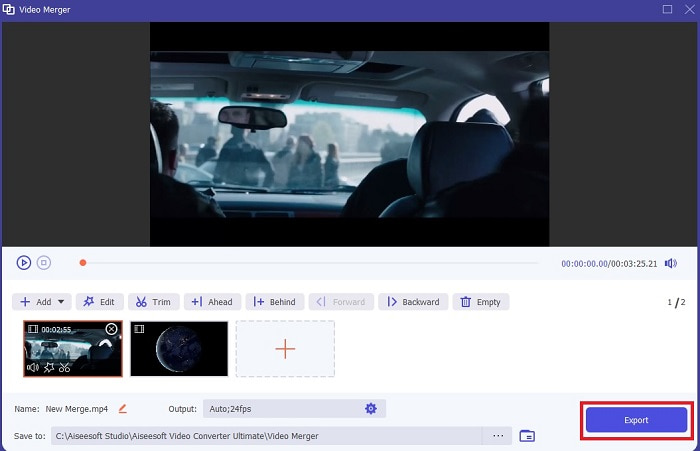
ขั้นตอนที่ 4 เมื่อคุณพร้อมจะเริ่มกระบวนการแล้ว ให้คลิก Export หลังจากส่งออกเสร็จแล้ว จะมีหน้าต่างจัดการไฟล์เด้งขึ้นมาบนหน้าจอ หากต้องการชมวิดีโอที่ส่งออกแล้ว เพียงคลิกไฟล์แล้วรับชมได้เลย.
ส่วนที่ 2 เครื่องตัด MP4 ออนไลน์ที่ดีที่สุด
ตัวตัดวิดีโอตัวนี้อาจจะดี แต่ก็ยังไม่ดีที่สุดเหมือนกับ FVC Video Converter Ultimate อย่างไรก็ตาม ก็ยังคุ้มค่าที่จะลองใช้ ตัวตัด MP4 ออนไลน์ เหล่านี้.
1. 123Apps เครื่องตัดวิดีโอออนไลน์
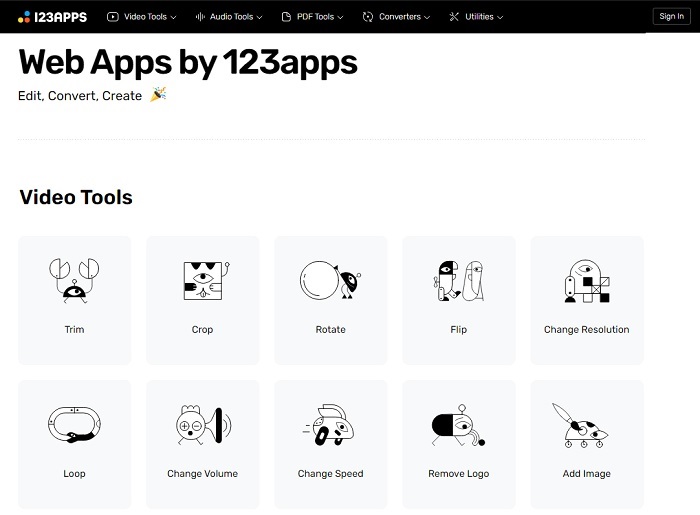
เครื่องมือออนไลน์เครื่องแรกนี้มีจุดประสงค์เพื่อทำให้วิดีโอของคุณดีขึ้น สามารถปรับระยะเวลาของวิดีโอ ครอบตัด เพิ่มข้อความ และอื่นๆ แต่เครื่องมือนี้ใช้เวลาในการส่งออกเป็นจำนวนมาก หลังจากที่คุณส่งออก คุณต้องดาวน์โหลด และกระบวนการนี้จะขึ้นอยู่กับความเร็วอินเทอร์เน็ตของคุณ นอกจากนี้ คุณไม่สามารถปรับคุณภาพของวิดีโอของคุณได้ ดังนั้น หากวิดีโอของคุณค่อนข้างเบลอและจำเป็นต้องปรับ fps ของวิดีโอ คุณจะไม่สามารถทำสิ่งนี้ได้ที่นี่ แต่ก็ยังคุ้มค่าที่จะลอง
2. คลิดิโอ
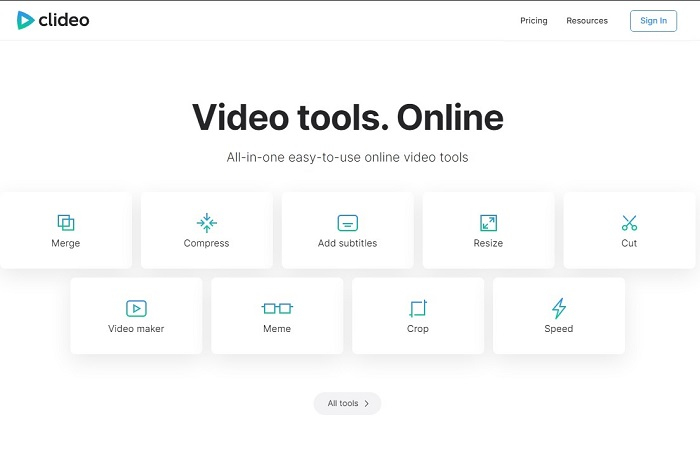
ถ้าเราจะพูดถึงการตัดวิดีโอแล้ว เครื่องมือนี้ก็นับเป็นตัวเลือกที่ดีอีกตัวหนึ่ง Clideo เป็นหนึ่งในตัวตัด MP4 ออนไลน์ ที่ดีที่สุดตัวหนึ่งที่คุณสามารถหาได้บนออนไลน์ เช่นเดียวกับเครื่องมือออนไลน์ตัวแรกที่กล่าวไป เครื่องมือนี้ก็มีฟีเจอร์ตัดต่อพื้นฐานให้ใช้เช่นกัน แม้จะรองรับการตัดต่อพื้นฐาน แต่ก็ยังไม่เพียงพอหากคุณต้องการทำวิดีโอที่ดึงดูดสายตา อย่างไรก็ตาม คุณสามารถลองใช้แบบออนไลน์ได้ โดยไม่ต้องกังวลเพราะฟรีและปลอดภัยด้วย.
ส่วนที่ 3 3 แอพตัด MP4 ที่ดีที่สุดบน Android และ iOS
จะเกิดอะไรขึ้นถ้าคุณไม่มีเดสก์ท็อปเพื่อใช้เครื่องมือด้านบนและต้องการเป็น vlogger หรือไม่ ยังคงเป็นไปได้ หากคุณมีโทรศัพท์เช่น Android หรือ iOS คุณสามารถใช้แอปเหล่านี้เพื่อแก้ไขในโทรศัพท์ของคุณได้ แต่มีคุณลักษณะบางอย่างที่มีอยู่ด้านบนซึ่งไม่มีอยู่ที่นี่ ดังนั้น อ่านต่อด้านล่างเพื่อดูว่าเครื่องมือเหล่านี้คืออะไรและเลือกจากเครื่องมือเหล่านี้
1. iMovie สำหรับ iOS
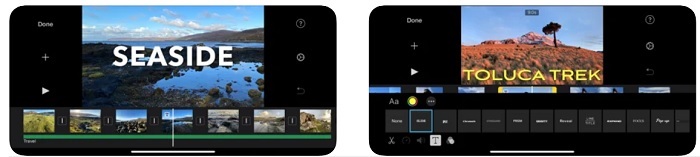
หากคุณอยากเพิ่มกลิ่นอายแบบฮอลลีวูดให้วิดีโอของคุณ iMovie ก็คือซอฟต์แวร์ที่เหมาะสม แอปตัด MP4 ตัวนี้ถูกสร้างมาสำหรับผู้ใช้ iOS เท่านั้น แต่ถึงแม้เครื่องมือนี้จะมีฟีเจอร์ตัดต่อขั้นสูง บั๊กบางอย่างก็ยังไม่ได้รับการแก้ไข ในบางกรณีแอปมักจะค้างทุกครั้งที่คุณพยายามตัดต่อ แล้วหน้าจอจะกลายเป็นสีดำ บางครั้งภาพกับเสียงก็ไม่ตรงกันเนื่องจากปัญหากระตุก นี่เป็นเพียงตัวอย่างของบั๊กบางส่วน ซึ่งแม้จะดูเหมือนปัญหาเล็กน้อย แต่ก็น่ารำคาญอยู่บ่อยครั้ง ดังนั้นหากคุณอยากลองใช้ iMovie คุณยังสามารถดาวน์โหลดได้จาก App Store.
2. โปรแกรมตัดต่อวิดีโอ & ผู้สร้าง – วิดีโอ Viva สำหรับ Android
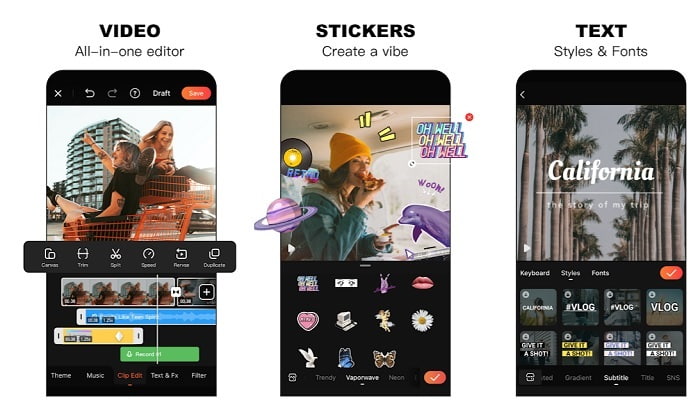
หนึ่งในตัวตัด MP4 ฟรีที่ดีที่สุด บน Android คือ Video Editor & Maker – Viva Video เช่นเดียวกับเครื่องมือด้านบน ทั้งสองตัวมีฟีเจอร์ตัดต่อที่ยอดเยี่ยมบนมือถือ เช่น ทรานซิชันสำหรับวิดีโอ เอฟเฟกต์ภาพกระตุก (glitch) และอื่น ๆ แต่แอปนี้เป็นแบบเสียเงินเพื่อใช้งาน มีกรณีที่มันไม่ดีนักเพราะไม่มีปุ่มยกเลิกการสมัครใช้งานเพื่อหยุดแอป วิธีที่คุณคิดว่าอาจดีที่สุดคือการลบแอปเพื่อยกเลิกการสมัคร แต่จริง ๆ แล้วการสมัครจะไม่สิ้นสุด มันจะตัดเงินจากบัตรเครดิตของคุณต่อไปหากคุณเลือกวิธีชำระเงินแบบนี้ แต่โดยรวมแล้ว เครื่องมือนี้ก็ถือว่าจัดอยู่ในระดับคลาส A ไม่มากไม่น้อย.
ส่วนที่ 4 คำถามที่พบบ่อยเกี่ยวกับเครื่องตัด MP4
MP4 คืออะไร?
MP4 เรียกอีกอย่างว่ารูปแบบสื่ออเนกประสงค์ แทนที่จะจัดเก็บรหัส แต่จะจัดเก็บข้อมูลของวิดีโอ ภาพนิ่ง คำบรรยายหรือข้อความ นอกจากนี้ยังเป็นรูปแบบวิดีโอที่ใช้กันมากที่สุดทั่วโลก
MP4 สูญเสียหรือสูญเสียหรือไม่?
เนื่องจากเป็นรูปแบบอเนกประสงค์ MP4 จึงเป็นการบีบอัดแบบสูญเสียข้อมูล
อะไรคือรูปแบบที่ดีที่สุดนอกเหนือจาก MP4?
มีบางรูปแบบไฟล์ที่ให้คุณภาพเอาต์พุตดีกว่า MP4 แต่ก็ไม่ยืดหยุ่นเท่ารูปแบบนี้ ตัวอย่างเช่น WMV รูปแบบนี้ให้ขนาดไฟล์ที่เล็กกว่า MP4 แต่ไม่รองรับบนอุปกรณ์ของ Apple เพราะถูกออกแบบให้เป็นรูปแบบไฟล์หลักของ Windows Media Player คุณสามารถเลือกแปลงไฟล์ MP4 ของคุณเป็น WMV เพื่อการเล่นวิดีโอที่ดีขึ้น.
สรุป
เพื่อสรุปแล้ว ตอนนี้คุณน่าจะเข้าใจความแตกต่างของแต่ละเครื่องมือที่คุณจะเลือกใช้ได้ง่ายขึ้น แต่ดังที่ได้กล่าวไป ไม่ใช่ทุกตัวที่จะมีฟีเจอร์ตัดต่อขั้นเทพเท่ากับ FVC Video Converter Ultimate โดยเฉพาะอย่างยิ่งหากคุณต้องการสร้างวิดีโอที่ดึงดูดสายตาเพื่อเพิ่มยอดวิวและทำกำไรไปพร้อมกัน ดังนั้น แทนที่จะใช้แต่ตัวเลือกชั่วคราว ทำไมคุณไม่ลองเลือกใช้ FVC Video Converter Ultimate เพื่อมองไปข้างหน้าและได้เวอร์ชันที่ดีที่สุดสำหรับตัวคุณเอง.
-
 คำแนะนำเกี่ยวกับวิธีการแปลง RMVB เป็น MP4 บน Windows / Mac (3 วิธีฟรี)
 ต้องการแปลง RMVB เป็น MP4 เพื่อให้เล่นง่ายบนคอมพิวเตอร์หรือโทรศัพท์มือถือของคุณหรือไม่? คุณจะพบวิธีง่ายๆ ในการแปลงไฟล์ RMVB เป็น MP4 ในคู่มือนี้
-
 4 สุดยอดตัวแปลง MP4 เป็น M4V เพื่อเปลี่ยนวิดีโอ MP4 เป็น M4V ได้อย่างง่ายดาย
 เมื่อคุณต้องการเปลี่ยนไฟล์ MP4 เป็น M4V คุณควรเรียนรู้รายละเอียดเพิ่มเติมเกี่ยวกับความแตกต่างระหว่างสองรูปแบบรวมถึงตัวแปลง MP4 เป็น M4V ที่ดีที่สุดจากบทความ
-
 AMV Converter - 3 วิธีที่ดีที่สุดในการแปลง MP4 เป็น AMV บน Win / Mac
 ตัวแปลง MP4 เป็น AMV ที่ดีที่สุดในการเปลี่ยนวิดีโอเป็น Amine Music Video คืออะไรคุณสามารถเรียนรู้เพิ่มเติมเกี่ยวกับ 3 วิธีที่มีประสิทธิภาพสูงสุดเพื่อให้ได้วิดีโอที่ต้องการได้อย่างง่ายดาย
