


 视频转换大师
 屏幕录影大师
 视频修复
视频修复
 安全下载
安全下载如何使用 3 MTS 到 FLV 转换器将 MTS 转换为 FLV
想把 MTS 文件转换成 FLV 吗?使用 AVCHD 摄像机录制的视频通常以 MTS 或 M2TS 格式保存。某些媒体播放器并不常见支持 MTS 文件,而且它们也不能直接上传到 YouTube 或 Facebook。如果你使用的是 Sony、Panasonic(松下)或 Canon(佳能)等品牌的 AVCHD 摄像机,你可能会想把录制的 MTS 视频转换成 Flash 视频格式,这样就能在大多数媒体播放器上播放。这正是你需要继续阅读本文的原因,我们将提供 3 种在 Windows 和 Mac 上将 MTS 文件转换为 FLV 的方法。

第 1 部分。 免费将 MTS 转换为 FLV 的专业方法
要将 MTS 文件转换为 Flash 视频以上传使用,你需要一款专业工具,比如 FVC Free MTS Converter。它是一款 MTS 转 FLV 转换器,可以批量将 MTS 文件转换为 FLV、MP4、WMV、MOV 及其他视频和音频格式。借助内置的视频编辑工具,你可以在转换前先编辑 MTS 文件。

FVC免费MTS转换
1,286,400+ 次下载- 在 Windows 10/8/7/Vista/XP 和 Mac OS X 上将 MTS 转换为 FLV。
- 压缩、合并和添加其他视频效果到 MTS 文件。
- 为您的 MTS 文件添加特殊主题,如假期、家庭、生日。
- 以 50 倍的速度将 MTS 批量转换为 FLV、MP4、MKV 等。
步骤 1. 添加 MTS 文件
免费下载、安装并启动 FVC Free MTS Converter。点击 Add File(s) 按钮导入你的 MTS 文件。你也可以将多个 MTS 文件拖入程序中进行免费转换。
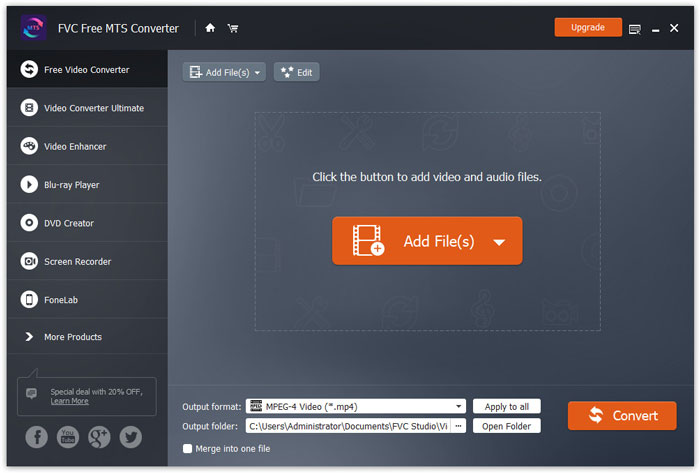
步骤 2. 编辑 MTS 文件
点击 Edit 按钮开始编辑 MTS 文件。你可以选择特定主题,并在片头和片尾编辑标题、作者、时间等信息。
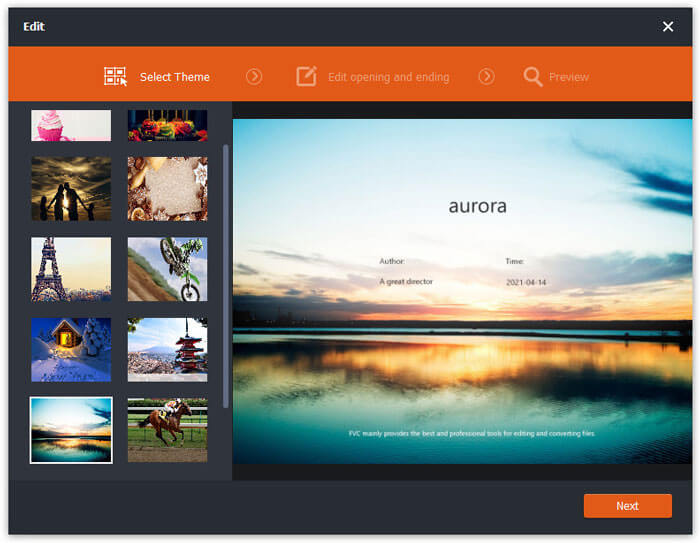
步骤 3. 设置 FLV 为输出格式
接着前往 Output format(输出格式)区域,选择 General Video(常规视频)类别。找到 FLV - Flash Video Format (.flv) 并将其设为输出格式。该格式是广泛使用的网络视频流媒体格式。
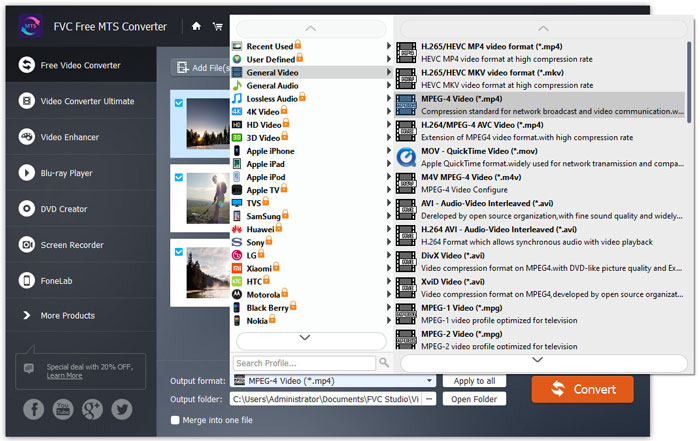
步骤 4. 将 MTS 转换为 FLV
最后前往 Output folder(输出文件夹)区域,选择转换后 FLV 文件的保存位置。然后点击 Convert 按钮,即可免费开始将 MTS 转换为 FLV 文件。
之后,您可以将转换后的 FLV 文件上传到 YouTube、Vimeo、Facebook、谷歌视频或其他媒体平台。
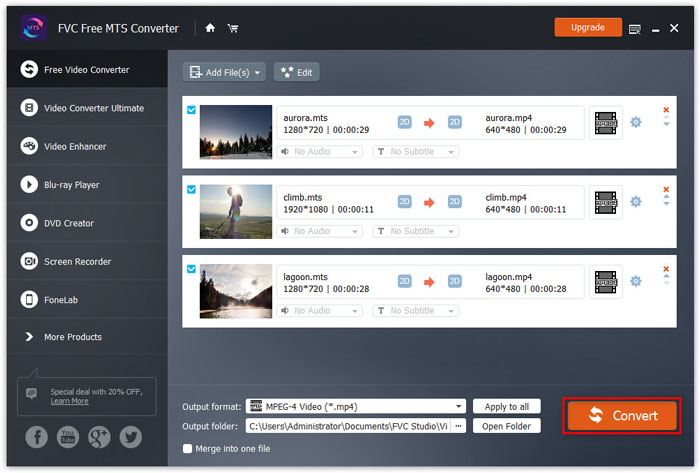
第 2 部分。 如何将 MTS 更改为 FLV 免费在线
如果你想使用无需下载安装软件的在线工具,可以试试 FVC Free Online Video Converter。这是一款简单易用且免费的在线 MTS 转 FLV 转换器,可在 Windows 和 Mac 上完全免费地将包括 MTS 在内的任意常见视频/音频格式转换为 FLV、MP4、WMV、AVI、MOV、MP3 等。你可以参考以下详细步骤,使用这款免费在线工具将 MTS 转换为 FLV。
步骤 1. 访问 FVC Free Online Video Converter(https://www.free-videoconverter.net/free-online-video-converter/)官方网站。点击 Add Files to Convert 按钮下载并安装启动器。

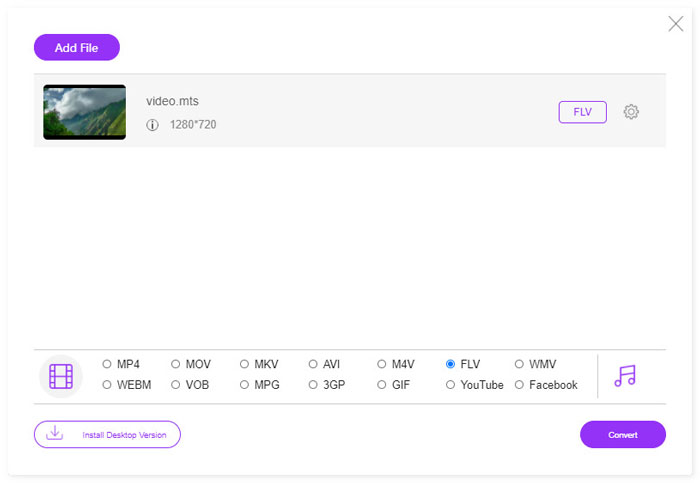
步骤 2. 从电脑中选择你要转换的 MTS 文件。
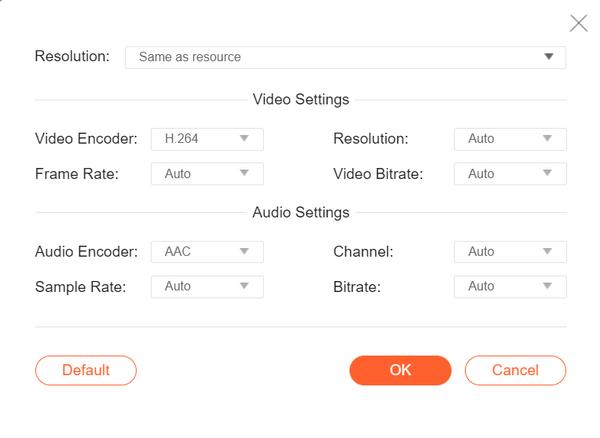
步骤 3. 在底部将 FLV 设置为输出格式。如果你想进一步调整参数,可以点击齿轮图标,对视频编码器、分辨率、帧率、比特率以及音频编码器、声道、采样率和比特率等进行设置。
步骤 4. 点击 Covert 按钮,开始将 MTS 文件转换为 FLV。
第 3 部分。 使用 VLC 从 MTS 文件中免费导出 Flash 视频
VLC 媒体播放器 不仅是一款简单的视频/音频播放器,还是一款功能丰富的视频转换工具。它可以作为一款优秀的 MTS 转 FLV 转换器,支持处理多种格式的转换。该软件完全免费且无任何限制。借助 VLC,你可以在 Windows 或 Mac 上免费将 MTS 文件导出为 Flash 视频。要将 MTS 文件转换为 FLV,你需要先在电脑上下载并安装 VLC。
步骤 1. 启动 VLC 媒体播放器,进入 Media 菜单并点击 Convert / Save 按钮。
步骤 2. 点击 Add 按钮添加 MTS 文件,然后点击 Convert / Save 按钮继续。
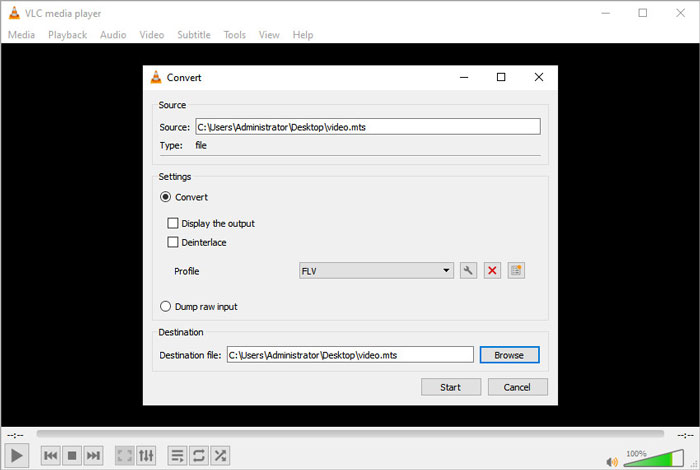
步骤 3. 在设置区域勾选 Convert ,然后点击下拉箭头选择 FLV 作为输出格式。如果列表中没有 FLV 输出选项,你可以点击“创建新配置”图标,新建一个 FLV 配置。
步骤 4. 接着进入 Destination (目标)区域,点击 Browse 按钮设置输出文件夹。
步骤 5. 确认所有设置无误后,点击 Start 按钮,在 VLC 中开始将 MTS 转换为 FLV。
第 4 部分。 将 MTS 转换为 FLV 的常见问题
什么是 MTS 视频格式?
MTS 文件是一种采用高级视频编码高分辨率(AVCHD)格式保存的视频文件。MTS 文件是许多 Sony 和 Panasonic 高清摄像机所使用的标准视频格式,也常用于在蓝光光盘中存储高清晰度视频。
如何将 MTS 文件转换为 MP4?
使用 FVC Free MTS Converter,你还可以将 MTS 文件转换为 MP4。点击 Add File(s) 按钮导入 MTS 文件,然后前往 Output format 选择 MP4 作为输出格式。之后点击 Convert 按钮,即可免费开始将 MTS 转换为 MP4。
Windows 10 可以播放 MTS 文件吗?
是的。您可以使用 Windows Media Player 播放您的 MTS 文件。如果 MTS 文件无法播放,您可以尝试其他 MTS 播放器,如 VLC 媒体播放器、5K 播放器、FVC 免费视频播放器等。
结论
在本文中,我们主要讨论了 3 种免费将 MTS 文件转换为 FLV 的方法。您可以尝试以上所有 MTS 到 FLV 转换器来导出 Flash 视频文件以供上传。这个免费的 MTS 转换器可以轻松地将您的 MTS 文件快速更改为 FLV、MP4、WMV、VOB、MP3 等。
-
 2021年适用于Windows,Mac,iOS和Android的十大FLV播放器
 FLV播放器可帮助您轻松地在Windows,Mac,Android,iOS设备上访问FLV文件。查看可以立即下载的最佳FLV文件播放器。
-
 将 VOB 转换为 FLV 的最佳方法
 想要将 VOB 文件转换为 FLV 文件?您可以使用桌面或在线转换器轻松完成任务。阅读本指南并了解如何轻松快速地将 VOB 转换为 FLV。
-
 MTS VS M2TS – MTS和M2TS之间的区别
 什么是MTS或M2TS文件? M2TS和MTS有什么区别?如何观看摄像机录制的MTS或M2TS文件?在这篇文章中找到所有答案。
