


 视频转换大师
 屏幕录影大师
 视频修复
视频修复
 安全下载
安全下载WTV到MP4转换器:如何将WTV转换成MP4
WTV是DVR-MS格式的继任者,由Microsoft开发,用于存储Windows Media Center记录的电视内容。 WTV已用MPEG-2和MPEG-4标准以及MPEG-1 Layer II或杜比数字AC-3编码,几乎不受FFMPEG,Windows Media Center,讯连科技PowerDVD 12,Nero 12,HandBrake,CCextractor等软件的支持。

如果你想更方便地观看或分享 WTV 文件,最好将其转换为 MP4,这种格式几乎适用于所有设备,也是目前最流行的格式。
我们在网上仔细查找了 WTV 转 MP4 的转换工具,并精选出 2 款顶级的免费 WTV 转 MP4 转换器,帮助你将 WTV 转换为 MP4。
第1部分。免费视频转换器–在线将WTV转换为MP4
将 WTV 转换为 MP4 非常简单。最简单的方法就是在线完成。Free Online Video Converter 是一款免费软件,可将 WTV 转换为 MP4 以及其他主流视频和音频格式。这个免费在线工具兼容 Windows 10/8/7 和 Mac OS X 10.7 或更高版本,你只需几个步骤就能轻松将 WTV 转码为 MP4。
要简化流程,您可以按照指南进行操作:
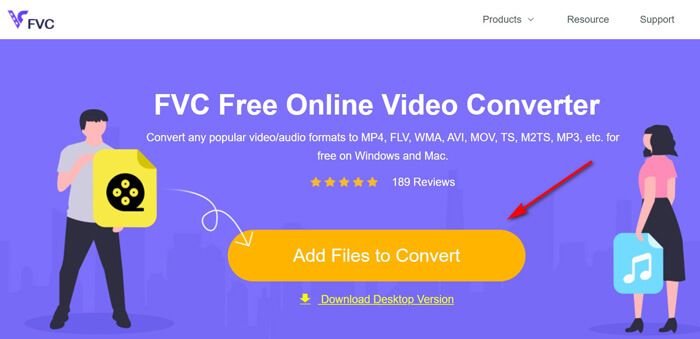
1. 点击 Add Files to Convert 按钮,从电脑上传 WTV 文件。
2. 在选项中勾选 MP4。
3. 点击 Convert,即可自动完成 WTV 文件的转换和下载。
现在,我们在这里向您详细介绍如何将WTV转换为MP4。
步骤 1. 添加 WTV 文件 通过浏览器打开这个免费的在线 WTV 转 MP4 转换器。点击 Add Files to Convert 按钮,会弹出窗口提示你下载并安装启动器。下载安装完成后,会自动弹出打开文件的窗口,然后你就可以在电脑中选择要上传的 WTV 录像。这款免费工具支持批量转换,你可以一次性在线添加多个 WTV 文件。
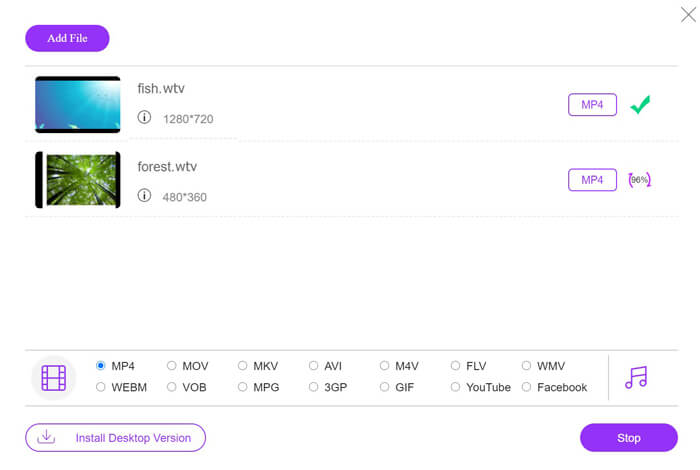
在底部勾选 MP4 选项,你还可以看到多种输出格式,例如 MKV、AVI、M4V、FLV、VOB、GIF、YouTube、Facebook、MP3、AAC、WMA、WAV、FLAC 等。
步骤 2. 选择 MP4
另外,你可以点击输出 MP4 面板旁边的 Settings 图标,来调整编码器、帧率、分辨率、比特率以及其他参数。
步骤 3. 将 WTV 转换为 MP4 全部设置完成后,点击 Convert 按钮,会弹出一个窗口要求你选择保存转换后 MP4 文件的目标位置。选好保存路径后返回这个免费在线转换器,再次点击 Convert 开始自动转换并下载 MP4 文件。你可以直接看到转换进度的百分比。

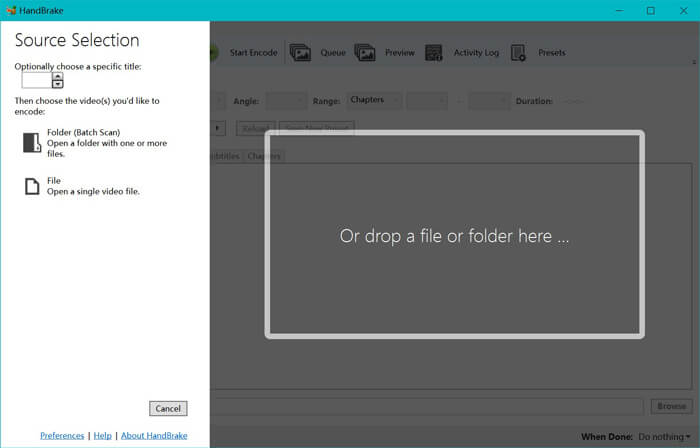
步骤 1. 将 WTV 文件导入 HandBrake 在电脑上安装好 HandBrake 之后,它会默认弹出打开源文件的对话框。在这里你可以点击 Folder 或 File,将 WTV 文件或包含 WTV 的文件夹导入主窗口。你也可以直接将 WTV 文件拖放到该软件中。
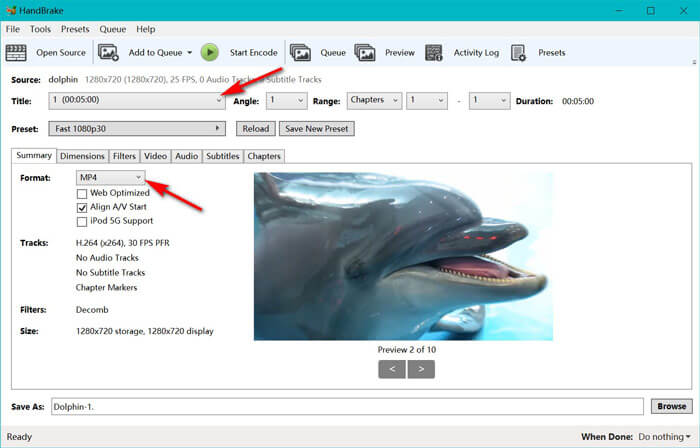
步骤 2. 选择 MP4 格式 加载 WTV 文件后,你可以在 Title 下拉选项中选择具体的 WTV 文件。然后在 Summary 选项卡中将输出格式设置为 MP4。此外,HandBrake 还允许你调整画面尺寸、滤镜、视频编码器/质量、音轨等。不仅可以输出 MP4,它还支持将 AVI、MOV、M2TS 等格式转换为 MKV。
第2部分。HandBrake –在PC / Mac上将WTV转换为MP4
将WTV转换为MP4的另一种免费方法是使用HandBrake。 HandBrake是少数可以读取WTV文件的软件。此外,它还可以在Windows和Mac计算机上将WTV转码为MP4 / MKV。
HandBrake是开源的桌面软件,因此您应该首先在计算机上下载此免费转换器。
同样,在HandBrake中将WTV转换为MP4的简单步骤如下:
1.将WTF文件或整个文件夹添加到HandBrake。
2.在HandBrake中自定义MP4配置文件。
2.预览WTV并将其转换为MP4。
这是在HandBrake中将WTV更改为MP4的综合指南。
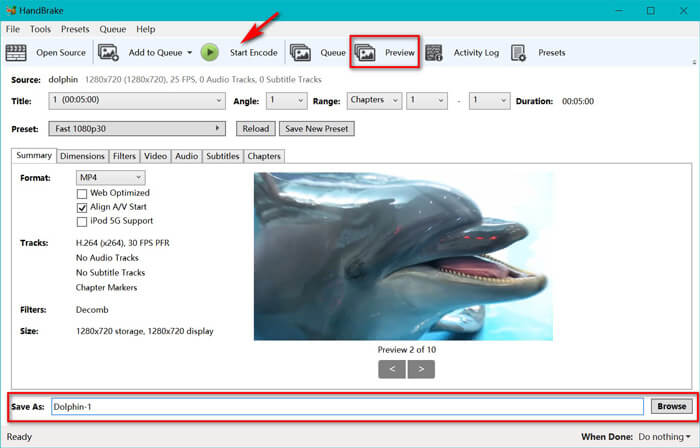
步骤 3. 预览并将 WTV 转换为 MP4 HandBrake 工具栏中的 Preview 功能,可以让你在正式编码前预览新的 MP4 视频效果。当你确认所有设置无误后,在底部点击 Browse 按钮,为转换后的 MP4 文件命名并选择保存位置。最后,点击工具栏上的 Start Encode 按钮,就可以开始将 WTV 转换为 MP4。
评分:4.9 / 5(基于 72 票).
Step 2. Select MP4 format
Once you have loaded the WTV files, you can select the exact WTF file from the Title drop-down option. Then select MP4 in the tab of Summary as the output for the selected WTV file. Besides, HandBrake allows you to adjust the dimensions, filters, video codec/quality, audio track, etc. Not only MP4, it can also convert other formats like AVI, MOV, M2TS, etc., to MKV.
Step 3. Preview and convert WTV to MP4
HandBrake’s Preview on the toolbar feature allows you to see what your new MP4 video will look before encoding it. After all your settings are just right, give the name of the converted MP4 files and select the location of your new videos by clicking the Browse button at the bottom. Finally, just click Start Encode button on the toolbar to convert WTV to MP4.
第3部分。WTV到MP4的常见问题解答
为什么HandBrake将MP4保存为M4V?
对于MP4文件,当您选择AC3音频和SRT字幕或具有用于自定义MP4文件的章节标记时,HandBrake将使用扩展名M4V自动使用MP4文件。但是您可以将.m4v扩展名直接更改为.mp4。
VLC播放器可以播放WTV文件吗?
VLC无法直接播放WTV文件。您应该安装K-Lite代码包以安装WTV代码包,然后在VLC上播放WTV文件。
我可以转换受保护的WTV文件吗?
是的你可以。但是,只有MCEBuddy支持受保护的商业WTF文件的编辑和转换。您必须使用此软件来复制和转换受保护的WTV文件。
结论
若要方便地使用Window Media Center录制的WTV文件,应首先将WTV转换为MP4。这篇文章分享了2种免费方法,可以通过免费的在线视频转换器和HandBrake在线将WTV转换为MP4。免费的在线视频转换器可让您将WTV转换为MP4和其他流行格式,而HandBrake则使您可以使用有限的输出格式选项进行更多的编辑控制。
您首选哪种方式?
或者,也许您有更好的WTV到MP4转换器?
无论哪种方式,我都希望收到您的来信。因此,请继续在下面发表评论。
-
 如何通过免费转换器将MXF转换为MP4
 这篇文章是将MXF转换为计算机上的MP4的详细指南。您可以获得4个免费MXF到MP4转换器,可通过简单的步骤将便携式MXF转换为MP4。
-
 三种免费的MP4转换为MOV的方法
 如何在Mac上将MP4转换为MOV?有没有免费的方法可以将MP4转换为MOV而不会造成质量损失?这篇文章分享了3种简单的方法来帮助您在Mac,Windows PC和在线上将视频从MP4转换为MOV。
-
 如何在Windows / Mac /在线上将M2TS转换为WMV(完全免费使用)
 这是将M2TS转换为WMV视频的3种简单方法。您可以在Windows,Mac和在线上免费免费将视频格式从M2TS更改为WMV。支持批量转换。
