


 视频转换大师
 屏幕录影大师
 视频修复
视频修复
 安全下载
安全下载使用这 5 个 MKV 转换器轻松将您的 DVD 转换为 MKV
随着流媒体平台和数字化视频内容的出现,观看电影和视频从未如此便捷。过去,人们需要购买实体光盘才能观看或播放自己喜欢的电影。但现在,由于有了更便捷的观影方式,这些光盘被存放或堆放在其他地方。
如果你想将实体光盘数字化,以便能在任何设备上观看,请继续阅读本文。我们为你准备了五款最佳的MKV 格式转换器工具,你可以学习并使用它们轻松将 DVD 转换为 MKV。MKV 是一种非常流行且广泛支持的格式。通过将 DVD 转换成这种格式,你就可以实现光盘的数字化,紧跟当前趋势。你准备好迎接这一变化了吗?如果是,那就开始吧!

| MKV转换器 | 支持的平台 | 支持的格式 | 速度和性能特点 | 转换速度 | 价钱 |
| AnyMP4 DVD 翻录器 | • Windows • macOS | 支持超过500种输出格式。 | • 采用 GPU 加速技术,速度提升 50 倍; • 撕裂性能出色,且不损失质量。 | 非常快 | 自由 月度许可证:$14.50 终身许可证: $49.96 商业执照: $119.00 |
| MakeMKV | • Windows • macOS •Linux | • 仅限 MKV | 没有 | 快速 | 自由 $50.00 |
| 手刹 | • Windows • macOS | • MP4 • M4V • MKV • MOV • MPG 或 MPEG • AVI • WMV | GPU 加速解码,提高播放速度。 | 缓和 | 自由 |
| VLC媒体播放器 | • Windows • macOS •Linux | • MP4 • MOV • AVI • FLV • WMV • MKV • WAV • MP3 • AAC • AC3 | 用于在 Windows、macOS、Linux、Android 和 iOS 操作系统上进行硬件解码的 GPU 硬件加速。 | 缓和 | 自由 |
| DumboFab 视频转换器终极版 | • Windows • macOS | • MP4 • MKV • AVI • MOV • WMV • FLV • WebM • TS • 每加仑英里数 | 由英特尔、NVIDIA 和 AMD 提供支持。 | 快速 | 1年许可证: $39.95 终身许可证: $59.95 家庭许可证: $105.95 |
第 1 部分:为何使用 MKV 转换器将 DVD 转换为 MKV
由于 DVD 内容保存在物理光盘上,因此您只能在 DVD 播放器或配备 DVD 驱动器的设备上播放。这种限制会带来不便,尤其是在许多现代设备不再配备 DVD 驱动器的情况下。因此,您需要将 DVD 转换为 MKV 的原因如下:
• 将 DVD 转换为 MKV 格式可提供数字化灵活性。这意味着您可以在各种设备上观看视频,包括笔记本电脑、智能电视、平板电脑和智能手机。由于文件是数字化的,您不再需要 DVD 播放器或驱动器来播放。
• 实体 DVD 容易出现划痕、破损和磨损,随着时间的推移,这些都会导致其无法播放。将 DVD 转换为 MKV 格式是最安全的方法,可以让您轻松保存备份,并在多年内轻松访问。
• 最后,将 DVD 转换为 MKV 意味着将媒体内容从物理光盘提取为数字格式。这样,用户可以将大量收藏存储在硬盘或云存储中,无需架子或物理存储空间即可轻松访问他们的图书馆。
第 2 部分。5 个工具可轻松将 DVD 转换为 MKV
市面上有很多可靠的工具可以将 DVD 转换为 MKV 格式。这些工具简化了流程,并提供用户友好的选项,方便您备份和保存数字媒体收藏。以下是五款顶级的 MKV 格式转换器:
AnyMP4 DVD 翻录器
首先要介绍的是 AnyMP4 DVD Ripper。这款工具支持 500 多种输出格式,例如 MKV 和 DVD。除此之外,转换任何类型的媒体文件,例如自制 DVD、商业 DVD、损坏的 DVD、包含 99 个标题的 DVD 等等,对它来说都轻而易举。更重要的是,这款工具能够确保 DVD 的画质得到 1:1 无损复制,不会造成任何质量损失。最后,其 Blu-Hyper 技术和硬件加速功能确保即使是高清视频也能快速转换,带来流畅高效的体验。
主要功能:
• 将 DVD 转换为数字视频,以便在 PC 和 iOS/Android 设备上播放。
• 支持 500 多种格式,例如 MP4、MKV、MOV、FLV、AVI 等。
• 可自定义输出设置,例如添加字幕、音轨、裁剪、旋转等。
• 用户界面非常简单明了,只需 4 个步骤即可完成撕取。
以下是使用 AnyMP4 DVD Ripper 将 DVD 转换为 MKV 的方法:
步骤 1. 首先,你需要在设备上安装 AnyMP4 DVD Ripper,将 DVD 放入电脑的 DVD 光驱中,等待几分钟让其被检测到。
步骤 2. 接着,软件会自动检测你的 DVD;如果没有检测到,你可以点击"加载 DVD(Load DVD)"来手动导入。
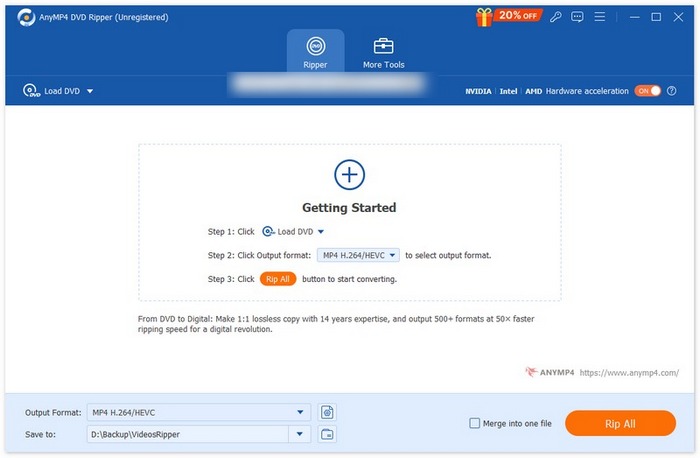
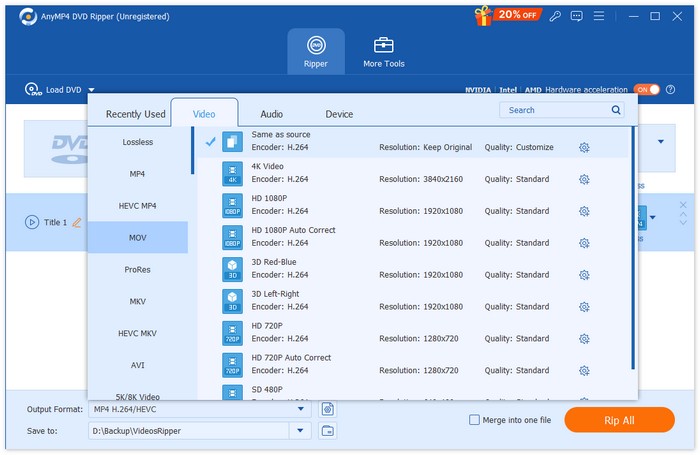
步骤 3. 点击"输出格式(Output Format)"旁边的下拉按钮,并选择你偏好的格式。
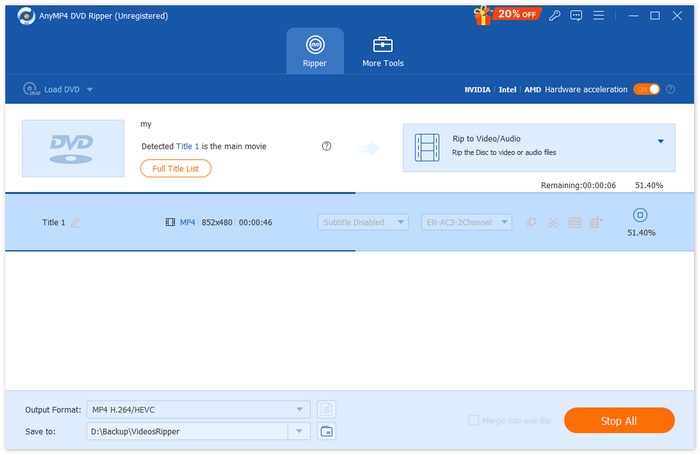
步骤 4. 点击"全部复制(Rip All)"开始抓取。
结论:
AnyMP4 DVD Ripper 堪称目前最好的 MKV 格式转换器之一。将 DVD 转换为 MKV 非常简单,而且由于采用了基于 GPU 和 CPU 的处理技术,转换速度也非常快。最后,用户还可以确保视频质量不受影响。
MakeMKV
MakeMKV,顾名思义,是一款将蓝光或DVD转换为MKV格式的转换器。这款MKV转换器之所以特别受欢迎,是因为它在转换为MKV格式后,几乎可以保留原始DVD的所有原始质量,包括音轨、字幕和元数据。
主要功能:
• 读取 DVD 和蓝光光盘。
• 维护所有视频和音轨、章节信息以及所有元信息。
• 转换或解密不需要额外的软件。
以下是使用 MakeMKV 将 DVD 转换为 MKV 的方法:
步骤 1. 首先,你需要访问 MakeMKV 的官方网站,并根据你的操作系统点击相应的下载链接。
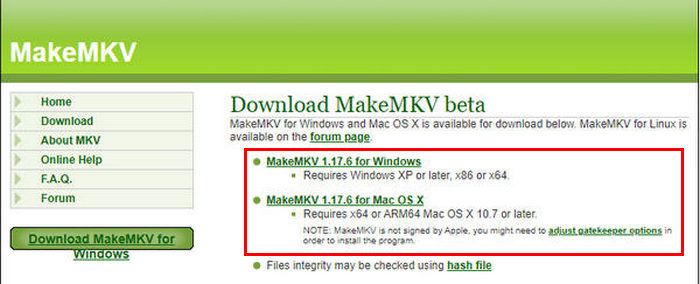
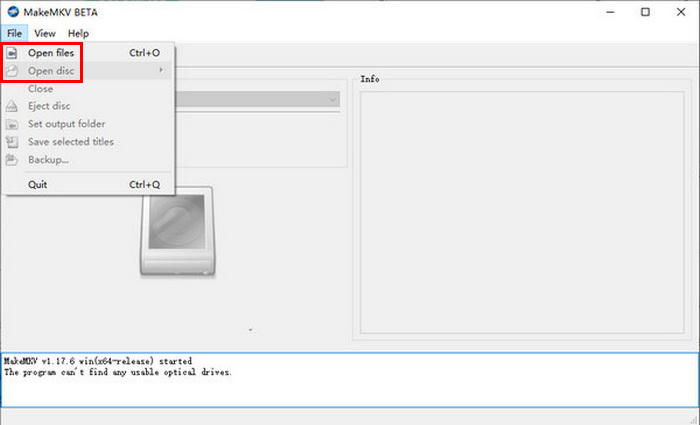
步骤 2. 之后,启动该工具,点击Open Files 或 Open Disc 来导入你的视频。
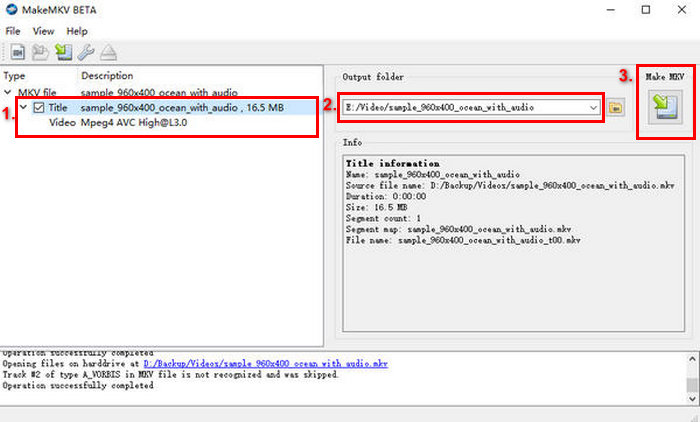
步骤 3. 现在,选择你想保存为 MKV 文件的标题以及你想保留的音轨。然后,选择你希望保存文件的文件夹,并点击MakeMKV 图标开始转码。
结论:
使用 MakeMKV 的过程很简单,但界面可能会让其他人,尤其是初学者感到不知所措。此外,由于它本身只是一个 MKV 格式转换器,因此在某些用户可能更喜欢将 DVD 转换为其他格式时,它失去了灵活性。
手刹
HandBrake 是一款流行的开源视频转换工具,支持范围广泛的主流视频格式。凭借对多种音视频格式的强大支持,HandBrake 可以让你高效、轻松地将 DVD 转换为 MKV。
主要功能:
• 将 DVD 转换为 MKV 等数字视频文件。
• 支持视频和音频格式,例如视频的 MP4、MKV、FLV、MOV、AVI 和 WebM,以及音频的 AAC、MP3、FLAC、M4A、ALAC、WAV 和 AC3。
• 允许自定义视频质量、分辨率和文件大小。
以下是使用 HandBrake 将 DVD 转换为 MKV 的方法:
步骤 1. 首先,你需要在电脑上下载并安装 HandBrake。
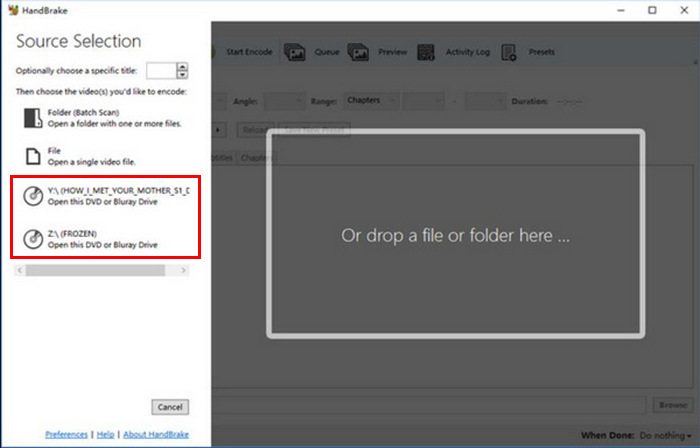
步骤 2. 接着,启动该工具,将 DVD 放入电脑的 DVD-ROM,然后在Source Selection 下选择你的 DVD。工具会开始扫描 DVD 的影片标题。
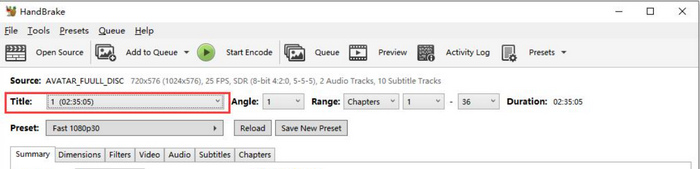
步骤 3. 打开 DVD 后,在“Title”下拉菜单中选择你想要抓取的标题。
步骤 4. 接下来,你需要决定输出文件的质量。只需点击Preset 按钮并自定义你的设置。在下方你会看到 Format(格式),点击它并选择 MKV 作为输出格式。
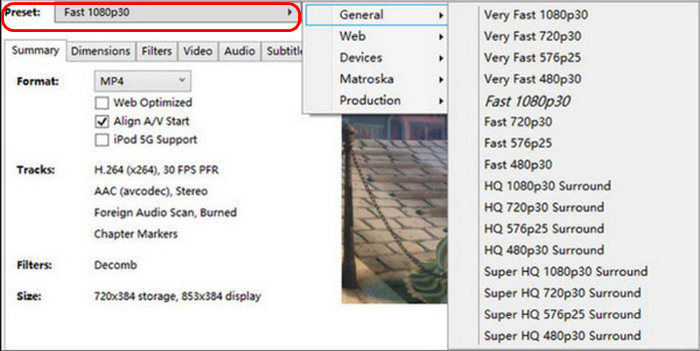
步骤 5. 然后,点击窗口顶部的Start Encode 按钮,将 DVD 转换为 MKV。
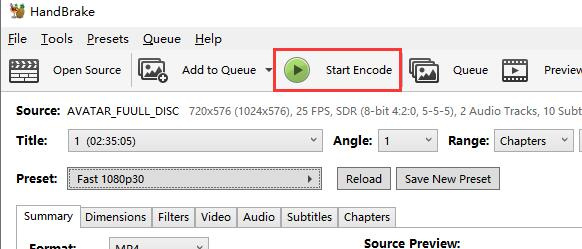
结论:
由于 HandBrake 是免费且开源的,它确实是一款很棒的转换工具,尤其适合将 DVD 转换为 MKV。但是,使用此工具时,您需要安装插件输入才能将受版权保护的 DVD 转换为 MKV。
VLC媒体播放器
VLC 是一款广泛使用的媒体播放器软件应用,它不仅以媒体播放器而闻名,还因其实用功能而闻名。用户还可以使用这款媒体播放器将 DVD 转换为 MKV。VLC 可以读取 DVD 和蓝光光盘,在播放的同时,用户还可以从光盘中提取内容,然后将其转换为 MKV 等数字化视频文件格式。
主要功能:
• 读取并转换 DVD 和蓝光光盘的内容。
• 允许在转换过程中选择特定的音轨、字幕和章节。
• 支持各种编解码器,可顺利转换为 MKV 格式。
以下是使用 VLC 将 DVD 转换为 MKV 的方法:
步骤 1. 首先,你需要在设备上下载并安装 VLC。然后加载 DVD。
步骤 2. 接着,进入媒体(Media)选项卡,并在列表中选择转换/保存(Convert/ Save)选项。
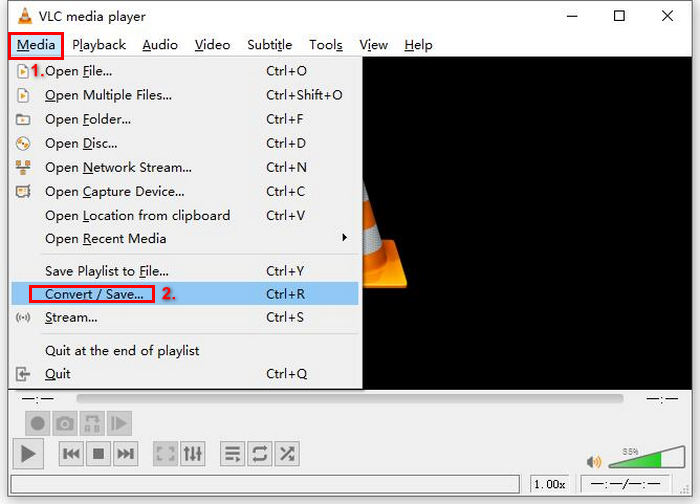
步骤 3. 然后,点击顶部的Disc 选项卡,启用DVD 选项,并在Disc device 中选择你想要抓取的 DVD。
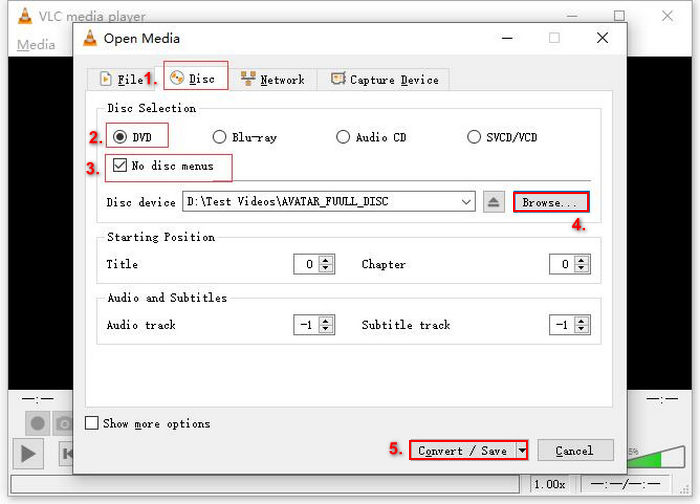
步骤 4. 现在,点击转换/保存(Convert/ Save)按钮,在下方通过配置文件(profile)下拉菜单设置输出格式。
步骤 5. 默认情况下,VLC 会选择将 DVD 抓取为 Video - H.264 + MP3 (MP4)。如果选项中没有 MKV,点击其旁边的齿轮按钮,选择 MKV 并保存。
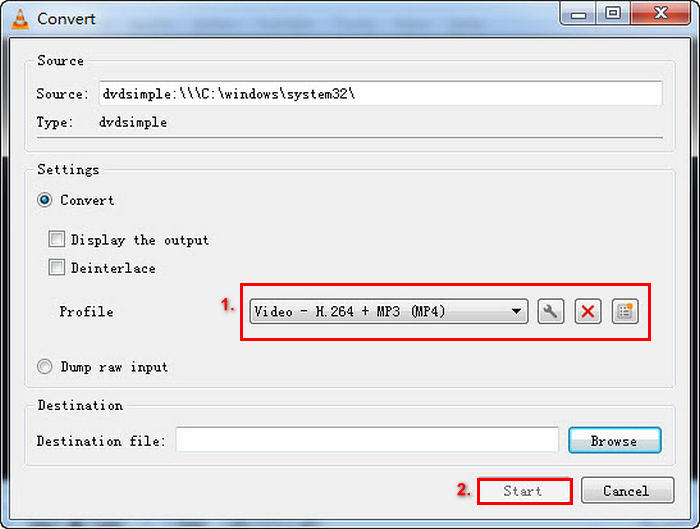
步骤 6. 然后,在下方的目标(Destination)部分,点击浏览(Browse),选择一个文件夹,并为输出文件命名。
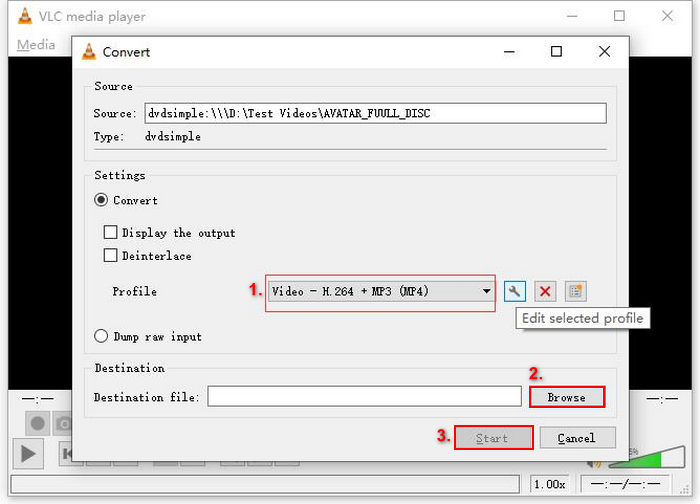
步骤 7. 全部设置完毕后,点击开始(Start)按钮,即可使用 VLC 抓取 DVD。
结论:
虽然 VLC 可以读取 DVD 内容并将其转换为 MKV,但转换过程耗时较长,而且由于其界面复杂,可能不适合初学者。此外,默认选项中不提供 MKV 格式,用户必须通过调整设置来手动选择。这会让不熟悉该软件的用户更加困惑。
DumboFab 视频转换器终极版
DumboFab Video Converter Ultimate 是一款一体化媒体工具箱,用户可转换各种视频,包括将 DVD 转换为 MKV。这款工具与其他 MKV 格式转换器的不同之处在于,它能够处理各种类型的 DVD,例如新发行的 DVD、有划痕的 DVD 和区域 DVD,同时保持原始内容的最高质量。
主要功能:
• 无损 DVD 到 MKV 转换,包括高清音频和字幕。
• 支持各种 DVD 类型,包括新发行、99 首曲目的光盘、有划痕的 DVD 和区域格式。
• 提供调整分辨率、比特率和编解码器的选项,以定制视频质量和文件大小。
以下是使用 DumboFab Video Converter Ultimate 将 DVD 转换为 MKV 的方法:
步骤 1. 首先,在电脑上下载并安装该软件。
步骤 2. 接着,将 DVD 放入电脑的 DVD 光驱,然后运行该工具。之后,点击Load Disc 按钮导入 DVD 内容。
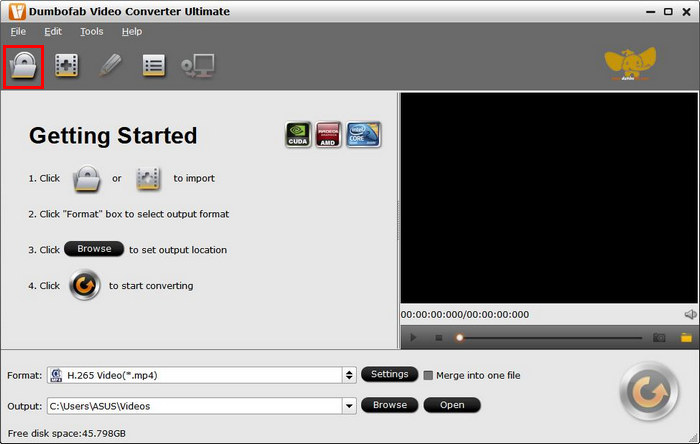
一旦 DVD 内容导入该工具,它将自动绕过复制保护。
步骤 3. 现在,点击Multi-track Video,并在选项列表中选择MKV。
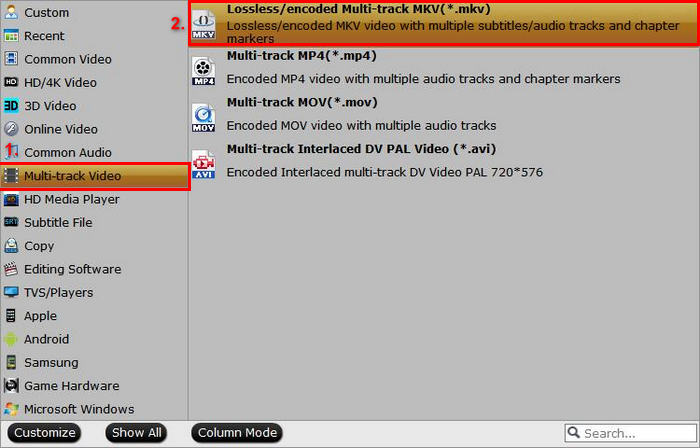
步骤 4. 最后,点击Browse 按钮选择你想保存输出视频的文件夹。完成后点击 Convert,开始进行 DVD 到 MKV 的转换。

结论:
DumboFab Video Converter Ultimate 是一款非常有前景的 DVD 转 MKV 转换器,因为它可以处理各种 DVD 类型,并且可以轻松转换为 MKV。此外,由于采用了先进的处理技术,转换过程非常快。它也是一款一流的转换工具,但由于其界面复杂,学习起来可能会比较费劲。
第 3 部分:关于将 DVD 转换为 MKV 的常见问题解答
我可以将受复制保护的 DVD 转换为 MKV 吗?
是的。一些转换器,例如 MakeMKV 和 DumboFab Video Converter Ultimate,可以处理复制保护。但是,像 HandBrake 这样的工具可能需要额外的插件才能绕过此保护。
使用 MKV 格式有什么优势?
MKV 是一种多功能格式,支持多条音频和字幕轨道,非常适合用于包含不同语言选项的电影。它还能实现高质量的视频,且无需进行大量压缩。
将 DVD 转换为 MKV 时质量会损失吗?
大多数可靠的 MKV 格式转换器,例如 MakeMKV 和 AnyMP4 DVD Ripper,都能保持 DVD 的原始画质。但是,如果您使用对视频进行大量压缩的转换器,则可能会出现画质损失。
结论
将DVD 转换为 MKV格式,是保存 DVD 媒体内容的绝佳方式。借助 AnyMP4 DVD Ripper、MakeMKV、HandBrake、VLC Media Player 和 DumboFab Video Converter Ultimate 等工具,你可以轻松实现光盘数字化。只需选择一款符合你需求的 MKV 转换器,即可开始将 DVD 转换成高质量的 MKV 文件!
-
 将 DVD 翻录为 AVI:3 款最佳 DVD 翻录软件 [评测]
 想要将 DVD 翻录成 AVI 以便于播放和存储吗?请阅读我们对最佳 DVD 转 AVI 转换器的详细评论,找到最适合您的工具。
-
 如何使用 HandBrake 翻录 DVD:初学者指南 [2025]
 如果您想知道如何使用 HandBrake 翻录 DVD,您来对地方了。本文将教您一些方法,并为您提供精心设计的替代方案。
-
 如何通过 Chromecast 将 DVD 电影从 PC/Mac 流式传输到电视
 不知道如何通过 Chromecast 在电视上观看 DVD 电影?本文介绍了通过 Chromecast 将 DVD 电影从 PC 投射到电视的最简单方法。
