


 Video Converter Ultimate
 Screen Recorder
 Oprava videa
 Bezpečné stažení
Nejlepší 4 bezplatné způsoby převodu MTS na MOV
Pomocí videokamery Sony, která exportovala soubory MTS, jsem zachytil několik videí. Všiml jsem si, že MTS nemůže být podporován mým přehrávačem médií a iMovie. Používám Mac a chci upravit tato zachycená videa MTS. Nějaká pomoc? Existuje nějaký jednoduchý způsob, zejména bezplatný způsob převodu MTS na MOV?
MTS is a high-definition video format which widely used by Sony and Panasonic camcorders, as the file extension of AVCHD (Advanced Video Coding High Definition). After recording video with your digital camera, you are more likely get a MTS file. It carries 720p/1080i HD and can provide a higher video quality. However, MTS is not a popular format which can be supported by most media players or editors.

When you have the need to edit MTS in iMovie or play it with media player, you should convert MTS to MOV or MP4 for the better compatibility. Here in this post, we will show you 4 free MTS converters to help you convert MTS to MOV with ease.
Část 1. Nejlepší bezplatný způsob převodu MTS na MOV bez ztráty kvality
There are a large number of MTS converting tools offered on the internet that can help you convert MTS to MOV with high quality. Here at the first part, we like to recommend the best free MTS to MOV converting software, Free MTS Converter for you.
Je speciálně navržen pro všechny druhy konverzí. Je kompatibilní s téměř všemi formáty videa a zvuku, jako jsou MP4, MOV, MKV, MTS, AVI, FLV, WMV, MP3, AAC, FLAC a další. Můžete si jej zdarma stáhnout a podle následujícího průvodce převést MTS na MOV zdarma.
Free DownloadPro Windows 7 nebo novějšíBezpečné stažení
Free DownloadPro MacOS 10.7 nebo novějšíBezpečné stažení
Krok 1. Nejprve je třeba nainstalovat a spustit tento bezplatný převodník MTS na MOV na vašem počítači. Nabízí verze pro Windows i Mac, které si můžete stáhnout.
Step 2. Click Add File(s) to import the MTS file(s) you want to convert. You are allowed to convert one or more MTS files at a time.
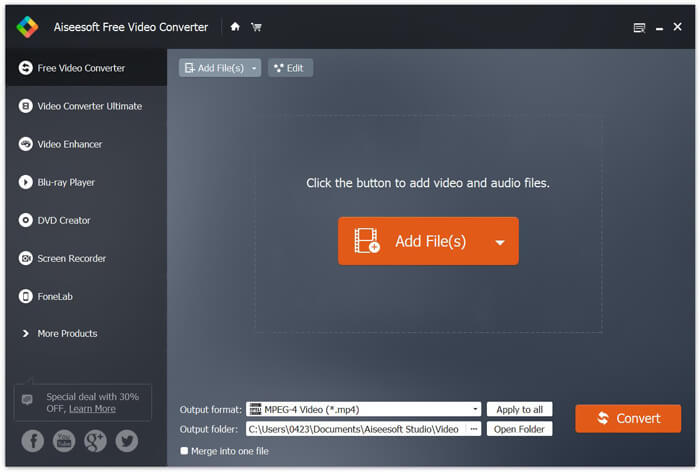
Step 3. Select MOV as your target format from the list of Output format. Then click on Convert button to start the conversion from MTS to MOV.
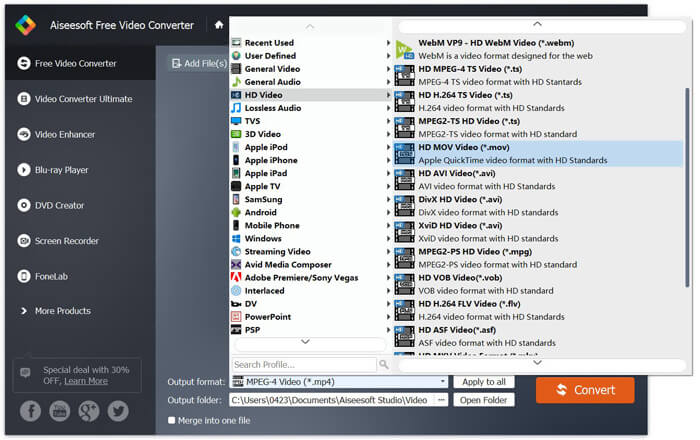
Jak je vidět výše, tento bezplatný převodník MTS na MOV také obsahuje některé základní editační funkce. Před konečným převodem je můžete použít k přizpůsobení souboru MTS. Ve srovnání s online převaděči vám tento bezplatný převaděč videa může poskytnout rychlejší rychlost převodu a vyšší kvalitu videa. Proto z něj děláme první doporučení.
Část 2. Bezplatný online převodník vám pomůže snadno převádět videa
When you Google how to convert MTS to MOV, you can get many free online converter results. Here we introduce you with an easy-to-use free online MTS to MOV converter, FVC Free Online Video Converter. Without installing any softwares, you can convert any popular video formats to MP4, AVI, MOV, etc. for free. And you don’t need to worry anything because the conversion is safe and stable. No data will lose during the conversion process.
Step 1. Open the link above and click the Add Files to Convert button. Before converting, please download FVC launcher and install it. It only takes a few seconds.

Step 2. After installing and updating the launcher, just pick the video you want to convert. Then choose the format you need and press Convert.

Step 3. Open the link above and click the Add Files to Convert button. Before converting, please download FVC launcher and install it. It only takes a few seconds.
Část 3. Jak převést MTS na MOV zdarma online pomocí ZAMZARU
ZAMZAR je jeden z nejpopulárnějších online software pro převod videa, který vám pomůže bezplatně převést MTS na MOV. Je navržen se stručným rozhraním a jednoduchou funkcí převodu. K provedení převodu videa MTS můžete použít následující příručku.
Krok 1. Otevřete prohlížeč a přejděte na oficiální stránku ZAMZAR. Zde můžete přímo přejít na stránku https://www.zamzar.com/convert/mts-to-mov/. Zde můžete přímo převádět MTS na MOV bez dalších nastavení.
Krok 2. Klepnutím na tlačítko Přidat soubory načtěte soubor MTS, který chcete převést. Pro nahrávání souboru MTS můžete přetahovat. Jedna věc, kterou byste měli vědět, je, že tento bezplatný online převodník MTS umožňuje převést pouze soubor MTS menší než 150 MB.
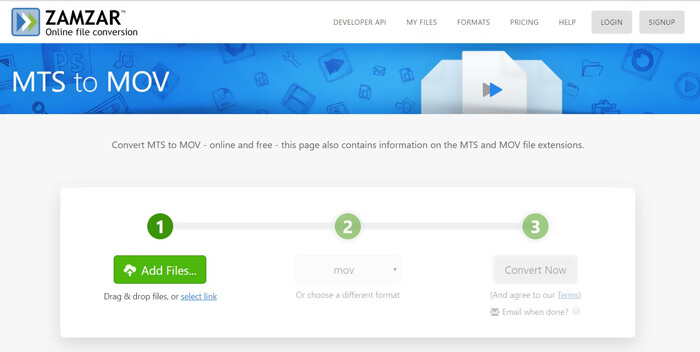
Step 3. After uploading, you can click the Convert Now button to start converting MTS to MOV free online.
Část 4. Online způsob převodu MTS na MOV pomocí FreeConvert
FreeConvert is another popular online video converter which has the capability to make the MTS to MOV video conversion free. This free MTS to MOV converter highly supports MTS and M2TS. It enables you to upload a MTS file up to 1GB. What’s more, it allows you to upload 20 MTS files at a time for converting. Now you can follow the steps below to convert your MTS to MOV.
Step 1. First, you need to go to FreeConvert.com on your browser. Here you can directly go to https://www.freeconvert.com/mts-to-mov for the conversion.
Step 2. Click the big blue Choose MTS Files to upload the MTS file you want to convert to MOV. At it mentioned above, here you are allowed to upload one or more MTS files for the conversion.
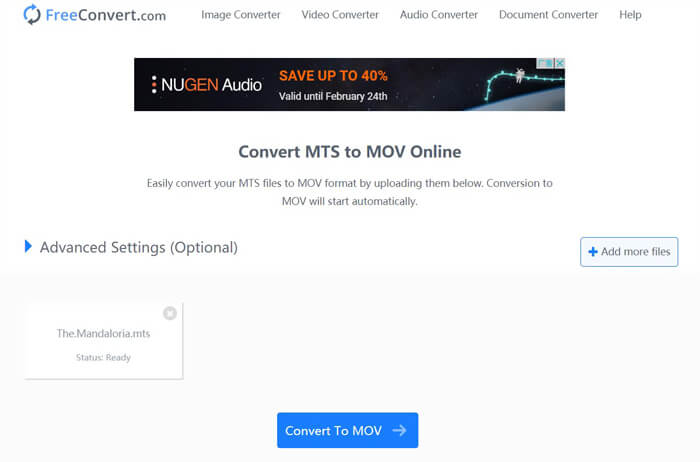
Step 3. Click Convert To MOV button to start the uploading and converting process. After that, you need to click the Download button to save the converted file on your computer.
When you choose free online converters to convert MTS to MOV, you need to take a relatively long time for the uploading and converting. So you’d better convert a small-size MTS file with online converting software. If you want to convert a large MTS or M2TS video, you should rely on the highly-recommended Free Video Converter.
-
 6 snadných způsobů, jak převést TS na AVI / MKV / MOV / WMV ve Windows / Mac
 Chcete rychle převést soubory TS na AVI / MKV / MOV / WMV? Tento článek ukazuje online a offline převaděče videa s kompletním průvodcem. Možná zde získáte nejlepší bezplatný převodník TS.
-
 MOV VS MP4 - který z nich je lepší
 MOV VS MP4, který z nich je lepší? Tento příspěvek popisuje rozdíl mezi MP4 a MOV, takže můžete získat lepší volbu pro použití s vašimi video soubory.
-
 Jak se zdarma připojit k souborům MOV (QuickTime)
 Pro začátečníky může být obtížné spojit několik videoklipů MOV dohromady. Existuje tedy jednoduchý a rychlý způsob, jak kombinovat soubory MOV? Pokud existuje, jak jej použít? Tento příspěvek vám pomůže tyto odpovědi získat.
