


 Video Converter Ultimate
 Bildschirm recorder
 Videoreparatur
 Sicherer Download
7 einfache Möglichkeiten zum schnellen Konvertieren von HEIC in PNG in Sekunden
Möchten Sie Ihre HEIC-Datei mit möglichst vielen Geräten kompatibel machen? Wir haben genau das, was Sie suchen! In diesem Artikel zeigen wir Ihnen die besten Methoden, um Ihre HEIC-Datei ohne Mühe in PNG zu konvertieren. Also schnallen Sie sich an – wir stellen Ihnen die besten Wege vor, um HEIC in PNG ganz unkompliziert umzuwandeln.

Teil 1. Warum HEIC in das PNG-Format konvertieren?
Das HEIC-Dateiformat ist ein von Apple erstelltes Bildformat. Es ist ein Bildformat, das Apple-Geräte häufig verwenden. Obwohl es eine hochwertige Auflösung hat, nimmt es nicht zu viel Platz auf Ihrem Gerät ein. HEIC-Dateien sind jedoch nicht mit Nicht-Apple-Geräten kompatibel. Im Gegensatz dazu ist PNG, das für Portable Graphics Format steht, ein Bilddateiformat, das erstellt wurde, um GIF-Formate zu ersetzen.
Es ist das am häufigsten verwendete Bildformat, das unkomprimiert ist, was bedeutet, dass es eine riesige Dateigröße hat. Trotzdem unterstützen fast alle Geräte dieses Bilddateiformat. Wenn Sie also Ihr HEIC-Bild auf anderen Geräten als Apple öffnen möchten, konvertieren Sie es besser in ein PNG-Dateiformat.
Teil 2. 5 einfache Möglichkeiten, Ihre HEIC-Datei online in eine PNG-Datei zu konvertieren
Die Suche nach den besten Möglichkeiten zum Konvertieren von HEIC in PNG ist ziemlich schwierig. Wir haben jedoch nach den besten und einfachsten Methoden gesucht, um HEIC in ein PNG-Dateiformat zu ändern.
Verwenden Sie den FVC-freien HEIC-zu-PNG-Konverter
Die beste Methode, HEIC in PNG zu konvertieren, ist die Verwendung eines Konverter-Tools. Und das beste Tool, das wir im Internet gefunden haben, ist der FVC Free HEIC to PNG Converter. Dieser Konverter ist ein Online-Tool, mit dem Sie Ihre HEIC-Datei bequem in das PNG-Format umwandeln können. Außerdem können Sie mit diesem Tool Ihre HEIC-Dateien auch stapelweise in PNG konvertieren – diese Funktion ist ebenfalls integriert.
Es ist auch in fast allen gängigen Browsern zugänglich, was es zu einem Tool ohne Browserbegrenzung macht. Darüber hinaus verfügt es über eine unkomplizierte Softwareschnittstelle und hat keine Dateigrößenbeschränkung, sodass Sie HEIC-Dateien konvertieren können, ohne sich Gedanken über die Dateigröße machen zu müssen. Folgen Sie daher der einfachen Anleitung unten, wenn Sie daran interessiert sind, diesen Online-Konverter von HEIC zu PNG zu verwenden.
Schritt 1. Suchen Sie in Ihrem Browser nach FVC Free HEIC to PNG Converter. Sie können auch auf diesen Link klicken, um direkt auf die Webseite zu gelangen. So sieht die erste Oberfläche aus:

Schritt 2. Klicken Sie anschließend auf die Schaltfläche Add HEIC/HEIF File(s). Es werden Ihre Computerordner geöffnet, in denen Sie Ihre HEIC-Datei auswählen.
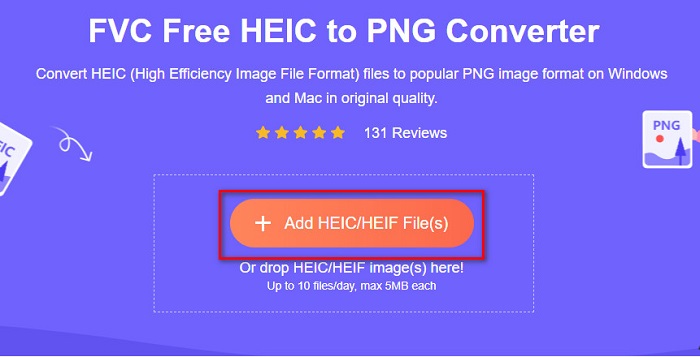
Schritt 3. Dann werden Ihre Computerordner eingeblendet, in denen Sie Ihre HEIC-Datei auswählen. Klicken Sie auf Open. Danach beginnt die Konvertierung von HEIC zu PNG.

Schritt 4. Klicken Sie abschließend in der Oberfläche der Software auf die Schaltfläche Download, um Ihre PNG-Datei herunterzuladen.

Einfach, nicht wahr? Sie können Ihre HEIC-Datei in eine PNG-Datei konvertieren, indem Sie diesen einfachen Schritten folgen.
Verwenden Sie Xconvert.com
Xconvert ist ein kostenloser Online-HEIC-zu-PNG-Konverter, der HEIC-Dateien mühelos in PNG-Dateien umwandelt. Dieser Online-Konverter verfügt über eine benutzerfreundliche Oberfläche, die besonders für Einsteiger geeignet ist. Zudem können Sie bei der Verwendung dieses Online-Konverters die Bildauflösung Ihres Bildes anpassen. Da es sich jedoch um ein internetabhängiges Tool handelt, kann der Konvertierungsvorgang bei langsamer Internetverbindung verzögert sein. Außerdem enthält es Werbung, die störend sein kann.
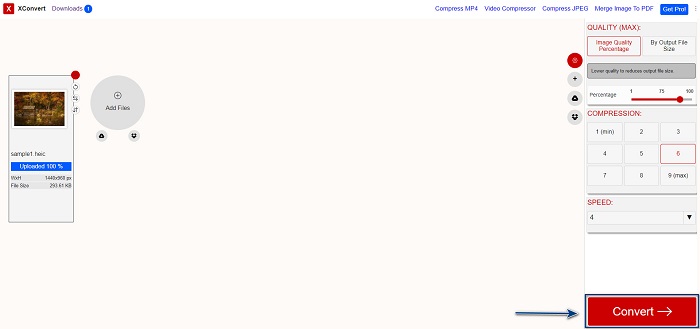
Schritt 1. Suchen Sie in Ihrem Browser nach Xconvert.com. Klicken Sie auf der Webseite auf die Schaltfläche „Add Files“, anschließend werden Ihre Computerdateien angezeigt und Sie wählen Ihre HEIC-Datei aus.

Schritt 2. Ihr Bild wird nun in die Oberfläche der Software hochgeladen. Nach dem Hochladen klicken Sie auf die Schaltfläche Convert, die sich unten rechts in der Oberfläche befindet. Warten Sie dann, bis Ihre Datei zum Download bereit ist, und fahren Sie mit dem nächsten Schritt fort.
Schritt 3. Sobald Ihre Datei fertig ist, klicken Sie auf die Schaltfläche Download, um Ihre PNG-Datei herunterzuladen. Über der Download-Schaltfläche sehen Sie zudem die Ausgabedateigröße und die benötigte Konvertierungszeit.

Verwenden Sie Zamzar
Eine weitere Möglichkeit, HEIC online in PNG zu konvertieren, ist der Online-Konverter Zamzar. Wahrscheinlich sind Sie bereits auf diesen Konverter gestoßen, als Sie nach einem HEIC-zu-PNG-Konverter gesucht haben. Dieser Konverter ist in nahezu allen gängigen Browsern verfügbar. Zudem verfügt er über eine einfache Benutzeroberfläche, was ihn zu einem benutzerfreundlichen Tool macht. Wird Ihre Internetverbindung während des Konvertierungsvorgangs allerdings unterbrochen, kann Ihre Datei beschädigt werden. Dennoch nutzen viele Anwender diesen Konverter, um HEIC in PNG-Dateien umzuwandeln.
Schritt 1. Suchen Sie in Ihrem Browser nach Zamzar. Klicken Sie auf der Webseite auf die Schaltfläche Add Files. Es werden Ihre Computerdateien eingeblendet, dann laden Sie Ihr HEIC-Bild hoch.

Schritt 2. Nachdem Sie Ihre HEIC-Datei hochgeladen haben, klicken Sie auf die Drop-down-Schaltfläche und wählen PNG als Ausgabeformat.

Schritt 3. Klicken Sie abschließend auf die Schaltfläche Convert Now, um Ihre HEIC-Datei in das PNG-Format zu konvertieren. Laden Sie anschließend Ihre PNG-Datei herunter. Warten Sie einfach ein paar Sekunden – und das war’s!

Verwenden Sie Conversion-Tools.io
Conversion Tool ist ein Online-HEIC-zu-PNG-Konverter mit einer einfachen Benutzeroberfläche. Er kann Ihre HEIC-Dateien mit hoher Geschwindigkeit in PNG umwandeln. Außerdem enthält er im Vergleich zu anderen Online-Konvertern deutlich weniger Werbung. Der Nachteil ist jedoch, dass Sie nur zehn Dateien pro Tag konvertieren können und eine Größenbeschränkung für Dateien besteht. Wenn Sie jedoch nur eine kleine Datei konvertieren möchten, könnte dieses Tool gut für Sie geeignet sein.
Schritt 1. Suchen Sie in Ihrem Browser nach Conversion Tools.io. Klicken Sie dann auf der Hauptoberfläche der Software auf die Schaltfläche Browse oder ziehen und legen Sie Ihre HEIC-Datei auf der Schaltfläche Browse ab.

Schritt 2. Klicken Sie anschließend auf die Schaltfläche Run Conversion, um mit der Umwandlung Ihrer HEIC-Datei in eine PNG-Datei zu beginnen. Warten Sie dann, bis Ihre Bilddatei geladen ist, und fahren Sie mit dem nächsten Schritt fort.

Schritt 3. Zum Schluss klicken Sie auf die Schaltfläche Download, um Ihre PNG-Datei herunterzuladen.

Verwenden Sie CDKM
Ein letztes Tool, das wir Ihnen vorstellen möchten, ist CDKM. Mit diesem Tool können Sie HEIC-Dateien mit nur wenigen Klicks in PNG konvertieren. Die Konvertierung mit diesem Online-Tool kann jedoch je nach Internetgeschwindigkeit einige Sekunden dauern. Es enthält außerdem Werbung, die störend wirken kann. Dennoch gibt es keine Beschränkung der Dateigröße, sodass es sich auf jeden Fall lohnt, es auszuprobieren.
Schritt 1. Suchen Sie in Ihrem Browser nach dem CDKM Online-Konverter. Klicken Sie auf der Hauptoberfläche der Software auf die Schaltfläche Choose Files. Es werden Ihre Computerordner angezeigt, wählen Sie dann Ihre HEIC-Datei zum Hochladen aus.

Schritt 2. Klicken Sie anschließend auf die Schaltfläche Start Conversion, um den Konvertierungsprozess zu starten.

Schritt 3. Scrollen Sie zum Schluss ein wenig nach unten, bis Sie die Schaltfläche Download sehen. Klicken Sie auf Download, um Ihre PNG-Datei herunterzuladen.

Teil 3. Konvertieren Sie HEIC in PNG auf dem Mac
Apple-Geräte unterstützen HEIC-Dateiformate, und mit Mac können Sie eine HEIC-Datei nativ öffnen. Wenn Sie Ihre HEIC-Datei jedoch in PNG konvertieren möchten, können Sie sie mit der Foto-App auf dem Mac ändern. Wenn Sie also ein Mac-Benutzer sind, lesen Sie diesen Teil besser.
Schritt 1. Ziehen Sie zuerst Ihre HEIC-Datei per Drag & Drop in die Fotos-App. Anschließend zeigen Sie Ihr HEIC-Foto in der Vorschau an und klicken auf Ablage > Exportieren > 1 Foto exportieren.

Schritt 2. Wählen Sie bei Fotoart das gewünschte Ausgabeformat. Wählen Sie das PNG-Dateiformat aus.

Schritt 3. Klicken Sie anschließend auf die Schaltfläche Exportieren und wählen Sie den Speicherort für die Ausgabedatei. Sie werden sehen, dass Ihre HEIC-Datei in das PNG-Format umgewandelt wurde.

Teil 4. HEIC-Datei auf dem iPhone in PNG konvertieren
Wenn Sie ein iPhone verwenden, können Sie eine HEIC-Datei auf Ihrem Gerät öffnen. Aber wenn Sie Ihre HEIC-Datei mit einem iPhone-Gerät in PNG konvertieren möchten, dann haben wir einen Weg für Sie. Indem Sie diese einfachen und einfachen Schritte unten befolgen, können Sie HEIC mühelos in PNG konvertieren.
Schritt 1. Öffnen Sie die Fotos-App auf Ihrem iPhone und tippen Sie oben auf dem Bildschirm auf die Schaltfläche „Auswählen“. Wählen Sie dann Ihre HEIC-Datei aus und tippen Sie auf das Teilen-Symbol.
Schritt 2. Wischen Sie den Bildschirm nach oben; Sie sehen die Option „Foto kopieren“, tippen Sie darauf.
Schritt 3. Öffnen Sie anschließend die Dateien-App, tippen Sie auf Durchsuchen und wählen Sie den gewünschten Speicherort für die Ausgabe (tippen Sie auf iCloud Drive oder Auf meinem iPhone). Fügen Sie dort Ihre HEIC-Datei ein.

Nachdem Sie Ihre Datei eingefügt haben, werden Sie sehen, dass Ihre Datei automatisch in eine PNG-Datei konvertiert wird.
Teil 5. Erweitertes Wissen über HEIC-Dateien und PNG-Dateien
Wenn Sie immer noch Zweifel haben, ob Sie Ihre HEIC-Datei in PNG konvertieren möchten, stellen wir Ihnen eine Vergleichstabelle zur Verfügung, die Ihnen hilft, die Unterschiede zwischen diesen beiden Dateien zu erkennen. Darüber hinaus erhalten Sie einen klaren Überblick über die HEIC- und PNG-Eigenschaften. Lesen Sie sorgfältig, um den Unterschied zwischen HEIC-Dateien und PNG-Dateien zu kennen.
| HEIC | PNG | |
| Kompatibilität | Dieses Dateiformat wird nur von Apple-Geräten unterstützt. | Fast alle Geräte unterstützen diese Datei, einschließlich Apple-Geräte. |
| Dateigröße | Kleine Dateigröße. | Kann eine riesige Dateigröße erreichen. |
| Bildqualität | Hohe Bildqualität. | Hat eine gute Qualität, aber nicht besser als die HEIC-Datei. |
| Komprimiert/Unkomprimiert | Komprimiert | Unkomprimiert |
| Bearbeitung | Behält die Bildqualität beim Bearbeiten bei. | Die Qualität kann sich beim Bearbeiten verschlechtern. |
Teil 6. Häufig gestellte Fragen zum Konvertieren von HEIC in PNG
Wirkt sich die Konvertierung von HEIC in PNG auf die Dateigröße aus?
Ja. Wenn Sie HEIC in PNG konvertieren, wird die Dateigröße erhöht, obwohl sie nicht hoch ist.
Können Sie PNG-Dateien in Adobe Photoshop öffnen?
Sicherlich. Sie können PNG-Dateien in Adobe Photoshop öffnen, da Adobe Photoshop das PNG-Dateiformat unterstützt.
Können Sie das PNG-Dateiformat auf Apple-Geräten nativ öffnen?
Ja. Wenn Sie Screenshots von Ihrem iPhone machen, werden diese automatisch als PNG-Datei auf Ihrer Kamerarolle gespeichert.
Fazit
Endlich! Wir sind nun am Ende unserer kleinen Entdeckungsreise angekommen. Dieser Artikel liefert Ihnen die besten Lösungen, um Ihre HEIC-Dateien in das PNG-Format zu konvertieren. Alle oben vorgestellten Online-HEIC-zu-PNG-Konverter können Ihre Dateien zuverlässig und ohne großen Aufwand umwandeln. Darüber hinaus gibt es weitere Möglichkeiten, wenn Sie Mac- oder iPhone-Nutzer sind. Wenn Sie jedoch nach dem besten HEIC-zu-PNG-Konverter mit herausragenden Funktionen suchen, ist der FVC Free HEIC to PNG-Konverter die beste Wahl für Sie.
-
 So öffnen Sie die HEIC-Datei unter Windows, Mac und Online
 Suchen Sie nach einer Möglichkeit, HEIC-Dateien zu öffnen? Dieser Artikel bietet Ihnen die besten Lösungen zum Öffnen von HEIC-Dateien unter Windows, Mac und Online.
-
 JPG VS GIF: 3 mühelose Möglichkeiten zum Konvertieren von JPG in GIF
 Möchten Sie den Unterschied zwischen JPG und einem GIF kennen? Oder möchten Sie JPG in das animierte GIF-Format umwandeln? Dann lesen Sie diesen Artikel, um eine Idee zu bekommen.
-
 Die 5 besten Möglichkeiten, Bilder in animierte GIFs umzuwandeln [Aktualisiert 2022]
 Benötigen Sie ein Konverterbild in GIF? Dieser Artikel stellt die fünf besten Konverter vor, die wir auf dem Markt finden können. Lassen Sie uns also diese Tools herausfinden, indem Sie diesen Artikel lesen.
