


 Video Converter Ultimate
 Bildschirm recorder
 Videoreparatur
 Sicherer Download
Erfahren Sie, wie Sie mit den besten und kostenlosen Konvertern HEIC in GIF konvertieren
Möchten Sie Ihre HEIC‑Bilder in animierte GIFs verwandeln? Dann haben wir die passende Lösung für Sie. HEIC‑Dateien sind hochwertige Bilddateien, die nur wenig Speicherplatz benötigen. Allerdings sind HEIC‑Bilder lediglich statische Bilder. Wenn Sie also aus einer Bilddatei ein animiertes Bild machen möchten, müssen Sie Ihre HEIC‑Datei in das GIF‑Format konvertieren. GIF‑Dateien können statische oder animierte Bilder enthalten. Lesen Sie daher diesen Artikel, um den besten HEIC‑zu‑GIF‑Konverter kennenzulernen, mit dem Sie Ihre Datei verlustfrei umwandeln können.

Teil 1. 4 beste Tools zum Konvertieren von HEIC in GIF
Wenn es um Bequemlichkeit geht, sind Online-Konverter sicher die besten, da Sie nichts herunterladen müssen. Und wenn Sie nach den besten Online-Konvertern von HEIC zu GIF suchen, haben wir einige der besten HEIC-zu-GIF-Konverter ausprobiert, die im Internet verfügbar sind. In diesem Teil lernen Sie also die drei besten Online-Konverter von HEIC zu GIF kennen.
Aiseesoft Kostenloser Online-Bildkonverter
Wenn Sie nach dem besten Online‑Konverter von HEIC zu GIF suchen, ist dieses Tool genau das Richtige für Sie. Aiseesoft Free Image Converter Online ist ein kostenloses Online‑Tool, mit dem Sie HEIC‑Bilder in die Formate GIF, PNG und JPG konvertieren können. Es gilt als der schnellste HEIC‑zu‑GIF‑Konverter im Internet. Außerdem enthält es im Gegensatz zu vielen anderen Online‑Konvertern keine Werbung und lädt sehr schnell.
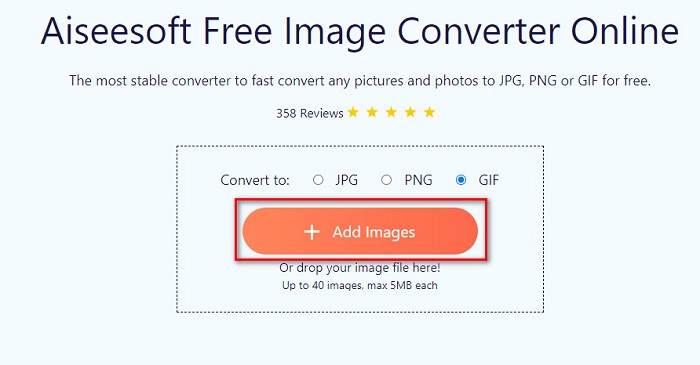
Schritt 1. Suchen Sie nach Aiseesoft Free Image Converter Online oder klicken Sie auf diesen Link, um direkt auf die Webseite zu gelangen. Klicken Sie dann in der ersten Oberfläche auf die Schaltfläche Add Images.
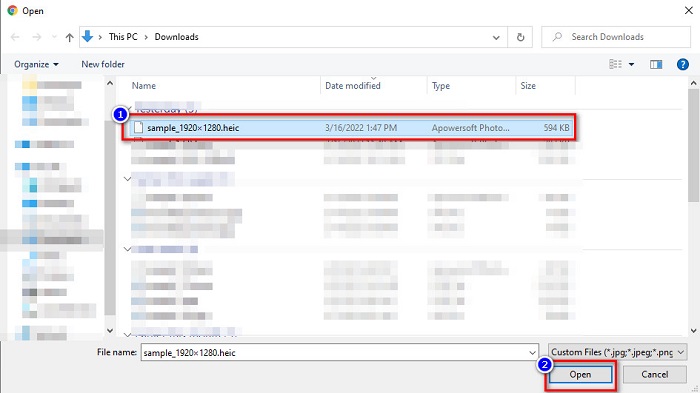
Schritt 2. Anschließend öffnet sich Ihr Dateimanager. Suchen Sie Ihr HEIC‑Bild und klicken Sie auf Open.
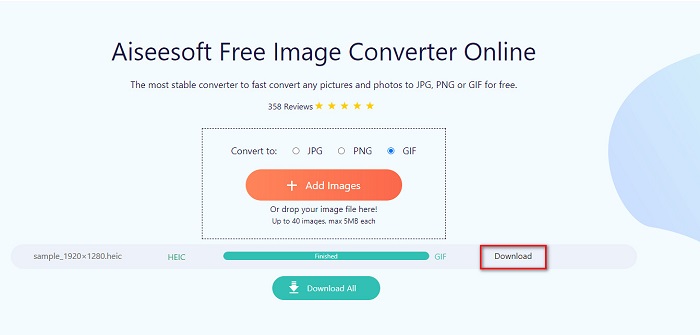
Schritt 3. Klicken Sie zum Schluss auf die Schaltfläche Download, um Ihr GIF‑Bild herunterzuladen.
Vorteile
- Es hat einen ultraschnellen Konvertierungsprozess.
- Es enthält keine störende Werbung.
- Es kann jede Bilddatei in PNG, JPG und GIF konvertieren.
- Zugänglich auf allen Webbrowsern, einschließlich Google, Firefox und Safari.
Nachteile
- Bei einer langsamen Internetverbindung kann es zu einem langsamen Konvertierungsprozess kommen.
CloudConvert
Einer der meistgenutzten Konverter im Internet ist CloudConvert. Mit diesem Konverter können Sie dank der einfachen Benutzeroberfläche HEIC‑Dateien mühelos in GIF‑Dateien umwandeln. Darüber hinaus unterstützt er viele Bildformate, darunter HEIC, GIF, BMP, JPG, ICO und mehr. Sie können außerdem die Auflösung, Dateigröße und Qualität Ihres Bildes anpassen. Obwohl es sich um eine webbasierte Anwendung handelt, wird keine Werbung angezeigt.
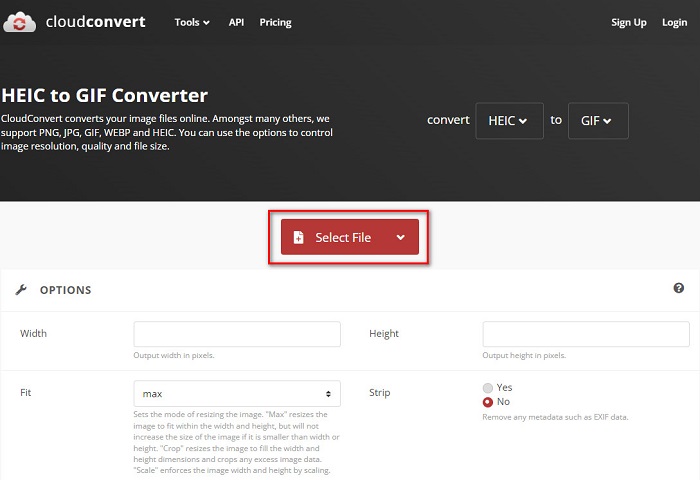
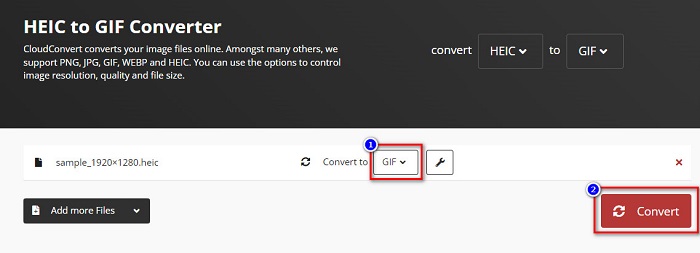
Schritt 1. Suchen Sie in Ihrem Browser nach dem CloudConvert HEIC‑zu‑GIF‑Konverter. Klicken Sie dann in der Hauptoberfläche der Software auf die Schaltfläche Select. Ihr Dateimanager öffnet sich, damit Sie Ihre HEIC‑Datei zum Hochladen auswählen können.
Schritt 2. Klicken Sie anschließend auf die drop-down‑Schaltfläche neben „Convert to“ und wählen Sie das gewünschte Ausgabeformat. Klicken Sie danach auf die Schaltfläche Convert, um die Konvertierung Ihrer HEIC‑Datei ins GIF‑Format zu starten.
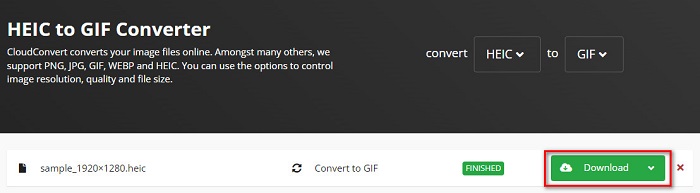
Schritt 3. Klicken Sie schließlich auf die Schaltfläche Download, um Ihre GIF‑Datei herunterzuladen, sobald die Konvertierung abgeschlossen ist.
Vorteile
- Es hat einen schnellen Konvertierungsprozess.
- Es enthält keine lästige Werbung.
- Es unterstützt verschiedene Dateiformate, darunter HEIC, GIF, JPG, PNG usw.
- Zugänglich auf fast allen Suchmaschinen wie Google und Safari.
Nachteile
- Wenn die Internetverbindung langsam ist, kann es zu einem langsamen Konvertierungsprozess kommen.
OnlineConvertFree
Ein weiterer Online‑Konverter von HEIC zu GIF, den Sie ausprobieren sollten, ist OnlineConvertFree. Dieser Konverter bietet eine benutzerfreundliche Oberfläche und einen schnellen Konvertierungsprozess. Wenn Sie außerdem einen Konverter suchen, mit dem Sie Ihre Datei komprimieren und die Größe anpassen können, bietet dieses Tool genau diese Funktionen.
Es enthält jedoch Anzeigen, die für viele Benutzer störend sind. Nichtsdestotrotz kann dieser Konverter HEIC immer noch bequem in GIF konvertieren.
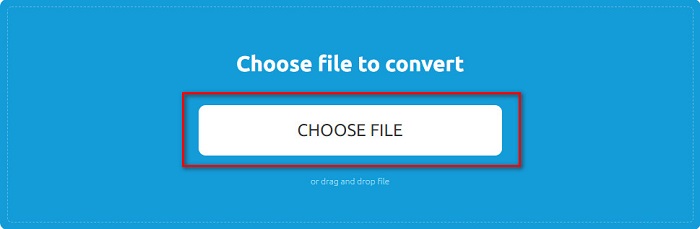
Schritt 1. Suchen Sie zunächst in Ihrem Browser nach OnlineConvertFree. Klicken Sie dann in der Hauptoberfläche der Software auf Choose Files. Anschließend öffnet sich Ihr Dateimanager, in dem Sie Ihre HEIC‑Datei auswählen und hochladen.
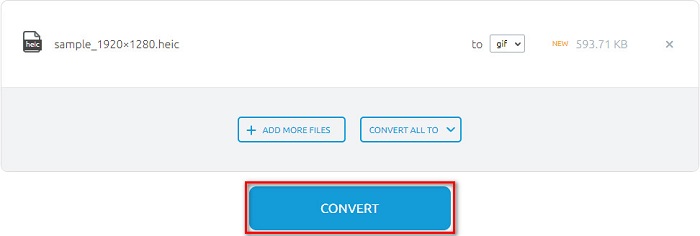
Schritt 2. Klicken Sie danach auf die Convert button, um Ihre HEIC‑Datei in eine GIF‑Datei zu konvertieren. Danach erscheint eine neue Oberfläche.
Schritt 3. Scrollen Sie zum Schluss nach unten und klicken Sie auf die Schaltfläche Download, um Ihre GIF‑Datei herunterzuladen.

Vorteile
- Es hat eine einfache Benutzeroberfläche.
- Es ist sicher zu verwenden.
Nachteile
- Es enthält Anzeigen.
CDKM
CDKM ist ein Online-Tool, mit dem Sie HEIC-Dateien in GIF-Dateien konvertieren können. Dieser Online-Konverter ist ein einfach zu bedienendes Tool, das es zu einem anfängerfreundlichen Tool macht. Darüber hinaus unterstützt es Standarddateiformate wie HEIC, GIF, PNG, JPG und SVG. Dieser Konverter enthält jedoch Werbung, die Sie stören könnte. Trotzdem kann es Ihre Datei schnell konvertieren, also ist es ein Konverter, den Sie unbedingt ausprobieren müssen.
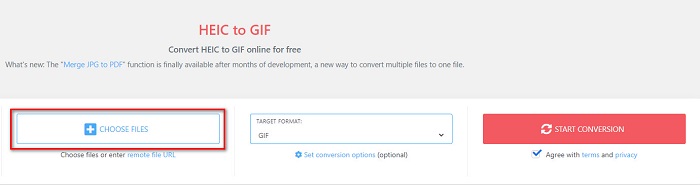
Schritt 1. Suchen Sie in Ihrem Browser nach CDKM und öffnen Sie die Webseite. Klicken Sie in der Hauptoberfläche der Software auf die Schaltfläche Choose Files. Wenn Ihre Computerordner erscheinen, wählen Sie Ihre HEIC‑Datei aus und laden Sie sie in die Hauptoberfläche hoch.
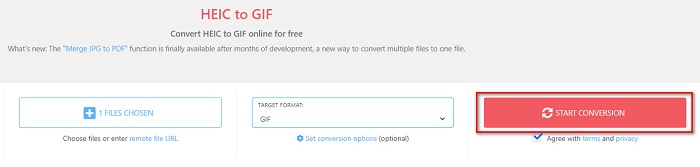
Schritt 2. Klicken Sie anschließend auf die Schaltfläche Start Conversion, um Ihre HEIC‑Datei in eine GIF‑Datei zu konvertieren. Fahren Sie dann mit dem nächsten Schritt fort.
Schritt 3. Laden Sie danach Ihre GIF‑Datei herunter, indem Sie unten auf die Schaltfläche Download klicken.

Teil 2. Vergleichstabelle zwischen HEIC und GIF
HEIC ist ein von Apple entwickeltes Bilddateiformat. Wenn Sie mit einem Apple‑Gerät ein Foto aufnehmen, sehen Sie, dass die Dateiendung Ihres Bildes .heic lautet. Diese Bilddateien haben zudem eine hohe Qualität bei geringer Dateigröße, was dieses Format sehr beliebt macht. Allerdings sind HEIC‑Dateien mit vielen Geräten nicht kompatibel. Auf Apple‑Geräten lassen sich HEIC‑Dateien leicht öffnen und anzeigen. Möchten Sie sie jedoch auf anderen Plattformen betrachten, müssen Sie sie in andere Formate konvertieren.
Auf der anderen Seite sind GIF-Dateien verlustfreie Bildformate, die animiert sind. Diese Bildformate können animierte oder statische Bilder sein. Darüber hinaus unterstützen fast alle Medienplattformen GIF-Formate.
| HEIC | GIF | |
| Komprimiert/Unkomprimiert | Komprimiert | Komprimiert |
| Verfügbarkeit | Verfügbar auf Apple-Geräten. | Verfügbar auf allen Medienplattformen |
| Verlustfrei/Nicht | Verlustfrei | Verlustfrei |
| Bildqualität | Hohe Bildqualität | Haben im Vergleich zu HEIC-Bildern eine geringere Qualität |
| Am besten geeignet für | Am besten zum Fotografieren geeignet | Wird am besten zum Animieren kurzer Videoclips verwendet. |
Teil 3. Häufig gestellte Fragen zum Konvertieren von HEIC in GIF
Können Sie animierte GIFs auf einem Mac-Gerät abspielen?
Ja. Ein Mac‑Gerät kann animierte GIFs abspielen; es kann jedoch vorkommen, dass dies nicht funktioniert. In diesem Fall sollten Sie einen Online‑Viewer verwenden.
Kann ich JPG-Bilder in GIFs konvertieren?
Es gibt viele Möglichkeiten, wie Sie JPG in GIF konvertieren können. Die oben genannten Online‑Konverter ermöglichen es Ihnen, JPG‑Bilddateien in GIFs umzuwandeln.
Können Sie GIFs auf Ihrem iPhone speichern?
Glücklicherweise unterstützen iPhone-Geräte GIF-Dateien. Daher können Sie GIFs auf Ihrem iPhone speichern. Aber wenn Sie eine GIF-Datei nicht speichern können, stellen Sie sicher, dass Sie Ihr iPhone neu starten und versuchen Sie es erneut herunterzuladen.
Fazit
Wie oben gezeigt, gibt es zahlreiche Wege, HEIC in GIF zu konvertieren. Allerdings bieten nicht alle Online‑Konverter einen extrem schnellen Konvertierungsprozess. Wenn Sie daher nach dem besten Online‑HEIC‑zu‑GIF‑Konverter suchen, verwenden Sie Aiseesoft Free Image Converter Online.
-
 Was ist eine VOB-Datei und wie man eine VOB-Datei kostenlos in GIF umwandelt?
 Möchten Sie mehr über VOB-Dateien erfahren und wie Sie sie nach dem Rippen freigeben können? oder Warum müssen Sie VOB in GIF konvertieren? Dann lesen Sie diesen Artikel aufmerksam durch.
-
 Top 3 Konverter, die Sie nicht verpassen sollten, um PNG in animiertes GIF zu konvertieren
 Möchten Sie Ihr PNG zum Leben erwecken? Versuchen Sie dann, das PNG- in das animierte GIF-Format mit den verfügbaren hilfreichen Tools und den entsprechenden Schritten zu konvertieren.
-
 Die 5 besten Möglichkeiten, Bilder in animierte GIFs umzuwandeln [Aktualisiert 2022]
 Benötigen Sie ein Konverterbild in GIF? Dieser Artikel stellt die fünf besten Konverter vor, die wir auf dem Markt finden können. Lassen Sie uns also diese Tools herausfinden, indem Sie diesen Artikel lesen.
