


 Video Converter Ultimate
 Bildschirm recorder
 Videoreparatur
 Sicherer Download
Was ist Apowersoft Free HEIC Converter und alternative HEIC Converter zu verwenden?
Since Apple introduced the newly advanced HEIC image format, many of us have loved it because it can contain a hi-res image while having a decreased file size. Although the ability to compress the file size is impressive, we shouldn't put aside that the image format is new, and all of the platforms that are non-related to Apple don't support it. So, if you want to make the HEIC file well suited to the receiver, you will need to convert the format into a JPEG, mainly if the receiver isn't an iOS or Mac user. With the help of Apowersoft Free HEIC Converter, you can handle the task quickly, but before downloading it, here is a review of the converter that you need to read first to help you decide quickly.

Teil 1. Vollständige Apowersoft Free HEIC Converter Review
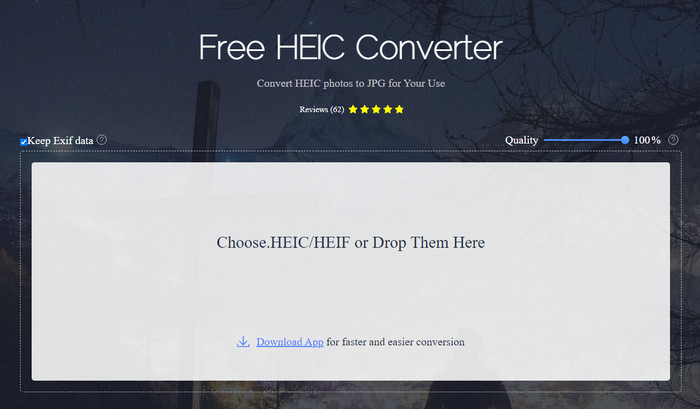
As the name proposes, Apowersoft HEIC Converter offers you a chance to convert your HEIC file into a compatible JPEG format for free. Instead of downloading an unreliable converter on your desktop, you can use this right away without downloading or installing additional resources. Accessing the web tool is safe because your connection is protected while you're on its official website. And you can efficiently upload the HEIC file by dragging and dropping it here. But what makes the online converter unique from the other converters you can use on the web or desktop? Here are the key features you can attain if you decide to use them.
Key Features of Apowersoft Free HEIC Converter:
◆ Das Herunterladen des Konverters ist nicht erforderlich, da Sie über das Internet auf die Software zugreifen können.
◆ Es unterstützt die Konvertierung von HEIC-Dateien im Batch oder einzeln in das JPEG-Format.
◆ Bearbeiten Sie die Bildqualität, bevor die Konvertierung verfügbar ist.
◆ Nach der Konvertierung können Sie dieselbe EXIF-Datei in der JPEG-Datei speichern.
◆ Konvertieren Sie die HEIC-Datei automatisch ohne zusätzliche Schritte.
Vorteile
- Die Web-Tool-Oberfläche ist ziemlich anständig und insgesamt Ausblick.
- Nach dem Konvertieren der Datei in JPEG bleibt ein qualitativ hochwertiges Bild erhalten.
- Das Konvertieren von Stapeldateien ist einfach, da es das gleichzeitige Konvertieren der Datei unterstützt.
Nachteile
- Obwohl es sagt, dass es die Metadaten behält, gehen die Metadaten manchmal nach der Konvertierung des Formats verloren.
- Das Ausgabeformat ist auf eines beschränkt, und das ist JPEG.
- Funktionen sind eingeschränkt.
Teil 2. 3 der besten kostenlosen Apowersoft-HEIC-Konverter-Alternativen online und offline
FVC Free HEIC to JPG Converter
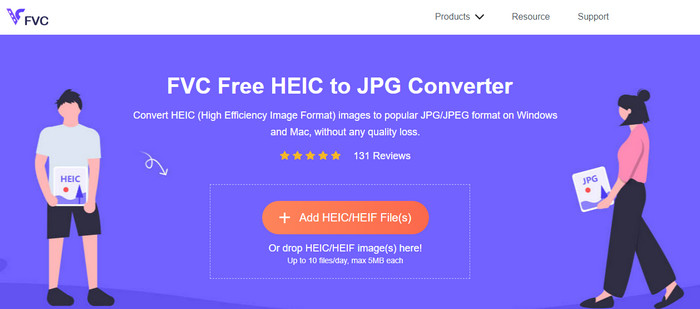
FVC Free HEIC to JPG Converter is the best substitute for Apowersoft free HEIC to JPG converter because it has an intuitive interface that will help you finish the task within a second. With a web converter like this, you won't need to download the actual tool to use it, but you will need to download its launcher. Although the launcher is a must to download, it still has the upper hand on converting speed. Even though you aren't experienced in converting HEIC to JPG, with this tool, you can easily do the task effectively without any tutorials to guide you.
Bisher bewältigt das Webtool diese Aufgabe wie kein anderer Online-Konverter. Aber wir können die Tatsache nicht ignorieren, dass dieses Webtool Einschränkungen hat, wie die Dateigröße jeder Datei und die zulässigen Dateien, die Sie pro Tag hochladen können. Aber wenn Sie diese Einschränkungen nicht haben möchten, empfehlen wir Ihnen, die Desktop-Version herunterzuladen – Aiseesoft HEIC Converter. Diese Software ist für beide Betriebssysteme wie Windows und Mac verfügbar.
HEICtoJPEG.com
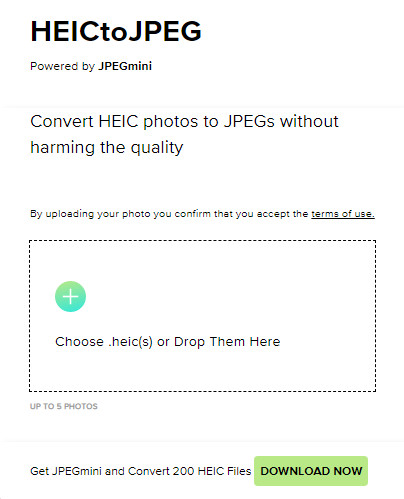
HEICtoJPEG.com is another alternative for Apowersoft HEIC Converter you can access on the web for free and safe. Like the tool we review, you can convert your HEIC files here into a JPEG only. So, if you want to directly convert the HEIC format into a JPEG without adjusting the quality, you must use this. After opening the webtool, you can drag and drop the file here, and the converting will automatically start. Also, you can do a batch HEIC conversion using this web tool, but it isn't limited to daily usage.
Insgesamt ist das Webtool großartig, da es die Stapelkonvertierung für einen schnellen Prozess unterstützt. Sie können die erweiterten Einstellungen jedoch nicht manuell manövrieren, bevor Sie das Format in JPEG konvertieren, wie es das andere Online-Tool tun kann. Obwohl das Webtool keine professionelle Wahl ist, ist es dennoch am besten für Anfänger wie uns geeignet, die eine einfache Konvertierung auf unserem HEIC durchführen möchten.
Pixillion-Bildkonverter
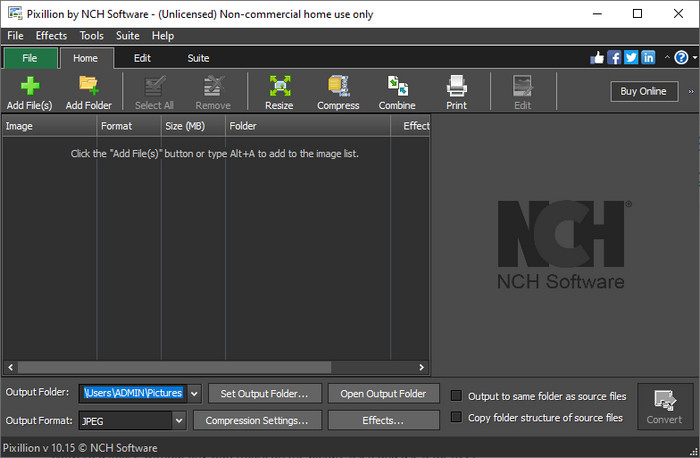
Suppose your internet connection isn't stable, so you can't use the Apowersoft Free HEIC Converter because this tool is web-based. Is it possible to convert? Yes, with the Pixillion Image Converter. This offline software lets you convert your image into a multitudinous image output format such as JPG, BMP, PNG, etc. With a tool like this, you can adjust your HEIC image before you export them; you can either resize, compress, edit, and more than the web tool we present couldn't offer you.
Unabhängig von der hochgeladenen Bilddatei können Sie das Format einfach in die gewünschte Ausgabe konvertieren und mit Ihrem aktuellen Gerät kompatibel machen. Großartig, nicht wahr? Ja ist es. Aber bevor Sie es verwenden können, müssen Sie die Software herunterladen und installieren, was etwas umständlich ist, da dies ein weiterer Schritt ist, insbesondere wenn Sie eine einzelne HEIC-Datei in ein JPG- oder ein anderes Format konvertieren möchten. Nichtsdestotrotz ist das Tool großartig und kann kostenlos auf Ihr Windows-Betriebssystem heruntergeladen werden.
Verwandt:
Teil 3. Häufig gestellte Fragen zum Apowersoft HEIC Converter Review
Hat der Export der konvertierten HEIC-Datei auf Apowersoft Free HEIC Converter ein Wasserzeichen?
Glücklicherweise hinterlässt die Datei, die Sie hier konvertieren, kein Wasserzeichen auf Ihrem Bild. So können Sie das konvertierte Bild ohne Wasserzeichen auf dem Bild selbst genießen und es kostenlos verwenden.
Muss ich mich anmelden, um den Apowersoft HEIC Converter zu verwenden?
Sie können sich entweder anmelden, um Ihr Konto zu überprüfen, aber Sie müssen sich nicht anmelden, wenn Sie den Online-Konverter verwenden möchten. Sie können es also sofort verwenden, indem Sie es per Drag & Drop auf die offizielle Website des Tools ziehen und automatisch konvertieren.
Fazit
Nach der Überprüfung des Apowersoft HEIC Converter wissen wir jetzt, ob es der beste Konverter ist, den wir verwenden müssen, um unser HEIC-Problem zu lösen, indem wir das Format in JPG konvertieren. Obwohl das Web-Tool kostenlos verwendet werden kann und im Internet zugänglich ist, nehmen wir in diesem Artikel dennoch einige Nachteile auf. Wenn Sie also der Meinung sind, dass dies nicht das richtige Tool für Sie ist, dann könnten die drei Alternativen die Lücke füllen, die Sie auf Ihrem Konverter benötigen und die Ihnen der von uns überprüfte Konverter nicht bieten kann. Aber wenn all dies nicht ausreicht, empfehlen wir Ihnen, das ultimative Tool herunterzuladen, das Ihre HEIC-Datei in JPEG oder PNG konvertieren kann. Willst du wissen, was es ist? Dann müssen Sie auf die Download-Schaltfläche klicken, die wir oben hinzufügen, um sie in Ihrer Reichweite zu haben, egal ob Sie Windows oder Mac verwenden.
-
 Beste Möglichkeiten, MKV-Metadaten wie ein Profi zu bearbeiten [Einfach]
 Haben Sie keine Ahnung, wie Sie MKV-Metadaten bearbeiten können? Einige Benutzer finden es schwierig, die Tags auf MKV zu bearbeiten, wenn Sie einer von ihnen sind, dann lesen Sie diesen Artikel.
-
 Top 3 FLAC-Metadaten-Editoren auf Mac und Windows [Aktualisiert 2023]
 Möchten Sie FLAC-Metadaten ändern? In diesem Fall müssen Sie diesen Artikel lesen, da wir ausreichende Kenntnisse über den neuesten FLAC-Metadaten-Editor verwenden können.
-
 Beste Technik zum schnellen Bearbeiten von WebM-Metadaten
 Lesen Sie die vollständigen Details, die wir unten bereitgestellt haben, während wir ein Tutorial zum Bearbeiten von WebM-Metadaten einfügen. Klicken Sie auf diesen Link, um mehr darüber zu erfahren.
