


 Video Converter Ultimate
 Bildschirm recorder
 Videoreparatur
 Sicherer Download
Die 6 besten HEIC-zu-JPG-Konverter zum Konvertieren von HEIC in ein Standard-JPG
In der heutigen Zeit machen viele von uns gerne Schnappschüsse, egal ob Selfies oder Gruppenfotos mit unseren mobilen Geräten wie iPhones. Die überwiegende Mehrheit der auf iOS‑Geräten aufgenommenen Bilder liegt im HEIC-Format vor, da dies inzwischen das Standardbildformat für iOS ist. Wenn Sie die Datei auf ein anderes, nicht‑iOS‑Gerät übertragen, lässt sie sich dort oft nicht öffnen, weil dieses Format standardmäßig nicht unterstützt wird. Wenn Sie die Bilddatei auf anderen Geräten versenden möchten, sollten Sie daher in Betracht ziehen, sie in das JPG-Format zu konvertieren, da dieses von vielen Geräten unterstützt wird. Die folgende Liste zeigt Ihnen, wie Sie HEIC in JPG umwandeln können – mit fünf Konvertern, mit denen Sie diese Aufgabe erledigen.

Teil 1. Konvertieren von HEIC in JPG mit den Webtools [Online-Möglichkeiten]
Wir testen jeden dieser 3 genannten Online-HEIC-Konverter, um relevante Informationen über sie bereitzustellen. Wenn Sie ein kostenloses Web-Tool verwenden möchten, ist dies der richtige Teil für Sie, aber denken Sie daran, dass es einige Einschränkungen bei der Verwendung eines solchen Konverters gibt. Stellen Sie vor allem eine stabile Internetverbindung sicher, wenn Sie die folgenden Tools verwenden, um Unterbrechungen beim Konvertieren zu vermeiden. Bitte lesen Sie die vollständigen Details unten, um jeden von ihnen zu kennen.
FVC Free HEIC to JPG Converter
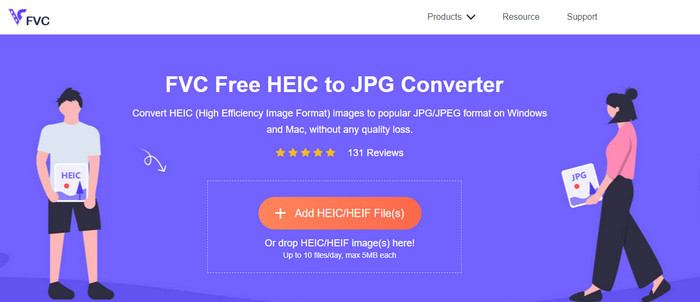
Der FVC Free HEIC to JPG Converter hilft Ihnen dabei, HEIC‑Dateien mit nur wenigen Klicks ins JPG‑Format umzuwandeln. Mit diesem Online‑Tool müssen Sie kein zusätzliches Programm herunterladen oder sich registrieren, um es zu nutzen. Obwohl das Tool kostenlos ist, gibt es einige Einschränkungen: Sie können bis zu zehn Dateien pro Tag konvertieren, und die maximale Dateigröße für jedes Bild darf 5 MB nicht überschreiten. Im Vergleich zu manchen anderen Online-Konvertern ist das oft ausreichend, insbesondere wenn Sie den Dienst nicht häufig benötigen. Wenn Sie das Onlinetool ausprobieren möchten, folgen Sie einfach den unten aufgeführten Anweisungen.
Schritt 1. Klicken Sie zunächst auf diesen Link, um einen neuen Tab in Ihrem Webbrowser zu öffnen; dieser Link führt Sie auf die Hauptseite des Online-Konverters.
Schritt 2. Klicken Sie auf Add HEIC/HEIF File (s), suchen Sie im angezeigten Ordner die HEIC-Datei, wählen Sie sie aus und drücken Sie Open, um sie hochzuladen.
Schritt 3. Der Konvertierungsvorgang startet automatisch; sobald er abgeschlossen ist, können Sie auf die Schaltfläche Download klicken.
HEIC zu JPEG
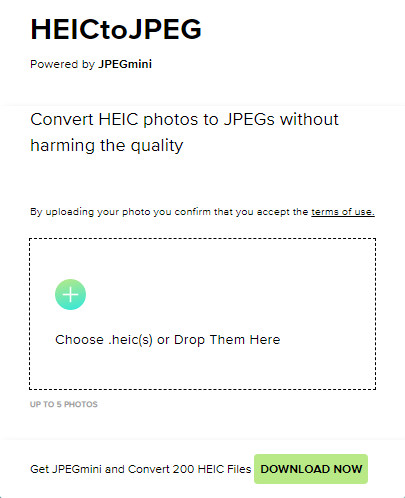
HEIC to JPEG ist ein Online‑Tool, auf das Sie sich verlassen können, wenn es darum geht, HEIC in JPG zu konvertieren; wie das oben genannte Onlinetool ist es kostenlos zugänglich. Mit diesem Tool können Sie Ihre HEIC‑Datei in ein unterstütztes JPG umwandeln und dann auf ein anderes Gerät übertragen, das HEIC nicht unterstützt. Bedenken Sie jedoch, dass auch hier die Anzahl der täglichen Konvertierungen begrenzt ist. Im Gegensatz zum zuvor erwähnten Konverter können Sie mit diesem Webtool nur fünf HEIC‑Dateien pro Tag umwandeln, was deutlich eingeschränkter ist als bei den anderen Konvertern. Wenn Sie es verwenden möchten, folgen Sie den angegebenen Schritten.
Schritt 1. Suchen Sie den Webkonverter über Ihre Suchmaschine und öffnen Sie ihn.
Schritt 2. Klicken Sie auf die Plus-Schaltfläche, um die HEIC-Datei von Ihrem Desktop hochzuladen.
Schritt 3. Warten Sie, bis der Upload- und Optimierungsvorgang abgeschlossen ist, und klicken Sie dann auf Download JPEG.
Image.convert-online
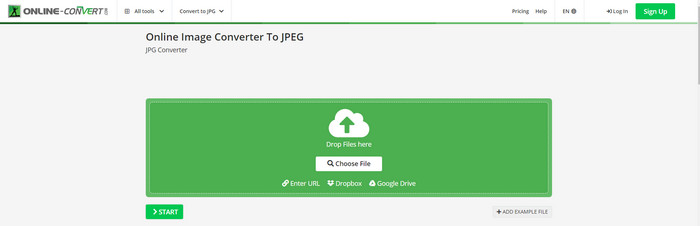
Image.convert-online ermöglicht es Ihnen, HEIC online in JPG zu konvertieren und bietet zusätzliche Optionen zur Anpassung der Bildqualität. Anders als bei den ersten beiden Konvertern, die Sie im Web nutzen können, gibt es bei diesem Webtool keine Begrenzung – Sie können hier mehr HEIC‑Dateien konvertieren, als es die beiden anderen erlauben. Außerdem können Sie die Bildqualität verbessern und die gewünschte Kompression auswählen. Allerdings sind die Bildbearbeitungsfunktionen dieses Tools nicht so professionell wie bei speziellen Bildbearbeitungsprogrammen. Nichtsdestotrotz ist es immer noch ein ausgezeichneter HEIC‑Konverter, den Sie verwenden können.
Schritt 1. Öffnen Sie Ihren bevorzugten Browser, geben Sie Image.convert-online ein und klicken Sie zum Öffnen.
Schritt 2. Klicken Sie auf Choose File und fügen Sie die HEIC-Datei in das Webtool ein.
Schritt 3. Passen Sie die Bildeinstellungen und die Kompression an; klicken Sie auf Start, wenn alles eingestellt ist, und klicken Sie anschließend auf Download, um die Datei auf Ihrem Desktop zu speichern.
Teil 2. Konvertieren von HEIC-Dateien in JPG oder JPEG unter Windows und Mac [Offline-Möglichkeiten]
Wenn Sie eine schlechte Internetverbindung haben, ist das oben erwähnte Webtool nicht die beste Wahl, um dieses Problem zu lösen und zu handhaben. Wenn Sie also das Problem ohne Internetverbindung lösen möchten, können Sie die Schritte lesen und befolgen, die wir zu jedem der unten genannten Tools hinzufügen. Bitte lesen Sie sie sorgfältig durch, um zu erfahren, wie Sie die HEIC auf Ihrem Desktop offline konvertieren können.
Aiseesoft HEIC Converter – Beste Wahl zum Konvertieren von HEIC-Dateien
Aiseesoft HEIC Converter ist das Tool, das Sie für alle Probleme benötigen, die Sie beim Umwandeln von HEIC in JPG auf Ihrem Desktop haben. Wenn Sie das beste Tool zum Konvertieren von HEIC‑Dateien suchen, ist dies zweifellos eine hervorragende Lösung. Dank seiner einfachen Bedienung müssen Sie kein Profi sein: Mit nur wenigen Klicks liegt Ihnen die konvertierte HEIC‑Datei vor.
Zusätzlich zu seiner Konvertierungsfähigkeit unterstützt dieses Tool einen blitzschnellen Konvertierungsprozess, also machen Sie sich keine Sorgen mehr, denn Sie können das JPEG sofort haben. Überraschenderweise kann das Tool mehrere HEIC-Dateien gleichzeitig konvertieren, wenn Sie mehrere HEIC-Dateien haben. Erstaunlich, oder? Wenn Sie von der von uns erwähnten Beschreibung erstaunt sind, müssen Sie die folgenden Schritte weiterlesen, da wir ein leicht verständliches Tutorial zur erfolgreichen Konvertierung von HEIC in JPG unter Windows und Mac bereitstellen.
Schritt 1. Laden Sie die Software herunter, folgen Sie dem Installationsprozess und öffnen Sie sie anschließend.
Schritt 2. Sie können die HEIC‑Dateien per Drag & Drop hierher ziehen, um sie einfacher hochzuladen, oder auf Add HEIC klicken, die Datei auf Ihrem Desktop suchen und dann auf Open klicken, um sie hinzuzufügen.
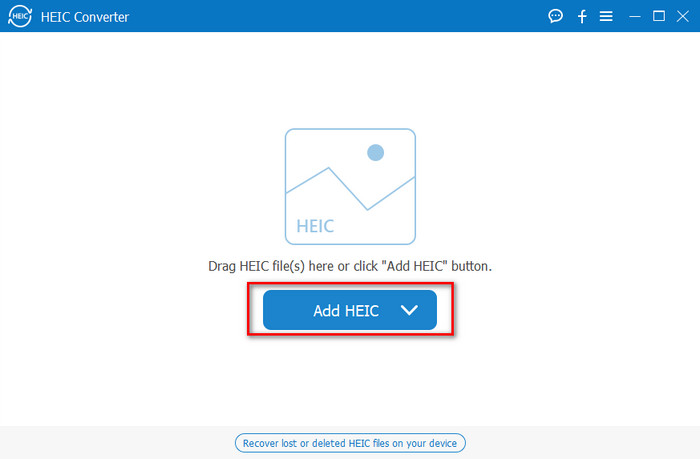
Sie fügen hier beliebig viele HEIC-Dateien hinzu, da dieses Tool die HEIC-Datei gleichzeitig in ein JPG konvertieren kann.
Schritt 3. Nachdem Sie die HEIC‑Datei hochgeladen haben, klicken Sie oben rechts in der Oberfläche auf die Drop-down-Schaltfläche und wählen JPEG/JPG aus.
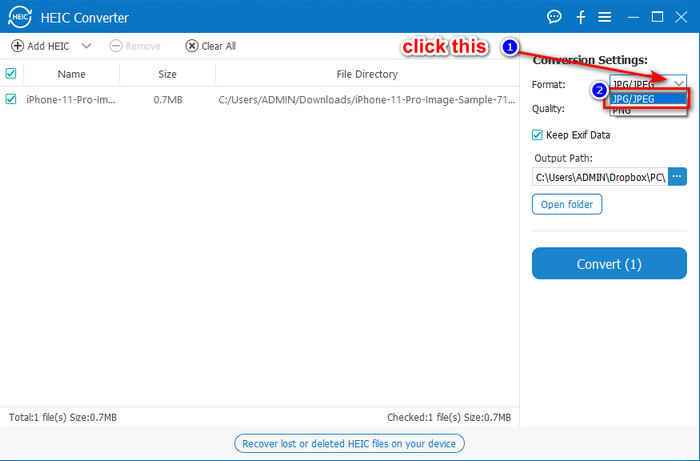
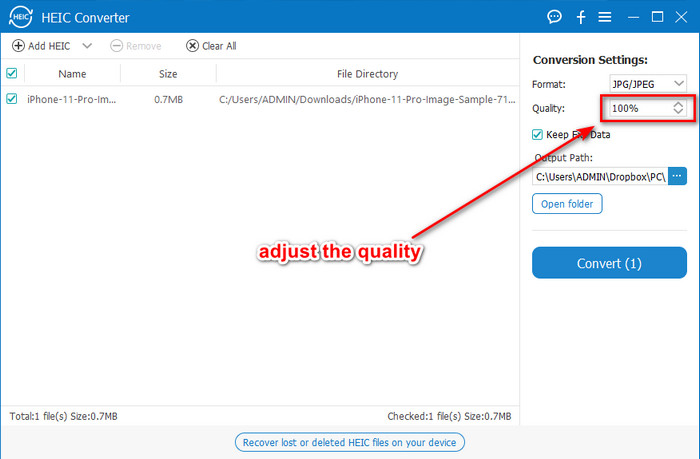
Optional. Anders als bei einigen Konvertern können Sie hier die Qualität des HEIC‑Bildes anpassen, indem Sie vor dem Export unter Quality den Wert ändern.
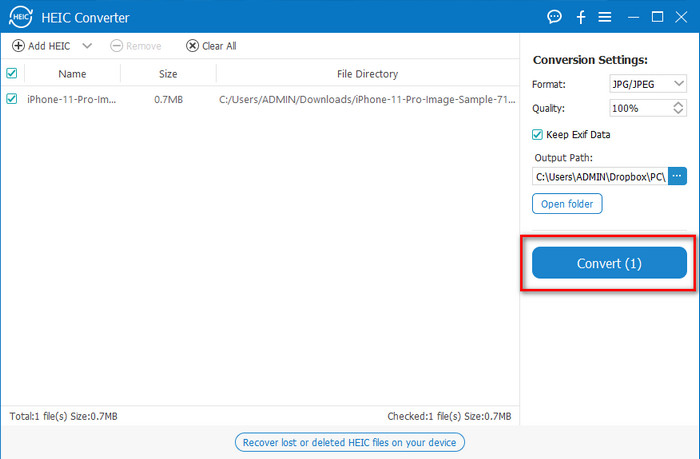
Schritt 4. Wenn alles eingestellt ist und Sie bereit sind, HEIC in JPG zu konvertieren, klicken Sie auf die Schaltfläche Convert. Der Konvertierungsvorgang beginnt; dank des extrem schnellen Konvertierprozesses dieses Tools müssen Sie nicht lange warten. So einfach können Sie die Datei nun in einem anderen Format, aber mit der Endung .jpg, weitergeben.
Das ist alles zum Konvertieren Ihres HEIC-Fotos in JPG. Außerdem können Sie dieses Tool verwenden, um HEIC in einem Stapel in PNG zu konvertieren.
Vorschau
Vorschau ist der integrierte Bildbetrachter auf dem Mac, mit dem Sie HEIC‑Dateien anzeigen und ihr Format ändern können. Die Konvertierung läuft dabei etwas anders ab als bei den anderen in diesem Artikel genannten Tools. Wenn Sie diesen Standard-Bildbetrachter verwenden, können Sie die Dateiendung von HEIC in .jpg ändern.
Abgesehen von seiner Fähigkeit zum Anzeigen und Konvertieren kann es auch PDF-Dateien verschlüsseln und die Verwendung der Datei, die Bildkorrektur und andere einschränken. Sie können die folgenden Schritte ausführen, um HEIC unter macOS in JPG zu konvertieren, wenn Sie ein Mac-Benutzer sind.
Schritt 1. Öffnen Sie den Finder, suchen Sie Vorschau und öffnen Sie die HEIC-Datei mit diesem Tool.
Schritt 2. Sobald Sie die Datei in Vorschau geöffnet haben, gehen Sie zum Menü Datei und wählen aus der Liste Exportieren.
Schritt 3. Klicken Sie auf Format und wählen Sie entweder JPEG oder JPEG-2000 und klicken Sie auf Sichern, wenn Sie fertig sind.
GIMP
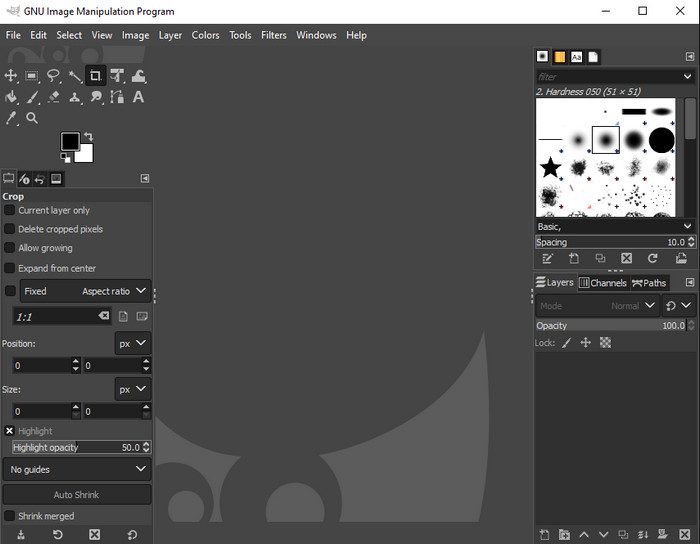
GIMP ist ein leistungsfähiges Bildbearbeitungsprogramm, das Sie für Windows und Mac herunterladen können. Dieses Tool unterstützt die Bearbeitung von HEIC‑Dateien, sodass Sie u. a. Sättigung, Kontrast usw. anpassen können, um das Bild zu verbessern. Ähnlich wie bei Vorschau auf dem Mac dient dieses Tool nicht primär als Konverter, kann aber die Dateiendung von HEIC in JPE, JPEG, JPG oder ein anderes gewünschtes Bildformat ändern.
Dieses Tool hat beim Konvertieren nicht viel zu bieten, aber wenn Sie lernen möchten, wie man HEIC auf dem PC in JPG konvertiert, können Sie die Schritte kopieren, die wir unten hinzufügen.
Schritt 1. Laden Sie die Software für Windows oder Mac herunter und starten Sie sie nach Abschluss des Downloadvorgangs.
Schritt 2. Gehen Sie zum Menü Datei, klicken Sie auf Öffnen, wählen Sie die HEIC-Datei auf Ihrem Desktop aus und laden Sie sie hoch.
Schritt 3. Gehen Sie zurück zum Menü Datei, klicken Sie auf Exportieren als; im daraufhin erscheinenden Fenster „Bild exportieren“ klicken Sie auf Dateityp wählen (nach Endung) und wählen in der Liste JPEG aus. Klicken Sie zum Schluss auf Exportieren, wenn Sie fertig sind.
Teil 3. Häufig gestellte Fragen zum Konvertieren von HEIC in JPEG
Wird nach dem Konvertieren von HEIC-Fotos in JPG die Transparenz entfernt?
Ja, die Transparenz einer HEIC-Datei geht verloren, nachdem Sie das Format in JPG konvertiert haben. JPEG bzw. JPG unterstützt – anders als PNG – keine Transparenz. Stattdessen können Sie den Aiseesoft HEIC Converter verwenden, um HEIC in ein transparentes PNG zu konvertieren. Wählen Sie dazu in Schritt 3 nach dem Klick auf die Drop-down-Schaltfläche statt JPG/JPEG das Format PNG und folgen Sie den weiteren Schritten, um die Datei zu exportieren.
Was ist das HEIC-Format?
HEIC ist ein bekanntes Format für Bilddateien, das kleinere Dateigrößen als JPG ermöglicht, dabei aber eine hohe Qualität beibehält. Apple Inc. verwendet dieses Format inzwischen als natives Bildformat auf seinen iOS- und Mac‑Produkten. Wenn Sie mehr über dieses Format erfahren möchten, können Sie auf diesen Link klicken, um mehr über das HEIC-Dateiformat zu erfahren.
Kann ich HEIC stapelweise in JPG konvertieren?
Sie können den Aiseesoft HEIC Converter verwenden – einen speziellen Batch‑Konverter für HEIC‑Dateien, den Sie für Windows und Mac herunterladen können. Laden Sie beliebig viele HEIC‑Dateien hoch und konvertieren Sie sie alle in JPG oder PNG, ohne die Qualität zu beeinträchtigen. Außerdem gibt es keine Begrenzung, wie oft Sie konvertieren dürfen, und die Dateigröße spielt für dieses Tool keine Rolle.
Fazit
Sie können jetzt die HEIC-Dateien mit den Informationen und Schritten in ein JPG-Format konvertieren. Wählen Sie, ob Sie einen Online-HEIC-zu-JPG-Konverter oder den Offline-Konverter verwenden möchten. Was auch immer Ihre Wahl ist, der Erfolg ist neben Ihnen, wenn Sie diesen Artikel gründlich lesen.
Wenn Sie sich noch nicht entschieden haben, welches Tool Sie verwenden möchten, empfehlen wir Ihnen, den Aiseesoft HEIC Converter herunterzuladen, da er der beste HEIC‑Konverter unter allen hier vorgestellten ist. Sie können das Tool testen, indem Sie es auf Ihren Desktop herunterladen, prüfen, ob es zu Ihnen passt, und Ihr Problem mithilfe der oben beschriebenen Schritte lösen.
-
 Die besten kostenlos zu verwendenden Konverter von MOV zu DivX für Mac und Windows
 Wir haben die Lösung für Sie, wenn Sie nach kostenlosen Konvertern von MOV zu DivX suchen. Dieser Artikel stellt die besten MOV-zu-DivX-Konverter für Mac und Windows vor.
-
 Kostenlose WMV-zu-DivX-Konverter Die erste Wahl für Benutzer
 Hier sind die besten kostenlosen WMV-zu-DivX-Konverter, die Benutzer am häufigsten verwenden. Dieser Artikel bietet Ihnen die besten Möglichkeiten, Ihre WMV-Datei in DivX zu konvertieren.
-
 Tipps zum Ändern von Video-Metadaten auf dem iPhone in Reichweite
 Haben Sie Schwierigkeiten beim Ändern von Video-Metadaten auf iPhone-Geräten? Glücklicherweise geht es in diesem Artikel um die beste Möglichkeit, Video-Metadaten auf dem iPhone zu ändern.
