


 Video Converter Ultimate
 Bildschirm recorder
 Videoreparatur
 Sicherer Download
Beste Möglichkeiten zum Konvertieren von TIFF in HEIC unter Windows und Mac
TIFF oder Tag Image File Format ist ein Bildformat, das bei Fotografen sehr bekannt ist. Dieses Bildformat kann Bilder in hoher Qualität speichern und ist verlustfrei. Allerdings sind TIFF-Dateien sehr groß, was das Teilen mit anderen Geräten oder Anwendungen erschwert. Wenn Sie also eine Bilddatei mit hoher Qualität, aber ohne riesige Dateigröße haben möchten, ist die beste Lösung für Sie, TIFF in HEIC zu konvertieren.

Teil 1. Konvertieren von TIFF in HEIC online und offline
Das Konvertieren von TIFF in HEIC mag schwierig klingen, aber mit Hilfe dieser Online-Konverter von TIFF in HEIC ist es sehr einfach. Und wenn Sie diese besten Online-Konverter kennenlernen möchten, stellt Ihnen dieser Teil die herausragendsten und kostenlossten TIFF-zu-HEIC-Konverter vor.
XConvert
XConvert ist ein Online-TIFF-zu-HEIC-Konverter, mit dem sich TIFF-Dateien mühelos in HEIC umwandeln lassen. Dieser Konverter ist kostenlos und sicher, sodass Sie sich um Ihre Daten keine Sorgen machen müssen. Außerdem können Sie mehrere TIFF-Dateien mit nur wenigen Klicks in HEIC umwandeln. Mit diesem Konverter können Sie auch die Auflösung und Dateigröße Ihres Bildes anpassen. Obwohl er viele Werbeanzeigen enthält, kann er Ihre TIFF-Dateien dennoch schnell in HEIC konvertieren.
Schritt 1. Öffnen Sie Ihren Browser und suchen Sie nach dem XConvert TIFF-zu-HEIC-Konverter. Klicken Sie dann in der Hauptoberfläche der Software auf die Schaltfläche Add Files. Ihre Computerordner werden angezeigt, damit Sie Ihre TIFF-Datei zum Hochladen auswählen können.
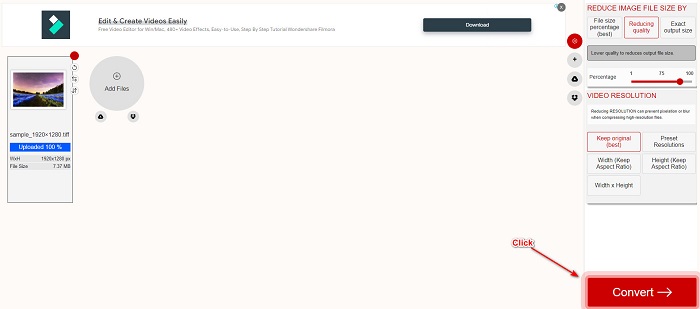
Schritt 2. Wenn Ihre TIFF-Datei hochgeladen ist, klicken Sie auf die Schaltfläche Convert, um Ihre TIFF-Datei in das HEIC-Dateiformat zu konvertieren. Warten Sie anschließend, bis Ihre Datei heruntergeladen ist, und fahren Sie mit dem nächsten Schritt fort.
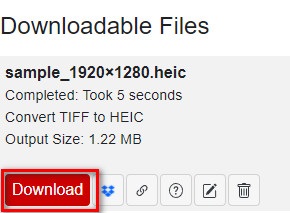
Schritt 3. Klicken Sie abschließend auf die Schaltfläche Download, um Ihre HEIC-Datei herunterzuladen.
Vorteile
- Es ist sicher zu verwenden.
- Es hat eine einfache Benutzeroberfläche.
- Es hat einen schnellen Konvertierungsprozess.
Nachteile
- Es enthält lästige Werbung, die Sie stören könnte.
Convertio
Convertio ist einer der bekanntesten Online-Konverter im Web. Es kann ebenfalls TIFF-Dateien in HEIC-Dateien umwandeln, ohne dass es kompliziert wird. Es verfügt über eine benutzerfreundliche Oberfläche und enthält, anders als das oben genannte Tool, nicht viele Werbeanzeigen. Außerdem unterstützt es verschiedene Bildformate, darunter TIFF, HEIC, JPG, PNG, GIF und mehr. Da es sich jedoch um eine webbasierte Anwendung handelt, können Konvertierung und Download langsamer verlaufen, wenn Ihre Internetverbindung nicht stabil oder langsam ist.
Schritt 1. Suchen Sie in Ihrem Browser nach dem Online-Konverter Convertio. Klicken Sie dann in der Hauptoberfläche der Software auf die Schaltfläche Choose File, um Ihre TIFF-Datei hochzuladen.

Schritt 2. Klicken Sie anschließend auf die Drop-down-Schaltfläche, um Ihr gewünschtes Ausgabeformat HEIC auszuwählen.
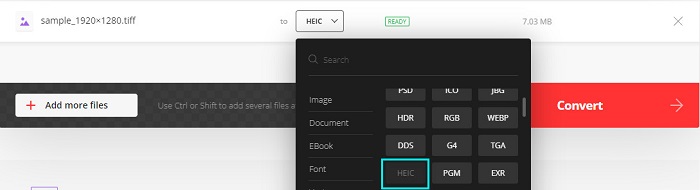
Schritt 3. Klicken Sie zum Schluss auf die Schaltfläche Convert, um den Konvertierungsvorgang zu starten. Danach erscheint eine neue Oberfläche, auf der Sie Ihr HEIC-Bild herunterladen können.

Vorteile
- Es unterstützt zahlreiche Dateiformate wie TIFF, HEIC, JPG, PNG, GIF und mehr.
- Es verfügt über eine einfach zu bedienende Softwareschnittstelle.
- Zugänglich in fast allen Webbrowsern, einschließlich Google, Firefox und Safari.
Nachteile
- Bei langsamer Internetverbindung kann es zu einem langsamen Konvertierungsprozess kommen.
- Es enthält Anzeigen.
Dateistar
Filestar ist ein Offline-TIFF-zu-HEIC-Konverter. Dieser Konverter kann kostenlos heruntergeladen werden und ist leicht zugänglich. Darüber hinaus verfügt es über eine einfache Benutzeroberfläche, die es zu einem anfängerfreundlichen Tool macht. Noch erstaunlicher ist, dass es viele Funktionen zu bieten hat. Dieser Konverter kann Ihre Datei in der Größe ändern, animieren und sogar komprimieren. Darüber hinaus unterstützt es zahlreiche Dateiformate, darunter TIFF, HEIC, JPEG, PNG, WEBPM, MP4 und mehr.
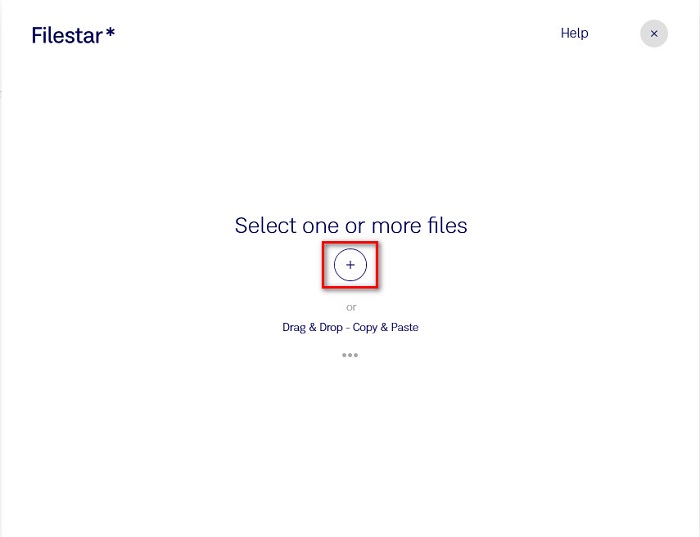
Schritt 1. Laden Sie Filestar auf Ihren Desktop herunter und führen Sie die Anwendung aus. Klicken Sie auf das +-Symbol, um Ihre TIFF-Datei in der Hauptoberfläche der Software hochzuladen.
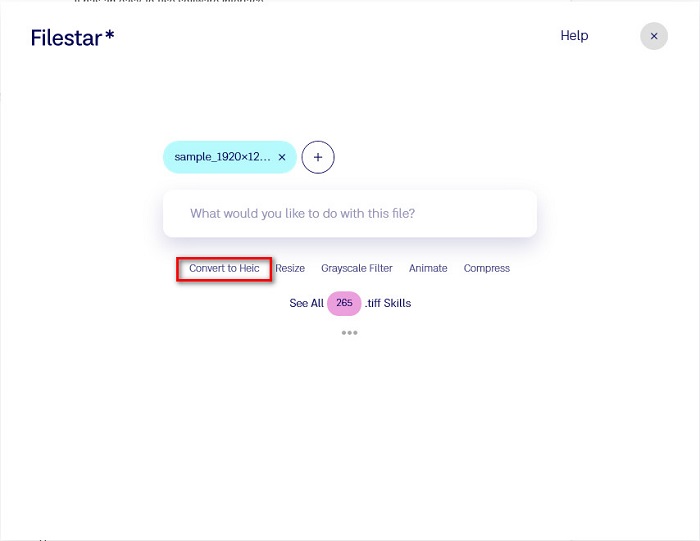
Schritt 2. Klicken Sie dann in der nächsten Oberfläche auf die Option Convert to HEIC.
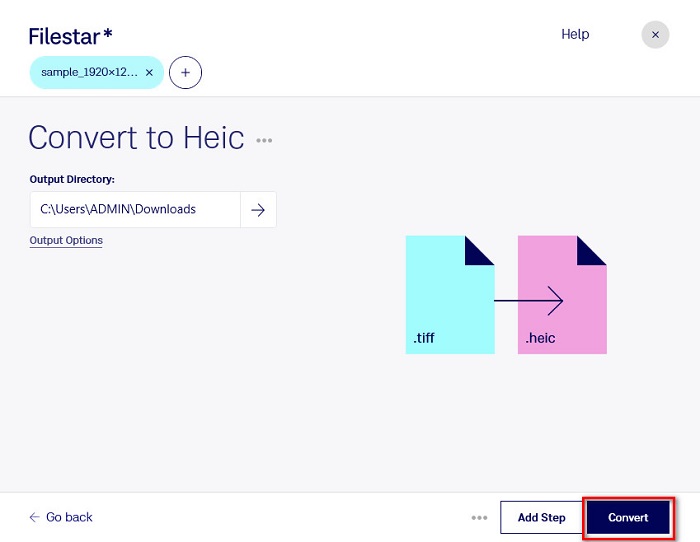
Schritt 3. Klicken Sie im letzten Schritt auf die Schaltfläche Convert, um Ihre TIFF-Datei in HEIC zu konvertieren.
Vorteile
- Es verfügt über eine einfach zu bedienende Benutzeroberfläche.
- Es erlaubt Ihnen, Ihre TIFF-Datei zu skalieren und zu komprimieren.
- Es kann Ihre TIFF-Datei stapelweise in das HEIC-Dateiformat konvertieren.
Nachteile
- Nur unter Windows verfügbar.
Teil 2. Empfehlung: Konvertieren Sie HEIC-Dateien mit dem besten HEIC-Konverter
Wenn Sie Probleme haben, HEIC-Dateien auf Ihrem Windows-PC anzusehen, haben wir die passende Lösung für Sie. Die beste Möglichkeit, eine HEIC-Datei unter Windows oder in anderen Bearbeitungsprogrammen zu öffnen, besteht darin, Ihre HEIC-Datei in eine JPG- oder PNG-Datei zu konvertieren, die von Windows und anderen Anwendungen unterstützt wird. Das Tool bietet außerdem eine Funktion, mit der Sie Ihre HEIC-Dateien stapelweise in PNG oder JPG umwandeln können. Darüber hinaus verfügt es über eine sehr übersichtliche Benutzeroberfläche und ist damit besonders einsteigerfreundlich. Wenn Sie mehr über dieses Tool erfahren möchten, lesen Sie die folgende Beschreibung.
Gratis DownloadFür Windows 7 oder neuerSicherer Download
Gratis DownloadFür MacOS 10.7 oder neuerSicherer Download
Aiseesoft HEIC Converter:
- Es ist 100% kostenlos zu verwenden.
- Es hat eine einfache Benutzeroberfläche.
- Es kann HEIC-Dateien stapelweise in JPG und PNG konvertieren.
- Verfügbar auf allen Cross-Media-Plattformen, einschließlich Windows und Mac.
Teil 3. Unterschiede zwischen TIFF und HEIC
TIFF und HEIC haben nicht die gleichen Eigenschaften; Wenn Sie sich also noch nicht sicher sind, ob Sie TIFF in HEIC konvertieren werden, hilft Ihnen dieser Teil dabei.
TIFF oder Tag Image File Format ist eine flexible Bilddatei mit hoher Auflösung. Fotografen und Grafikdesigner verwenden normalerweise diese Bilddatei für ihre Fotos, da Sie sie problemlos auf andere Geräte und andere Bildbearbeitungsanwendungen wie Adobe Photoshop übertragen können. Darüber hinaus sind diese Bilddateien verlustfrei komprimiert, was bedeutet, dass sie nicht an Qualität und Daten verlieren. Beeindruckender an dieser Datei ist, dass sie auch als Dateicontainer für kleine JPEG-Bilder dienen kann. Außerdem unterstützen viele Geräte und Medienplattformen diesen Dateityp.
Im Gegensatz dazu ist die HEIC-Datei ein von Apple entwickeltes Bilddateiformat. Da es von Apple entwickelt wurde, kann es nur auf Apple-Geräten wie iPhone, Mac und iPad angezeigt werden. Dennoch bietet dieses Bildformat eine hohe Qualität und eignet sich daher hervorragend zum Fotografieren. Außerdem sind HEIC-Dateien komprimiert, wodurch ihre Dateigröße gering bleibt.
Teil 4. Häufig gestellte Fragen zum Konvertieren von TIFF in HEIC
Können Sie TIFF-Bilder auf dem Mac anzeigen?
Ja. Mit der Vorschau-App auf dem Mac können Sie ein TIFF-Bild nativ auf einem Mac-Gerät öffnen.
Was ist besser, TIFF oder HEIC?
TIFF- und HEIC-Bilder haben beide eine hohe Auflösung. Man kann jedoch mit Sicherheit sagen, dass HEIC besser ist, da HEIC-Bilder eine komprimierte Dateigröße haben.
Können Sie das TIFF- in das JPG-Format konvertieren?
Sicherlich ja. Einige Konverter unterstützen TIFF-zu-JPG-Konverter. Darüber hinaus können einige der oben genannten Konverter auch TIFF in JPG konvertieren.
Fazit
Hier hast du es! Es gibt viele Möglichkeiten, Ihre TIFF-Datei in eine HEIC-Datei zu konvertieren. Aber alle oben vorgestellten Konverter haben unterschiedliche Funktionen zu bieten. Jetzt liegt es in Ihrer Hand, welchen Konverter Sie verwenden, um Ihre TIFF-Datei in das HEIC-Dateiformat zu konvertieren. Aber wenn Sie nach einem HEIC-Konverter mit den besten Funktionen suchen, dann ist Aiseesoft HEIC Converter das beste Tool. Also, worauf wartest Du? Laden Sie es jetzt kostenlos herunter, um das ultimative HEIC-Konverter-Tool zu erleben.
-
 Konvertieren Sie HEIC in PDF mit den 4 wichtigsten verbesserten Möglichkeiten im Jahr 2022
 Um weitere Informationen über den besten HEIC-zu-PDF-Konverter zu erhalten, können Sie diesen 2022 herunterladen. Sie können diesen Artikel lesen, da wir eine Rezension dazu bereitgestellt haben.
-
 5 der besten HEIC-zu-JPG-Konverter-Auswahl dieses Jahr 2022
 Mit dem HEIC-zu-JPC-Konverter können Sie das Bildformat ganz einfach in ein tragbares JPG ändern. Möchten Sie wissen, was diese 5 Tools sind? Lesen Sie diesen Artikel.
-
 Bester kostenloser und kostenpflichtiger HEIC-Konverter, den Sie kennen müssen [Aktualisiert 2022]
 Möchten Sie wissen, was der HEIC-Konverter ist? In diesem Fall stellen wir die 5 besten kostenlosen und kostenpflichtigen HEIC-Konverter vor, mit denen Sie das HEIC-Format ändern können.
