


 Video Converter Ultimate
 Bildschirm recorder
 Videoreparatur
 Sicherer Download
Vollständige Überprüfung des WaltR HEIC-Konverters und seiner besten Alternativen [2022]
Es besteht kein Zweifel, dass HEIC-Bilder aufgrund ihrer geringen Dateigröße und der hohen Auflösung eines der gängigen Bildformate sind, die man im Internet findet. Mit dem Erscheinen von iOS 11 hatten jedoch viele Menschen Probleme mit diesem Bildformat, weil man es weder in anderen Anwendungen noch unter Windows anzeigen kann. Daher konvertieren viele es in andere Bildformate wie JPG. Einer der beliebtesten HEIC-zu-JPEG‑Konverter ist WaltR HEIC Converter. Und in diesem Artikel erfahren Sie, welche Funktionen er bietet und wie Sie HEIC mit dem WaltR HEIC Converter in JPG umwandeln können.

Teil 1. WaltR HEIC Converter – das beste Tool zum Konvertieren von HEIC in JPEG
WaltR HEIC Converter gehört zu den besten Konvertern, wenn es darum geht, HEIC in das JPEG-Format umzuwandeln. Dieses Online-Tool ermöglicht es Ihnen, HEIC bequem offline in JPG zu konvertieren. Es ist ein benutzerfreundliches Tool, da es über eine einfache und leicht zu bedienende Programmoberfläche verfügt. Außerdem können Sie mehrere HEIC-Dateien mit nur einem Klick konvertieren. Darüber hinaus ist es kostenlos nutzbar und kann Ihre HEIC-Dateien extrem schnell umwandeln. Und wenn Sie Ihr HEIC-Bild in das PNG-Format konvertieren möchten, kann dieses Tool das ebenfalls für Sie erledigen.
Vor- und Nachteile des WaltR HEIC-Konverters
Vorteile
- Es hat eine einfache Benutzeroberfläche.
- Es kann Ihre HEIC-Bilder stapelweise in JPEG- und PNG-Bilder konvertieren.
- Es ist 100% kostenlos zu verwenden.
- Verfügbar auf allen Medienplattformen, einschließlich Windows und Mac.
Nachteile
- Es unterstützt nur die Dateiformate JPEG und PNG.
So verwenden Sie den WaltR HEIC-Konverter
Lassen Sie uns wissen, wie Sie HEIC mit WaltR HEIC Converter in das JPEG-Dateiformat konvertieren.
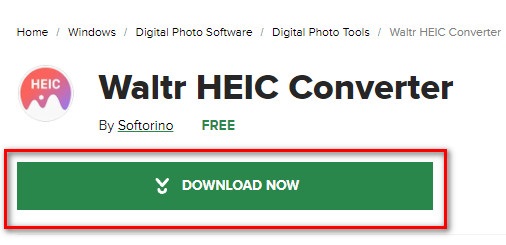
Schritt 1. Um die WaltR HEIC Converter‑App herunterzuladen, suchen Sie nach WaltR HEIC Converter. Folgen Sie anschließend dem Installationsprozess und starten Sie die Anwendung.
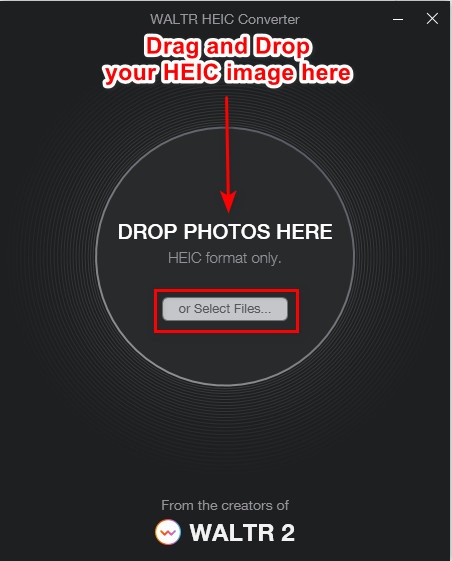
Schritt 2. Ziehen Sie Ihr HEIC-Bild per Drag & Drop auf die Hauptoberfläche der Software oder klicken Sie auf die Schaltfläche Dateien auswählen, um Ihr HEIC-Bild in die Warteschlange hochzuladen. Warten Sie dann, bis Ihr HEIC-Bild hochgeladen ist, und fahren Sie mit dem nächsten Schritt fort.
Schritt 3. Klicken Sie anschließend auf die Drop-down-Schaltfläche neben Format, um das gewünschte Ausgabeformat auszuwählen. Klicken Sie auf JPEG.

Schritt 4. Klicken Sie abschließend auf die Schaltfläche „Konvertieren“, um Ihr HEIC-Bild in das JPEG-Bildformat umzuwandeln. Wählen Sie dann den Speicherort für Ihr Bild aus – das war’s!
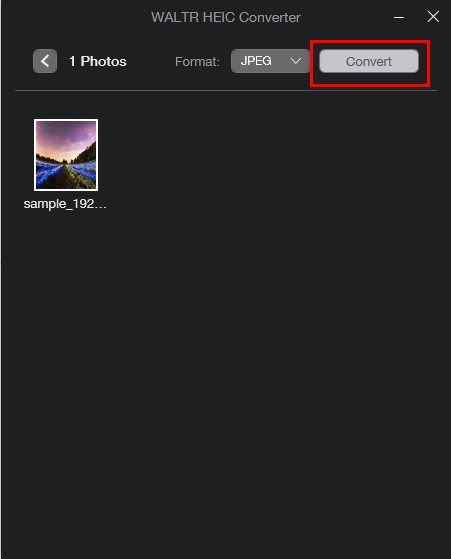
Einfach richtig? Sie können das HEIC-Bild in ein JPEG-Bild konvertieren, indem Sie die obigen Schritte ausführen.
Teil 2. 4 beste Alternativen zum WaltR HEIC Converter
Wenn Sie jedoch nach einer bequemeren Möglichkeit suchen, HEIC in JPEG zu konvertieren, die Sie nicht herunterladen müssen, dann ist die Lösung für Sie die Verwendung eines Online-Konverters von HEIC in JPEG. Wir haben im Internet nach den besten Online-Konvertern von HEIC zu JPEG gesucht und festgestellt, dass diese Tools am besten zu verwenden sind. Lesen Sie daher diesen Artikel weiter, um die zwei besten Alternativen für WaltR HEIC Converter zu kennen.
Alternative 1. FVC-freier HEIC-zu-JPEG-Konverter
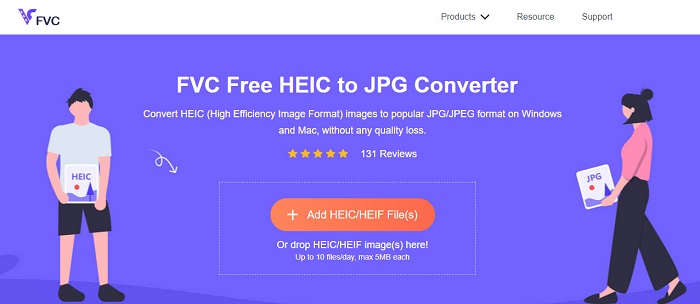
FVC Free HEIC to JPEG Converter ist das beste Tool, um HEIC online in JPEG zu konvertieren. Dieser Konverter kann Ihr HEIC-Bild in JPEG umwandeln, ohne dass die Bildqualität verloren geht. Außerdem können Sie damit mehrere HEIC-Bilder in einem Durchgang in JPEG/JPG konvertieren – mit nur einem Klick. Darüber hinaus werden bei der Konvertierung Ihrer Bilder die EXIF-Daten wie Größe, Abmessungen, Aufnahmedatum/-uhrzeit und Belichtungseinstellungen beibehalten. Es ist außerdem 100% kostenlos und sicher zu verwenden. Und im Gegensatz zu vielen anderen Online-Tools enthält FVC Free HEIC to JPEG Converter keine lästige Werbung.
Vorteile
- Es verfügt über eine einfach zu bedienende Softwareschnittstelle.
- Es kann Ihre HEIC-Bilder stapelweise in das JPEG-Bildformat konvertieren.
- Es ist sicher zu verwenden und 100%-frei.
- Zugänglich auf allen Webbrowsern, einschließlich Google, Firefox und Safari.
Nachteile
- Bei einer langsamen Internetverbindung kann es zu einem langsamen Konvertierungsprozess kommen.
Alternative 2. OnlineConvert.com

OnlineConvert.com ist ebenfalls ein beliebtes Tool zum Konvertieren von HEIC in JPEG-Bilder. Mit diesem Online-HEIC-zu-JPEG‑Konverter können Sie die Größe und Qualität Ihres Ausgabebildes verändern. Zudem ist dieser Konverter benutzerfreundlich, da er über eine einfache grafische Oberfläche verfügt. Allerdings enthält er lästige Werbeanzeigen, die Sie stören könnten. Nichtsdestotrotz verwenden viele Menschen dieses Tool weiterhin, um ihre HEIC-Bilder in JPEG umzuwandeln.
Vorteile
- Es verfügt über eine intuitive Softwareschnittstelle.
- Es ermöglicht Ihnen, die Größe Ihres Bildes zu ändern und die Qualität anzupassen.
Nachteile
- Es enthält Anzeigen.
- Ihre Datei kann beschädigt werden, wenn die Internetverbindung unterbrochen wird.
Alternative 3. CloudConvert
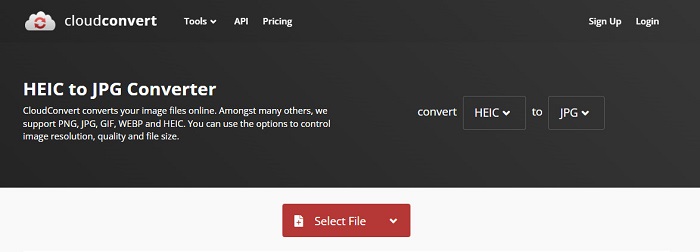
CloudConvert ist ein Online-Konverter, der ebenfalls HEIC in JPEG-Bilder umwandeln kann. Dieser Konverter hat eine einfache Oberfläche und ist daher benutzerfreundlich. Mit diesem Konverter können Sie die Breite und Höhe Ihres Ausgabebildes sowie dessen Qualität ändern. Außerdem unterstützt dieses Tool zahlreiche Dateiformate wie HEIC, JPEG, PNG, GIF und WebP.
Trotzdem muss Ihre Internetverbindung bei der Verwendung dieses Konverters schnell sein, damit Sie beim Konvertieren Ihres HEIC-Bildes nicht zu lange warten. Trotzdem ist es immer noch eines der effizientesten Tools, die Sie im Internet finden können.
Vorteile
- Es ist sicher zu benutzen und kostenlos.
- Damit können Sie die Qualität Ihrer Bildausgabe ändern.
- Es hat eine einfach zu bedienende Oberfläche.
Nachteile
- Ihr Konvertierungsprozess wird abhängig von Ihrer Internetgeschwindigkeit langsam sein.
Alternative 4. FreeToolOnline.com
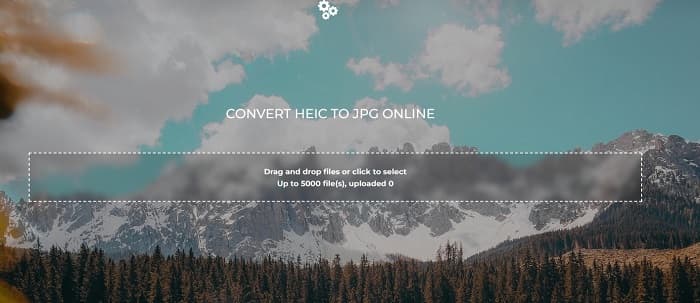
Ein weiterer Online-HEIC-zu-JPEG‑Konverter, den Sie ausprobieren sollten, ist FreeOnlineTool.com. Dieses Tool kann HEIC-Bilder in JPEG- und PDF-Formate konvertieren. Zudem ist dieser Online-Konverter sicher in der Anwendung und kostenlos. Und wenn Sie mehrere HEIC-Bilder auf einmal in JPEG umwandeln möchten, bietet dieser Konverter ebenfalls diese Funktion. Darüber hinaus verfügt er über eine benutzerfreundliche und intuitive Oberfläche. Wie andere Konverter auch enthält er jedoch Werbung, die bei der Nutzung störend sein kann.
Vorteile
- Es unterstützt die Konvertierung von HEIC in das JPEG- und PFD-Format.
- Es hat eine einfache GUI.
- Sie können HEIC-Bilder stapelweise in JPEG-Bilder konvertieren.
Nachteile
- Es enthält Anzeigen.
Teil 3. Häufig gestellte Fragen zum WaltR HEIC Converter
Ist WaltR HEIC Converter auf Mobilgeräten verfügbar?
Leider kann WaltR HEIC Converter auf keinem Mobilgerät heruntergeladen werden.
Können Sie HEIC mit WaltR HEIC Converter in GIF konvertieren?
Nein. WaltR HEIC Converter unterstützt keine GIF-Bilddateien. Wenn Sie Ihr HEIC-Bild jedoch in das GIF-Format konvertieren möchten, können Sie dieses Tool verwenden: Aiseesoft Free Image Converter Online, um HEIC-Bilder in GIF umzuwandeln.
Hat WaltR HEIC Converter eine Online-Version?
WaltR HEIC Converter hat keine Online-Version. Wenn Sie HEIC online in JPEG konvertieren möchten, verwenden Sie daher die oben genannten Alternativen.
Fazit
Waltr HEIC Converter ist tatsächlich ein großartiges Tool für die Konvertierung von HEIC in JPEG. Angesichts der hervorragenden Funktionen ist es kein Wunder, dass viele Menschen es nutzen. Wenn Sie jedoch keine App herunterladen möchten, um HEIC in JPEG umzuwandeln, ist die Verwendung eines Online-Tools die beste Wahl. Wir empfehlen Ihnen das beste Tool auf dem Markt: FVC Free HEIC to JPEG Converter.
-
 Konvertieren Sie HEIC in PDF mit den 4 wichtigsten verbesserten Möglichkeiten im Jahr 2022
 Um weitere Informationen über den besten HEIC-zu-PDF-Konverter zu erhalten, können Sie diesen 2022 herunterladen. Sie können diesen Artikel lesen, da wir eine Rezension dazu bereitgestellt haben.
-
 5 der besten HEIC-zu-JPG-Konverter-Auswahl dieses Jahr 2022
 Mit dem HEIC-zu-JPC-Konverter können Sie das Bildformat ganz einfach in ein tragbares JPG ändern. Möchten Sie wissen, was diese 5 Tools sind? Lesen Sie diesen Artikel.
-
 Die 5 besten Möglichkeiten, Bilder in animierte GIFs umzuwandeln [Aktualisiert 2022]
 Benötigen Sie ein Konverterbild in GIF? Dieser Artikel stellt die fünf besten Konverter vor, die wir auf dem Markt finden können. Lassen Sie uns also diese Tools herausfinden, indem Sie diesen Artikel lesen.
