


 Video Converter Ultimate
 ضبط صفحه
 تعمیر ویدیو
نحوه تبدیل MP4 به M4A در ویندوز / مک (رایگان و آنلاین)
MP4 یک قالب فایل گسترده است که با چندین ایستگاه و پخش کننده ویدیو استفاده می شود. پرونده های MP4 می توانند محتوای ویدیویی ، صوتی و سایر موارد را ذخیره کنند. اکنون ، بسیاری از افراد ترجیح می دهند آهنگ صوتی ویدیوی MP4 را گوش دهند. برای حفظ کیفیت ، تبدیل MP4 به M4A ایده خوبی است. M4A مخفف MPEG 4 Audio است. اکثر برنامه ها می توانند فایل های M4A ، از جمله iTunes ، QuickTime ، Windows Media Player و موارد دیگر را پخش کنند.

ممکن است بپرسید چطور میتوان صدای یک فایل MP4 را استخراج کرد. راههای زیادی برای تبدیل یک فایل MP4 به فایل M4A وجود دارد. این مطلب را بخوانید تا متوجه شوید چگونه میتوانید برای گوش دادنهای بعدی روی دستگاههای همراه خود، MP4 را به M4A تبدیل کنید.
قسمت 1. بهترین روش رایگان آنلاین برای تبدیل MP4 به M4A بدون افت کیفیت
FVC Free Online Video Converter یک مبدل رایگان فایل MP4 به M4A است که میتواند فرمت MP4 را نهتنها به M4A، بلکه به فرمتهای دیگری مانند MP3، WAV، M4R، WMA، AIFF، AC3 و غیره نیز تبدیل کند. این ابزار امکان تبدیل دستهای را فراهم میکند تا بتوانید همزمان چندین ویدیوی MP4 را فوراً به M4A تبدیل کنید. همچنین این ابزار آنلاین رایگان به شما اجازه میدهد ویدیوی MP4 را به MOV، AVI، FLV و سایر فرمتهای ویدیویی تبدیل کنید.
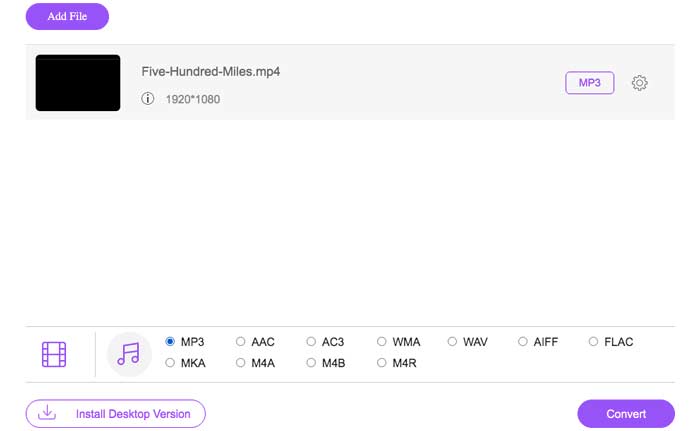
گام 1. در مرورگر خود آدرس https://www.free-videoconverter.net/free-online-video-converter/ را باز کنید. روی دکمه Add Files to Convert کلیک کنید و سپس لانچر آن را دانلود و نصب نمایید.

گام 2. ویدیوی MP4 موردنظرتان را برای تبدیل بارگذاری کنید، سپس روی Open کلیک کنید تا به مرحله بعد بروید.
گام 3. پس از بارگذاری فایلهای ویدیویی در این برنامه، روی آیکون Audio کلیک کنید و فرمت M4A را بهعنوان فرمت خروجی انتخاب نمایید.
گام 4. در پایان، روی دکمه Convert در گوشه پایین سمت راست کلیک کنید. کمی صبر کنید تا فایل صوتی M4A خود را از فایل MP4 دریافت کنید.
قسمت 2. نحوه تبدیل MP4 به M4A با مبدل صوتی رایگان
FVC Free Audio Converter نرم افزاری رایگان است که به شما امکان می دهد فایل های MP4 را بدون زحمت به M4A تبدیل کنید. این برنامه قادر است هرگونه فایل ویدئویی یا صوتی را به M4A ، MP3 ، WAV و غیره تغییر دهد. برای شروع تبدیل می توانید آن را بارگیری و روی رایانه ویندوزی خود نصب کنید.
دانلود رایگانبرای Windows 7 یا جدیدتردانلود امن
دانلود رایگانبرای MacOS 10.7 یا جدیدتردانلود امن
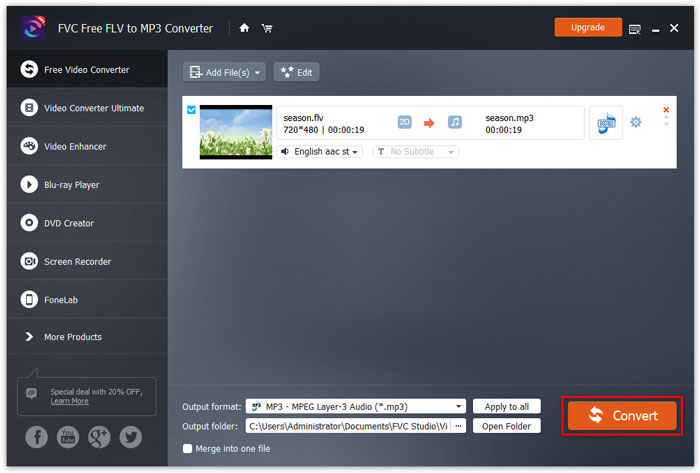
گام 1. این مبدل صوتی را روی رایانه خود اجرا کنید. روی دکمه Add File(s) کلیک کنید تا فایلهای MP4 را در این برنامه بارگذاری نمایید.

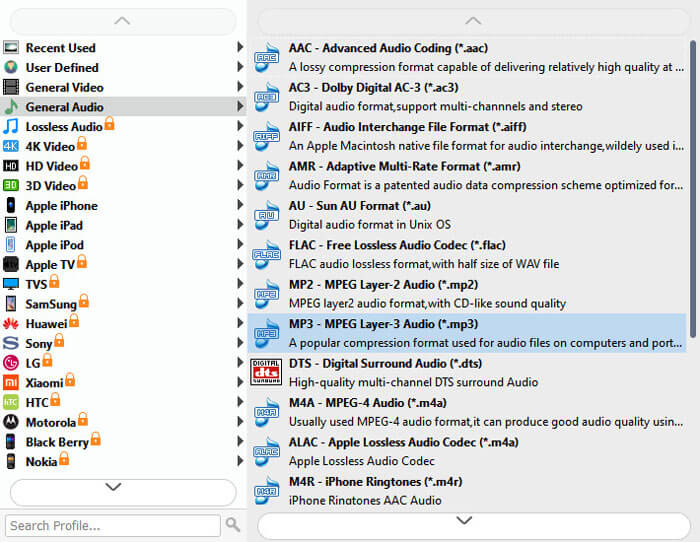
گام 2. گزینه Output formats را پیدا کرده و از فهرست کشویی آن، M4A را بهعنوان فرمت خروجی انتخاب کنید.
گام 3. روی دکمه Convert کلیک کنید تا تبدیل فایلهای MP4 به M4A آغاز شود.
علاوه بر M4A، میتوانید از آن برای تبدیل MP4 به MP3، AAC یا سایر فرمتهای صوتی استفاده کنید.
قسمت 3. نحوه تبدیل MP4 به M4A با استفاده از iTunes
برای تبدیل MP4 به M4A با iTunes برای ویندوز یا Mac ، باید تنظیمات واردات iTunes را تغییر دهید و سپس از گزینه Convert menu استفاده کنید تا از M4A کپی بگیرید.
گام 1. iTunes را روی رایانۀ ویندوزی یا مک خود باز کنید.
گام 2. Edit را انتخاب کرده، سپس در نوار منو روی Preferences کلیک کنید. بعد به زبانه General بروید و روی Import Settings کلیک کنید.
گام 3. منویی را که کنار Import Using قرار دارد پیدا کرده و روی آن کلیک کنید، سپس فرمتی را که میخواهید ویدیو به آن تبدیل شود انتخاب کنید. سپس روی OK کلیک نمایید.
گام 4. آهنگهایی را که در کتابخانه خود میخواهید تبدیل کنید، انتخاب کنید. بعد از آن، File را انتخاب کرده، سپس روی Create New Version کلیک کنید و نسخه M4A را ایجاد نمایید.
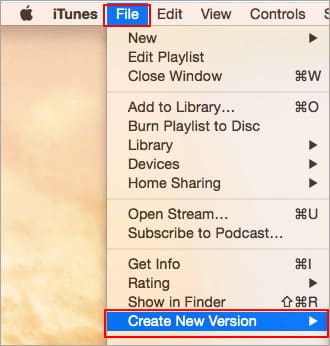
فایل های صوتی تبدیل شده در کتابخانه شما در کنار پرونده های اصلی ظاهر می شوند.
قسمت 4. سQالات متداول MP4 به M4A تبدیل
1. پرونده M4A چیست؟
فایلی با پسوند پرونده M4A یک فایل صوتی MPEG-4 است. M4A را می توان اغلب در فروشگاه iTunes اپل به عنوان قالب بارگیری آهنگ مشاهده کرد.
2. چگونه پرونده های M4A را باز کنیم؟
برنامه هایی که پرونده های M4A را باز می کنند شامل iTunes ، QuickTime ، Windows Media Player و غیره هستند. قرص ها و تلفن های Android ، iPhone ، iPad و iPod touch همچنین از پخش فایل های M4A پشتیبانی می کنند.
3. چگونه پرونده های MP4 را بصورت آنلاین ادغام کنیم؟
FVC Free Online Video Merger میتواند به شما کمک کند تا انواع فایلهای MP4 یا سایر فرمتهای ویدیویی مانند MOV، AVI، FLV و موارد دیگر را بهصورت آنلاین با هم ادغام یا به هم وصل کنید.
4- آیا Windows Media Player می تواند MP4 را به M4A تبدیل کند؟
خیر Windows Media Player فقط از تبدیل پرونده های ویدئویی به MP3 یا WAV پشتیبانی می کند.
نتیجه
سه روش فوق می تواند به شما کمک کند بدون تلاش زیاد MP4 را به صورت رایگان به M4A تبدیل کنید. اگر ترجیح می دهید تبدیل را بصورت آنلاین انجام دهید ، FVC Free Video Converter Online باید یک انتخاب عالی باشد. اگر اندازه پرونده های MP4 شما زیاد باشد ، تبدیل FVC Free Audio یا iTunes برای تبدیل فایل های MP4 به M4A از قابلیت اطمینان بیشتری برخوردار خواهد بود.
-
 نحوه تبدیل MP4 به WMV برای Mac / Windows
 این پست نحوه تبدیل فیلم MP4 به فرمت WMV را در مک یا ویندوز به اشتراک می گذارد. ما همچنین گزینه های مختلفی از جمله نرم افزار دسک تاپ و مبدل های آنلاین مبتنی بر وب را به شما ارائه می دهیم. آیا می خواهید بهترین ابزارهای تبدیل MP4 به WMV را بدانید؟
-
 نحوه تبدیل WMV به MP3 در دسک تاپ و آنلاین
 شما می توانید هر نرم افزار مبدل فیلم رایگان را از استودیوی FVC پیدا کنید. هر قالب ویدئو / صوتی پشتیبانی می شود ، از جمله MP4 ، MOV ، TS ، AVI ، WMV ، FLAC ، MP3 و غیره
-
 نحوه تبدیل AVCHD به فیلم های MP4 به صورت رایگان در ویندوز / مک / آنلاین
 5 روش آسان برای تبدیل فیلم های AVCHD به MP4 در رایانه شما وجود دارد. می توانید فیلم های AVCHD را بدون از دست دادن کیفیت با هر مبدل اینجا به MP4 تبدیل کنید.
